Claude Code 2.0 Complete Breakdown: Checkpoint Rollback, Context Visualization, and Other Core Features Explained
Claude Code 2.0 Complete Breakdown: Ch…
Claude Code 2.0 is a complete rewrite adding checkpoint rollback, context visualization, and more
Anthropic released Claude Code 2.0, a complete ground-up rewrite. The new version introduces checkpoint rollback, context window visualization, usage tracking, conversation history search, and a native VS Code extension with fine-grained file context management. It defaults to Sonnet 4.5 and integrates third-party tools like Snyk via MCP protocol, recommending a "plan first, execute later" workflow for complex tasks.
Anthropic released Claude Code 2.0 alongside Sonnet 4.5—a complete rewrite from the ground up. The new version introduces checkpoint rollback, context window visualization, usage tracking, conversation history search, and a host of other powerful features. Combined with the brand-new native VS Code extension, Claude Code is becoming one of the most noteworthy tools in the AI coding space.
Brand-New Native VS Code Extension
Search for "Claude Code for VS Code" in the VS Code extension marketplace to install it. After installation, you'll need to log in with your Claude Code account or Cloud account.
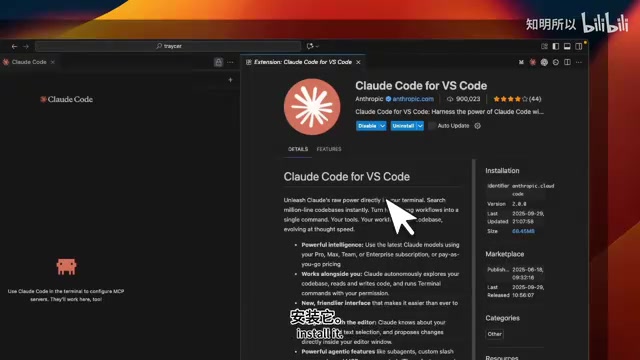
The extension's interface is similar to other AI coding IDEs but offers deeper integration. You can perform most Claude Code CLI operations directly in the visual interface: start new conversations, resume past conversations, mention files, attach files (bringing content into the context window), connect to various MCP servers, and more.
One standout new command is /context, which visualizes your current context usage. For example, you can clearly see that the current session has used approximately 40% of available tokens, with the system prompt consuming about 12,000 tokens (~6%), leaving roughly 76,000 tokens available.
Context Window & Token Management: The context window is the maximum amount of text a large language model can "see" at once, measured in tokens. Tokens aren't equivalent to characters or words—in English, approximately 4 characters correspond to 1 token, while in Chinese, typically 1-2 characters map to 1 token. Claude's context window has expanded to 200,000 tokens, but a larger context doesn't mean unlimited use—as the context fills up, the model's attention gets diluted, reasoning quality may decline, and API costs increase linearly with input token count. This is precisely the core value of context visualization: helping developers make informed trade-offs between quality, cost, and efficiency.
This level of transparency has been rare in previous AI coding tools.
Notably, Claude Code's file integration with VS Code is remarkably granular. You can open a file (like package.json) and it automatically becomes part of the context. Even more powerful: you can select a specific portion of a file and bring only the selected content into context rather than the entire file. This fine-grained context management isn't currently available in OpenAI's Codex.
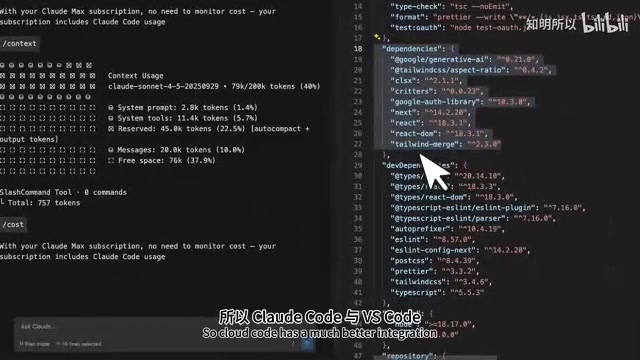
The default model has switched to Sonnet 4.5, though you can also switch to 4.1. Based on benchmarks, Sonnet 4.5 is the better choice for everyday coding tasks.
CLI Version: Claude Code's Full Power
While the VS Code extension is already impressive, the CLI version of Claude Code represents its most feature-complete form. After launching the new CLI, you'll notice the redesigned icon and rapidly iterating version numbers (from 2.0.0 to 2.0.1), indicating the team is actively developing.
Model & Thinking Mode Switching
Type /model to view and switch the current model. The default is Sonnet 4.5, with Thinking Mode disabled by default. Press Tab to enable thinking mode. Here's an important recommendation: for complex tasks, strongly consider enabling thinking mode.
Extended Thinking Explained: Thinking mode is a reasoning enhancement mechanism Anthropic introduced in the Claude 3.7 series, similar in principle to OpenAI's o1/o3 series "Chain-of-Thought" approach. When enabled, the model performs an internal reasoning process (the "thinking chain") before generating its final answer—this process is visible to users but isn't counted in conversation history. Thinking mode significantly outperforms standard mode on mathematical reasoning, multi-step code refactoring, architecture design, and other tasks requiring deep analysis, at the cost of increased response latency and token consumption. For simple everyday completion tasks, disabling thinking mode provides faster responses and lower costs.
Sonnet 4.5 shows markedly improved performance on complex coding tasks when thinking mode is enabled.
Usage Monitoring (/usage)
This feature is currently missing from the VS Code extension but available in the CLI. The /usage command displays real-time rate limit usage, including percentage used and reset time. For developers who need to carefully manage their API quotas, this is extremely practical.
Conversation Search & Checkpoint Rollback
These are the two most exciting features in Claude Code 2.0:
Ctrl+R Conversation Search: Similar to terminal history search, you can search across all past conversations for specific prompts. For example, typing "hotkeys" quickly locates previous conversations about keyboard shortcuts.
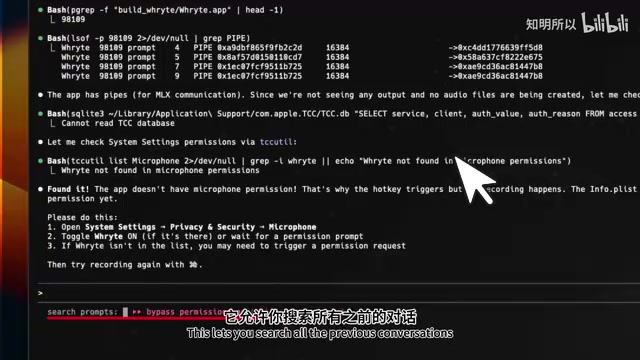
/rewind Checkpoint Rollback: This feature is a genuine game-changer. It allows you to roll back to any previous checkpoint, similar to navigating Git commit history.
The Engineering Logic Behind Checkpoints: The checkpoint mechanism borrows core concepts from version control systems. In Git, each commit is a snapshot of the codebase, and developers can revert to any historical state at any time. Claude Code's
/rewindfeature brings this concept into the AI conversation workflow: the system automatically saves session state before each significant operation (including conversation history, file modification records, and model context). When the AI's modifications go in the wrong direction, developers don't need to manually undo a series of file changes—they simply roll back to the previous checkpoint. This is particularly important for high-risk operations like AI-assisted refactoring, effectively reducing the debugging cost of "the AI broke something but I don't know what it changed."
After selecting a checkpoint, the system asks whether to restore the conversation. Upon confirmation, the entire session state reverts to that point in time. Cursor has a similar checkpoint rollback feature, but Claude Code now has this capability as well—without requiring manual management.
MCP Server Integration: Security Scanning as an Example
Claude Code 2.0's MCP (Model Context Protocol) integration enables connections to various external tools.
MCP Protocol Background: MCP is an open standard protocol launched by Anthropic in late 2024, designed to solve the "last mile" integration problem between AI models and external tools/data sources. Before MCP, every AI tool needed to develop separate adapters for different external services, creating massive duplication of effort. MCP defines a unified client-server communication specification, allowing any protocol-compliant tool to plug in seamlessly. MCP currently supports multiple transport modes including stdio and SSE (Server-Sent Events), with hundreds of official and community implementations for GitHub, Slack, database drivers, and more.
Using the security vulnerability scanning tool Snyk as an example, here's how to connect a locally running MCP server to Claude Code.
Configuration Steps
- Install Snyk CLI and complete authentication
- Start the MCP server: Run
snyk mcp -t sseto start the MCP server in SSE mode - Connect to Claude Code: Use the command
claude mcp add --transport sse [name] [URL]to connect the server to Claude Code
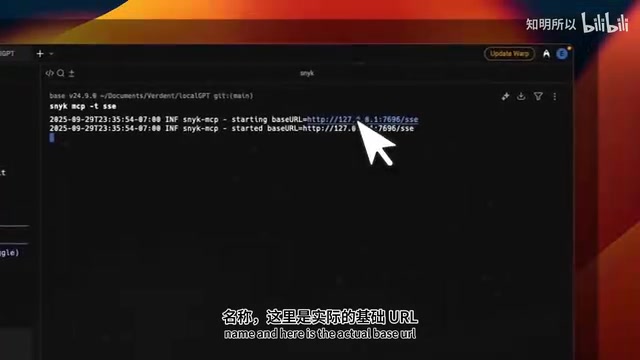
Once connected, type /mcp to view connected servers and available tools (Snyk provides 13 tools).
In Practice: Discovering and Fixing Security Vulnerabilities
Ask Claude Code: "Tell me if there are any security vulnerabilities in this project's open-source dependencies." Claude Code will automatically invoke the Snyk MCP server to perform a scan and generate a detailed security report.
Software Supply Chain Security Background: Snyk is a developer security SaaS platform whose core capability is scanning project dependencies for known vulnerabilities (CVEs). Modern software projects typically depend on hundreds or even thousands of open-source packages, which themselves have their own dependency trees, forming complex "software supply chains." The 2021 Log4Shell vulnerability (CVE-2021-44228) affected millions of systems worldwide through such transitive dependencies, pushing supply chain security to the top of the industry agenda. Snyk maintains a real-time vulnerability database (aggregating NVD, GitHub Advisory, and other sources) to identify security risks in both direct and indirect dependencies and provide remediation recommendations. Integrating it into AI coding workflows via MCP means security scanning transforms from "a separate step before deployment" to "real-time feedback during coding."
In the demonstration, the scan discovered 61 security vulnerabilities across critical, high, and medium severity levels, listing each affected dependency package.
Next comes the remediation phase. Here's a highly practical workflow recommendation:
- Press Shift+Tab twice to enter Plan Mode
- Have Claude analyze all vulnerabilities and develop a remediation plan
- Review the plan contents
- Implement fixes feature by feature, rather than modifying everything at once
Plan Mode & AI Workflow Best Practices: Plan Mode is Claude Code's engineering implementation of the "think before you act" principle. In AI-assisted programming, both research and practice show that directly asking models to execute complex tasks often leads to "hallucinatory modifications"—the model confidently makes seemingly reasonable but actually incorrect changes scattered across multiple files that are difficult to track. Plan Mode forces the model to first output a structured action plan (which files are involved, what changes to make, expected impact), which humans review and confirm before execution. This closely parallels the "design review" process in software engineering and aligns with the "Human-in-the-Loop" principle emphasized in Anthropic's AI safety research. For high-risk operations involving security fixes, database migrations, and similar tasks, this workflow significantly reduces unexpected side effects.
This "plan first, execute later, implement step by step" methodology is a best practice for using AI coding tools. Having AI complete all modifications at once often leads to quality degradation and hard-to-track issues.
Claude Code 2.0 vs. Cursor and Codex
Claude Code 2.0 demonstrates differentiated advantages across several dimensions:
- Context management transparency: Visualized token usage gives developers clear awareness of the AI's "memory"
- File-level granular control: Selecting code snippets to bring into context is more efficient than importing entire files
- Checkpoint system: Automated conversation state management reduces the cost of trial and error
- MCP ecosystem: An open protocol standardizes third-party tool integration
Of course, Cursor still has advantages in native IDE experience and multi-model support, while OpenAI Codex takes a different approach with cloud-based asynchronous execution. But Claude Code 2.0's rewrite has genuinely evolved it from a simple CLI tool into a fully-featured AI coding platform.
For developers already using Claude Code, upgrading to 2.0 is a no-brainer. For those still on the fence, now is an excellent time to get started—especially if you value context management transparency and workflow controllability.
Key Takeaways
- Claude Code 2.0 is a complete rewrite, adding core features including checkpoint rollback, context visualization, usage monitoring, and conversation history search
- The native VS Code extension supports fine-grained file context management—you can select code snippets to bring into context individually, offering better integration than Codex
- Defaults to Sonnet 4.5 model; enabling Thinking Mode for complex tasks is recommended for better results
- Third-party tools (like Snyk security scanning) can be integrated via MCP protocol for automated vulnerability detection and remediation
- The recommended workflow is "plan first, execute later": use Plan Mode to develop a strategy, review it, then implement step by step—avoiding large-scale one-shot modifications
Related articles
 Product Reviews
Qoder vs Cursor Real-World Comparison: Which $20/Month AI IDE Is Better?
Hands-on comparison of Qoder vs Cursor AI IDEs: Agent autonomy, human interaction count, and architecture decisions. Qoder needed only 2 interactions vs Cursor's 8.
 Product Reviews
Cursor Cloud Agent Demo: Eliminating Bottlenecks Across the Entire Software Development Lifecycle
Deep analysis of Cursor's Cloud Agent demo showing how cloud VMs, automated test artifacts, and a full-chain control plane systematically eliminate human bottlenecks across the software development lifecycle.
 Product Reviews
Cursor 3.0 Deep Dive: Multi-Agent Parallelism, Design Mode, and Best-of-N Model Comparison
Cursor 3.0 evolves from an AI coding assistant into an Agent fleet command center. Explore multi-agent parallelism, Design Mode, and Best-of-N model comparison.