Cursor vs Windsurf vs PearAI: An In-Depth Comparison of AI Code Editors

Cursor, Windsurf, and PearAI compared hands-on—Cursor leads in overall experience.
This article compares Cursor, Windsurf, and PearAI across four dimensions: UI design, user experience, AI coding capability, and additional features. Cursor leads comprehensively with its clean interface, real-time code previews, transparent coding process, and stable AI performance. Windsurf is feature-complete but suffers from an opaque editing process and lacking context management. PearAI offers highlights like cost display but misses core features like change revert, making it not yet ready for daily use.
With AI programming tools flourishing, developers face a pleasant dilemma: which AI code editor should they choose? This article is based on a developer's comprehensive hands-on testing of three mainstream tools—Cursor, Windsurf, and PearAI—comparing them across four dimensions: UI design, user experience, AI coding capability, and additional features, to help you find the best "Vibe Coding" companion.
Evaluation Rules and Methodology
To ensure fairness, this comparison established three core rules:
- Unified Model: All three editors use Claude 3.7 as the underlying LLM, eliminating any differences caused by model variation
- Four-Dimensional Scoring: Separate scores for UI design, user experience (UX), AI coding capability, and additional features
- Average User Perspective: No documentation consulted, no deliberate searching for hidden features—purely intuitive usage from an ordinary user's standpoint
The evaluation tasks included two typical scenarios: creating a Next.js landing page from scratch, and refactoring a complex file within a large codebase. These two scenarios test the AI editor's ability to "build from nothing" and "understand existing code," respectively.
Windsurf: Feature-Complete but Lacking Polish
UI Design (7/10)
As a VS Code fork, Windsurf allows users to import existing VS Code settings, making onboarding virtually effortless. The "Cascade" panel on the right is the core area for AI interaction, offering two modes: "Write" and "Chat." The problem is that the distinction between these two modes is quite vague—you have to hover over tooltips to understand that "Write" mode is the actual entry point for having AI modify code.
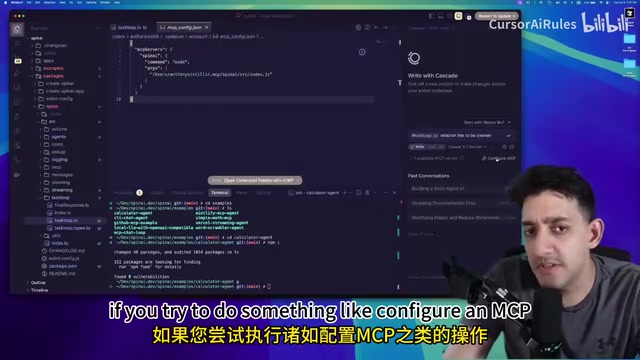
The file search experience is also subpar. For example, when searching for "TaskLoop," a file named TaskLoop.ts ranks only third, and different file types lack clear visual differentiation. For MCP configuration, Windsurf simply directs users to the settings.json file without building a visual management interface like Cursor does.
User Experience (5/10)
Windsurf's biggest pain point is the opacity of the code editing process. When AI starts modifying code, users can't see any real-time progress—they can only wait blindly for several minutes. To view changes, you must manually click to open the diff view, and you can only see the full difference comparison without any summary or preview.
The terminal experience also has detail issues: there's no buffer at the bottom, so typed text clings to the very bottom of the window, which is visually uncomfortable.
Even more critical is the lack of context management. Windsurf doesn't maintain a running context record (at least not visibly in the UI), requiring users to repeatedly add relevant files manually, with no way to build a persistent global context pool. This becomes extremely frustrating when working on large projects.
AI Coding Capability (6.5/10)
Windsurf performs well in understanding large codebases. During the refactoring test, it correctly identified code conventions and placed new files in the right directories, even inferring workspace-level dependency reference patterns. However, in the landing page creation test, its performance was disappointing—ultimately generating only a blank HTML page.
In everyday coding tasks, the difficulty of auditing what the AI is writing reduces actual efficiency. That said, if you have a large codebase and don't want to manually provide context, just wanting the AI to "figure it out on its own," Windsurf's performance is commendable.
Cursor: The Benchmark Product Leading Across the Board
UI Design (9/10)
Compared to Windsurf, Cursor's interface is noticeably cleaner. There's no clutter of buttons at the top, and the left navigation has been streamlined into tabs at the top—a change that feels unfamiliar at first but quickly wins you over with its refreshing simplicity.
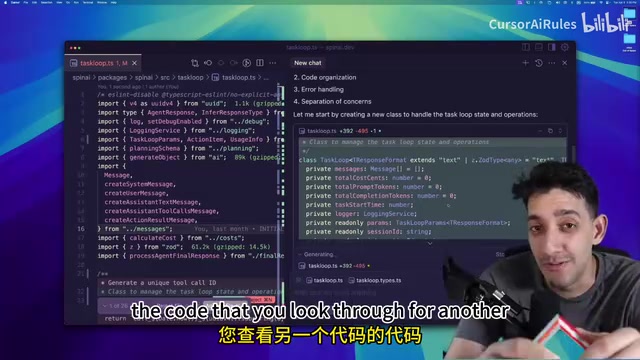
The chat panel on the right automatically includes the currently open file in the context by default—a small detail that significantly boosts workflow efficiency. The context management feature is designed very intuitively: you can pre-select the files you'll be working with today, such as taskloop.types, building a precise context window to avoid exceeding token limits.
While MCP management still requires editing JSON, it at least provides a clear UI showing which MCPs are connected and functioning properly. The terminal also thoughtfully includes a buffer at the bottom, avoiding the text-clinging-to-the-window-edge issue.
User Experience (9/10)
Cursor's greatest advantage lies in the transparency of the coding process. When AI modifies code, the chat panel generates real-time mini previews. The reviewer noted multiple times that this preview feature allowed them to catch the AI heading in the wrong direction and stop it before problems escalated. This experience feels more like "collaborating with AI" rather than "throwing a task at AI and praying."
"Thinking Mode" is another bonus—when enabled, you can see the AI's complete reasoning process. YOLO mode allows automatic execution of routine commands (like npm install) while intercepting dangerous operations (like file deletion), striking a balance between efficiency and safety.
AI Coding Capability (8/10)
Cursor performed well in both test scenarios. In the landing page test, while the result wasn't stunning, it at least generated a usable page—far better than Windsurf's blank HTML. In the large codebase refactoring, it similarly placed code in the correct directories and created a .env.example file that Windsurf missed.

Notably, even without manually provided context, Cursor can autonomously traverse the codebase to find the right location. It strikes an excellent balance between "inferring context" and "leveraging user-provided context," delivering more stable and consistent overall performance.
PearAI: Great Potential but Not Yet Mature
UI Design (7/10)
PearAI's interface design has several highlights. It retains the classic VS Code layout, with a more modern-feeling right panel. The top buttons have a "gamified" visual style—slightly cartoonish but highly recognizable.
The most eye-catching feature is real-time cost display—while AI executes tasks, the top continuously updates the API call costs. This is a feature neither of the other two editors offers, and it's extremely practical for developers concerned about cost control. You can also expand to view the complete request content sent to the LLM, providing high transparency.
However, the UI also has obvious issues: buttons lack tooltips, custom themes cause display glitches, and overall polish is insufficient.
User Experience (3/5)
PearAI's most serious problem is the lack of a change revert function. In Cursor and Windsurf, if you're unhappy with AI's modifications, you can "Revert" or "Reject All Changes" with one click to return to the previous state. But in PearAI, clicking cancel directly terminates the entire conversation with no rollback mechanism. This is an almost fatal flaw for daily development.
The information display during AI execution is also too chaotic—multiple tasks scroll simultaneously, making it difficult to track specific progress. While there's an auto-approve mode, the way information is presented makes everything feel "out of control."
Unique Features and Shortcomings (5/10)
PearAI has two interesting unique features: a search tab powered by Perplexity, and a "Memories" feature—the latter allows users to preset system-level instructions, such as telling the AI "don't use this deprecated API" or "always use TypeScript strict mode." This is essentially visual management of system prompts—not revolutionary, but certainly convenient.
However, PearAI doesn't even have a dedicated settings panel—clicking settings jumps directly to VS Code's general settings page, while both Cursor and Windsurf have dedicated product settings entries. Considering PearAI is developed by a two-person team, achieving a level close to Windsurf is already impressive, but the absence of core features makes it unsuitable as a daily primary tool for now.
Final Scores and Recommendations
| Dimension | Cursor | Windsurf | PearAI |
|---|---|---|---|
| UI Design | 9/10 | 7/10 | 7/10 |
| User Experience | 9/10 | 5/10 | 3/5 |
| AI Coding | 8/10 | 6.5/10 | - |
| Additional Features | 7/10 | 7/10 | 5/10 |
Cursor is currently the best overall choice. While slightly more expensive than competitors, the efficiency gains from code quality and user experience are well worth the price.
Windsurf is feature-complete but lacks polish in the details. It has a unique advantage in automatically understanding large codebases, making it suitable for "hands-off" developers who don't want to manually manage context.
PearAI, as a two-person team's creation, shows surprising potential (especially with cost transparency and the Memories feature), but the core experience still needs significant refinement.
As one commenter put it: "These tools are all excellent, but they have no moat or user lock-in. Users will switch to whichever is best at any given moment." Just as people shifted from Midjourney to ChatGPT for generating Ghibli-style images, the AI code editor landscape could look completely different a year from now. Choosing what feels best right now while keeping an open mind is the most pragmatic strategy.
Related articles
 Product Reviews
Qoder vs Cursor Real-World Comparison: Which $20/Month AI IDE Is Better?
Hands-on comparison of Qoder vs Cursor AI IDEs: Agent autonomy, human interaction count, and architecture decisions. Qoder needed only 2 interactions vs Cursor's 8.
 Product Reviews
Cursor Cloud Agent Demo: Eliminating Bottlenecks Across the Entire Software Development Lifecycle
Deep analysis of Cursor's Cloud Agent demo showing how cloud VMs, automated test artifacts, and a full-chain control plane systematically eliminate human bottlenecks across the software development lifecycle.
 Product Reviews
Cursor 3.0 Deep Dive: Multi-Agent Parallelism, Design Mode, and Best-of-N Model Comparison
Cursor 3.0 evolves from an AI coding assistant into an Agent fleet command center. Explore multi-agent parallelism, Design Mode, and Best-of-N model comparison.