Dyad: A Free, Open-Source AI Full-Stack Builder — An In-Depth Look at This Lovable Alternative
Dyad: A Free, Open-Source AI Full-Stac…
Dyad is a free, open-source, locally-run AI full-stack app builder that rivals Lovable and Bolt.new.
Dyad is an open-source AI full-stack application builder under the Apache 2.0 license — completely free and locally run — designed as an alternative to paid tools like Lovable and Bolt.new. It supports multiple AI model integrations (including free Gemini 2.5 Pro, Kimi, and local models via Ollama), generates web apps from natural language prompts, offers component-level precision editing, multiple project templates, and one-click deployment to Vercel, making it ideal for rapid prototyping and privacy-sensitive use cases.
In the world of AI-driven full-stack development tools, products like Lovable, Bolt.new, and Replit have already demonstrated the enormous potential of "generating applications from natural language." The underlying logic of these tools is the deep integration of large language models (LLMs) with code generation and sandboxed execution environments, allowing users to describe requirements through conversation and receive runnable web applications without writing code manually — they represent the commercialization of an emerging development paradigm: "prompt as product." However, the core features of these tools are often locked behind paywalls, putting them out of reach for many developers and creators. Today, we're introducing Dyad, a locally-run, fully open-source, and free AI application builder that's becoming a compelling alternative to these commercial tools.
What Is Dyad?
Dyad is an AI full-stack application builder released under the Apache 2.0 license. Apache 2.0 is one of the most permissive licenses in the open-source world, allowing commercial use, modification, and distribution without requiring derivative works to be open-sourced — a stark contrast to "copyleft" licenses like GPL. This means enterprises can build proprietary products on top of Dyad with zero legal risk. Unlike cloud-based tools such as Lovable and Bolt.new, Dyad runs locally, giving users complete data control and privacy protection. It supports macOS and Windows, offers a one-click installer, and has an extremely low barrier to entry.
The core philosophy is simple: generate fully functional, well-designed web applications in minutes through natural language prompts — all completely free, with no paywall restrictions whatsoever.
What AI Models Does Dyad Support?
One of Dyad's greatest strengths is its highly flexible AI model integration. Users can choose from multiple options based on their needs and budget:
- Completely free options: Access free models (such as GPT-4.5 free tier) through OpenRouter, or use Moonshot AI's Kimi model. OpenRouter is an AI model aggregation platform that provides a unified API interface to access dozens of different LLMs. Users don't need to apply for separate API keys or manage billing for each model — they can switch between models on demand through a single interface, greatly reducing the complexity of multi-model management.
- Google Gemini 2.5 Pro: Offers free-tier access with rate limits, but sufficient for everyday development tasks.
- Local models: With adequate computing resources, you can run models locally through Ollama and connect them to Dyad for a fully offline, private deployment. Ollama is one of the most popular local LLM runtime frameworks, supporting one-click download and local inference for dozens of open-source models including Llama, Mistral, Gemma, and Qwen. It exposes an OpenAI-compatible REST API, allowing any application that supports the standard API to seamlessly connect to local models.
- Commercial APIs: Supports API key integration with major providers like Anthropic Claude and OpenAI.

Notably, users can also add custom providers by entering a locally-hosted API base URL, providing tremendous flexibility for enterprise private deployments. Based on actual testing, Anthropic's Claude delivers the best code generation quality, while the free Kimi and Gemini 2.5 Pro also produce quite impressive results.
What's the Actual Building Experience Like?
Rapidly Generating Landing Pages with Natural Language
After installing Dyad, you first need to install Node.js as a prerequisite, then configure your AI model. Once the basic setup is complete, you can start building directly through natural language prompts.
Taking a product landing page as an example, Dyad's workflow is very clear: the system first deploys a planning agent for task decomposition, then builds individual components one by one — CTA buttons, testimonial sections, feature modules, etc. — each generated independently. This "Plan-and-Execute" pattern is a classic paradigm in multi-agent system design: compared to generating all code in a single prompt, decomposing complex tasks into manageable sub-task sequences and executing them sequentially significantly improves success rates and code quality for complex projects, while also allowing users to observe the code generation process and results in real time.
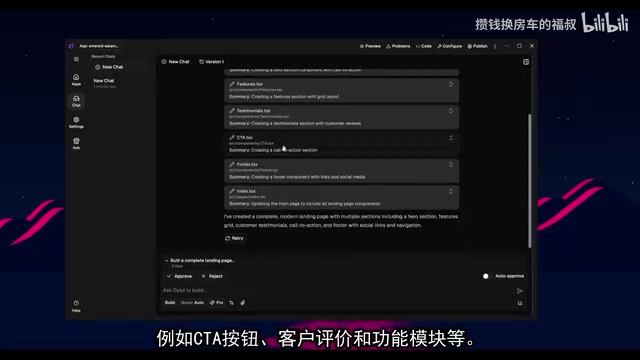
Dyad offers two working modes:
- Build Mode: The agent autonomously generates complete code
- Q&A Mode: Ask the AI questions directly for answers
Within Build Mode, you can also choose between Auto Mode and Human-in-the-Loop Mode. The latter allows users to review and refine each step during generation, which is very useful for projects requiring fine-grained control.
Component-Level Precision Editing
Dyad has a highly practical feature — Select Component to Edit. Users can click on a specific component directly in the preview interface; the system highlights that component and adds it to the chat panel, where you can make precise modifications through natural language descriptions.
For example, if you want to change the wording of a heading, simply select that component, type in the new description, and the system will quickly make the change without affecting other parts of the page. This component-level precision editing capability is comparable to Lovable's similar feature — but completely free.
Building Complex Data Visualization Applications
Beyond simple landing pages, Dyad can handle more complex projects as well. A personal finance dashboard built during testing — containing expense category charts, recent transaction records, budget progress tracking, and other data visualization components — was generated quickly and rendered correctly by Dyad.
Project Templates and Deployment Options
Dyad currently offers three project templates: React/JSX, Next.js, and Angular, covering mainstream frontend technology stacks. While the number of templates is still limited, the team has stated they will continue expanding, including support for MCP (Model Context Protocol). MCP is an open standard protocol proposed and promoted by Anthropic in late 2024, designed to solve the standardized connection problem between AI models and external tools/data sources — think of it as the "USB port" for AI. Through a unified protocol, it enables AI applications to invoke external resources like file systems, databases, and API services in a standardized way, without developing custom integration code for each tool. The addition of MCP support will significantly expand the boundaries of application types that Dyad can build.
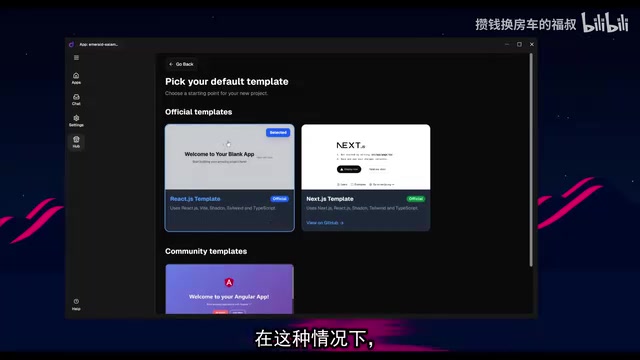
For deployment, Dyad supports multiple flexible options:
- One-click deploy to GitHub
- One-click deploy to Vercel: Vercel is a cloud deployment platform optimized for frontend frameworks, offering global CDN acceleration, automatic HTTPS, preview deployments, and more. Its free tier is quite generous for personal projects. Dyad's one-click Vercel integration means users can publish applications to a globally accessible production environment with virtually zero configuration after generating code locally.
- Configure backend services through environment variables
- Export code and migrate to platforms like Supabase for backend configuration
This flexible deployment approach makes Dyad not just a prototyping tool, but also a viable starting point for production projects.
Who Is Dyad Best Suited For?
To be candid, Dyad may not yet fully replace commercial tools for building complete production-grade applications. However, it excels in the following scenarios:
- Rapid prototyping: Transform ideas into interactive prototypes in minutes
- Component development: Quickly generate specific UI components and integrate them into existing projects
- Learning and experimentation: Explore AI-assisted development workflows at zero cost
- Privacy-sensitive projects: Runs locally with data never leaving your machine
Compared to subscription-based tools like Lovable (starting at ~$20/month), Bolt.new, and Replit, Dyad's core competitive advantage is: completely free, locally run, and open-source controllable. For individual developers, indie creators, and small teams, this is a choice worth serious consideration.
Conclusion
Dyad represents an important direction in the democratization of AI development tools — bringing powerful AI coding capabilities from paid cloud services to everyone's local desktop. From its Apache 2.0 open licensing and native support for Ollama local models to the upcoming MCP protocol integration, Dyad's technology choices consistently revolve around the core values of "open, controllable, and extensible." While there's still room for improvement in feature completeness, as an open-source project, its development potential should not be underestimated. I recommend interested readers download the free version and try it out — you can get considerable value without any payment whatsoever.
Related articles
 Product Reviews
Qoder vs Cursor Real-World Comparison: Which $20/Month AI IDE Is Better?
Hands-on comparison of Qoder vs Cursor AI IDEs: Agent autonomy, human interaction count, and architecture decisions. Qoder needed only 2 interactions vs Cursor's 8.
 Product Reviews
Cursor Cloud Agent Demo: Eliminating Bottlenecks Across the Entire Software Development Lifecycle
Deep analysis of Cursor's Cloud Agent demo showing how cloud VMs, automated test artifacts, and a full-chain control plane systematically eliminate human bottlenecks across the software development lifecycle.
 Product Reviews
Cursor 3.0 Deep Dive: Multi-Agent Parallelism, Design Mode, and Best-of-N Model Comparison
Cursor 3.0 evolves from an AI coding assistant into an Agent fleet command center. Explore multi-agent parallelism, Design Mode, and Best-of-N model comparison.