GPT Image 1.5 Deep Dive: Multi-Turn Editing Stability and a Fundamental Shift in Image Generation

OpenAI launches GPT Image 1.5, delivering a fundamental shift in AI image generation.
OpenAI releases GPT Image 1.5 with qualitative leaps in multi-turn editing stability, generation speed (up to 4x faster), creative editing capabilities, and text rendering. The model is available to developers via API, with Canva, Wix, Figma and other platforms already integrated, pushing AI image generation from experimental to large-scale commercial use. The release timing is closely tied to competitive pressure from Google Gemini.
OpenAI recently launched GPT Image 1.5 in ChatGPT. At first glance, it might seem like a routine upgrade—more precise prompts, cleaner edits, faster generation. But once you dig into the core changes, it becomes clear this isn't a surface-level improvement—it's a fundamental shift in how image generation works.
Multi-Turn Editing Stability: Solving AI Image Generation's Biggest Pain Point
For anyone who's used earlier AI image models, the most frustrating experience is "image collapse" after multiple rounds of editing: the first edit looks fine, the second distorts the face, the third destroys the background, and you're forced to start over. This isn't a creative limitation—it's a structural problem.
GPT Image 1.5 solves this at the system level. When you request a specific modification, the model applies that change precisely while keeping everything else intact—lighting stays stable, composition remains unchanged, faces stay sharp. Even after multiple rounds of editing, characters, objects, and the overall scene maintain consistency.
OpenAI explicitly states: the model now modifies what users ask for while preserving lighting, composition, and style across multiple edits. This improvement transforms image generation from an "experimental toy" into a genuine "productivity tool."
A New Workflow: Dual Improvements in Speed and Flow
Speed improvements are equally critical. GPT Image 1.5 generates images up to four times faster, and more importantly, you won't get stuck waiting—you can continue generating and iterating, starting new attempts while other images are still processing.
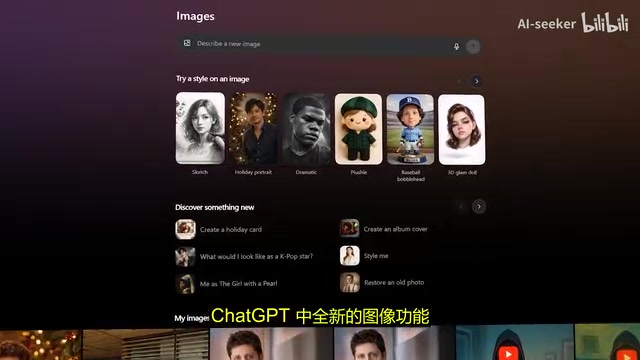
The new image features in ChatGPT are clearly designed to support this workflow. There's now a dedicated image section in the sidebar, available on both web and mobile, with a cleaner interface, more intuitive editing, preset styles, and popular prompts that save you from detailed input every time.
The core design philosophy is keeping users in a "flow state"—trying idea after idea without interruptions from waiting or starting over. It sounds trivial, but in actual creative work, this change in experience is a qualitative leap.
A Qualitative Leap in Editing: From Filters to Creative Image Processing
Editing capabilities have advanced dramatically. The model can handle adding and removing elements, concept blending, and style transfers without destroying the overall image. You can combine multiple inputs into a single scene, then selectively change the style of certain elements while leaving others untouched.
OpenAI showcased an impressive example: multiple people and a dog composited into a vintage film-style photo with playful children added to the background; one person converted to a hand-drawn anime style while everything else stays photorealistic; then the people removed entirely while the environment remains intact. This kind of editing chain is precisely where image models used to fail—and now it's handled flawlessly.
GPT Image 1.5 can also adjust layouts, naturally integrate text into images, and generate designs that feel cohesive rather than cobbled together. Movie posters, fashion ads, character designs, and stylized illustrations all maintain content coherence while preserving their distinctive character. At this point, the model begins to overlap functionally with tools like Photoshop, Canva, and Figma—it can't replace them, but it can serve as a generative front-end that instantly handles most of the initial work for you.
Major Progress in Text Rendering
Text rendering is another area with significant progress. Dense text, small fonts, structured layouts, and even Markdown now render into realistic newspaper-style layouts with much greater reliability. This matters for infographics, posters, UI prototypes, and marketing materials. Earlier image models struggled to produce readable text; the new model still has limitations, but output quality is now high enough that results aren't just presentable—they're practical.
API Access and Ecosystem Integration: Moving Toward Large-Scale Commercial Applications
GPT Image 1.5 is available to developers via API, bringing the same improvements at lower costs for both image input and output than before. This pricing adjustment is deliberate—pushing image generation technology toward large-scale commercial adoption.
Creative platforms including Wix, Canva, Envato, Higgsfield, and Figma Weave have already integrated the technology. Wix specifically highlighted the model's high consistency in lighting, composition, and detail, making it suitable for actual production rather than just conceptual work.
What you might have missed: Amazon and OpenAI are in discussions about e-commerce integration, building on OpenAI's existing partnerships with Shopify, Etsy, and Instacart. Real-time generation and iteration of product images, brand visuals, and storefront assets aligns perfectly with GPT Image 1.5's strengths.
OpenAI's Infrastructure Strategy and Competitive Pressure
On the business side, OpenAI is reshaping its operating model. Its relationship with Microsoft has been restructured, removing exclusivity clauses and allowing OpenAI to sign infrastructure deals with other providers. Following this, OpenAI committed to spending approximately $38 billion over the next 7 years leasing Amazon's servers, with Amazon also planning to invest over $10 billion directly—potentially pushing OpenAI's valuation past $500 billion.
OpenAI has locked in long-term agreements totaling approximately $1.5 trillion, partnering with NVIDIA, Oracle, AMD, and Broadcom for chips and compute, with NVIDIA alone committing up to $100 billion.
Strategic Considerations Behind the Release Timing
A noteworthy detail: GPT Image 1.5's release was moved up. It was reportedly planned for later, but OpenAI pushed it forward, coinciding with competitive pressure from Google Gemini. Sam Altman previously described the situation as a "state of emergency," and this release appears to be a direct response.
Honest Limitations and Future Direction
OpenAI has been transparent about the model's shortcomings: scientific illustrations may still contain inaccuracies; multilingual text handling remains inconsistent; certain styles may not perform well under strict constraints; handling multiple faces in a single image has improved but still has edge cases. Importantly, these are now "edge cases" rather than "common problems."
On the research front, OpenAI's frontier science benchmarks show that GPT 5.2 performs well on competition problems (scoring around 77%) but drops to about 25% on open-ended research tasks, highlighting the distinction between solving structured problems and conducting genuine scientific research. This consideration applies equally to image generation—OpenAI is clearly distinguishing between tools that assist human work versus claiming autonomous intelligence.
As OpenAI CEO Fidji Simo noted: When visuals tell the story better than words, ChatGPT should leverage visual content. GPT Image 1.5 dramatically accelerates creative work, but always guided by human intent—these systems enhance productivity rather than replace expertise.
Related articles
 Product Reviews
Qoder vs Cursor Real-World Comparison: Which $20/Month AI IDE Is Better?
Hands-on comparison of Qoder vs Cursor AI IDEs: Agent autonomy, human interaction count, and architecture decisions. Qoder needed only 2 interactions vs Cursor's 8.
 Product Reviews
Cursor Cloud Agent Demo: Eliminating Bottlenecks Across the Entire Software Development Lifecycle
Deep analysis of Cursor's Cloud Agent demo showing how cloud VMs, automated test artifacts, and a full-chain control plane systematically eliminate human bottlenecks across the software development lifecycle.
 Product Reviews
Cursor 3.0 Deep Dive: Multi-Agent Parallelism, Design Mode, and Best-of-N Model Comparison
Cursor 3.0 evolves from an AI coding assistant into an Agent fleet command center. Explore multi-agent parallelism, Design Mode, and Best-of-N model comparison.