Open Design: An Open-Source AI Design Framework — Deep Dive into 19 Skills + 71 Design Systems

Open Design: an open-source local AI design tool that reuses your existing coding agents.
Open Design is an Apache 2.0 open-source design application whose core philosophy is reusing existing coding agents on your system (like Claude Code, Cursor, etc.) as the design engine — no extra subscriptions needed. It offers 19 composable skills covering web, mobile, and business scenarios, ships with 71 Design.md systems inspired by well-known brands, and ensures output quality through discovery forms and a five-dimensional evaluation mechanism. Still in early stages, it's best suited for rapid prototyping and visual exploration.
Why We Need an Open-Source AI Design Tool
Cloud Design (Anthropic's AI design tool) has won over many users with its impressive design generation capabilities, but its closed-source pricing model, cloud dependency, and deep ties to the Anthropic ecosystem have kept many developers at bay. If you want private deployment, or wish to drive your design workflow using tools like Codex, Cursor Agent, Gemini CLI, and others, Cloud Design simply can't meet those needs.
Open Design was built to solve exactly this pain point. It's a local-first, open-source design application under the Apache 2.0 license. Its core philosophy: rather than bundling a proprietary AI agent, it automatically detects and reuses the coding agents already on your system (such as Claude Code, Codex CLI, Cursor Agent, Gemini CLI, Open Code, Q1 Code, etc.), leveraging them as the design engine to power the entire design generation workflow.
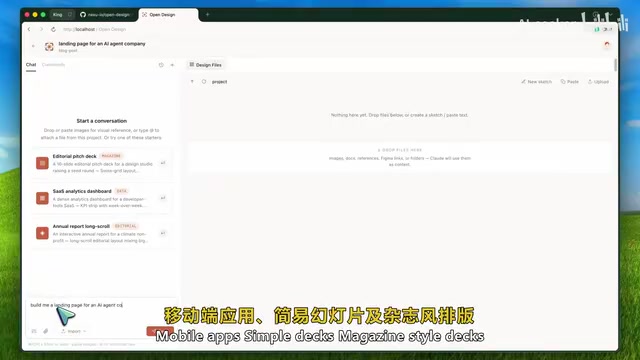
In other words, if you're already paying for a coding agent, there's no need to subscribe to yet another design service. The cost depends entirely on the underlying model or agent configuration you're already using.
Core Architecture: 19 Skills and 71 Design Systems
A Composable Skill System
What sets Open Design apart from "yet another chat box with a preview panel" is its 19 composable skills, covering the vast majority of common design scenarios:
- Web: SaaS landing pages, dashboards, pricing pages, documentation pages, blogs
- Mobile: Mobile app interfaces
- Presentation: Slide decks, magazine cover layouts
- Work Templates: PRDs, design frameworks, weekly reports, meeting notes, operations manuals
- Business: Financial reports, invoices, kanban boards, OKRs
Each skill sets explicit rule constraints for the agent. For example, selecting the "Dashboard" skill biases the agent toward generating data-dense admin interfaces; selecting "Magazine Cover" enforces corresponding typographic standards. This kind of structured constraint is exactly the architectural design that AI design tools need most.
71 Design.md Design Systems
Open Design ships with 71 Markdown-based design system files (Design.md), inspired by renowned brands like Linear, Stripe, Vercel, Airbnb, Tesla, Notion, Anthropic, and Apple, as well as the visual styles of tools like Cursor, Supabase, Figma, Raycast, and Spotify.
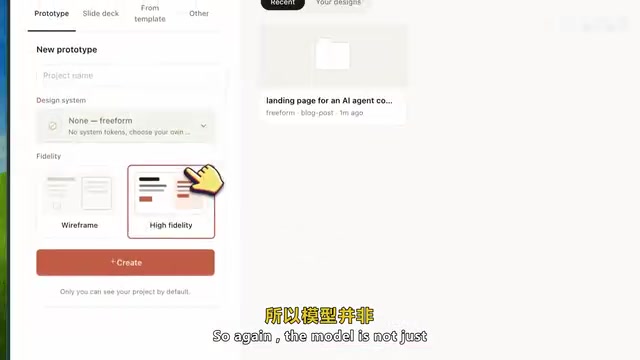
Design.md is essentially a pure Markdown design specification that establishes a complete visual foundation for the agent, including: colors, typography, spacing, layout, components, animations, tone of voice, brand rules, and anti-patterns. You no longer need to use vague language like "make it clean" or "more modern" — just select a brand style like Linear or Stripe, and the generated design will follow that specific visual language.
Workflow Design: Ask the Right Questions Before Generating
Direction Selector and Discovery Form
If you don't have a preset brand, Open Design offers five visual directions to choose from:
- Editorial — Bold typography and visual impact
- Modern Minimal — Restraint, whitespace, sophistication
- Tech — Data-driven technical aesthetics
- Pragmatic — Function-first, practical design
- Soft & Warm — Approachability and human warmth
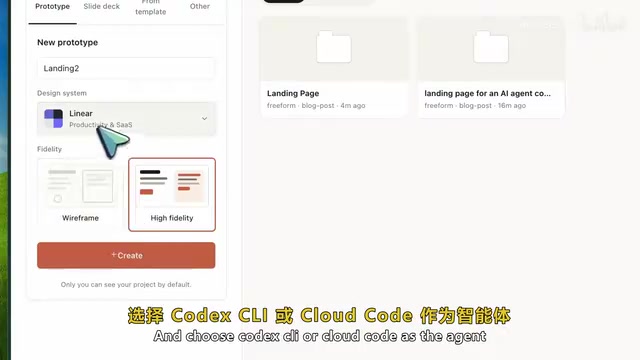
More importantly, Open Design introduces a discovery form mechanism. When you input a design brief, the system presents a form first rather than jumping straight to code generation, asking about visual expression, audience, brand tone, use case, scale, and constraints.
This might seem trivial, but it's actually critical — spending 30 seconds answering questions can save 30 minutes of rework. If the model starts building before understanding the target audience, brand tone, and use case, you'll often end up tweaking a dozen prompts just to correct the initial directional drift.
Anti-Degradation Mechanisms and Quality Checks
Open Design's prompt stack includes a five-dimensional evaluation mechanism that reviews outputs before they're accepted, checking design rationale, visual hierarchy, execution quality, clarity, and customization. Each skill can also include checklists (P0/P1/P2 priority rules) that the agent must satisfy before delivering the final output.
Even more noteworthy is that it explicitly avoids a series of common AI UI design pitfalls:
- Garish purple gradients
- Overused emoji icons
- Random rounded-corner cards
- Left border decorations
- Fake placeholder data
- Excessive decorative components
These are precisely the culprits that make AI-generated UI look cheap. Open Design addresses this systematically through rule-level constraints.
Technical Architecture and Local Deployment
Architecture Design
Open Design's technical architecture is clean and elegant:
- Frontend: Vite + React + TypeScript
- Backend: Built on Node, using a SQLite daemon to manage projects, conversations, messages, and tabs
- Working Directory: The daemon has system permissions, creating project folders in a local directory where agents write real files directly
- Preview Environment: Sandboxed isolation to prevent generated HTML code from gaining unnecessary system permissions
Supported export formats include HTML, PDF, ZIP, Markdown, and PPTX.
Local Deployment Steps
git clone <repository-url>
cd open-design
nvm use
corepack enable
pnpm install
pnpm dev:all
Once launched, the background daemon runs on port 7456 and the web app on port 5173. On first startup, it automatically detects installed agents. If none are detected, you can manually switch to Anthropic API key mode.
Limitations and Use Cases
Current Limitations
It's important to be objective about Open Design's shortcomings:
- Still in early stages — recommended as an experimental tool; not yet suitable for direct use in team production design workflows
- Output quality depends on the underlying agent — Claude Code has the best streaming support; other CLI tools mostly use buffered mode, resulting in a slightly inferior experience
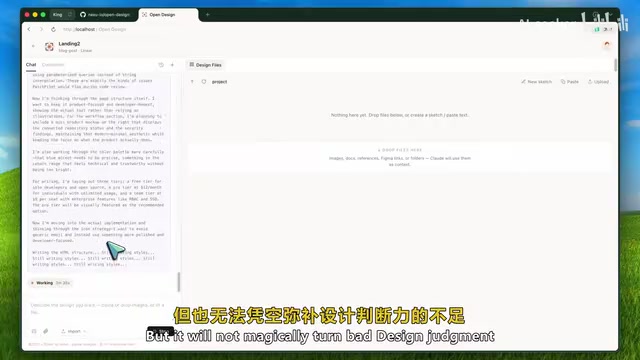
- Requires a powerful underlying model — design system files help, but they can't compensate for a weak model's lack of design judgment
- Security requires careful consideration — as a local daemon, it needs open working directory permissions
- Some features are still planned — comment mode, precision editing, AI-assisted adjustment panels are not yet implemented
Best Use Cases
- Rapid prototyping
- Landing page generation
- Internal dashboard building
- Presentation creation
- Visual experimentation and exploration
For production-ready UI, it's recommended to use Open Design's output as a starting point, then perform code review, responsive layout testing, accessibility improvements, and manual design refinements.
Conclusion: The Right Path for AI Design Tools
Open Design's greatest value isn't that it's an open-source clone of Cloud Design — it's that it combines three critical capabilities: existing coding agents + file-based skill system + Design.md design systems.
This means design workflows can be version-controlled, branched, and run locally. Teams can customize internal skills and proprietary brand Design.md files, then use any agent to generate spec-compliant design outputs — far more practical than a closed-off design chatbot.
In my view, this is exactly the direction AI UI generation should be heading: less random prompting, more structured capabilities; more design systems, stronger local control; outputs that are easier to inspect and directly editable.
Related articles
 Product Reviews
Qoder vs Cursor Real-World Comparison: Which $20/Month AI IDE Is Better?
Hands-on comparison of Qoder vs Cursor AI IDEs: Agent autonomy, human interaction count, and architecture decisions. Qoder needed only 2 interactions vs Cursor's 8.
 Product Reviews
Cursor Cloud Agent Demo: Eliminating Bottlenecks Across the Entire Software Development Lifecycle
Deep analysis of Cursor's Cloud Agent demo showing how cloud VMs, automated test artifacts, and a full-chain control plane systematically eliminate human bottlenecks across the software development lifecycle.
 Product Reviews
Cursor 3.0 Deep Dive: Multi-Agent Parallelism, Design Mode, and Best-of-N Model Comparison
Cursor 3.0 evolves from an AI coding assistant into an Agent fleet command center. Explore multi-agent parallelism, Design Mode, and Best-of-N model comparison.