The Big Four AI Coding CLIs Compared: Claude Code vs. Copilot vs. Gemini vs. Codex — How to Choose

A comprehensive comparison and selection guide for the four major command-line AI coding assistants.
This article compares four command-line AI coding assistants — Claude Code, GitHub Copilot CLI, Gemini CLI, and Codex CLI — across their core differences: Claude Code leads with its MCP ecosystem and sub-agent system, Gemini CLI offers a million-token ultra-long context advantage, Codex CLI is the only open-source option, and Copilot CLI suits GitHub-centric teams and enterprises. The author recommends a hybrid approach leveraging each tool's strengths as the optimal strategy, with incremental migration and careful dependency assessment.
The command-line AI coding assistant space is now a four-way race. Claude Code, GitHub Copilot CLI, Gemini CLI, and Codex CLI — each has its killer features, and each has its weak spots. The question is no longer "should I use AI?" but "which AI should I use?"
This article breaks down all four tools in detail — from core parameters and migration paths to selection decisions — helping you find the best fit for your workflow.
Meet the Four Contenders
Let's start with a quick overview of each tool's positioning:
- Claude Code: Anthropic's official CLI, known for deep code understanding and the MCP ecosystem — currently the strongest all-around option
- GitHub Copilot CLI: Deeply integrated with the GitHub ecosystem, offering enterprise-grade support and team collaboration features
- Gemini CLI: Made by Google, featuring multimodal capabilities and a million-token ultra-long context window
- Codex CLI: OpenAI's lightweight open-source solution, fully controllable with deep customization support
Key Parameter Comparison: Where the Differences Lie
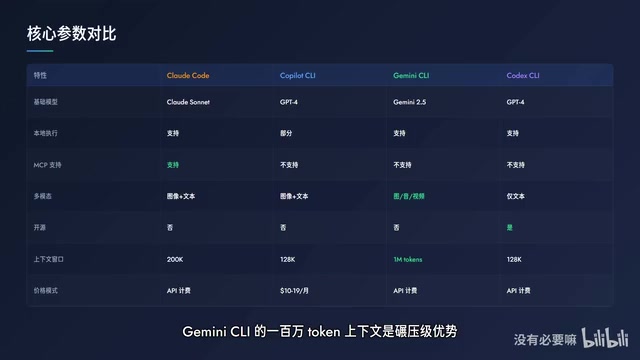
The four tools may seem similar on the surface, but they diverge significantly across several critical dimensions.
MCP Protocol Support
Currently, only Claude Code supports MCP (Model Context Protocol). MCP is an open standard protocol launched by Anthropic in late 2024, designed to solve the fragmentation problem of integrating AI models with external tools and data sources. Before MCP, every AI tool needed custom adapters for different external services, making maintenance costs extremely high. Through a unified client-server architecture, MCP enables AI models to invoke database queries, file system operations, API requests, and other capabilities in a standardized way — developers only need to implement an MCP server once, and it can be reused by all MCP-compatible clients. The MCP ecosystem now includes hundreds of official and community servers, covering integrations with mainstream tools like PostgreSQL, Slack, GitHub, and Figma.
This means if you've already built an MCP toolchain — connecting databases, calling internal APIs, integrating third-party services — migrating to another tool means losing all those capabilities outright. The MCP ecosystem is Claude Code's biggest moat right now.
Context Window Capacity
Gemini CLI's million-token context window is a crushing advantage. The context window refers to the maximum number of tokens a large language model can process in a single inference — tokens are the basic units of text processing for models, with one English word typically equaling 1-2 tokens. Early versions of GPT-4 only supported 8K tokens, while Gemini 1.5 Pro pushed this limit to 1 million tokens, roughly equivalent to thousands of code files. When analyzing an entire large codebase, you can feed the whole project in at once without batch processing — particularly useful for understanding complex project architectures and performing global refactoring.
However, ultra-long context isn't without trade-offs: inference latency grows linearly with context length, and API costs are billed per token. This makes it better suited for one-off global analysis tasks rather than high-frequency daily completion scenarios.
Open-Source Status and Pricing Models
Only Codex CLI is fully open source. If you want to inspect the source code, modify behavior, or build custom features, it's your only option.
Regarding pricing, Copilot CLI uses a fixed monthly subscription model (approximately $10-19/month), while the other three use pay-per-use API billing. These two models are fundamentally different: fixed monthly fees suit heavy users with zero marginal cost and predictable budgets; API pay-per-use is extremely cheap for light usage, but deep analysis tasks or ultra-long context calls can generate unexpectedly high bills. For example, with Gemini 1.5 Pro, a million-token input costs about $3.50 — if you run full-codebase analysis multiple times daily, monthly costs could exceed a fixed subscription by several times over. You need to accurately assess your usage frequency and task types before choosing.
Project Configuration Files
The four tools use different configuration file formats but share the same philosophy: telling the AI what your project looks like. Claude Code uses CLAUDE.md, Copilot uses configuration files in the .github directory, Gemini CLI uses GEMINI.md, and Codex CLI uses CODEX.md or AGENTS.md. If you want to support multiple tools simultaneously, you can maintain a unified project context file as the single source of truth for all tools.
Three Migration Paths Explained
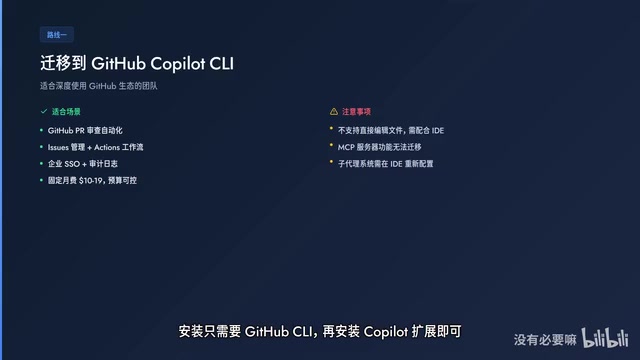
Path One: Migrating to Copilot CLI
Best for: Teams deeply embedded in the GitHub ecosystem who need enterprise-grade SLA support.
Operationally, you need to install GitHub CLI first, then install the Copilot extension, and complete authentication to start using it. However, there are two important limitations: Copilot CLI doesn't support direct file editing — you need to use it alongside an IDE; MCP server functionality cannot be migrated, and the sub-agent system needs to be reconfigured within the IDE.
The sub-agent system is a concrete implementation of multi-agent architecture in coding assistants — the main agent dynamically spawns sub-agents when handling large tasks, for example, separately handling frontend component generation, backend API implementation, and test case writing. This significantly improves processing efficiency for cross-module tasks. This capability is not yet available in Copilot CLI.
Path Two: Migrating to Gemini CLI
Best for: Projects requiring multimodal capabilities or ultra-long context.
The million-token context window is ideal for analyzing large codebases. Multimodal features are particularly useful for UI/UX-related work, such as analyzing interface screenshots or generating components from design mockups. But watch out for API costs — ultra-long context calls aren't cheap, and heavy usage might result in a bill that catches you off guard.
Path Three: Migrating to Codex CLI
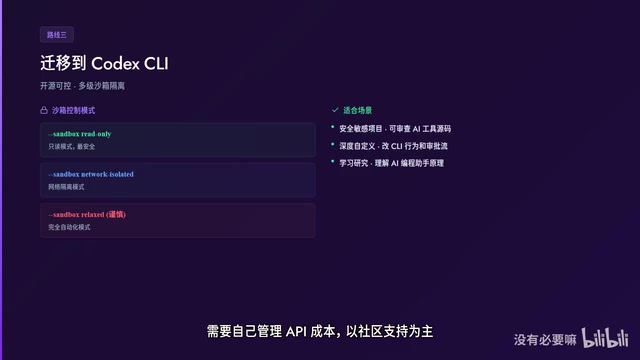
Best for: Developers who need full control and transparency.
Codex CLI is open source and supports multiple sandbox modes. This sandbox mechanism stems from systematic consideration of security risks when AI agents autonomously execute code — when AI is authorized to run terminal commands, potential risks include accidentally deleting files, leaking code to external servers, or executing scripts from malicious dependency packages:
- Read-only mode: The safest option, restricting write operations through file system permissions — can only read files, not modify them
- Network-isolated mode: Uses OS-level network namespaces or firewall rules to cut outbound connections, preventing data leakage
- Fully automated mode: Often combined with container technologies like Docker, running in isolated environments — suitable for CI/CD scenarios but should be used with caution
You'll need to manage API costs yourself, rely primarily on community support, and won't have official enterprise-grade support.
Decision Tree: Quickly Find the Right Tool for You
Don't want to read the full article? Here's the bottom line:
- Need MCP integration and sub-agent systems → Choose Claude Code
- Deep GitHub usage or need enterprise SLA → Choose Copilot CLI
- Need multimodal support or ultra-long context → Choose Gemini CLI
- Need open-source control and deep customization → Choose Codex CLI
- Not sure → Start with Claude Code, then add other tools as needed
Best Practice: A Hybrid Approach Is the Optimal Solution
Honestly, the most effective strategy often isn't picking just one tool — it's using different tools for different tasks:
- Copilot for quick completions
- Claude Code for deep analysis
- Gemini for multimodal tasks
- Codex for security audits
Each tool handles what it does best, with all four working in concert for maximum overall efficiency.

General Recommendations
Regardless of which path you ultimately choose, these tips apply universally:
- Assess dependencies first: Clearly list which features you currently use, especially MCP services and custom commands
- Migrate incrementally: Don't swap out all your tools at once — test the waters on a small project first
- Stay flexible: Maintain multiple configuration files to keep your options open
- Monitor costs: Keep an eye on usage for API-billed tools to avoid runaway bills
- Watch for updates: This field evolves extremely fast, with tool capabilities changing monthly
As things stand, Claude Code has the strongest overall capabilities — the MCP ecosystem, sub-agent system, and deep code understanding combine to form a unique competitive advantage. But this space moves too fast — today's conclusions may need updating in three months. Staying flexible is the best strategy for navigating change.
Related articles
 Product Reviews
Qoder vs Cursor Real-World Comparison: Which $20/Month AI IDE Is Better?
Hands-on comparison of Qoder vs Cursor AI IDEs: Agent autonomy, human interaction count, and architecture decisions. Qoder needed only 2 interactions vs Cursor's 8.
 Product Reviews
Cursor Cloud Agent Demo: Eliminating Bottlenecks Across the Entire Software Development Lifecycle
Deep analysis of Cursor's Cloud Agent demo showing how cloud VMs, automated test artifacts, and a full-chain control plane systematically eliminate human bottlenecks across the software development lifecycle.
 Product Reviews
Cursor 3.0 Deep Dive: Multi-Agent Parallelism, Design Mode, and Best-of-N Model Comparison
Cursor 3.0 evolves from an AI coding assistant into an Agent fleet command center. Explore multi-agent parallelism, Design Mode, and Best-of-N model comparison.