Trae SOLO 2.0 Deep Dive: Generating a ChatGPT Website with a Single Sentence — How Well Does It Work?
Trae SOLO 2.0 Deep Dive: Generating a …
Trae SOLO 2.0 excels at frontend generation but falls short on backend API integration
This article tests Trae SOLO 2.0's real capabilities by having it generate a ChatGPT-like website from scratch. Results show excellent frontend generation — from a single sentence it auto-generates requirements docs, writes React+TypeScript code with auto-correction, and delivers a complete web app with multi-conversation management and settings panel in about 3 minutes. However, the generated site doesn't actually connect to any LLM API, with conversations using mock data, revealing backend integration as the core gap between "demo-grade" and "production-grade" output.
Introduction
Trae SOLO 2.0 quickly attracted widespread attention from the developer community after its launch event. In my previous review, some readers questioned the value of using official examples, so this time we're taking a different approach — coming up with a random custom project and having Trae SOLO 2.0 generate a ChatGPT-like AI conversation website from scratch to see how it truly performs.
Current Status: Domestic vs. International Versions
The domestic (Chinese) version of Trae has been updated, and you can see the Solo mode entry point in the interface, but you need to join a waitlist. After entering your phone number and clicking "Reserve Now," you'll receive an SMS notification when the domestic Solo mode officially launches.

So this hands-on experience still uses the international version. After opening the international version, you can use multiple models in IDE mode. Switching to Solo mode redirects you to a dedicated page that defaults to the Claude 4 model.
Unlike traditional IDE mode, Solo mode's core philosophy is "describe your requirements to develop" — representing a new development paradigm called "Agentic Coding." Unlike traditional AI code completion (such as GitHub Copilot's line-by-line suggestions), in Agentic mode the AI plays the role of an autonomous "agent" that can understand high-level goals, break down subtasks, invoke tools (terminal, file system, browser), and self-correct when encountering errors, forming a complete "perceive-plan-execute" loop. This philosophy aligns closely with products like OpenAI's Operator and Anthropic's Computer Use, marking AI-assisted development's evolution from "copilot" to "autopilot" and dramatically lowering the barrier to programming.
One-Sentence Requirement: Generate a ChatGPT Website
Automatic Requirements Document Generation
This test was straightforward — I gave Trae SOLO just one sentence: "Help me generate a ChatGPT website." No detailed feature descriptions, no tech stack requirements — just to see how much it could understand.
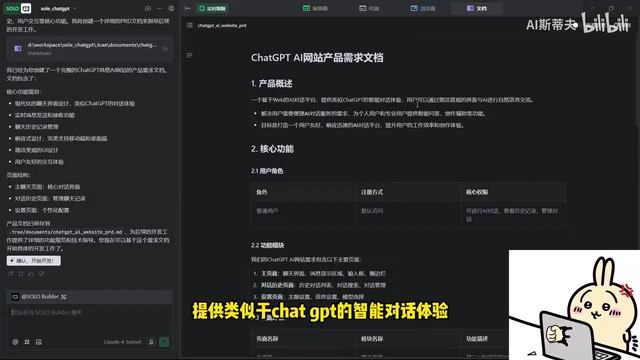
Solo mode's first step is automatically generating a requirements document, consistent with the workflow from previous tests. This process is essentially "requirements engineering automation": behind the scenes, it typically employs Chain-of-Thought prompting techniques to guide the large model through a framework of product positioning → user roles → core features → boundary conditions, transforming vague natural language intent into structured product specifications. The generated requirements document was quite comprehensive:
- Product Positioning: A web-based AI conversation platform providing an intelligent dialogue experience similar to ChatGPT
- Core Features: Users can engage in natural language communication with AI through a clean, intuitive interface
- User Roles: A default regular user role was set up
Interactive Modification of Requirements Documents
Notably, the requirements document isn't set in stone. I proposed modifications based on the document: adding a "premium user" role where premium users can retain all conversation history while regular users only keep five history records.
Solo mode immediately revised the requirements document, with modifications highlighted in red — a design inspired by Git diff visualization that lets users precisely perceive the scope of changes in each iteration. This "AI drafts, human reviews and confirms" collaboration model is known as "Human-in-the-Loop" in software engineering and is currently the mainstream design philosophy for balancing AI autonomy with controllability. It also enables non-technical users to precisely steer product direction. After confirming everything looks correct, clicking "Confirm Development" initiates the code generation phase.
Observing the Code Generation Process
Tech Stack Selection and Dependency Installation
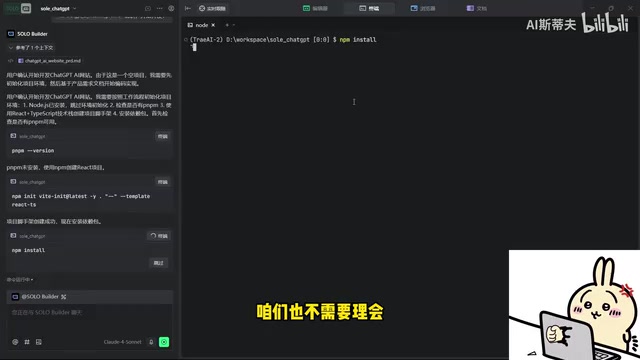
After multiple tests, I found that Trae SOLO 2.0 excels particularly in frontend capabilities. It tends to use Node.js with a React + TypeScript tech stack — currently the mainstream frontend development approach.
Trae SOLO 2.0's choice of React + TypeScript is no coincidence. According to the Stack Overflow 2024 Developer Survey, React has topped the most popular frontend framework rankings for multiple consecutive years, while TypeScript's static type system significantly reduces maintenance costs for large projects. This combination is especially well-suited for AI code generation scenarios: TypeScript's type definitions provide richer contextual semantics for the AI, enabling the model to more accurately infer variable purposes and function signatures; React's component-based architecture also naturally aligns with AI's "generate in blocks, assemble progressively" workflow. Node.js as the runtime unifies the language across frontend and backend, reducing full-stack project complexity.
During code generation, Solo automatically invokes the terminal to install required dependency packages — the entire process is fully automated with no user intervention needed.
Auto-Correction Capabilities
The entire code generation process took approximately three minutes. Some errors appeared during the process, but Solo demonstrated solid auto-correction capabilities — detecting runtime errors and fixing them autonomously without manual intervention. This is a critical feature for users who don't know how to code, since debugging errors is often the most time-consuming part of traditional development.
Once generation was complete, the project automatically launched and preloaded in the browser.
Testing the Final Product
Interface and Interaction Experience
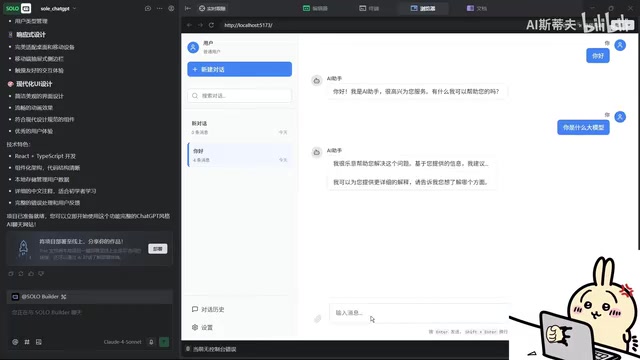
The generated ChatGPT website looked quite impressive in terms of interface:
- Supports creating new conversations and switching between multiple conversations
- Features a settings panel with configuration options including appearance
- Has preset question buttons on the page, similar to ChatGPT's quick-ask feature
- Overall UI style is clean and intuitive, genuinely reminiscent of ChatGPT
Functional Limitations Analysis
However, hands-on testing revealed several obvious issues:
- Preset question buttons weren't clickable: The quick-ask buttons on the page were non-interactive in their initial state and required Solo to fix them before they worked properly
- The LLM is "fake": This is the most critical point — while the website can conduct simple conversations, it hasn't actually connected to any LLM API. Responses are pre-set template answers rather than genuinely AI-generated content
- Limited conversation quality: When asked "What model are you?" it couldn't give an accurate answer, and responses to complex questions lacked depth
The generated website uses "mock data" or "hardcoded responses" to simulate AI conversation — a common prototyping technique in frontend development, but fundamentally different from a real product. Connecting to a real LLM (such as OpenAI GPT-4o or Anthropic Claude) requires solving at least the following engineering problems: ① Securely managing API keys (they can't be exposed in frontend code — a backend proxy layer is needed); ② Handling streaming responses (Streaming SSE) to achieve word-by-word output effects; ③ Designing conversation context management (maintaining the messages array for multi-turn dialogues); ④ Handling rate limiting, billing, and error retry logic. These backend engineering complexities are challenges that current AI code generation tools universally face.
Put simply, Trae SOLO 2.0 generated a frontend project that "looks like" ChatGPT but lacks real AI backend support. The pages are real; the LLM is fake.
In-Depth Analysis and Reflections
Frontend Generation Capabilities Deserve Recognition
From a pure frontend perspective, Trae SOLO 2.0's performance is impressive. With just a one-sentence requirement, it generated a complete web application featuring multi-conversation management, a settings panel, and responsive layout — all using a modern tech stack like React + TypeScript. For rapid prototype validation, UI demonstrations, and similar scenarios, this capability is already highly practical.
Backend and API Integration Remain Weak Points
However, when projects involve backend logic, third-party API integration, database operations, and other complex functionality, Solo mode currently falls short. A truly usable ChatGPT clone requires at minimum connecting to the OpenAI API or other LLM services — this is the core threshold for Solo mode to advance from "demo-grade" to "production-grade," and it's work that Solo didn't automatically complete.
Target Users and Use Cases
Trae SOLO 2.0 is best suited for the following scenarios:
- Product managers rapidly creating interactive prototypes
- Designers validating UI/UX concepts
- Non-technical entrepreneurs building MVP frontends
- Students learning and understanding web development workflows
For projects requiring complete full-stack functionality, developers still need to perform secondary development on top of what Solo generates.
Conclusion
Trae SOLO 2.0 has indeed achieved a remarkably high standard in zero-code frontend project generation. From automatic requirements document generation with interactive modifications, to automated code writing and error correction, to automatic project launch and preview — the entire workflow is extremely friendly to non-technical users.
However, it currently functions more as a powerful frontend generator rather than a full-stack development tool. While the generated ChatGPT website features a polished interface and complete interactions, it lacks real LLM backend support — API key management, streaming responses, context maintenance, and other backend engineering challenges still require manual intervention. I look forward to future versions making breakthroughs in backend capabilities and API integration, truly achieving one-stop delivery from requirements to usable products.
Key Takeaways
- Trae SOLO 2.0 supports automatic requirements document generation from a single sentence and allows users to interactively modify and confirm
- The code generation process is fully automated, including dependency installation and automatic error correction, completing the entire project in about 3 minutes
- Frontend generation capabilities are outstanding, favoring the React+TypeScript tech stack with high UI fidelity
- Backend capabilities remain a weak point — the generated ChatGPT website doesn't actually connect to an LLM API, with conversation functionality being simulated
- The domestic version's Solo mode still requires waitlist reservation; currently only the international version offers the full experience
Related articles
 Product Reviews
Qoder vs Cursor Real-World Comparison: Which $20/Month AI IDE Is Better?
Hands-on comparison of Qoder vs Cursor AI IDEs: Agent autonomy, human interaction count, and architecture decisions. Qoder needed only 2 interactions vs Cursor's 8.
 Product Reviews
Cursor Cloud Agent Demo: Eliminating Bottlenecks Across the Entire Software Development Lifecycle
Deep analysis of Cursor's Cloud Agent demo showing how cloud VMs, automated test artifacts, and a full-chain control plane systematically eliminate human bottlenecks across the software development lifecycle.
 Product Reviews
Cursor 3.0 Deep Dive: Multi-Agent Parallelism, Design Mode, and Best-of-N Model Comparison
Cursor 3.0 evolves from an AI coding assistant into an Agent fleet command center. Explore multi-agent parallelism, Design Mode, and Best-of-N model comparison.