WhichLLM: One Command to Find the Best Local LLM for Your Hardware

WhichLLM: one command to auto-recommend the best local LLM for your hardware
WhichLLM is an open-source tool that automatically detects your hardware configuration and combines the latest model data from Hugging Face with multiple authoritative benchmarks to recommend the best local LLM and quantization level for your machine. Beyond checking if a model fits in VRAM, it filters fake benchmark data, downranks outdated models, supports simulating any GPU configuration for purchase planning, and can download and deploy the recommended model with a single command — dramatically lowering the barrier to local LLM selection and deployment.
Why Is Choosing a Local Model So Hard?
Anyone who's tinkered with local LLMs knows the struggle: you want to run a large language model on your own machine, but just picking the right model eats up half your day — calculating whether you have enough VRAM, researching the differences between various quantized versions, scouring benchmark comparison posts, and still ending up with the wrong choice. Either the model is too large to run smoothly, or you settle for a small model with underwhelming performance.

The "quantized versions" mentioned here are a core concept you can't avoid when deploying LLMs locally. Original model weights are typically stored in FP16 or BF16 format, with each parameter taking up 2 bytes — a 70B parameter model requires roughly 140GB just for the weights, far exceeding the VRAM capacity of consumer-grade GPUs. Quantization compresses weights from high-precision floating-point numbers to lower-precision integer representations (such as INT8, INT4, or even lower), dramatically reducing model size. The most popular quantization format today is GGUF (a standard format driven by the llama.cpp project), where labels like Q2_K, Q3_K, Q4_K, Q5_K, Q6_K, and Q8_0 indicate different quantization bit levels — higher numbers mean greater precision, larger file sizes, and less quality loss. Generally speaking, Q5 quantization is considered the community's "sweet spot" between quality and size, reducing the model to about 30-35% of the original FP16 size while typically losing only 1-3% on mainstream benchmarks. However, different models have varying sensitivity to quantization, and choosing the wrong quantization level can cause output quality to fall off a cliff — one of the root causes of decision paralysis.
Many people follow a simple, brute-force logic when choosing models: bigger is better. 70B must be better than 7B, right? But in reality, a 70B model that can't fit entirely in VRAM and constantly swaps to system memory delivers a far worse experience than a smoothly running, high-quality 27B quantized model. The technical reason lies in the massive bandwidth gap between GPU VRAM and system RAM. Take the RTX 4090 as an example: its VRAM bandwidth reaches 1 TB/s, while DDR5 system memory bandwidth typically sits at 50-80 GB/s — more than a tenfold difference. LLM inference is fundamentally a "memory-bandwidth bound" task — generating each token requires reading the model's entire weights from storage. When a model can't be fully loaded into VRAM, some layers get offloaded to system memory or even disk, and inference speed can plummet from 30+ tokens per second to single digits, making conversation unbearable. What truly affects the user experience is the combined balance of model quality, quantization precision, and inference speed — not raw parameter count alone.
Now, an open-source tool called WhichLLM aims to solve this problem with a single command.
What Is WhichLLM?
WhichLLM is an open-source project that has already earned 700+ stars on GitHub. Its core function is crystal clear: automatically detect your hardware configuration, then recommend the best local LLM for your machine from a vast pool of models.

Here's how it works:
- Automatic hardware detection: Identifies your GPU model, VRAM size, system memory, and other key specs
- Fetches the latest model data: Pulls up-to-date model listings and quantized version info from Hugging Face
- Comprehensive benchmark ranking: Combines real data from multiple authoritative benchmarks to score and rank runnable models
- Delivers the best recommendation: Tells you directly which model is the optimal choice for your hardware
It's worth elaborating on Hugging Face's role here. Hugging Face is currently the largest open-source model hosting platform in the AI space — think of it as the GitHub of AI models. As of 2025, the platform hosts over 1 million models, with tens of thousands of GGUF quantized versions of LLMs alone. Nearly all mainstream open-source models (Llama, Qwen, Mistral, Gemma, etc.) have their official weights and community quantizations published on Hugging Face first. By pulling data from this platform, WhichLLM covers virtually every local model option worth considering and stays in sync with the latest releases.
For example, if you're running an RTX 4090 (24GB VRAM), WhichLLM might recommend Qwen3.6 27B at Q5 quantization, with an estimated inference speed of about 27 tokens per second — a choice that strikes an excellent balance between quality and speed.
Key Highlights: More Than Just "Will It Fit?"
Intelligent Scoring, Not Simple Matching
There are other tools out there that can help you calculate VRAM usage, but WhichLLM takes things a step further. It doesn't just check whether a model can squeeze into your VRAM — it incorporates data from multiple authoritative benchmarks to make its recommendations. This means the models it suggests are ones that genuinely perform well in evaluations, not just "the biggest one that can run."

Even more noteworthy, WhichLLM filters out fake benchmark data and automatically downranks outdated models. This design tackles a persistent problem in the LLM evaluation space. Current mainstream benchmarks include MMLU (Massive Multitask Language Understanding), HumanEval (code generation), GSM8K (math reasoning), ARC (science reasoning), and others, each measuring model capabilities from different angles. However, since these benchmark datasets are public, some model developers engage in "data contamination" — mixing benchmark questions or their variants into training data, inflating scores on leaderboards while delivering mediocre real-world performance. This practice is known in the open-source community as "benchmark hacking." Additionally, the LLM field iterates extremely fast — a top-tier model from six months ago may have been completely surpassed by newer ones. WhichLLM addresses this through algorithmic measures including cross-validating consistency across multiple benchmarks, detecting anomalously high scores, and applying time-decay factors based on model release dates — all to ensure recommendation reliability and prevent users from being misled by inflated leaderboard numbers.
Simulate Any Hardware Configuration
If you're considering a GPU upgrade or want to help a friend plan their setup, WhichLLM also supports simulating any hardware configuration. You don't need to actually own an RTX 5090 to preview what level of models that card can run, helping you make more informed purchasing decisions.
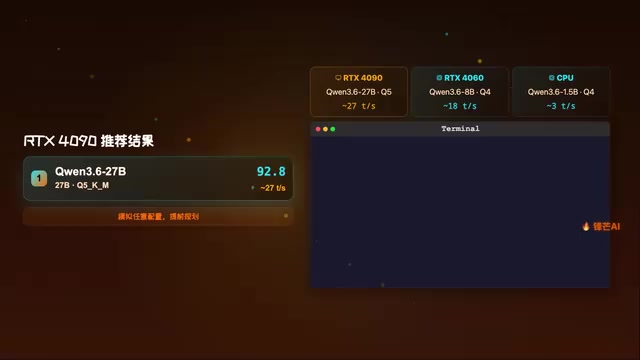
This feature is incredibly practical for budget-conscious users. Rather than buying a GPU only to discover it can't run the model you want, you can simulate it with WhichLLM first. Here's a concrete example: the price difference between an RTX 4060 (8GB VRAM) and an RTX 4060 Ti 16GB is roughly $150-200, but the latter can jump from running 7-8B models to 14-15B models — a significant quality leap. With the simulation feature, you can clearly see how much model capability that extra investment buys, helping you decide whether it's worth it.
One-Click Chat, Ready Out of the Box
WhichLLM's most powerful feature: after recommending a model, a single command starts a conversation. It automatically downloads the recommended model, configures the runtime environment, and delivers a truly out-of-the-box experience.
To appreciate how big a pain point this solves, you need to understand the current local LLM inference toolchain landscape. The most mainstream local inference solutions include llama.cpp (a pure C/C++ inference engine supporting CPU and GPU hybrid inference, and the birthplace of the GGUF format) and Ollama (a higher-level tool built on llama.cpp that provides a Docker-like model management experience). While these tools have greatly simplified local deployment, they still present hurdles for newcomers: choosing the correct model file, configuring GPU layer allocation (n_gpu_layers), setting context length, handling potential dependency conflicts, and more. WhichLLM streamlines the entire pipeline of "select model → download → configure → run" into a single command, dramatically lowering the barrier to entry for users who don't want to wrestle with toolchain configuration.
Installation and Usage
Installing WhichLLM is straightforward, with two options:
# Option 1: Install via pip
pip install whichllm

# Option 2: One-liner with uvx
uvx whichllm
uvx is a command provided by uv, Python's next-generation package manager. It runs Python packages directly in a temporary, isolated environment without prior installation and without polluting your system Python environment — perfect for "run it once and done" tool scenarios. If you haven't installed uv yet, you can quickly set it up with curl -LsSf https://astral.sh/uv/install.sh | sh (macOS/Linux).
Once installed, simply run it in your terminal to get model recommendations tailored to your current hardware. The entire process requires zero manual configuration — the tool handles all detection and computation automatically.
Who Is This For?
- Local LLM beginners: Don't know what models your computer can run? WhichLLM gives you the answer directly
- Hardware upgrade planners: Want to know what level of models a specific GPU can handle? Use the simulation feature to plan ahead
- Efficiency-focused developers: Don't want to spend time choosing models? One command handles recommendation + deployment
- Multi-machine administrators: Need to quickly determine the optimal model for machines with different configurations
Final Thoughts
As the local LLM ecosystem flourishes, model counts are exploding, quantized versions are proliferating, and decision paralysis is only getting worse. WhichLLM's value lies in transforming model selection — something that used to require extensive experience and time — into an automated process that takes just one command.
Of course, any automated recommendation tool has its limitations — it can't fully understand your specific use case (whether you're writing code or prose, whether you need long context or fast responses). Different tasks emphasize very different model capabilities: code generation relies more on logical reasoning and instruction-following, creative writing values language fluency and imagination, while RAG (Retrieval-Augmented Generation) scenarios have hard requirements for long context windows. These specialized needs still require users to do secondary filtering based on their own situations. But as a quick-screening starting point, WhichLLM already does an outstanding job.
Don't blindly follow the hype — let real testing reveal the truth. Instead of asking "what models can my GPU run?" on forums, just run WhichLLM yourself and let the data speak.
Related articles
 Product Reviews
Qoder vs Cursor Real-World Comparison: Which $20/Month AI IDE Is Better?
Hands-on comparison of Qoder vs Cursor AI IDEs: Agent autonomy, human interaction count, and architecture decisions. Qoder needed only 2 interactions vs Cursor's 8.
 Product Reviews
Cursor Cloud Agent Demo: Eliminating Bottlenecks Across the Entire Software Development Lifecycle
Deep analysis of Cursor's Cloud Agent demo showing how cloud VMs, automated test artifacts, and a full-chain control plane systematically eliminate human bottlenecks across the software development lifecycle.
 Product Reviews
Cursor 3.0 Deep Dive: Multi-Agent Parallelism, Design Mode, and Best-of-N Model Comparison
Cursor 3.0 evolves from an AI coding assistant into an Agent fleet command center. Explore multi-agent parallelism, Design Mode, and Best-of-N model comparison.