Comprehensive Review of 10 Mainstream AI Coding Tools: How to Choose from Cursor to Claude Code
Comprehensive Review of 10 Mainstream …
Comprehensive comparison of 10 mainstream AI coding tools with recommendations for different developer profiles.
This article comprehensively reviews 10 mainstream AI coding tools, categorizing them into IDE plugins (GitHub Copilot, Gemini, JetBrains), terminal Agents (Claude Code, Codex, Mistral), AI-native IDEs (Cursor, Windsurf, Jules), and cloud platforms (Replit). It analyzes each across feature positioning, target audience, and pricing strategy to help developers of varying skill levels and budgets find their ideal tool.
Introduction
The AI coding tool market is flourishing, spanning IDE plugins to cloud-based Agents, terminal assistants to full-stack development platforms, leaving developers facing unprecedented choice paralysis. The explosion of AI coding tools began with GitHub Copilot's official release in 2022, after which the market rapidly evolved from simple code completion to multimodal Agents. The current market landscape can be understood through a "four-layer architecture": at the bottom are LLM providers like OpenAI, Anthropic, and Google; the middle layer consists of product companies that package model capabilities into developer tools; above that are IDEs and development platforms; and at the top are no-code/low-code solutions for end users. This layering means the same underlying model may power multiple competing tools, and differentiation is more about context management, workflow integration, and user experience design.
This article, based on an in-depth review by Bilibili creator Vlad, provides a comprehensive comparison of 10 mainstream AI coding tools across three dimensions—feature positioning, target audience, and pricing strategy—to help you find the most suitable productivity tool.
IDE Plugins: Lightweight Integration, Seamless Workflow
GitHub Copilot
As one of the earliest AI coding assistants, GitHub Copilot currently supports three major IDE platforms: VS Code, Visual Studio, and JetBrains. It offers Ask and Agent modes, supports multi-model selection, and core features include auto-completion, boilerplate code generation, and error fix suggestions.
The Agent mode represents a key capability upgrade over traditional code completion. Traditional completion is a passive "you write a line, AI continues a line" model; in Agent mode, the AI has autonomous planning, execution, and verification capabilities in a complete closed loop—it can analyze task requirements, formulate implementation plans, execute code changes step by step, run tests to verify results, and self-correct based on feedback. This relies on LLM reasoning capabilities (Chain-of-Thought), tool-calling abilities (Function Calling), and long context window technology. The maturity of Agent mode directly determines whether a tool can handle complex tasks spanning multiple files and modules.
GitHub Copilot also offers a CLI version—an AI system built into the terminal, meaning one subscription gives you both an in-IDE and terminal tool. For students, GitHub provides a free Pro plan, which is a very generous policy.
Pricing: Free tier available → Pro paid tier → Pro Plus for advanced features
Google Gemini Code Assistant + Gemini CLI
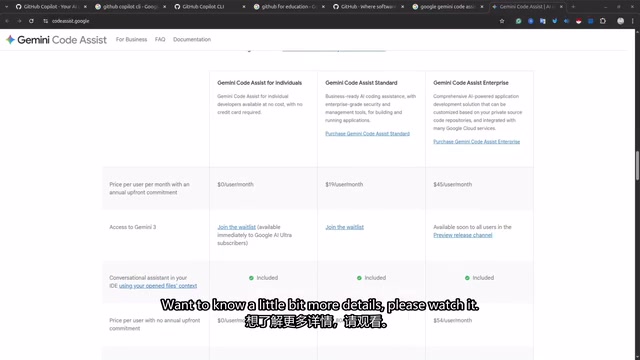
Google's approach is similar to GitHub Copilot—Gemini Code Assistant is a VS Code extension, and Gemini CLI is a terminal assistant. Both are based on the Gemini model and don't support GPT or Anthropic models.
The biggest highlight is that it's completely free for individual users, with approximately 6,000 code requests per day, far exceeding typical daily usage needs. Students can get a full year of completely free access, including the Gemini LLM itself. However, the downside is that it only runs locally—your computer must stay on during task execution. Local execution means code and context data never leave the developer's machine, offering strong privacy but being limited by local computing power and network conditions; by contrast, cloud execution allows access from any device and supports larger-scale code analysis, but involves security concerns about uploading code to third-party servers. For enterprise users, this is one of the core considerations when choosing tools.
JetBrains AI Assistant
If you're a Java developer or a heavy JetBrains user, this AI assistant provides intelligent code completion, code block generation, and next-edit prediction. Its biggest advantage is multi-model support, including OpenAI, Anthropic, Gemini, and even local models (like LLaMA), which is relatively rare among similar products.
Supporting local models means developers can use AI-assisted programming in completely offline environments, which is particularly important for enterprise developers handling sensitive code. The LLaMA series are Meta's open-source large language models that, after community fine-tuning, demonstrate solid capabilities in code generation tasks. While they still lag behind GPT-4 or Claude, they excel in zero cost and data privacy guarantees.
Pricing: Starting at $100/year, with a recently introduced limited free tier for individual developers (3 AI credits per 30 days).
Terminal Agents: Command-Line Powerhouses for Developers
Claude Code
Claude Code is one of the most popular AI coding tools in the developer community today. As a terminal Agent, it can plan and debug errors, search codebases, run Shell commands, and even handle entire codebase refactoring tasks.
The Claude model performs exceptionally well on programming tasks, which is the core reason for its widespread acclaim. Anthropic's Claude series consistently leads in authoritative benchmarks like SWE-bench (Software Engineering Benchmark), with particularly outstanding capabilities in code comprehension, bug localization, and complex logical reasoning. This stems from Anthropic's deep expertise in RLHF (Reinforcement Learning from Human Feedback) and Constitutional AI, enabling the model not only to generate code but also to understand code intent and perform high-quality architecture-level reasoning.
You can run multiple Agents simultaneously handling different tasks—developing features, fixing bugs, running unit tests—while you just grab a coffee and wait for results. This multi-Agent parallel workflow essentially applies the "divide and conquer" philosophy of software development to AI-assisted programming, with each Agent independently maintaining its own context and execution environment.
Barrier & Pricing: Requires terminal experience; Max subscription at $200/month (minimum $100/month). Without a subscription, usage limits are very noticeable. Also supports VS Code extension integration.
OpenAI Codex + Codex CLI
Codex is an AI coding Agent available through ChatGPT that can read/write files, run tests, and submit Pull Requests. It's deeply integrated with GitHub accounts, capable of managing different repositories, creating branches, and conducting code reviews.
The biggest advantage is cloud-based execution—no local environment setup needed, accessible from any device. The cloud architecture means Codex executes code operations in isolated sandbox environments, which ensures security (code changes don't directly affect production) and solves the pain point of "can't work when switching computers." For teams that need to switch between multiple devices or collaborate remotely, this is a significant advantage. A ChatGPT Pro subscription gives you ChatGPT Chat + Codex cloud + Codex CLI + VS Code integration, offering solid value for money.
Use Cases: Implementing new features, refactoring large codebases, writing unit tests for entire projects, and other complex tasks. However, deployment still needs to be handled manually.
Mistral Vibe CLI
This is a relatively new open-source command-line Agent based on the DevSteel 2 model. If you're looking for a low-cost alternative to Gemini CLI, Claude Code, or Codex CLI, it's worth considering.
Mistral is a French AI company known for efficient open-source models. Their models excel in parameter efficiency, achieving near-large-model performance at smaller scales, making local execution feasible. DevSteel 2 is a model variant specifically optimized for code tasks, with specialized training in code generation and comprehension.
The core advantage is support for local model execution with data staying entirely on your machine, though it requires strong hardware (typically a GPU with 16GB+ VRAM for smooth operation). Student pricing is just $6/month, regular users pay $15/month, and a free plan is also available.
AI-Native IDEs: A New Development Paradigm
Cursor
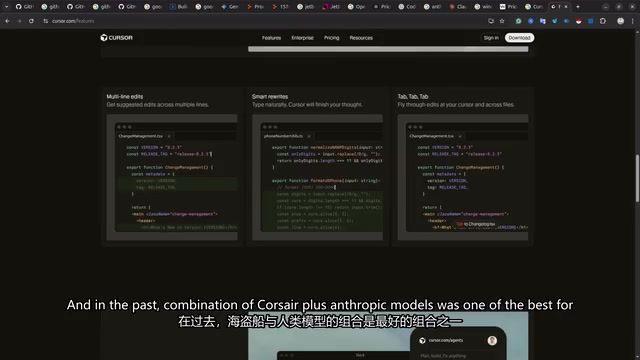
Cursor is a fork of VS Code that deeply integrates AI into the IDE core. VS Code itself is Microsoft's open-source code editor built on the Electron framework, with an extremely rich extension API and plugin ecosystem. As a forked IDE, Cursor's advantage lies in its ability to deeply modify the editor kernel, embedding AI capabilities into the editor's underlying architecture (such as syntax tree parsing, file indexing, and debugger integration) rather than running merely as a plugin. This enables a smoother AI interaction experience, though the trade-off is potential compatibility issues with official VS Code extensions.
Cursor was one of the first IDEs to introduce Agent mode, which is why it gained popularity so quickly. Features include auto-completion, code prediction, Agent mode, command execution, and a unique Background Agent feature—Background Agent allows you to have AI independently complete time-consuming tasks (like large-scale refactoring or test writing) in the background without interrupting your current coding work, notifying you to review results when finished.
It supports multi-model selection (proprietary models + OpenAI + Anthropic + Gemini). The "Cursor + Anthropic model" combination was previously considered the best pairing for programming tasks, but technology iterates extremely fast, so continuous evaluation is recommended.
Pricing: Starting at $20/month, with a free trial tier. All operations are performed locally, with no cloud option.
Windsurf
Windsurf is an AI-native IDE that uses the Cascade system to maintain codebase context and provide real-time generative assistance. The Cascade system's core design philosophy is to continuously track the developer's coding intent and project context, rather than starting from scratch to understand the codebase with each interaction. It maintains a dynamically updated project knowledge graph, enabling AI to understand inter-file dependencies, cross-file variable references, and overall project architecture patterns.
Core features include generative auto-completion, real-time code change preview, deep code search, MCP support, and "Super Complete"—suggesting your next action. MCP (Model Context Protocol) is an open protocol proposed by Anthropic that aims to standardize interactions between AI models and external tools/data sources, similar to how USB standardized hardware interfaces. MCP support means Windsurf can more flexibly connect to third-party services (such as databases, API documentation, project management tools, etc.), extending AI's capability boundaries.
In actual testing, Windsurf's coding capabilities performed impressively, competing in the same tier as Cursor.
Pricing: Free trial available → Starting at $15/month. Requires local environment, no cloud option.
Google Jules (Anti-Gravity)
Google's latest AI-native IDE, based on the Gemini model, can be seen as Google's response to Cursor and Windsurf. The Agent can plan, reason, write, test, and iterate code.
Biggest Highlight: It can test applications in the browser, understand visual UI elements, click buttons, and identify UI issues. This capability relies on the Gemini model's multimodal nature—it can process not only text and code but also understand image content. When AI can "see" the actual rendered output of an application, it can discover layout misalignment, color inconsistencies, interaction anomalies, and other visual-level issues like a human QA engineer. You can even take screenshots, annotate problem areas, and let the IDE auto-fix them. For frontend developers, this is practically an essential tool.
Pricing: Currently completely free, supporting Mac, Linux, and Windows.
Cloud Development Platforms: Zero-Barrier Vibe Coding
Replit Agent
Replit is the only fully beginner-oriented cloud solution. No local environment setup needed—everything happens in the browser, and you can generate full-stack applications by describing requirements in natural language. "Vibe Coding" is a concept proposed by Andrej Karpathy in 2024, referring to developers describing their intent in natural language and letting AI handle the actual coding work, while developers only need to steer direction and accept results rather than writing code line by line.
The key advantage is built-in deployment capability—something most tools lack. After building, you can deploy directly to production, with multi-user collaboration support and no need to worry about Git or other version control systems. Replit's cloud environment is based on containerization technology (similar to Docker), with each project running in an independent isolated environment, meaning dependency management, environment configuration, and other traditional development pain points are automatically handled by the platform.
Pricing: Free tier available → Core plan starting at $20/month.
How Different Developers Should Choose: Recommendation Summary
| User Type | Recommended Tools |
|---|---|
| Complete beginners | Replit Agent, Google Jules |
| Students with some experience | GitHub Copilot (free Pro), Gemini CLI (free for one year) |
| Professional frontend developers | Google Jules + Cursor/Windsurf |
| Professional backend developers | Claude Code + Cursor |
| Budget-conscious | Gemini CLI (free), Mistral Vibe CLI (from $6) |
| Enterprise needs | Codex (cloud isolation), Claude Code (deep refactoring) |
There's no one-size-fits-all answer for choosing an AI coding tool—it depends on your technical level, budget, and work scenario. It's worth noting that the competitive landscape in this field changes extremely fast—Cursor was the clear leader in early 2024, but by mid-year faced strong challenges from Windsurf and Jules; Claude Code went from launch to developer favorite in just a few months. We recommend starting with free options to evaluate, finding the tool that best fits your workflow before considering paid upgrades, while staying open to trying new tools as they emerge.
Key Takeaways
- Current mainstream AI coding tools fall into four categories: IDE plugins (Copilot/Gemini), terminal Agents (Claude Code/Codex), AI-native IDEs (Cursor/Windsurf/Jules), and cloud platforms (Replit)
- Claude Code has become the top choice for professional developers thanks to Anthropic's powerful coding model, though the $100-200/month subscription is a significant barrier
- Google Jules (Anti-Gravity) as a free AI-native IDE with in-browser testing and visual understanding capabilities is extremely attractive for frontend developers
- Students can access Pro-level tools for free through GitHub and Google's education programs—making now the best time to get started with AI-assisted programming
- Tool selection fundamentally depends on three factors: technical level (terminal familiarity), budget (free to $200/month), and deployment needs (local vs. cloud)
Related articles
 Product Reviews
Qoder vs Cursor Real-World Comparison: Which $20/Month AI IDE Is Better?
Hands-on comparison of Qoder vs Cursor AI IDEs: Agent autonomy, human interaction count, and architecture decisions. Qoder needed only 2 interactions vs Cursor's 8.
 Product Reviews
Cursor Cloud Agent Demo: Eliminating Bottlenecks Across the Entire Software Development Lifecycle
Deep analysis of Cursor's Cloud Agent demo showing how cloud VMs, automated test artifacts, and a full-chain control plane systematically eliminate human bottlenecks across the software development lifecycle.
 Product Reviews
Cursor 3.0 Deep Dive: Multi-Agent Parallelism, Design Mode, and Best-of-N Model Comparison
Cursor 3.0 evolves from an AI coding assistant into an Agent fleet command center. Explore multi-agent parallelism, Design Mode, and Best-of-N model comparison.