AI Game Character Design in Practice: Complete Pipeline from Concept Art to Layered Assets in 30 Minutes
AI Game Character Design in Practice: …
HelloPix AI streamlines the full game character art pipeline, helping indie developers efficiently produce usable assets.
Using a wuxia female swordswoman as a case study, this article fully breaks down the HelloPix AI-assisted game character design workflow: from concept art generation, hand repair, and character pose transfer to layered asset splitting — all completed within a single tool. Its core competitive advantage lies in designing a complete toolchain around the game art production pipeline, making it especially suitable for indie developers and small teams, though limitations remain in detail precision and copyright issues.
For indie game developers, character art design has always been one of the most time-consuming tasks. From concept art to multi-pose variants to layered asset exports, the traditional pipeline often takes days or even weeks. Recently, an AI tool built specifically for game concept artists — HelloPix AI — has been gaining attention. Through its "One-Click Draft" and "Free Canvas" features, it claims to complete an entire character design pipeline in just 30 minutes.
This article uses a practical case study of a wuxia female swordswoman to fully break down this AI-assisted character design workflow.
Game Art Production Pipeline: Why "Full Workflow" Matters So Much
Before diving into the tool itself, it's important to understand the concept of a game Art Production Pipeline — the complete workflow from concept design to final usable game assets. Traditional pipelines typically involve collaboration across multiple specialized software: Photoshop or Procreate for concept design, Maya or Blender for 3D modeling, Substance Painter for texture painting, and final export to game engines like Unity or Unreal Engine. Every handoff between stages means file format conversions and communication overhead. For indie developers, this multi-software workflow is often the primary efficiency bottleneck. This is precisely why a vertical tool that covers the complete pipeline offers value far beyond the generation quality of a single image.
Concept Art Generation: From Keywords to Character Draft
The starting point of character design is establishing the thematic direction. In HelloPix AI, users need to complete three actions: select a model style, input keywords, and use the smart optimization feature to refine the prompt.
In this case study, the goal was a "wuxia female swordswoman" character, using a retro-toned anime model. After inputting basic keywords, the tool's built-in smart optimization feature automatically expands and refines the prompt content, helping users fill in details they might have missed. After clicking "One-Click Draft," the system quickly generates concept art.
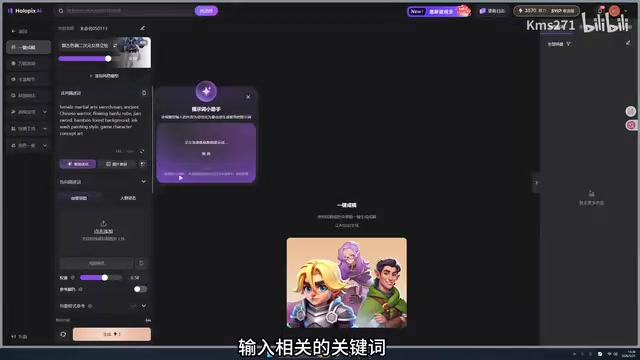
From the actual results, the generated concept art performs well in terms of style consistency and character personality expression, largely meeting the "wuxia female swordswoman" design requirements. However, it's important to note that this step only produces concept art — there's still considerable distance to usable game assets. This is also where many AI drawing tools stop.
Free Canvas Deep Processing: From Concept Art to Usable Game Assets
What truly demonstrates this tool's understanding of the game production pipeline is the series of professional templates in the Free Canvas. After uploading concept art to the Free Canvas, you can see multiple generation templates designed specifically for game art scenarios.
Hand Repair: Solving AI Drawing's Notorious Problem
The difficulty AI drawing tools face with hand generation has deep technical roots. Hand structure is extremely complex — the human hand has 27 bones and 29 joints, presenting highly diverse forms across different angles and poses. Mainstream Diffusion Models rely on statistical patterns from large image datasets during training, but hands typically occupy a small portion of images and exhibit highly variable poses, making it difficult for models to learn stable structural priors for hands. Additionally, errors in finger count and joint bending direction are visually conspicuous, making hand issues a universally acknowledged technical challenge in AI drawing.
HelloPix AI provides a dedicated hand repair template that fixes hand defects with one click. From the demo results, the repaired hand structures are noticeably more natural and anatomically correct, eliminating the need for manual retouching.
Character Pose Transfer: Generating Multi-Pose Variants from a Single Concept Art
In game production, a single character often needs multiple poses — standing, sitting, combat, and more. The traditional approach requires drawing each pose separately, resulting in enormous workload. HelloPix AI's character pose transfer template offers an efficient alternative:
- Use the confirmed concept art as the character anchor
- Find and upload a suitable pose reference image from the internet
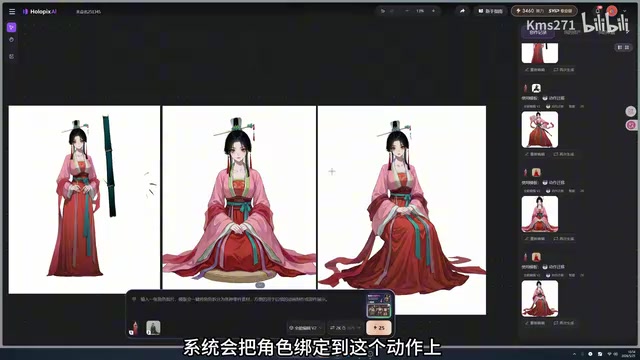
- AI automatically "binds" the character to the target pose
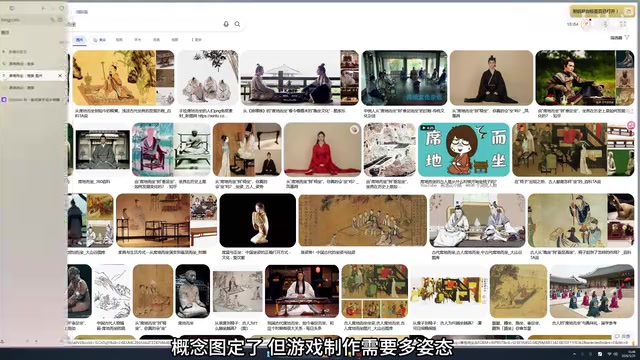
From a technical perspective, Pose Transfer is an important research direction in computer vision. Its core objective is to decouple the "appearance" from the source image and the "pose" from the target pose image, then recombine them. Modern diffusion model-based methods use conditional control mechanisms like ControlNet to input pose skeleton maps as additional conditions, while leveraging image prompt adapter technologies like IP-Adapter to maintain consistency in clothing textures, facial features, and other appearance information.
The key point is that the system maintains clothing details and facial features while switching poses, ensuring character consistency. From the sitting pose conversion results in the demo, the character's costume textures, color scheme, and facial features are indeed well preserved.
If more pose variants are needed, you can also use the "Batch Poses" feature to generate 16 different poses at once, then select satisfactory ones for fine-tuning.
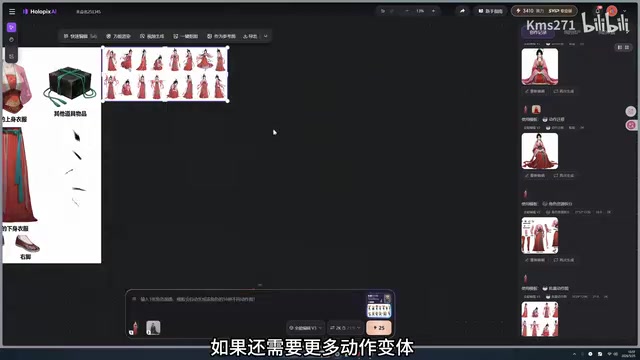
Asset Splitting: Directly Outputting Engine-Ready Layered Assets
This is the most practically valuable step in the entire character design workflow. Game engines require layered art assets due to the practical needs of animation production and rendering optimization. For 2D games, characters typically need to be split into independent layers — head, torso, limbs, weapons, etc. — each exported as PNG format with transparency channels (RGBA), then combined in the engine through Skeletal Animation or Costume Systems. In Unity's Spine plugin or Unreal's Paper2D system, these layered assets are mapped to skeleton nodes to achieve smooth character animation.
In the traditional workflow, this step requires artists to manually separate layers in Photoshop — time-consuming and tedious. HelloPix AI's asset splitting template can automatically identify layers, decomposing the character's body, expressions, and clothing details into independent elements. The exported results are ready-to-use layered resources with transparency channels. From the demo, the splitting granularity covers clothing details, character body, facial expressions, and multiple other dimensions, largely meeting game production layering requirements.
Tool Positioning and Use Cases
Looking at the entire workflow, HelloPix AI's core competitive advantage isn't in single-image generation quality — there's no shortage of AI tools that can generate high-quality concept art. Its true differentiation lies in designing a complete toolchain around the game art production pipeline: from concept generation, hand repair, and pose transfer to asset splitting, all completed within a single tool without switching between multiple software applications.
This toolset is best suited for the following user types:
- Indie game developers: Solo developers or small teams without dedicated concept artists who need to quickly produce usable character assets
- Concept artists in small game teams: Using AI to accelerate early-stage concept validation and asset preparation, focusing their energy on fine-tuning
- Artists who need rapid concept validation: Quickly producing multiple character proposals for team discussion in early project stages
Capability Boundaries of AI Art Tools
Of course, it's important to rationally assess the limitations of such tools. AI-generated characters still cannot fully replace professional concept artists' hand-drawn work in terms of detail precision, especially in highly stylized or detail-intensive AAA projects. While character consistency is controlled reasonably well, whether it can remain stable across a large number of pose variants still requires validation through more real-world projects.
Additionally, copyright issues surrounding AI-generated art remain in a legal gray area globally. The U.S. Copyright Office has explicitly stated that works purely generated by AI are not eligible for copyright protection, though works where human creators make substantial modifications and arrangements to AI output may receive limited protection. On the training data front, multiple class-action lawsuits against major AI drawing companies are ongoing, with the core dispute centering on unauthorized use of artists' work.
Related articles
 Product Reviews
Qoder vs Cursor Real-World Comparison: Which $20/Month AI IDE Is Better?
Hands-on comparison of Qoder vs Cursor AI IDEs: Agent autonomy, human interaction count, and architecture decisions. Qoder needed only 2 interactions vs Cursor's 8.
 Product Reviews
Cursor Cloud Agent Demo: Eliminating Bottlenecks Across the Entire Software Development Lifecycle
Deep analysis of Cursor's Cloud Agent demo showing how cloud VMs, automated test artifacts, and a full-chain control plane systematically eliminate human bottlenecks across the software development lifecycle.
 Product Reviews
Cursor 3.0 Deep Dive: Multi-Agent Parallelism, Design Mode, and Best-of-N Model Comparison
Cursor 3.0 evolves from an AI coding assistant into an Agent fleet command center. Explore multi-agent parallelism, Design Mode, and Best-of-N model comparison.