ChatGPT Voyager: A Browser Extension That Solves Conversation Management Pain Points
ChatGPT Voyager: A Browser Extension T…
ChatGPT Voyager extension launches to solve conversation management and long response navigation pain points
ChatGPT Voyager is a Chrome extension adapted from Gemini Voyager that addresses ChatGPT's interface shortcomings in conversation management and browsing experience. It offers timeline navigation, pin markers for one-click jumping within long responses, color-coded file type indicators with hover previews, one-click LaTeX/Markdown copying, and folder organization. It's now available on the Chrome Web Store.
If you're a heavy ChatGPT user, you know the struggle all too well: as conversations pile up and responses grow longer, finding a specific chat in your history or scrolling back and forth through lengthy replies becomes downright painful. Now, a Chrome browser extension called ChatGPT Voyager has officially launched on the Chrome Web Store, designed specifically to solve these pain points.
Project Background: From Gemini Voyager to ChatGPT Voyager
This extension was inspired by Gemini Voyager — an enhanced browser extension built for Google Gemini by developer Nagiovo. The developer reworked the Gemini Voyager codebase to adapt it for the ChatGPT interface, adding several new features tailored to ChatGPT use cases.
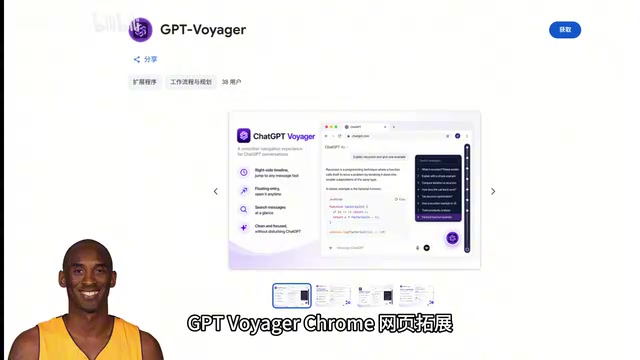
It's worth noting that this isn't a simple reskin. While retaining the original's excellent features, the developer did extensive customization based on the real needs of ChatGPT users. This development model is very common in the open-source community — under permissive licenses like MIT and Apache, developers can legally reuse, modify, and redistribute others' code as long as they retain the original author's attribution. This "standing on the shoulders of giants" approach dramatically lowers the barrier for building utility software, enabling individual developers to quickly port mature features to new contexts and focus their energy on differentiated innovation rather than reinventing the wheel.
How Does a Browser Extension Work?
Chrome extensions like ChatGPT Voyager are essentially web applications running in the browser's sandbox environment. They work through the Content Script injection mechanism provided by the Chrome Extension API — after the ChatGPT page loads, the extension injects its own JavaScript code into the page context, continuously monitors DOM (page structure) changes, and dynamically inserts new UI elements (such as sidebar indicators, pin buttons, etc.). This approach runs entirely on the user's local browser, requires no modification to ChatGPT's server-side code, and doesn't send user data to third-party servers. It's one of the most mainstream page enhancement techniques available today.
ChatGPT's Long-Standing Interface Shortcomings
Since ChatGPT launched in November 2022, its official interface's conversation management capabilities have been a persistent source of user complaints. The sidebar simply displays conversation titles in reverse chronological order, lacking basic information management features like tags, categories, and full-text search. With the release of models like GPT-4 and GPT-4o, the length and information density of individual responses have increased dramatically, making the navigation experience even more problematic. This has spawned a wave of third-party tools to fill the gap, and ChatGPT Voyager is a prime example of this ecosystem.
Core Features in Detail
Timeline Navigation: Quickly Locate Historical Conversations
ChatGPT Voyager offers a timeline navigation feature that lets you quickly jump to target content across a large number of historical conversations. The navigation experience is extremely smooth, completely eliminating the frustration of endlessly scrolling through the sidebar to find a conversation.
File Type Indicators and Hover Preview
This is an incredibly practical detail feature. The extension adds color-coded vertical bars indicating file types to each conversation in the sidebar, along with hover preview support. This means you don't need to open a conversation — a quick glance at the sidebar tells you:
- Which conversations have uploaded files
- What types of files were uploaded
- Which conversations have been bookmarked

For users who frequently work with documents, code, and images in ChatGPT, this feature can dramatically improve retrieval efficiency. The sidebar transforms from a plain title list into a visually rich, information-dense index.
Pin Feature: A Powerful Tool for Navigating Long Responses
This is arguably one of ChatGPT Voyager's most innovative features. As GPT models have grown more capable, their responses tend to get increasingly long — concept explanations at the top, code implementations at the bottom, with examples and caveats scattered in between. Users are forced to scroll up and down repeatedly within a single lengthy response, resulting in a terrible experience.

The Pin feature lets you "pin" a marker at any position within a response, then jump back to that position with a single click. For example, you can pin one marker at the concept section and another at the code section, then freely switch between the two without manual scrolling. This design philosophy is similar to the "bookmark" feature in code editors, bringing a mature interaction paradigm from the document editing world into the AI conversation context.
Inherited Classic Features
Beyond the new features above, ChatGPT Voyager fully retains the well-loved features from Gemini Voyager:
- One-click LaTeX/Markdown copy: Copy formatted content directly without manual adjustments
- Folder organization: Categorize and manage conversations, putting an end to chaotic conversation lists

A few more words about the LaTeX/Markdown copy feature. LaTeX is a typesetting language widely used in academia, particularly excelling at expressing mathematical formulas and scientific notation; Markdown is a lightweight markup language commonly used by programmers and content creators. ChatGPT's responses heavily use both formats, but the official interface renders them as rich text by default — copying directly strips all formatting information. For users who need to migrate AI output to academic papers, technical documentation, or code repositories, being able to grab the raw source code with one click is a genuine necessity.
The Core Value of ChatGPT Voyager
While ChatGPT's official interface continues to iterate, it has consistently fallen short in conversation management and browsing experience. As users accumulate more conversations and individual responses grow longer, these problems will only become more pronounced.
The value of ChatGPT Voyager lies in filling these gaps with a series of lightweight yet precisely targeted features:
- Enhanced information density: File type indicators transform the sidebar from a simple title list into an information-rich index
- Improved navigation efficiency: Timeline navigation and the pin feature make "finding content" no longer a physical chore
- Better content management: Folder organization and bookmark indicators make your conversation library truly manageable
How to Install ChatGPT Voyager
The extension is already available on the Chrome Web Store — simply search for "ChatGPT Voyager" to find and install it. The project is also open-sourced on GitHub, where interested developers can check out the source code or contribute.
For anyone who works with ChatGPT daily, this extension is a virtually zero-cost productivity booster that's well worth trying.
Key Takeaways
- ChatGPT Voyager is a Chrome extension adapted from Gemini Voyager, using Content Script injection to enhance conversation management on the ChatGPT page
- The new Pin feature solves the pain of scrolling back and forth in long GPT responses, allowing users to set markers at any position and jump to them with one click
- The sidebar adds color-coded file type indicators and hover previews, letting users see attachment and bookmark status without opening conversations
- Classic features like one-click LaTeX/Markdown source code copying and folder organization are retained; the extension is available on the Chrome Web Store
Related articles
 Product Reviews
Qoder vs Cursor Real-World Comparison: Which $20/Month AI IDE Is Better?
Hands-on comparison of Qoder vs Cursor AI IDEs: Agent autonomy, human interaction count, and architecture decisions. Qoder needed only 2 interactions vs Cursor's 8.
 Product Reviews
Cursor Cloud Agent Demo: Eliminating Bottlenecks Across the Entire Software Development Lifecycle
Deep analysis of Cursor's Cloud Agent demo showing how cloud VMs, automated test artifacts, and a full-chain control plane systematically eliminate human bottlenecks across the software development lifecycle.
 Product Reviews
Cursor 3.0 Deep Dive: Multi-Agent Parallelism, Design Mode, and Best-of-N Model Comparison
Cursor 3.0 evolves from an AI coding assistant into an Agent fleet command center. Explore multi-agent parallelism, Design Mode, and Best-of-N model comparison.