Claude Code's Frontend UI Too Ugly? This Open-Source Skill Teaches AI Professional Design
Claude Code's Frontend UI Too Ugly? Th…
Open-source Skill injects design standards into AI coding tools, solving AI-generated UI's lack of design quality.
UI-UX-Pro-Max-Skill is an open-source design enhancement Skill that injects structured design knowledge (67 UI styles, 161 color systems, 161 industry design rules) into AI coding tools like Claude Code and Cursor. It enables AI to perform design reasoning based on product type, transforming random output into standards-based code generation. Its killer feature is Design System persistence, ensuring visual consistency across all pages. Particularly suited for developers without design skills who need to rapidly build high-quality frontends.
The Pain Point: AI Can Write Code, But Can't Design
Anyone who's used Claude Code, Cursor, or Copilot for frontend development has probably experienced similar moments of frustration: the page works, but it looks like a backend admin panel; the color scheme screams "AI-generated" with purple gradients everywhere; button spacing and typography lack any design sense; the Landing Page looks like a PowerPoint slide; and every revision breaks the UI consistency.
The root cause is that LLMs don't lack coding ability — they lack stable design judgment. There are deep technical reasons behind this: LLMs are trained on massive amounts of code and text data, enabling them to learn syntax rules and common patterns, but design judgment is fundamentally a capability that requires visual perception, user psychology, and brand consistency considerations combined. When generating UI code, models tend to reproduce the visual patterns that appear most frequently in their training data — which explains why AI-generated interfaces are always filled with purple gradients and similar card layouts. More critically, the stateless nature of LLMs (each conversation is independent) prevents them from maintaining design consistency across multiple interactions. This is a fundamental limitation at the technical architecture level, not simply a Prompt issue. AI can easily produce Apple-style one moment, Dashboard-style the next, and suddenly switch to flashy gradient effects — completely inconsistent.
Today I'm sharing an open-source project that addresses this pain point: UI-UX-Pro-Max-Skill. Its goal is straightforward — give AI a "design brain."
Project link: https://github.com/next-level-builder/UI-UX-Pro-Max-Skill
What It Is: A Design Enhancement Skill for AI Coding Tools
In simple terms, UI-UX-Pro-Max-Skill is a UI/UX design enhancement Skill for AI coding tools. It's not design software, nor a Figma plugin — it's more like a design knowledge base + reasoning engine.
It's worth understanding that Claude Code, Cursor, and GitHub Copilot represent three different paradigms of AI-assisted programming: GitHub Copilot, as the earliest widely-adopted AI coding assistant, focuses on line-level code completion; Cursor builds on this by introducing codebase-level context understanding and multi-file editing capabilities; Claude Code is Anthropic's terminal-native AI coding tool, emphasizing deep understanding of entire project structures and autonomous execution. Their shared limitation is that they are fundamentally code generation tools, lacking an independent design reasoning layer. UI-UX-Pro-Max-Skill injects structured design knowledge into these tools' context windows, essentially adding a design decision layer before the code generation pipeline — a pragmatic engineering patch approach.
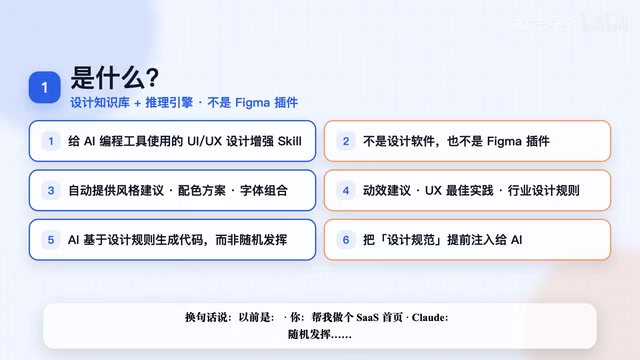
When you ask Claude Code to write a page, it automatically provides:
- UI style suggestions: Recommends appropriate visual styles based on product type
- Color schemes: Say goodbye to the same old purple gradients
- Font combinations: Professional typography pairing suggestions
- Animation suggestions: Tasteful interaction animations
- UX best practices: Avoid common design anti-patterns
- Industry design rules: Different industries matched with different design standards
- Tech stack best implementations: Ensure designs are implemented with high quality
In other words, before when you said "build me a SaaS homepage," Claude would improvise randomly; now the Skill first recommends style, typography, color scheme, layout, and interaction patterns, then Claude generates code based on these rules. The final results are usually much more consistent.
Core Value: Pre-injecting Design Standards into AI
The core value of UI-UX-Pro-Max-Skill lies in pre-injecting design standards into AI, enabling it to perform design reasoning based on product type. For example:
- Financial products: Lean toward stability, trustworthiness, high contrast, and readability — not flashy designs
- Healthcare products: Emphasize accessibility, clear layouts, and WCAG readability standards
- SaaS products: Lean toward Dashboard style, data visualization, and efficient interactions
Regarding the WCAG standards emphasized for healthcare products, this deserves further explanation. WCAG (Web Content Accessibility Guidelines) is an international web accessibility standard developed by W3C. The current mainstream version is WCAG 2.1, divided into three compliance levels: A, AA, and AAA. The most commonly cited requirement is color contrast: normal text needs a contrast ratio of 4.5:1 (AA level), and large text needs 3:1. This is not only a legal compliance requirement for healthcare and government products (both the US ADA Act and EU EN 301 549 standard have related provisions), but also an important indicator of design professionalism. AI-generated UI often performs poorly in this dimension — light gray text on white backgrounds is the most common accessibility violation.
The repository includes 161 industry design reasoning rules, covering SaaS, AI products, finance, healthcare, e-commerce, hospitality, education, gaming, creator tools, and more. Different scenarios recommend different design systems.
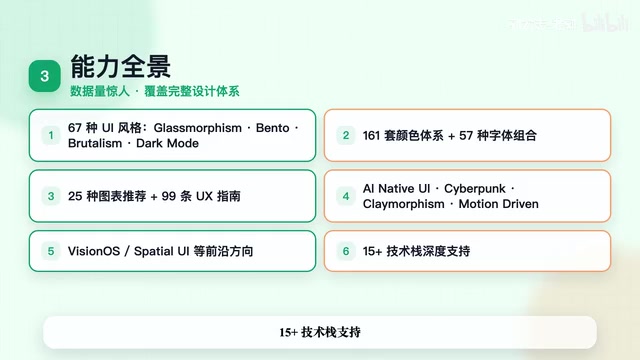
Impressive Data Volume: 67 Styles, 161 Color Systems
The built-in data volume of this project is quite staggering:
| Category | Count |
|---|---|
| UI Styles | 67 |
| Color Systems | 161 |
| Font Combinations | 57 |
| Chart Recommendations | 25 |
| UX Guidelines | 99 |
| Industry Design Rules | 161 |
| Tech Stack Support | 15 |
Style coverage includes Glassmorphism, Bento Grid, Minimalism, Brutalism, Dark Mode, AI Native UI, Cyberpunk, Claymorphism, Motion Driven UI, and even cutting-edge styles like VisionOS Spatial UI. Each of these styles has distinct technical implementation characteristics: Glassmorphism relies on CSS backdrop-filter for frosted glass effects, requiring attention to performance overhead; Bento Grid originates from Apple's product page grid layout system, achieving irregular divisions through CSS Grid's span property; Brutalism deliberately breaks traditional aesthetic norms, characterized by high contrast and raw typography; Claymorphism is an evolution of Neumorphism, simulating clay textures through multiple layers of box-shadow; VisionOS Spatial UI is the spatial computing interface paradigm designed for Apple Vision Pro, emphasizing depth perception and ambient light integration. Understanding the technical background of these styles helps developers make more precise style choices when using the Skill.
All mainstream AI coding tools (Claude Code, Cursor, etc.) are covered. If you primarily use Claude Code + Cursor, the experience will be quite smooth.
Installation and Usage Guide
Method 1: Claude Code Plugin Installation
Execute directly in Claude Code:
# Install plugin
plugin marketplace at next-level-builder/UI-UX-Pro-Max-Skill
plugin install uiux-pro-max
Once installed, Claude Code will automatically activate when encountering UI/UX-related requests.
Method 2: CLI Installation (Recommended)
# Install CLI
npm install -g uipro-cli

# Navigate to project directory
cd your-project

# Initialize (choose based on your tool)
uipro init ai cloud      # Claude Code
uipro init ai cursor     # Cursor
uipro init ai all        # All AI tools
uipro init ai cloud --global  # Global installation
After global installation, all projects can use it directly.
Actual Usage
Once installed, simply make requests in natural language:
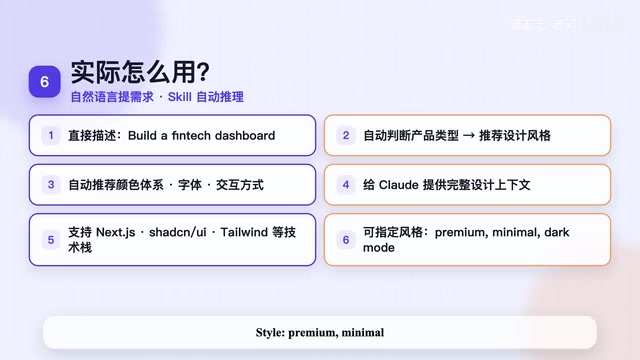
Build a landing page for my SaaS product
Create a fintech dashboard
Build a modern AI landing page, use Next.js + Shadcn UI, style: premium minimal, need dark mode
The Skill automatically determines product type → recommends design style → recommends color system → recommends typography → recommends interaction patterns → provides design context to Claude → then generates code.
Killer Feature: Design System Persistence
This feature is what I consider extremely valuable — it supports Design System persistence, directly generating design-system-master.md and design specification files for each page (e.g., pages/dashboard.md).
To understand the value of this feature, you need to know the industry background of Design Systems. Design systems are core infrastructure in modern frontend engineering, pioneered by companies like Airbnb, Google Material Design, and IBM Carbon. The core concept is Design Tokens — abstracting design decisions like colors, typography, and spacing into reusable variables to ensure visual consistency across different platforms and components. The rise of tools like Figma and Storybook has transformed design systems from a big-company exclusive to a standard for small and medium teams. The design-system-master.md generated by UI-UX-Pro-Max-Skill essentially transplants this engineering mindset into the AI workflow, fundamentally solving the consistency problem caused by LLM statelessness through persistent design constraint files.
What does this mean? Your website will have consistent colors, typography, spacing, and components across all pages — no more one style today and another tomorrow. For indie developers, SaaS projects, and enterprise projects, this solves a long-standing pain point — the lack of consistency in AI-generated UI.
Real-World Experience: Worth Installing, But Don't Overhype It
Bottom line: Worth installing, but don't overhype it.
The biggest value isn't "doing design for you" but "reducing AI's random design choices." It transforms AI from random improvisation to standards-based output.
Particularly suited for these scenarios:
- Backend developers who can't design building frontend pages
- Indie developers rapidly building MVPs
- Daily AI web coding development scenarios
- Quick SaaS Landing Page creation
But also recognize its boundaries:
- If you're a professional designer, it can't replace Figma
- It primarily raises the floor of AI frontend output quality, not the ceiling
Final Thoughts
Many people are using AI to write frontend code now, but what truly creates differentiation isn't who has the longer Prompt — it's who provides AI with more high-quality context.
What UI-UX-Pro-Max-Skill does is essentially add design context to AI. If you've always felt that Claude Code's pages aren't polished enough, give it a try — it might be more effective than endlessly tweaking your Prompts.
Project link: https://github.com/next-level-builder/UI-UX-Pro-Max-Skill
Related articles
 Product Reviews
Qoder vs Cursor Real-World Comparison: Which $20/Month AI IDE Is Better?
Hands-on comparison of Qoder vs Cursor AI IDEs: Agent autonomy, human interaction count, and architecture decisions. Qoder needed only 2 interactions vs Cursor's 8.
 Product Reviews
Cursor Cloud Agent Demo: Eliminating Bottlenecks Across the Entire Software Development Lifecycle
Deep analysis of Cursor's Cloud Agent demo showing how cloud VMs, automated test artifacts, and a full-chain control plane systematically eliminate human bottlenecks across the software development lifecycle.
 Product Reviews
Cursor 3.0 Deep Dive: Multi-Agent Parallelism, Design Mode, and Best-of-N Model Comparison
Cursor 3.0 evolves from an AI coding assistant into an Agent fleet command center. Explore multi-agent parallelism, Design Mode, and Best-of-N model comparison.