Cursor 1.0 Officially Released: Deep Dive into Six Core Features with Hands-On Testing

Cursor 1.0 officially launches, evolving from an AI editor into a full-lifecycle AI development platform
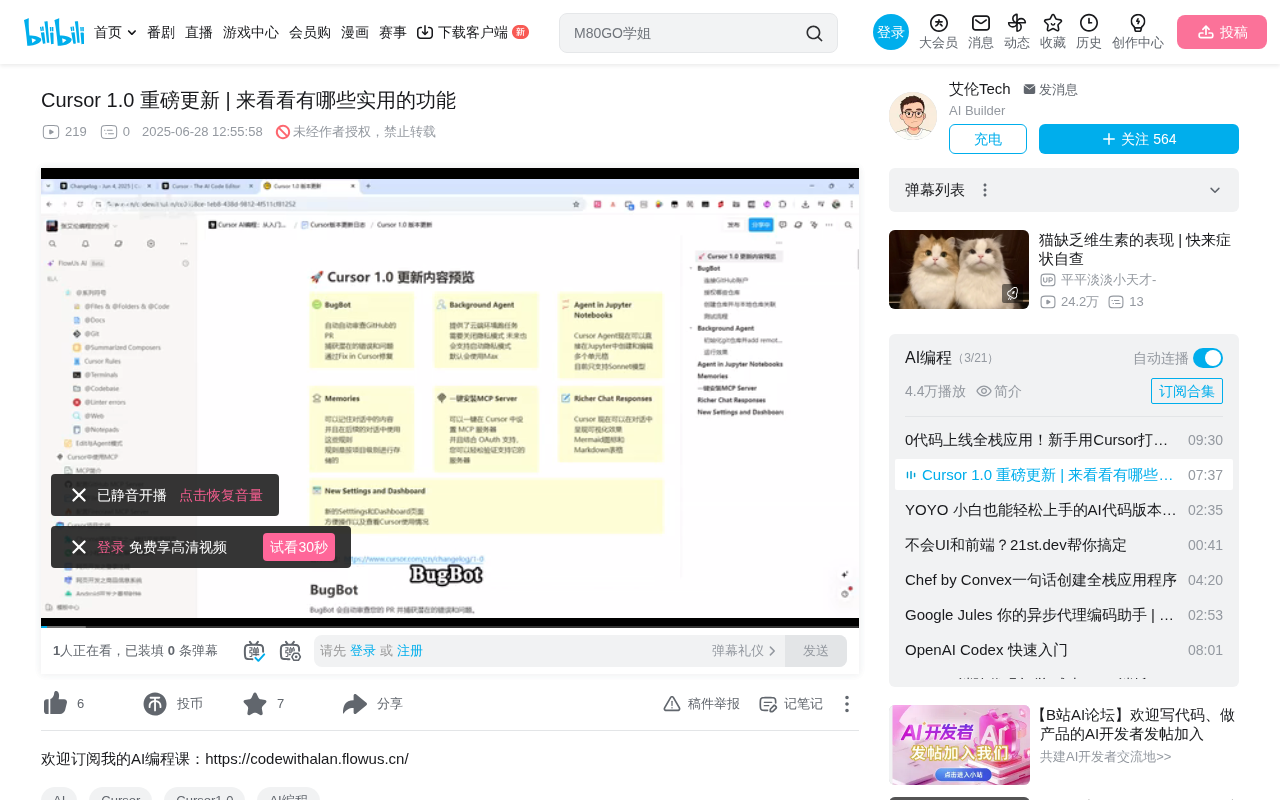
Cursor 1.0 introduces six core features: Backboard for automated GitHub PR review with one-click bug fixes; Background Agent for cloud-based task execution without consuming local resources; Memories for storing developer preferences per project; One-Click MCP for instant external service integration; Jupyter Support for Notebook editing; and Rich Chat Response with Mermaid diagram visualization. The overall direction is an evolution from code editor to a full development lifecycle AI platform.
Overview
Cursor 1.0 has officially launched, bringing a series of major feature updates. This release includes core features such as Backboard (automated PR review), Background Agent (cloud-based agent), Memories (memory system), One-Click MCP (one-click MCP installation), Jupyter Support, and Rich Chat Response. These updates transform Cursor from an excellent AI editor into a more complete AI development platform.
Backboard: AI Automatically Reviews Your PRs
Feature Introduction
Backboard is one of the most eye-catching features in Cursor 1.0. It automatically reviews your Pull Requests and catches potential bugs and issues. Once a problem is detected, Backboard posts a comment directly on the PR in GitHub, and you simply click "Fix in Cursor" to jump into the editor and apply the fix.
Comparison with Existing Code Review Tools
Before Backboard, development teams typically relied on tools like SonarQube, CodeClimate, or GitHub's built-in Dependabot for automated code review. These tools are mostly based on static analysis rules and can detect code style issues, security vulnerabilities, and dependency updates, but have limited ability to identify logic errors. What sets Backboard apart is its use of large language model semantic understanding capabilities—it can comprehend code intent and discover logical defects that traditional static analysis struggles to catch, such as type mismatches and missing boundary conditions. This AI-based review approach complements rather than replaces traditional tools.
Configuration and Usage
The configuration steps are relatively straightforward:
- Open the Cursor Dashboard page and select Backboard from the left sidebar menu
- Click Manage Connections to link your GitHub account
- Authorize specific repositories (you can choose all repositories or select specific ones)
- Enable the Backboard feature for the corresponding repositories
Something you might not have noticed: Backboard requires a paid subscription but offers a free trial period. To control costs, it's recommended to set a monthly spending cap after the trial expires. Based on hands-on testing, 6 Backboard analyses cost approximately $1.22—quite good value for money.
Real-World Testing Results
In actual testing, when submitting code containing a bug (for example, directly adding a String type to an Integer type), Backboard accurately identified the issue and left a comment. After clicking "Fix in Cursor," the editor automatically generated a fix prompt, enabling a one-click repair. This is a tremendous efficiency boost for team code reviews.
Background Agent: Execute Tasks in the Cloud
Core Value
Background Agent provides developers with a cloud environment to execute specific tasks. This feature was previously released as an early beta with positive community feedback, and is now officially available to all users.
Its core advantage: it doesn't consume local resources, executing tasks through a cloud environment. Even if you close your laptop to grab lunch or meet friends, tasks continue running. This feature is similar to OpenAI's Codex and Google's Jules.
Technical Architecture of Cloud Agents
Cloud-based AI Agents are the core battleground for AI programming tool competition in 2025. OpenAI's Codex, launched in May 2025, can process multiple coding tasks in parallel within sandboxed cloud environments; Google's Jules integrates within the Gemini ecosystem, focusing on automatic GitHub issue fixes. The common architectural pattern across these products is: spinning up a container with a complete development environment in the cloud (typically based on Docker or microVM), cloning the user's code repository, and then having the AI agent perform code writing, test execution, and other operations within it. Background Agent adopts a similar architecture, with its advantage being deep integration with the Cursor editor—after task completion, it seamlessly connects back to the local development workflow.
How to Use
- Open Background Agent mode via
Ctrl+E(orCommand+Eon Mac) - You can also open it through the Cloud icon in the upper-right corner of the Cursor chat window
- In this mode, regardless of which LLM you select, Max mode is enabled by default
Prerequisites:
- Privacy mode must be disabled (the team has stated future support for privacy mode)
- The current project must be a Git repository with a connected remote
After task completion, you can choose to create a PR or checkout locally to continue development. This feature is particularly valuable in team collaboration scenarios.
Memories: Project-Level Intelligent Memory
More Flexible Than Cursor Rules
The Memories feature allows Cursor to remember content from conversations and apply those rules in subsequent interactions. Unlike Cursor Rules, Memories are stored at the project level, offering more flexible usage and can be combined with Cursor Rules.
Specifically, Cursor Rules are static rule files pre-written by developers (typically stored in .cursor/rules at the project root), suitable for defining unified team coding standards and tech stack preferences. Memories, on the other hand, are preference records dynamically accumulated during daily conversations—more like habits the AI gradually "learns" while collaborating with you. The combination of both allows Cursor to follow team standards while adapting to individual work styles.
Enabling and Using Memories
In Cursor settings, select Rules and check "Generate Memories" to enable the feature. All Memories configured for the current project will be displayed in a centralized view.
For example, you can tell Cursor: "After generating or modifying code, don't automatically run the project—tell me what command to use, and I'll run it myself." Once set, Cursor will follow this preference for the current project.
One-Click MCP: Say Goodbye to Manual Configuration
Simplified MCP Configuration
Previously, configuring MCP in Cursor required manually editing JSON files, which had a relatively high barrier to entry. Now with the One-Click MCP feature, you simply open the official MCP listing page, select the desired MCP service (such as Notion, Figma, GitHub, etc.), and click "Add to Cursor" to complete the installation.
Technical Background of the MCP Protocol
MCP (Model Context Protocol) is an open protocol introduced by Anthropic in late 2024, designed to standardize interactions between AI models and external tools and data sources. Before MCP, every AI application needed custom integration code for different external services, resulting in massive duplication of effort. MCP defines a unified communication specification including three core primitives: Tools (tool invocation), Resources (resource access), and Prompts (prompt templates). Through MCP, AI models can access Notion databases, Figma designs, or GitHub repositories as easily as calling a standard API. Cursor's One-Click MCP feature essentially simplifies the configuration and connection process for MCP Servers, enabling non-technical users to quickly integrate these external services.
During installation, you can modify the name, type, and URL. Once authorization is complete, it's ready to use. While the list of MCP services supporting one-click installation isn't extensive yet, it will undoubtedly continue to expand.
Jupyter Support and Rich Chat Response
Jupyter Notebook Support
Cursor Agent can now directly create and edit multiple cells within Jupyter Notebooks, which is extremely practical for data science and machine learning developers. However, it currently only supports the Sonic model.
Jupyter Notebook is the de facto standard development environment in data science and machine learning, with its core feature being the organization of code, text explanations, and visual output into independently executable "cells." This interactive programming paradigm is particularly suited for highly iterative work such as data exploration, model training, and result visualization. However, most traditional AI programming assistants are optimized for standard code files (.py, .js, etc.) and offer weak support for the .ipynb format. Cursor's Jupyter Support means the Agent can understand Notebook cell structure and insert code or Markdown explanations in the correct locations—filling an important tool gap for developers working in data analysis and deep learning research.
Rich Text Chat Responses
Cursor's chat window now supports visual rendering, including Mermaid diagrams and Markdown tables. For example, you can ask Cursor to draw a learning path diagram using Mermaid, and it will render a visual flowchart directly in the conversation, greatly improving information readability.
Mermaid is a text-based diagram description language that allows developers to generate flowcharts, sequence diagrams, Gantt charts, class diagrams, and other visualizations through concise markup syntax. Its design philosophy is similar to Markdown—describe structure in plain text, and let the rendering engine automatically generate graphics. Mermaid is natively supported by major platforms including GitHub, GitLab, and Notion. Integrating Mermaid rendering capabilities into Cursor's Rich Chat Response means AI can present system architectures, business processes, or learning paths in a structured visual way, rather than relying solely on plain text descriptions—significantly improving the communication efficiency of complex information.
Other Updates
Beyond the core features above, Cursor 1.0 also includes several minor updates:
- Fixed patch model-related issues
- Gemini 2.5 Flash now supports Max mode
- The Settings page has been reorganized with consolidated features and improved navigation
- The Dashboard now provides better visibility into personal and team usage, including request counts and cost statistics
Summary
The direction of Cursor 1.0's updates is crystal clear: evolving from a pure AI code editor into a full-lifecycle AI development platform. Backboard covers the code review phase, Background Agent frees up local computing resources, Memories helps AI better understand your development habits, and One-Click MCP lowers the barrier to tool integration. The combination of these features makes the AI-assisted development experience more complete and seamless.
From an industry competition perspective, the release of Cursor 1.0 signals that AI programming tools are evolving from single-point "code completion" capabilities toward full lifecycle coverage spanning requirements understanding, code writing, test verification, code review, and deployment integration. Compared to competitors like GitHub Copilot, Windsurf (formerly Codeium), and Augment, Cursor has chosen a "deep integration + platform" approach, building higher product moats by extending Agent capabilities into the cloud and CI/CD workflows. For developers already using Cursor, this update is worth trying immediately.
Key Takeaways
- Backboard automatically reviews GitHub PRs, enabling one-click bug fixes in Cursor—6 analyses cost only about $1.22
- Background Agent provides a cloud execution environment without consuming local resources; tasks continue running even after shutting down your machine
- Memories stores conversation rules at the project level, more flexible than Cursor Rules, remembering developer preferences
- One-Click MCP simplifies MCP configuration, supporting one-click installation for services like Notion, Figma, and GitHub
- Jupyter Support enables the Agent to directly create and edit cells in Notebooks; Rich Chat Response supports Mermaid diagram visualization
Related articles
 Product Reviews
Qoder vs Cursor Real-World Comparison: Which $20/Month AI IDE Is Better?
Hands-on comparison of Qoder vs Cursor AI IDEs: Agent autonomy, human interaction count, and architecture decisions. Qoder needed only 2 interactions vs Cursor's 8.
 Product Reviews
Cursor Cloud Agent Demo: Eliminating Bottlenecks Across the Entire Software Development Lifecycle
Deep analysis of Cursor's Cloud Agent demo showing how cloud VMs, automated test artifacts, and a full-chain control plane systematically eliminate human bottlenecks across the software development lifecycle.
 Product Reviews
Cursor 3.0 Deep Dive: Multi-Agent Parallelism, Design Mode, and Best-of-N Model Comparison
Cursor 3.0 evolves from an AI coding assistant into an Agent fleet command center. Explore multi-agent parallelism, Design Mode, and Best-of-N model comparison.