Cursor 3.0 Update Analysis: Multi-Agent Windows and Design Mode Hands-On Experience

Cursor 3.0 launches Agent Window and Design Mode, redefining AI-assisted development workflows
Cursor 3.0 officially releases two groundbreaking features: Agent Window supports multiple Agents working independently in parallel across different code repositories while introducing cloud-based cross-device development capabilities; Design Mode allows frontend developers to directly click and modify UI elements in the browser, dramatically reducing communication costs with AI. This update marks the transition of developers from coders to task allocators and decision-makers.
Cursor 3.0 has officially launched, bringing two groundbreaking feature updates—Agent Window and Design Mode. This update isn't just a feature iteration; it's a fundamental redefinition of how developers work: developers are transitioning from "coders" to "task allocators and decision-makers."
Agent Window: A New Way of Working with Multi-Agent Parallelism
Say Goodbye to the Pain of Window Switching
In the past, developing with Cursor meant frequently switching between IDE, terminal, and chat panels across multiple windows—a fragmented experience that has long been a pain point for developers. Cursor 3.0's Agent Window merges all these functions into a single unified interface.
More critically, it supports running multiple Agents simultaneously, with each Agent working independently in different code repositories without interference. This means you can have one Agent fixing frontend bugs while another develops new features in the backend repository, and all you need to do is monitor and make decisions from the unified interface.
Technical Background on Multi-Agent Parallelism: Multi-Agent Systems (MAS) significantly improve processing efficiency for complex software engineering tasks by decomposing tasks and assigning them to multiple specialized agents for parallel execution. This approach draws from the microservices architecture concept in software engineering—each Agent focuses on a specific domain (frontend, backend, testing, etc.), decoupled from each other yet working collaboratively. The traditional single AI assistant model faces context window limitations and serial execution bottlenecks when handling complex tasks, and multi-agent architecture represents a systematic breakthrough against these limitations. Leading AI companies including OpenAI and Anthropic have all released their respective Agent frameworks around 2024, marking the official entry of AI-assisted development into the multi-agent era.
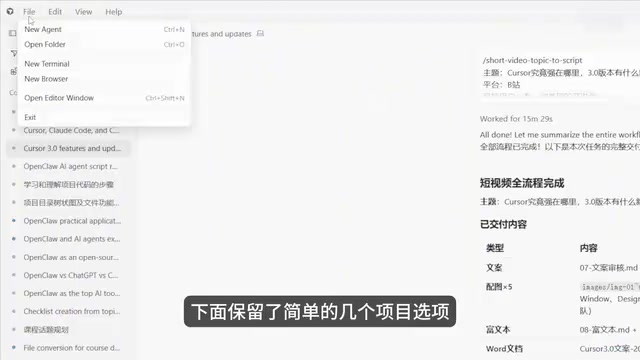
A Brand New Interface Layout
After opening the Agent Window, the entire interface is refreshed:
- Top menu bar is streamlined to four basic options: File, Edit, View, and Help
- Left panel is a multi-project workspace that supports sorting by time, status, or cloud
- Center area is the standard Agent chat box, which also allows switching projects, running terminals, and supports SSH connections
- Right panel can expand project branches, browser, terminal, and file working directory
Clicking a file lets you view its contents on the right side, while clicking "Open Edit Window" jumps to the traditional code editing interface. This design allows developers to flexibly choose the most appropriate interaction method for their current task.
Cloud Development: Breaking Device Limitations
Cursor 3.0 introduces a cloud-based interface that users can access via browser on any device. In the cloud interface, you can:
- Select GitHub projects and branches
- Switch between different AI models
- Use MCP (Model Context Protocol)
- Unlock project testing after completing environment setup
About the MCP Protocol: MCP (Model Context Protocol) is a standardized protocol proposed and open-sourced by Anthropic in late 2024, designed to solve the fragmentation problem of integrating AI models with external tools and data sources. Before MCP, every AI application needed custom integration code for different tools (databases, APIs, file systems, etc.), resulting in extremely high maintenance costs. MCP defines a unified client-server communication specification that enables AI models to invoke any external tools and resources in a standardized way. Cursor's integration of MCP into its cloud development interface means developers can let Agents access database queries, API calls, code repository operations, and more in the cloud environment, greatly expanding the boundaries of cloud-based AI development.
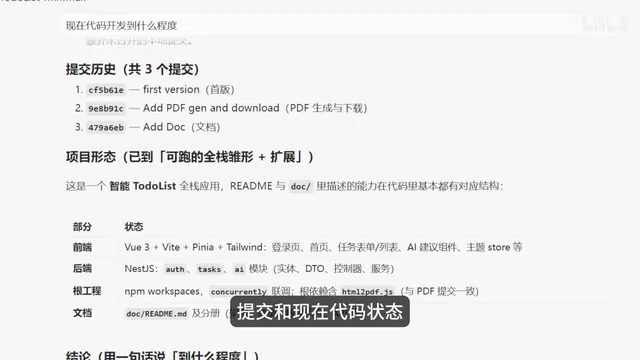
A highly practical scenario: even when you're away from your computer, you can check project progress via phone or tablet. For example, you can directly ask the Agent "what's the current state of code development," and it will report historical commit records, current code status, and next steps—then you can continue pushing development forward from there.
The "Open in Desktop" button in the upper right corner of the cloud interface lets you switch back to the desktop Cursor editing interface at any time. Both interfaces can coexist, and developers can freely switch between them based on context. This truly achieves a seamless cross-device development experience.
Design Mode: An Efficiency Revolution for Frontend Development
A What-You-See-Is-What-You-Change Design Experience
The second major update is Design Mode, which is nothing short of a blessing for frontend developers.
Previously, modifying UI required taking screenshots with annotations, describing specific locations, finding the corresponding UI element names, and then telling the AI what effect you wanted. This communication process was both tedious and error-prone.
Tracing the "What-You-See-Is-What-You-Change" Design Philosophy: The Direct Manipulation interface concept embodied by Design Mode was proposed by human-computer interaction scholar Ben Shneiderman in 1983. Its core principle is letting users directly manipulate visible objects rather than controlling them indirectly through abstract commands. Bringing this concept into AI-assisted development addresses the long-standing "intent communication distortion" problem in AI programming tools—when developers describe UI modification needs in natural language, AI often misunderstands due to lack of precise element positioning information. Design Mode transforms vague natural language intent into precise structured context by letting users directly click on DOM elements, fundamentally improving the accuracy of AI UI modifications. This aligns closely with the AI feature evolution direction of design tools like Figma, foreshadowing further blurring of boundaries between design and development tools.

Now with Design Mode, you can directly annotate UI elements in the browser, and the AI can precisely understand what you want to modify. The workflow is very intuitive:
- Open the browser interface created in Cursor
- Enable Design Mode at the bottom
- Click the target element (e.g., a button) and directly modify text or styles
- Click confirm, and the AI automatically completes the code changes
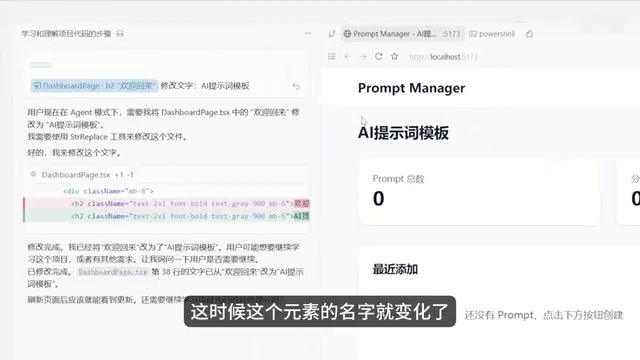
This "what-you-see-is-what-you-change" approach dramatically reduces communication costs between developers and AI, making UI adjustments as simple as using a design tool.
Cursor vs. Coco: Different Positioning, Complementary Use
Many developers struggle to choose between Cursor and Coco, but in reality, the two products have completely different positioning and can absolutely be used together.
Cursor's core advantages over Coco include:
- Deep AI integration into a familiar IDE environment, built on the VS Code ecosystem with virtually zero learning curve for existing users
- Visual, controllable development experience, not black-box code generation
- Multiple modes aligned with development workflows, including Plan, Debug, and Design, covering the complete development lifecycle
- More beginner-friendly, lowering the entry barrier for AI-assisted programming
Cursor's VS Code Ecosystem Advantage: Cursor is built as a secondary development on top of VS Code (Visual Studio Code), a choice with profound strategic significance. VS Code currently has over 17 million monthly active users, making it the world's most widely used code editor, with a plugin ecosystem of over 50,000 extensions. By forking VS Code, Cursor enables developers to seamlessly migrate their existing plugins, keyboard shortcuts, and workflow configurations, minimizing the cost of introducing AI capabilities. This forms an interesting contrast with GitHub Copilot's strategy of embedding as a plugin within VS Code—the former chooses to deeply modify the host environment for stronger AI integration capabilities, while the latter prioritizes compatibility with existing toolchains. The AI-ification of IDEs is becoming an irreversible industry trend, with mainstream IDEs like JetBrains and Zed having already launched their respective AI integration solutions.
Summary and Outlook
The core philosophy behind Cursor 3.0's update is crystal clear: free developers from specific coding work and transform them into task allocators and decision-makers. The ability to process different repositories with multiple Agents in parallel, combined with cloud-based cross-device development support and Design Mode's simplification of frontend development workflows, shows that Cursor is building a new-generation development paradigm centered on AI Agents.
For developers already using VS Code or Cursor, version 3.0 is worth trying as soon as possible. For developers still on the fence about AI programming tools, this might be an excellent time to jump in—AI-assisted development has evolved from "nice to have" to "changing how we work."
Related articles
 Product Reviews
Qoder vs Cursor Real-World Comparison: Which $20/Month AI IDE Is Better?
Hands-on comparison of Qoder vs Cursor AI IDEs: Agent autonomy, human interaction count, and architecture decisions. Qoder needed only 2 interactions vs Cursor's 8.
 Product Reviews
Cursor Cloud Agent Demo: Eliminating Bottlenecks Across the Entire Software Development Lifecycle
Deep analysis of Cursor's Cloud Agent demo showing how cloud VMs, automated test artifacts, and a full-chain control plane systematically eliminate human bottlenecks across the software development lifecycle.
 Product Reviews
Cursor 3.0 Deep Dive: Multi-Agent Parallelism, Design Mode, and Best-of-N Model Comparison
Cursor 3.0 evolves from an AI coding assistant into an Agent fleet command center. Explore multi-agent parallelism, Design Mode, and Best-of-N model comparison.