Cursor vs Claude Code vs Windsurf: Hands-On Comparison — Which One Is Worth Your Money?

Head-to-head test of Cursor, Claude Code, and Windsurf reveals each excels differently — choose based on your needs.
After spending $60 testing Cursor, Claude Code, and Windsurf on the same task, the results are clear: Cursor ($20/mo) offers the best IDE experience and fastest development speed but has security gaps; Claude Code ($20/mo) delivers the highest code quality and strongest architecture capabilities but lacks a GUI; Windsurf ($15/mo) provides the best value, ideal for beginners. AI coding tools are diverging into speed-focused and quality-focused camps — flexibly combining them is the optimal strategy.
I spent $60 testing three mainstream AI coding tools, running the same task across Cursor, Claude Code, and Windsurf for a head-to-head comparison. The results were surprising — the most expensive one isn't necessarily the best, while the cheapest offers the highest value for money.
Test Rules: Same Task, Fair Fight
To ensure fairness, this evaluation used identical conditions: building a web application with user login, data display, and AI chat functionality. All three tools received the same requirements document and the same time limit, with the final comparison based on speed and quality.
The three tools are: Cursor ($20/month), Claude Code ($20/month), and Windsurf ($15/month). They represent three different approaches to AI coding tools — deep IDE integration, command-line geek style, and the value-for-money route.
Cursor: Best IDE Experience, But Security Concerns
Cursor is an AI code editor built on VS Code, priced at $20/month for the Pro version. It's not simply a plugin slapped onto VS Code — it's a deeply customized version of Microsoft's open-source editor that inherits the complete plugin ecosystem and LSP (Language Server Protocol) system while adding a proprietary AI reasoning layer. Its core advantage lies in deep IDE integration — while you're writing code, the AI can simultaneously edit multiple files, and its interface is the most polished of the three tools.
This "multi-file simultaneous editing" capability relies on contextual indexing of the entire code repository: Cursor builds Vector Embeddings of the codebase locally, allowing the model to perceive cross-file dependencies when generating code rather than just focusing on the currently open file. This is extremely useful in refactoring and cross-module calling scenarios, but it also means code snippets need to be uploaded to the cloud for inference — which is one of the root causes of its security concerns.
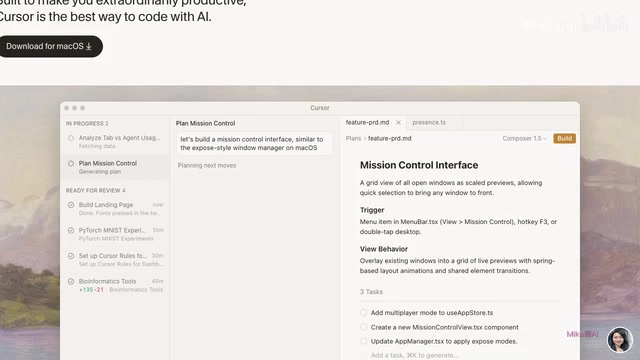
In terms of development speed, Cursor delivered the best performance. Thanks to its excellent IDE integration, developers can make changes and see results immediately, creating a very fast feedback loop. For everyday development scenarios where efficiency is paramount, this experience is hard to replace.
However, Cursor has notable weaknesses: it tends to make mistakes with complex architectural problems, and the security of generated code is mediocre — it frequently misses authentication checks. For production-grade projects that need to go live, this is a risk that cannot be ignored.
Claude Code: Highest Code Quality, Upfront Investment Pays Off Later
Claude Code is a command-line AI coding tool from Anthropic — no graphical interface, running directly in the terminal. This form factor isn't a technical limitation but a deliberate design choice. Anthropic is renowned in the AI safety field for its "Constitutional AI" training methodology, which has models self-audit whether their generated content complies with preset principles, fundamentally reducing harmful outputs. This philosophy extends to code generation, manifesting as stricter authentication checks and more complete error-handling logic.
At first glance, it seems less convenient than Cursor, but hands-on testing revealed it produces the highest code quality of the three. Its workflow is distinctive: before starting to code, it asks you a series of clarifying questions — which framework you want to use, what authentication method you prefer. This upfront clarifying questioning is essentially a lightweight Requirements Engineering process. The command-line interface forces developers to interact with the AI through "task descriptions" rather than "instant modifications," objectively encouraging users to think through requirements before diving in — highly aligned with the software engineering best practice of "design before implementation." Spending an extra 10 minutes upfront clarifying requirements can save hours of rework later.
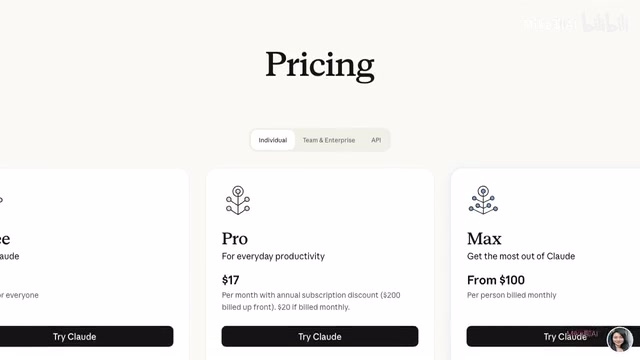
The generated code has clear structure, comes with auto-generated documentation, and its architectural design and error handling are noticeably superior to the other two tools. The downsides are equally obvious: the lack of a graphical interface isn't beginner-friendly, the feedback loop is slower, and it's not ideal for frontend development scenarios requiring frequent visual previews.
Windsurf: The Value King — 80% of the Features at 75% of the Price
Windsurf costs $15/month, making it the cheapest of the three. Its predecessor, Codeium, was founded in 2021 and initially entered the market with a free AI code completion plugin, accumulating a large user base through broad compatibility with mainstream IDEs like VS Code and JetBrains. In late 2024, Codeium launched the Windsurf brand, upgrading its product form from "plugin" to "standalone IDE," directly competing with Cursor. Behind this transformation is a structural shift in the AI coding tool market: pure code Autocomplete has become a red ocean, and AI coding environments with "Agentic" capabilities — meaning the ability to autonomously plan and execute multi-step tasks — represent the new competitive frontier. Windsurf's $15 pricing strategy is a pragmatic choice to leverage price as a lever to attract price-sensitive user segments in a market where Cursor has already established brand mindshare.

Hands-on testing showed decent speed — perfectly adequate for everyday programming. However, when handling particularly complex large-scale projects, its performance falls slightly behind the other two. If your projects are modest in scale or you're in a learning phase, Windsurf offers the lowest barrier to entry.
Data Comparison: Three Dimensions to See the Differences Clearly
| Dimension | Cursor | Claude Code | Windsurf |
|---|---|---|---|
| Monthly Fee | $20 | $20 | $15 |
| Code Quality | Medium | Highest | Medium-High |
| Development Speed | Fastest | Slower | Fast |
| Interface Experience | Best | No GUI | Good |
| Architecture Capability | Average | Strongest | Average |
| Security | Weak | Best | Medium |
Looking at the data, each tool has its strengths — there's no absolute "optimal solution." Which one to choose depends on what matters most to you.
Buying Recommendations: Match Your Needs

Professional developer, coding daily → Choose Cursor. Best IDE experience, fastest development speed, significantly boosts everyday coding efficiency.
Large projects or prioritizing code quality → Choose Claude Code. Its architectural capability is genuinely strong, generating more standardized and secure code — ideal for projects requiring long-term maintenance.
Just starting out or on a tight budget → Choose Windsurf. At $15/month you get 90% of the experience — unbeatable value.
A Trend Worth Watching
This test reveals an interesting trend: AI coding tools are diverging into two directions — the "speed camp" and the "quality camp." This divergence has a technical inevitability at its core, rooted in the fundamental Latency vs. Depth Trade-off between inference speed and inference depth. IDE-integrated tools pursuing instant feedback typically use smaller parameter models or aggressively quantize large models to achieve millisecond-level response times. Tools prioritizing code quality tend to call models with more parameters and longer reasoning chains, allowing the model to perform more thorough Chain-of-Thought reasoning before generating code. This mirrors the classic tension in software engineering between "rapid prototyping" and "production-grade code."
Cursor represents the speed camp, pursuing instant feedback and development efficiency; Claude Code represents the quality camp, preferring to be slower if it means getting the code right. As model inference efficiency continues to improve and dedicated AI chips become more widespread, the boundary between these two camps may gradually blur — but under current compute costs, this divergence will persist for quite some time.
For most developers, the most pragmatic approach is probably: use Cursor or Windsurf for speed in daily development, and use Claude Code to ensure quality on critical modules. After all, these tools aren't mutually exclusive — flexibly switching between them based on context is the smartest approach.
The competition among AI coding tools has only just begun. Prices will continue to drop and features will keep iterating. Which one you choose now doesn't matter much — what matters is integrating AI coding into your workflow as early as possible. That's where the real competitive advantage lies.
Related articles
 Product Reviews
Qoder vs Cursor Real-World Comparison: Which $20/Month AI IDE Is Better?
Hands-on comparison of Qoder vs Cursor AI IDEs: Agent autonomy, human interaction count, and architecture decisions. Qoder needed only 2 interactions vs Cursor's 8.
 Product Reviews
Cursor Cloud Agent Demo: Eliminating Bottlenecks Across the Entire Software Development Lifecycle
Deep analysis of Cursor's Cloud Agent demo showing how cloud VMs, automated test artifacts, and a full-chain control plane systematically eliminate human bottlenecks across the software development lifecycle.
 Product Reviews
Cursor 3.0 Deep Dive: Multi-Agent Parallelism, Design Mode, and Best-of-N Model Comparison
Cursor 3.0 evolves from an AI coding assistant into an Agent fleet command center. Explore multi-agent parallelism, Design Mode, and Best-of-N model comparison.