Deep Dive into the Codex Chrome Extension: How an AI Coding Assistant Breaks Beyond the Code Editor

OpenAI's Codex Chrome extension lets AI coding assistants operate real authenticated browser environments.
The most significant update in OpenAI's recent Codex 0.12.8 and 0.12.9 releases is the Codex for Chrome browser extension, which connects directly to users' authenticated Chrome environments to perform automated actions, bridging the gap between code writing and browser operations. The updates also bring Vim mode support, team plugin management, enhanced Hooks, and persistent Goals workflows, signaling OpenAI's intent to transform Codex from a coding assistant into a long-horizon agent workspace that builds competitive moats through workflow ecosystems.
OpenAI recently released consecutive updates with Codex versions 0.12.8 and 0.12.9. The most notable addition isn't a model upgrade, but rather the brand-new Codex for Chrome browser extension. This feature evolves Codex from a pure code editing assistant into a full-capability development workflow tool that can operate in real browser environments—its significance far exceeds an ordinary version iteration.
Codex for Chrome: Bridging the Last Mile Between Code and Browser
Why Do Developers Need Browser Capabilities?
Developers' daily work isn't confined to VS Code or the terminal. Investigating customer-reported issues requires logging into admin dashboards for debugging; reproducing specific bugs may only be possible in a logged-in staging environment; and after finishing code changes, you still need to update configurations in SaaS tools. In short, half of daily work is writing code, and the other half is operating within the browser.
Previous AI coding assistants could write code, but the moment tasks involved authentication, cookies, dashboards, or internal tools in the browser, AI was powerless. Codex for Chrome is OpenAI's key attempt at solving this pain point.
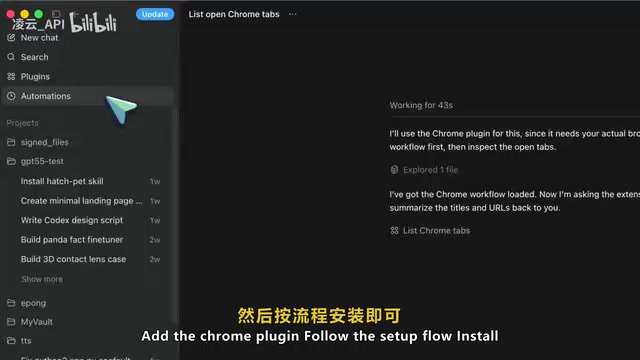
Core Capability: Automation in a Real Browser
Browser automation isn't a new concept—from early tools like Selenium and Puppeteer to modern ones like Playwright, developers have long tried to control browsers programmatically. However, the fundamental limitation of these tools is that they operate on a fresh, unauthenticated browser instance and cannot reuse the user's existing session state (cookies, tokens, local storage, etc.). The breakthrough of Codex for Chrome is that it connects directly to the user's running Chrome process, inheriting the complete authentication state. Technically, this relies on Chrome Extension privileged APIs—a fundamentally different approach from traditional automation tools.
Through the Chrome extension, Codex can directly invoke the browser and perform actions on real websites where you're already logged in. This is fundamentally different from Codex's built-in in-app browser—the in-app browser is suited for local dev servers, public page previews, and visual bug verification, while the Chrome extension targets scenarios requiring real browser state:
- Performing automated actions on platforms like Salesforce, LinkedIn, and Gmail
- Accessing internal company tools and admin dashboards
- Reproducing and verifying bugs in staging environments
- Updating issues, CRM entries, and internal management pages based on meeting notes
More importantly, Codex can handle tasks in parallel, working across multiple Chrome tabs simultaneously in the background without disrupting the user's normal workflow. Tabs are automatically organized into tab groups, preventing the browser from becoming cluttered with dozens of AI-opened tabs.
Permission Management: Deep Thinking on Security Design
Browser automation does require extensive permissions—page access, history, notifications, downloads, bookmarks, tab groups, and more can seem daunting. But OpenAI has implemented multiple layers of security:
- Per-site authorization: User consent is required before accessing a new website, with options to allow for the current conversation only or trust permanently
- Allowlist/blocklist mechanism: Pre-configure trusted and blocked sites
- Strict history restrictions: No "always allow" option; access limited to the current task
- Transparent data storage: Browsing activity is only stored when it becomes part of Codex's context

OpenAI explicitly states it does not separately log all user actions in Chrome. However, when Codex accesses private dashboards, customer records, or personal accounts, users should still be present to supervise in real time.
Important CLI Improvements
Vim Mode and Terminal Experience Optimization
The terminal editor in version 0.12.9 adds Vim mode support. Vim, born in 1991 as an improved version of the Unix editor Vi, still commands a large and loyal user base today despite the prevalence of modern IDEs, thanks to its modal editing philosophy (separation of Normal/Insert/Visual modes). The core demand of Vim users is a "hands never leave the keyboard" efficient operation experience—once muscle memory forms, switching to other editing modes creates noticeable cognitive friction. Major IDEs like JetBrains and VS Code all offer Vim plugins with millions of monthly downloads, demonstrating the scale of this user base. Codex CLI's Vim mode support is essentially a clear signal to this massive developer community: OpenAI doesn't intend to force terminal users to change their existing habits just to use an AI assistant. Additionally, the status bar supports theme-adaptive colors, PR summaries and branch change summaries have been added, along with debug commands for viewing terminal key events.
Fork Workflow and Context Management
Fork workflows received more comprehensive support, including a redesigned selector, raw scroll-back mode, IDE context injection, and workspace-aware diff comparison. In simple terms, Codex makes it easier for developers to recover previous work progress, copy content from earlier sessions, or inject context directly from the IDE.
Evolution of the Plugin Ecosystem and Team Collaboration
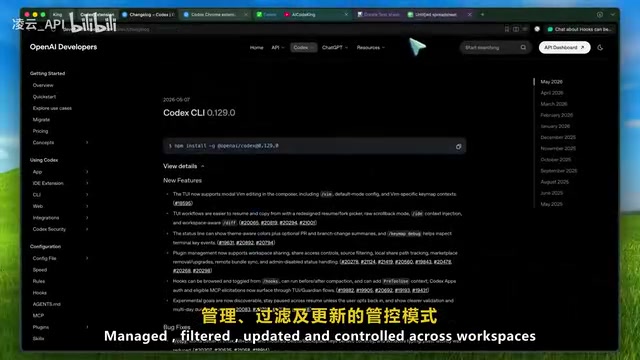
In version 0.12.9, plugin management received important team-oriented upgrades:
- Workspace sharing: Plugins support cross-workspace sharing and permission control
- Source filtering and path tracking: More granular plugin management capabilities
- Remote package sync: Plugin marketplace upgrade with admin disable states
Codex plugins are transitioning from the "install locally and pray it works" model to a cross-workspace sharing and unified governance team collaboration model. Notably, this evolution aligns closely with the industry trend toward MCP (Model Context Protocol)—an open protocol proposed by Anthropic in late 2024 that aims to standardize communication between AI models and external tools/data sources, with a core philosophy similar to USB interface unification. Only when MCP servers and plugins achieve standardization can AI coding tools truly deliver value within teams, and third-party developers can build tools according to unified specifications, potentially enabling cross-platform plugin reuse.
Hooks and Long-Horizon Agents: Codex's Ambition
Programmable Agent Behavior
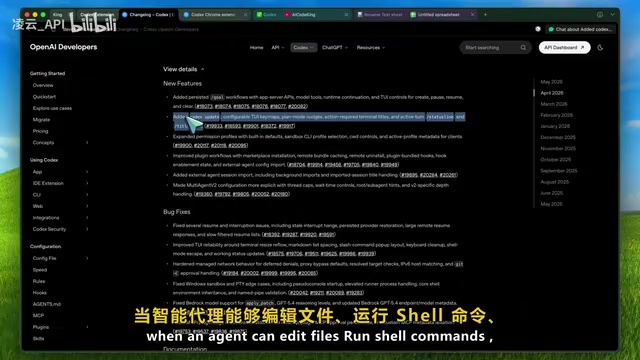
Hooks functionality was enhanced in version 0.12.9, supporting execution before and after context compression, as well as adding Tool call context. This means Codex's own behavior becomes more programmable—teams can use Hooks to introduce project rules, check conditions before tool execution, or supplement context before high-risk operations.
Persistent Goals Workflow
Version 0.12.8 introduced persistent Goals workflows, including an app server API, model tool runtime continuation, and CLI controls for pausing, resuming, and clearing goals. Together, these two versions clearly indicate: OpenAI is building Codex into a long-horizon agent system, not merely a chat box.
Long-horizon agents are one of the core directions in current AI research, referring to AI systems capable of autonomously planning, executing multi-step tasks, and handling intermediate states over extended time spans. Unlike traditional single-turn Q&A or short-range code completion, long-horizon agents must solve a series of engineering challenges including context window limitations, task state persistence, error recovery mechanisms, and human-AI collaborative approval. Codex's Goals workflow and Hooks mechanism directly address these challenges: Goals provide persistent storage for task state, while Hooks serve as programmable interception points for agent behavior, making human intervention at critical junctures possible.
Competitive Landscape: Workflow Ecosystem Is the Moat
The AI coding assistant market has entered a phase of intense competition. Anthropic's Claude Code focuses on deep code understanding and long-context processing; Google's Gemini CLI leverages deep integration with the GCP ecosystem and cloud toolchain; GitHub Copilot commands a large enterprise user base through Microsoft's IDE channel advantage; while emerging IDEs like Cursor and Windsurf attract individual developers with "AI-native" experiences. Against the backdrop of converging model capabilities, toolchain integration depth, workflow coverage breadth, and team collaboration capabilities are becoming the key dimensions of differentiated competition—which is precisely why OpenAI is investing heavily in browser extensions and plugin ecosystems rather than purely chasing model benchmark scores.
If you only look at model performance, the gap between Codex, Claude Code, and Gemini CLI can be debated endlessly. But these workflow features make Codex stand apart. When Codex can:
- Dive deep into code repositories and operate the terminal
- Test local applications and operate the browser
- Invoke a logged-in Chrome environment
- Manage plugins and run automation
- Handle approvals and long-running tasks
Its value is no longer limited to the model itself, but lies in having built an entire operational ecosystem. The runtime environment surrounding the model is the true competitive barrier.
Usage Recommendations
Although Codex for Chrome unlocks tremendous potential, this capability should be used with caution:
- Don't grant access to all websites outright
- Start with low-risk workflows and build trust gradually
- Enable per-conversation approval and block sensitive sites
- Only enable Chrome functionality when accessing sites with manageable risk
- Always be present to supervise when private data is involved
The significance of this Codex update isn't about what magical feature a particular version added, but rather that Codex is evolving into a more complete agent workspace. The launch of the Chrome browser extension marks the moment AI coding assistants officially break beyond the boundaries of the code editor, extending into developers' complete workflows.
Key Takeaways
- The Codex for Chrome extension enables AI coding assistants to directly operate in users' authenticated real browser environments, bridging the gap between code writing and browser operations
- Permission management is rigorously designed with per-site authorization, allowlists/blocklists, strict history restrictions, and other multi-layered security mechanisms
- The plugin ecosystem is evolving toward team collaboration, supporting workspace sharing, remote sync, and admin governance, aligning with the MCP protocol standardization trend
- Hooks and persistent Goals workflows indicate OpenAI is building Codex into a long-horizon agent system, not a simple chat-based coding assistant
- Workflow ecosystem, rather than model performance alone, is becoming the core competitive barrier for AI coding tools
Related articles
 Product Reviews
Qoder vs Cursor Real-World Comparison: Which $20/Month AI IDE Is Better?
Hands-on comparison of Qoder vs Cursor AI IDEs: Agent autonomy, human interaction count, and architecture decisions. Qoder needed only 2 interactions vs Cursor's 8.
 Product Reviews
Cursor Cloud Agent Demo: Eliminating Bottlenecks Across the Entire Software Development Lifecycle
Deep analysis of Cursor's Cloud Agent demo showing how cloud VMs, automated test artifacts, and a full-chain control plane systematically eliminate human bottlenecks across the software development lifecycle.
 Product Reviews
Cursor 3.0 Deep Dive: Multi-Agent Parallelism, Design Mode, and Best-of-N Model Comparison
Cursor 3.0 evolves from an AI coding assistant into an Agent fleet command center. Explore multi-agent parallelism, Design Mode, and Best-of-N model comparison.