Fitten Code MCP Launch: Connecting AI Agents to Unlimited External Tools
Fitten Code MCP Launch: Connecting AI …
Fitten Code Agent supports MCP protocol, connecting external tools like plugins to become a super assistant.
MCP (Model Context Protocol) is a standardized protocol proposed by Anthropic that enables AI Agents to flexibly connect to various third-party tool services through JSON-RPC communication. With official MCP support, Fitten Code Agent can now integrate GitHub, Bing search, Excel operations, and other external tools beyond its existing coding capabilities. Configuration is simple and intuitive, with support for timeout settings, service toggles, and token permission management. MCP transforms the AI Agent from a fixed-function coding assistant into an infinitely extensible intelligent work platform.
What Is MCP? Why It Matters for AI Programming
MCP (Model Context Protocol) is a standard protocol that enables seamless integration between large language models and external data sources and tools. In simple terms, it allows AI Agents to go beyond a fixed set of built-in tools and flexibly connect to various third-party services — much like installing plugins.
MCP was officially proposed and open-sourced by Anthropic in late 2024. Its design was inspired by LSP (Language Server Protocol) — the very protocol that enables editors like VS Code to support intelligent suggestions for dozens of programming languages through a unified interface. MCP aims to replicate this successful paradigm in the AI tool integration space: previously, every AI product that wanted to connect to external tools had to develop its own proprietary integration solution, resulting in massive duplication of effort. By defining a standardized JSON-RPC communication format, MCP allows any compliant tool server (MCP Server) to be called by any MCP-supporting AI client (MCP Client), fundamentally solving the fragmentation problem in the AI tool ecosystem.
Recently, Fitten Code's Agent feature officially added MCP support. This means that in addition to its existing capabilities like file read/write, code search, and terminal operations, the Agent can now connect to GitHub services, Bing search, Excel operations, and various other external tools. The Agent has evolved from a code assistant into a true super personal assistant.
Fitten Code MCP Service Configuration Guide
Adding Built-in MCP Service Templates
The configuration process is very intuitive. First, switch to Agent mode and click the MCP icon in the interface to enter the MCP service settings page. Initially, there are no configured services, but you can quickly add them from the templates provided by Fitten Code.
Taking GitHub and BingCN (Bing search) as examples, after clicking to add each one, the system automatically generates an MCP service configuration file. Different MCP service configurations are automatically added to a JSON object in key-value pair format — the key is the service name, and the value is the specific configuration information. It's worth noting that MCP uses JSON-RPC 2.0 as its underlying communication protocol, a lightweight remote procedure call specification that encapsulates requests and responses in JSON format. MCP Servers can be implemented in any programming language, with two mainstream approaches currently available: the local process mode based on stdio (standard input/output), and the remote HTTP mode based on SSE (Server-Sent Events). The command field in the configuration file specifies the command used to start the local MCP Server process.
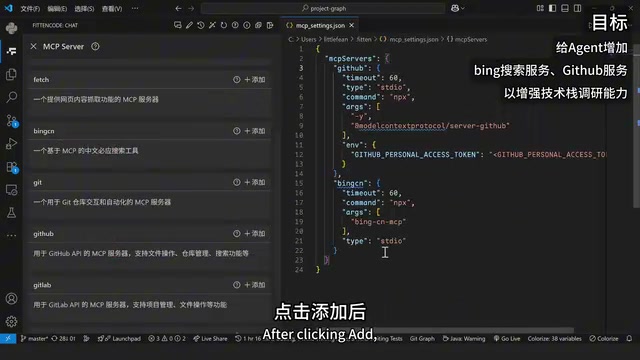
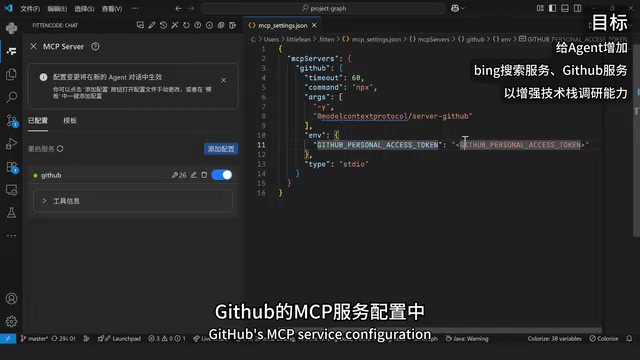
Once configured, the status light in the service list turns green, indicating that the service is ready to be called by the Agent. The number next to the wrench icon shows how many tools are available in that service. Expanding the tool information reveals each tool's name and functional description, giving you an intuitive understanding of what the service can do.
Key Configuration Details
There are several important details to note during configuration:
- Timeout: Defaults to 60 seconds. If a particular MCP service takes longer to execute, you can increase this value to prevent the Agent from giving up while waiting for results.
- Service Toggle: When two MCP services conflict, you can temporarily disable one using the toggle button without deleting the configuration.
- Token Configuration: For the GitHub service, you need to manually generate a Personal Access Token from the GitHub settings page and enter it in the corresponding field in the configuration file. GitHub Personal Access Tokens (PATs) are fine-grained authentication credentials that support on-demand authorization of specific permission scopes. Even if a token is leaked, the damage can be contained to a minimal scope. GitHub currently offers two types: classic tokens and fine-grained tokens, with the latter supporting permission control down to individual repository level for higher security. When using PATs in MCP configurations, it's recommended to follow the principle of least privilege — only grant the permissions the Agent actually needs, and rotate tokens regularly to reduce security risks.
Practical Demo: Using MCP Tools for Technical Research
The Research Power of GitHub MCP Tools
One of the most exciting use cases for MCP is technical research. Traditional search engines often fall short when dealing with error messages from emerging technology stacks, especially for recently open-sourced projects where the most valuable solutions are often buried in GitHub Issue discussions.
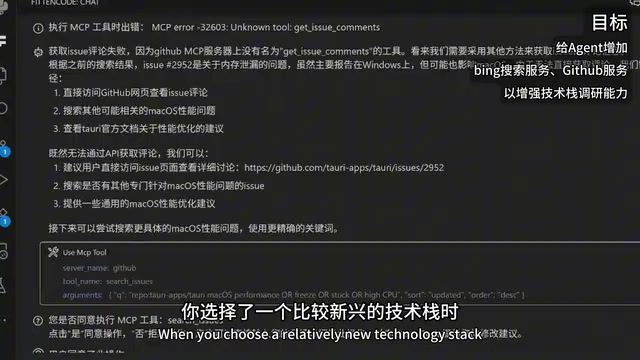
With the GitHub MCP service connected, the Agent can use tools like get_issue to automatically search for related Issues on GitHub based on error messages and filter solutions from comments, saving a tremendous amount of manual browsing time. This relies on the large language model's Function Calling capability: during reasoning, the Agent autonomously decides whether to call a tool, which tool to call, and what parameters to pass based on user intent and the available tool list. The entire process is multi-turn iterative — call tool → get result → incorporate into context → continue reasoning — until the task is complete. MCP's standardization means the Agent doesn't need to write specific calling logic for each tool, significantly reducing engineering complexity.
A Complete AI Research Workflow
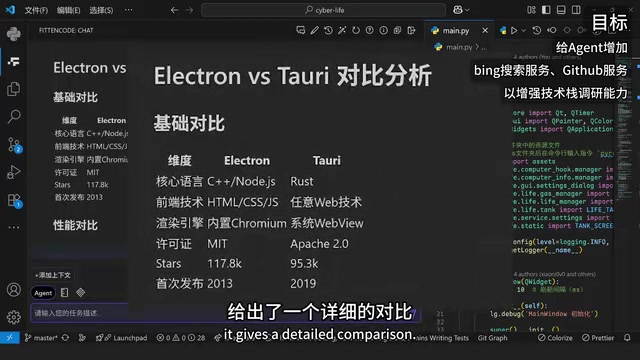
In the actual demo, Rules were first set for the Agent to define behavioral guidelines: "When receiving a technology stack research task, fully utilize tools to search and analyze various possibilities on GitHub." Then the question was posed: "If the current project were rewritten in TypeScript or other frontend technologies, what library would be most suitable?"
The Agent immediately began automatically calling GitHub tools to search, and after completing the research, delivered a detailed comparative analysis of technical solutions. This workflow greatly improves the efficiency and confidence of technology selection.
Connecting Custom MCP Services: Extending Agent Capabilities
Fitten Code's MCP support isn't limited to built-in templates. Users can search for and connect additional third-party MCP services through the MCP marketplace (community). The MCP marketplace is similar to VS Code's extension marketplace or npm's package registry. It has already gathered hundreds of third-party MCP Servers covering database queries, file processing, web scraping, cloud service management, office software operations, and virtually every common scenario. Notable open-source MCP Servers include: Playwright MCP (browser automation), Filesystem MCP (local file system operations), PostgreSQL MCP (database queries), and more. This open ecosystem means the developer community's creativity can continuously supplement AI Agent capabilities without waiting for official support from AI product vendors.
Taking Excel operations as an example, the specific steps are:
- Search for "Excel" in the MCP marketplace and select a popular service
- Find the configuration information in its documentation
- Copy the configuration information into Fitten Code's MCP configuration file
- The service automatically appears in the left-side service list and shows as green
Once configured, the Agent gains the ability to read and manipulate Excel files. In the demo, the Agent successfully used tools to read content from an Excel file, demonstrating the powerful extensibility of the MCP ecosystem.
Conclusion: MCP Transforms AI Agents into Infinitely Extensible Intelligent Platforms
The introduction of MCP transforms Fitten Code Agent from a fixed-function coding assistant into an infinitely extensible intelligent work platform. Its core value lies in:
- Standardized Integration: Through a unified JSON-RPC protocol specification, it lowers the barrier to tool integration and completely solves the fragmentation problem in the AI tool ecosystem
- Flexible and Controllable: Supports fine-grained management including timeout configuration, service toggles, and one-click deletion, with token permissions following the principle of least privilege for security
- Open Ecosystem: Beyond built-in templates, you can freely connect to a vast array of third-party services from the MCP marketplace, with community creativity continuously expanding Agent capabilities
For developers, MCP's most direct value is delegating repetitive tasks that previously required manual effort (such as technical research, data processing, and information retrieval) to the Agent for automatic completion. As the MCP ecosystem continues to grow, AI Agent capabilities will keep expanding, truly becoming a developer's super assistant.
Related articles
 Product Reviews
Qoder vs Cursor Real-World Comparison: Which $20/Month AI IDE Is Better?
Hands-on comparison of Qoder vs Cursor AI IDEs: Agent autonomy, human interaction count, and architecture decisions. Qoder needed only 2 interactions vs Cursor's 8.
 Product Reviews
Cursor Cloud Agent Demo: Eliminating Bottlenecks Across the Entire Software Development Lifecycle
Deep analysis of Cursor's Cloud Agent demo showing how cloud VMs, automated test artifacts, and a full-chain control plane systematically eliminate human bottlenecks across the software development lifecycle.
 Product Reviews
Cursor 3.0 Deep Dive: Multi-Agent Parallelism, Design Mode, and Best-of-N Model Comparison
Cursor 3.0 evolves from an AI coding assistant into an Agent fleet command center. Explore multi-agent parallelism, Design Mode, and Best-of-N model comparison.