FreeBuff Coder Review: Is This Ad-Supported Free AI Coding Assistant Actually Worth Using?

FreeBuff Coder offers a fully free terminal AI coding assistant sustained by command-line text ads.
FreeBuff Coder is a free terminal AI coding assistant built on CodeBuff, sustained by displaying text ads in the command line. It features 9 dedicated sub-agents for multi-agent collaboration and employs intelligent model routing calling DeepSeek V4, MiniMax M2.7, and Gemini Flash at different workflow stages. The officially recommended IPIR workflow makes it ideal for students and indie developers, though users should be aware of data collection risks with certain models and cloud dependency limitations.
A Truly Free AI Coding Assistant Has Arrived
In the 2025 AI coding assistant market, "free" basically means usage limits, stripped-down features, or hidden charges. FreeBuff Coder takes a different approach—it displays text ads in the command line to sustain operations, letting users access a fully-featured terminal AI coding agent without spending a dime.
But is this "ads-for-service" model actually viable? How well does it perform when writing real code? This review breaks down FreeBuff Coder from multiple angles including architecture design, core features, model selection, and privacy security.
FreeBuff Coder's Product Positioning and Core Architecture
Open-Source Evolution Based on CodeBuff
FreeBuff is built on the CodeBuff platform. CodeBuff itself is a mature terminal coding agent whose core design philosophy centers on multi-agent collaboration rather than having a single model handle everything.
Multi-Agent architecture has been a major trend in AI application development over the past two years. Traditional AI coding assistants typically use a single model to process all tasks—from understanding requirements and searching files to generating code and reviewing results—all handled by one large language model. The bottleneck with this approach is that a single model performs unevenly across different task types, and with limited context windows, it easily loses critical information when handling complex projects. The core idea behind multi-agent architecture borrows from the "separation of concerns" principle in software engineering: decomposing complex tasks into multiple subtasks handled by different specialized agents, coordinated through an Orchestrator layer that manages communication and workflow between agents. This design not only improves processing quality for individual tasks but also enables parallel execution, significantly boosting overall efficiency.
FreeBuff inherits these architectural advantages while lowering the barrier to entry to the absolute minimum—zero configuration, zero subscription, ready to use right after installation.
Three-Step Installation, Ready Out of the Box
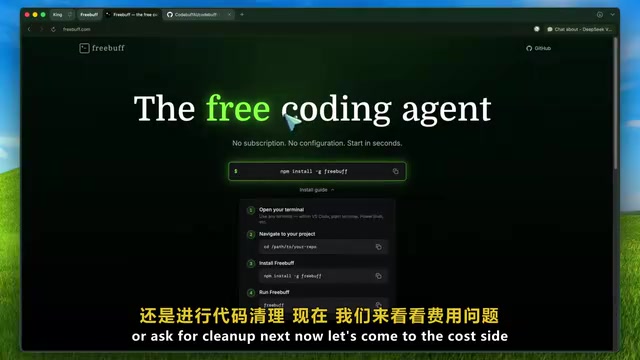
The entire installation process takes just three steps:
- Open your terminal and run
npm install -g freebuff - Navigate to your project directory
- Run
freebuff
The only prerequisite is having Node.js installed. FreeBuff supports Mac, Linux, and Windows—truly ready out of the box.
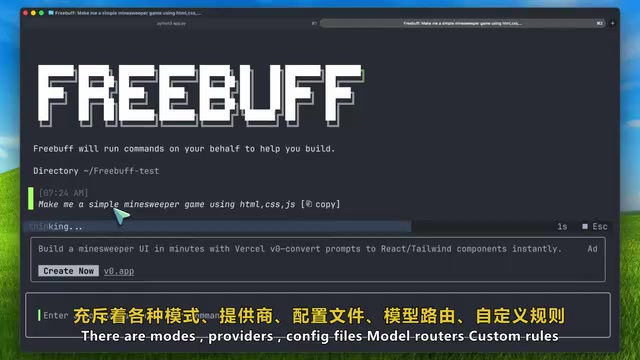
Many programming tools these days are getting increasingly complex, with various mode switches, provider configurations, model routing, and piles of settings toggles. The configuration alone is enough to scare people off. FreeBuff goes in the opposite direction, cutting all the complex configuration so developers can focus their energy on writing code.
FreeBuff Coder Core Features Explained
Nine Dedicated Sub-Agent System
FreeBuff's most distinctive feature is its 9 built-in dedicated sub-agents, which is the key differentiator from ordinary AI coding tools:
- File Selector: Intelligently locates and references relevant files in your project
- Code Reviewer: Automatically reviews code changes for quality and potential issues
- Browser Automation: Can automatically open a browser, execute click actions on pages, and directly test applications
- Thinker: Handles deep thinking and complex reasoning
This division-of-labor approach means that when handling a complex task, one agent finds relevant files, another modifies code, and yet another reviews the results. Each agent does what it does best, naturally improving overall efficiency. This stands in stark contrast to traditional single-model approaches—which, when handling multi-step tasks, must simultaneously maintain file information, modification logic, and review standards within one extremely long context, often resulting in quality degradation due to "attention dilution."
Intelligent Model Routing Strategy
For model selection, FreeBuff doesn't simply bind to a single cheap model. Instead, it calls different AI models at different stages of the workflow:
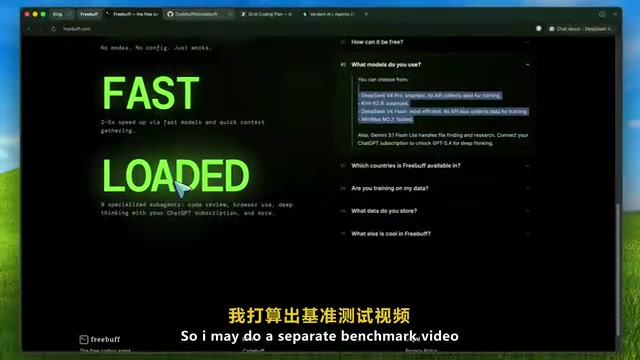
- DeepSeek V4: Handles core code generation
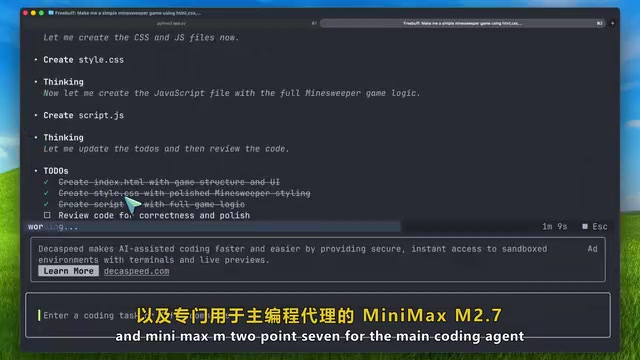
- MiniMax M2.7: Used as the Pro agent
- Gemini 3.1 Flash: Specifically handles file retrieval and research tasks
- GPT models (requires linked ChatGPT subscription): Used for deep thinking scenarios
The technical principle behind this "Model Routing" strategy is dynamically selecting the optimal model based on task characteristics. Different large language models vary enormously in capability, cost, and latency: models with more parameters excel at complex reasoning and deep thinking but have high inference costs and slow responses; lightweight models are extremely fast and inexpensive for simple retrieval and classification tasks. The core logic of model routing is "use the right model for the right job"—in scenarios sensitive to API call costs, this strategy can reduce overall operational costs by several times without sacrificing quality at critical stages. For a free tool, this model scheduling design shows genuine thoughtfulness.
DeepSeek is a large language model series developed by DeepSeek (the company), with outstanding performance in code generation. The DeepSeek series employs a Mixture of Experts (MoE) architecture—while the total parameter count is massive, only a portion of parameters are activated during each inference, maintaining high performance while controlling computational costs. This is a key reason FreeBuff chose it as the core code generation engine—strong enough performance with relatively controllable inference costs, suitable for a free product's cost structure.
Smart Follow-Up Suggestions
After completing each step, FreeBuff automatically provides three clickable follow-up suggestions. This feature looks simple but feels very smooth in practice—after AI completes an operation, developers often aren't sure whether the next step should be running tests, viewing code diffs, or doing code cleanup. These suggestions save you the hesitation time and keep your workflow flowing.
Recommended Workflow: The IPIR Four-Step Method (Interview-Plan-Implement-Review)
FreeBuff's officially recommended best practice follows the IPIR process:
- Interview: Start with low-risk questions, like having it familiarize itself with the project structure or finding code segments that handle authentication
- Plan: Have the AI develop a modification plan with clear implementation paths
- Implement: Execute the code changes
- Review: Personally check the code diffs and confirm modification quality
The core philosophy of this process is progressive trust. Don't immediately let AI touch core production code—this principle applies to all AI coding assistants, not just FreeBuff. Start with small tasks, gradually understand the tool's capability boundaries, and that's the safe and efficient way to use it.
It's worth noting that the IPIR process aligns with the classic "Code Review" practice in software engineering. In traditional team collaboration, developers must have their code reviewed by colleagues before merging into the main branch. Treating AI as a "junior developer" and manually reviewing every line of code it produces is the most prudent stance for using AI coding assistants at this stage.
The Ad-Driven Free Business Model: What to Think
FreeBuff's free model is built on a simple exchange: you accept text ads in the command line, and it provides complete coding assistance services.
In the developer tools space, ad-driven free models are uncommon. More common free models are "Open Core" (open source + commercial version) or "Freemium" (free tier + paid upgrades). What's unique about FreeBuff's choice of the ad model is that text ads in a command-line environment are far less intrusive than web popups or video ads, with minimal impact on the developer's workflow. However, whether this model is sustainable depends critically on whether ad revenue can cover the ever-growing API call costs—after all, LLM inference is billed per token, and user growth means costs scale proportionally.
There are several things worth acknowledging about this model:
- High transparency: Ads are displayed openly with no hidden fee traps
- Zero barrier to entry: Especially suitable for students, indie developers, and budget-constrained teams
- More honest than "fake free": Compared to heavily rate-limited so-called "free tiers," the ad model is actually more straightforward
Of course, not everyone can accept ads embedded in their terminal. If you don't want to see ads and need higher usage limits, consider paid alternatives like the GM Programming Plan or tools like Verdant.
Privacy and Security: Pay Attention to These Details
FreeBuff promises that code ownership always belongs to the user and won't share data with third parties for model training—unless you actively choose models that are explicitly labeled as collecting training data.
There's a critical detail you must watch for: Some DeepSeek model options are explicitly labeled "this model collects data for training." If you're developing proprietary company code, carefully check model labels and don't casually click confirm.
Data privacy in AI coding assistants is one of the core concerns for enterprises adopting such tools. When code snippets are sent to cloud-based models for processing, there are several layers of risk: first, data leakage during transmission; second, model providers may use user-input code for subsequent model training, causing code logic or trade secrets to be "memorized" in model weights and potentially leaked indirectly through other users' queries; third, data compliance regulations in certain regions (such as GDPR, China's Data Security Law) impose strict restrictions on cross-border transmission of code data. Previously, Samsung experienced a major security incident when employees pasted internal code into ChatGPT, after which multiple tech companies explicitly prohibited using cloud-based AI coding tools on sensitive projects.
Additionally, FreeBuff connects to a cloud backend, which is fundamentally different from purely local coding tools. For highly sensitive enterprise projects, this needs to be factored into security assessments.
FreeBuff Coder's Current Limitations and Shortcomings
Objectively speaking, FreeBuff currently has several notable weaknesses:
- Regional restrictions: Currently only available in certain countries and regions; users in some areas may need additional network configuration
- Cloud dependency: Requires internet connection; cannot run purely locally
- Privacy risks vary by model: Different models have different data handling policies, requiring users to discern for themselves
- Complex scenario performance unverified: Real-world performance in large application development, difficult bug fixes, browser automation testing, and other practical scenarios still needs more benchmark testing to validate
Terminal AI Coding Assistant Competitive Comparison
The terminal AI coding assistant space is already quite crowded, including Claude Code, Codex, CodeBuff, Kilo, OpenCode, GLM, and others. Terminal (CLI) AI coding agents and IDE plugins (like GitHub Copilot, Cursor) represent two fundamentally different AI coding assistance paradigms. IDE plugins are embedded in graphical editors, primarily working through code completion and inline suggestions, with the advantage of seamless integration with the editing experience. Terminal AI agents run in the command-line environment, functioning more like a "conversational coding partner"—they can directly execute Shell commands, read/write the file system, run test scripts, and even operate browsers, offering greater operational freedom. This mode is particularly suited for complex scenarios requiring cross-file modifications, project-level refactoring, and automated testing. The popularity of Claude Code and OpenAI Codex CLI signals that terminal AI agents are becoming one of the mainstream choices for professional developers.
FreeBuff's differentiated positioning is very clear:
| Use Case | Recommended Tool |
|---|---|
| Completely free, can accept ads | FreeBuff Coder |
| Don't want ads, need high limits | GM Programming Plan |
| Need planning, verification, workflow, and other advanced features | Verdant |
| Need top-tier model capabilities | Claude Code / Codex |
If you're a budget-constrained individual developer, FreeBuff is undoubtedly the best value choice; if you have higher requirements for code security and model capabilities, paid tools remain the safer option.
Conclusion: Who Is FreeBuff Coder For?
FreeBuff Coder is genuinely one of the most noteworthy free AI coding assistants to emerge recently. Terminal coding agent, nine sub-agent system, Bash mode, web search, browser automation, historical knowledge base, optional ChatGPT deep thinking—all these features are provided completely free, no subscription required.
For students, indie developers, and anyone wanting to experience AI coding at zero cost, FreeBuff is a very worthwhile option to try. But remember: start with low-risk tasks, always check code diffs, and build trust gradually—these are fundamental principles that apply to using any AI coding assistant.
Key Takeaways
- FreeBuff is a completely free terminal AI coding assistant that sustains operations through text ads, with zero-configuration instant setup
- Built-in 9 dedicated sub-agents (file selector, code reviewer, browser automation, etc.) using a multi-agent collaborative architecture
- Intelligent model routing strategy calling DeepSeek V4, MiniMax M2.7, Gemini 3.1 Flash, and other models at different stages
- Some models collect data for training—pay special attention to model selection and privacy labels when developing proprietary code
- Recommended to follow the Interview-Plan-Implement-Review workflow, starting with low-risk tasks to gradually build trust
Related articles
 Product Reviews
Qoder vs Cursor Real-World Comparison: Which $20/Month AI IDE Is Better?
Hands-on comparison of Qoder vs Cursor AI IDEs: Agent autonomy, human interaction count, and architecture decisions. Qoder needed only 2 interactions vs Cursor's 8.
 Product Reviews
Cursor Cloud Agent Demo: Eliminating Bottlenecks Across the Entire Software Development Lifecycle
Deep analysis of Cursor's Cloud Agent demo showing how cloud VMs, automated test artifacts, and a full-chain control plane systematically eliminate human bottlenecks across the software development lifecycle.
 Product Reviews
Cursor 3.0 Deep Dive: Multi-Agent Parallelism, Design Mode, and Best-of-N Model Comparison
Cursor 3.0 evolves from an AI coding assistant into an Agent fleet command center. Explore multi-agent parallelism, Design Mode, and Best-of-N model comparison.