Gemini 3 Pro Zero-Code Hands-On: Building Three Complete Apps with AI Studio
Gemini 3 Pro Zero-Code Hands-On: Build…
Gemini 3 Pro enables rapid full web app creation from natural language via Vibe Coding
Google's Gemini 3 Pro offers a Vibe Coding experience in AI Studio, allowing users to generate complete web applications from natural language descriptions with zero programming knowledge. Through cases like an AI course website, the article demonstrates its code generation power — including building a full landing page in 86 seconds, supporting Neo Brutalism design style and dark mode toggle, plus an Annotation Mode for visual "what you see is what you edit" iteration.
Google's newly released Gemini 3 Pro showcases stunning code generation capabilities. Through the built-in Vibe Coding experience in AI Studio, even those with zero programming knowledge can quickly build fully functional web applications using natural language descriptions. This article dives into three hands-on cases — an AI course website, a SaaS data dashboard, and a 3D shooting game — to thoroughly explore the model's real-world performance.
AI Studio's Vibe Coding Development Environment
The entire development process takes place in Google AI Studio, accessible at ai.studio/builds. Upon entering, you'll see a chat-like interface where users simply describe the application they want to build in natural language, select the Gemini 3 Pro Preview model, and click Build to start generating.
About Vibe Coding: This programming paradigm was formally introduced by OpenAI co-founder Andrej Karpathy in early 2025. The core idea is that developers rely entirely on AI to generate code without writing or deeply understanding the code themselves, instead driving development by describing their "feelings" and "intentions" in natural language. It represents a fundamental shift in the barrier to software development — from "knowing how to code" to "knowing how to describe requirements." Early Copilot could only complete single lines or function-level code, whereas the new generation of models can understand complete product requirements and generate multi-file, multi-module applications. Google has embedded this concept directly as a core feature of AI Studio, signaling that mainstream AI platforms are elevating Vibe Coding from an experimental workflow to an official product offering.
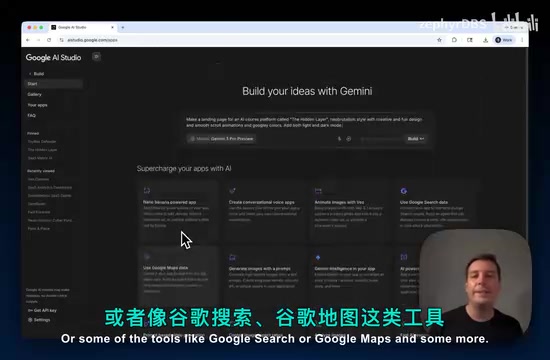
Interestingly, AI Studio also offers optional AI capability extensions — for example, integrating Nano Banana for image generation, VO for video generation, or tools like Google Search and Google Maps. This means the applications you build aren't just static pages but can possess genuine AI interaction capabilities.
Case 1: AI Course Platform Landing Page
Generating a Complete Page with a Single Prompt
The first case involves building a landing page for an AI course platform called "The Hidden Layer." The prompt described several key design requirements: Neo Brutalism style, creative and fun design, smooth scrolling animations, Google-style color scheme, and light/dark mode toggle.
About the Neo Brutalism Design Style: Neo Brutalism is a visual style that has emerged in web design in recent years, derived from the Brutalist aesthetic in architecture. Its core characteristics include thick black borders, high-contrast solid color blocks, deliberately exposed UI structures, irregular offset shadows, and anti-refined typography. This style gained popularity between 2022 and 2024 through the Figma community and indie developer circles, with representative products including Gumroad and early versions of Linear. It's a rebellion against the overly polished "glassmorphism" and "neumorphism" styles, emphasizing personality, readability, and visual impact. For AI code generation, Neo Brutalism is an interesting test case — it has clear visual rules for the model to learn, but requires striking the right balance between "intentionally rough" and "genuinely ugly," testing the model's depth of understanding of design language.
Gemini 3 Pro completed the entire page build in approximately 86 seconds. The generated page included a complete Hero section ("Unlock Your Hidden Potential"), a course showcase module ("Latest Drops"), a platform advantages section ("Why Learn with The Hidden Layer"), and an email subscription area. The dark mode toggle also worked flawlessly.
Annotation Mode: What You See Is What You Edit
AI Studio provides an extremely practical Annotation Mode feature. Users can directly select and annotate elements they want to modify on the preview interface, then describe the changes in natural language.
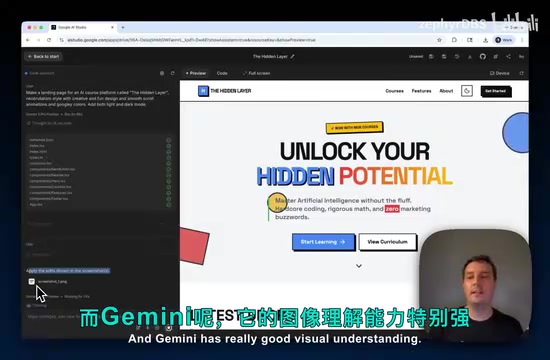
For example, in the demo, a button was directly selected and the input "change the button color to green" was entered. Leveraging its powerful visual understanding capabilities, Gemini accurately identified the code location corresponding to the annotation and completed the modification. This "what you see is what you edit" interaction approach dramatically reduces iteration costs — no understanding of code structure required.
The annotation mode relies on the cross-modal alignment capability of Vision-Language Models (VLMs) — the model needs to map the spatial region circled by the user on the screenshot back to the corresponding HTML/CSS code snippet, while understanding "this is a button.
Related articles
 Product Reviews
Qoder vs Cursor Real-World Comparison: Which $20/Month AI IDE Is Better?
Hands-on comparison of Qoder vs Cursor AI IDEs: Agent autonomy, human interaction count, and architecture decisions. Qoder needed only 2 interactions vs Cursor's 8.
 Product Reviews
Cursor Cloud Agent Demo: Eliminating Bottlenecks Across the Entire Software Development Lifecycle
Deep analysis of Cursor's Cloud Agent demo showing how cloud VMs, automated test artifacts, and a full-chain control plane systematically eliminate human bottlenecks across the software development lifecycle.
 Product Reviews
Cursor 3.0 Deep Dive: Multi-Agent Parallelism, Design Mode, and Best-of-N Model Comparison
Cursor 3.0 evolves from an AI coding assistant into an Agent fleet command center. Explore multi-agent parallelism, Design Mode, and Best-of-N model comparison.