Gemini Omni Video Generation In-Depth Review: Hands-On Comparison with Seedance 2.0
Gemini Omni Video Generation In-Depth …
Google's Omni video model vs. Seedance 2.0 hands-on comparison plus key I/O 2025 updates
This article provides an in-depth review of Google's Gemini Omni video generation model announced at I/O, comparing it hands-on with ByteDance's Seedance 2.0. Testing reveals Omni suffers from severe compute shortages and falls behind Seedance 2.0 in fur texture and camera motion control. The article also covers other major I/O updates including the Gemini 3.5 model upgrade, Google ecosystem integration, and new AI Agent tools.
Introduction
Google held its annual I/O conference on May 20, unveiling a series of major updates. Among them, the Gemini Omni video generation model drew the most attention from creators. AI video generation is one of the most challenging frontiers in generative AI — unlike image generation, video generation must maintain single-frame quality while ensuring temporal consistency between frames, avoiding artifacts like flickering and deformation. Current mainstream approaches to video generation include Diffusion Model-based methods and Transformer-based architectures. Google's Omni model and ByteDance's Seedance 2.0 each represent the latest advances along their respective technical paths.
This article combines key highlights from the I/O conference with an in-depth review of the Omni model, comparing it against the Chinese-developed Seedance 2.0 to help readers understand the real-world performance differences between these two AI video generation models.
Guide to Using the Gemini Omni Video Generation Model
Requirements and Pricing
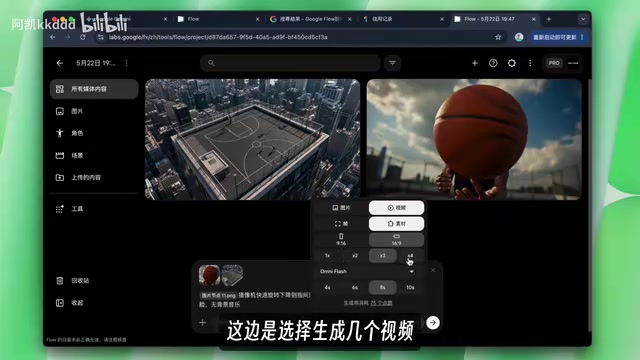
The Omni model requires a Gemini Pro subscription or higher. After subscribing to Pro, users receive 1,000 credits per month, with each 720p video costing approximately 20 credits. The platform used is Google's Flow (not the main Gemini interface), where users need to log in and create a project.
Flow is Google's AI creation platform built specifically for creative professionals, running independently from the main Gemini chat interface. Its design philosophy is similar to Adobe's Creative Cloud ecosystem, but centered on AI generation. Within Flow, you can upload images, use NobDunner to create consistent character identities (a built-in character consistency tool designed to solve the long-standing pain point of "the same character looking different across shots" in AI video generation), or create scenes. To generate a video, click "Select Video," set keyframes (note: the latest model does not support keyframes — only version 3.1 does), add assets, enter prompts, choose aspect ratio (portrait/landscape), and select the number of outputs. The "keyframe" concept here originates from traditional animation and video editing, referring to key frames that define the start and end states of an animation. The AI model automatically fills in the transition frames between keyframes (i.e., "interpolation").
Real-World Usage Experience
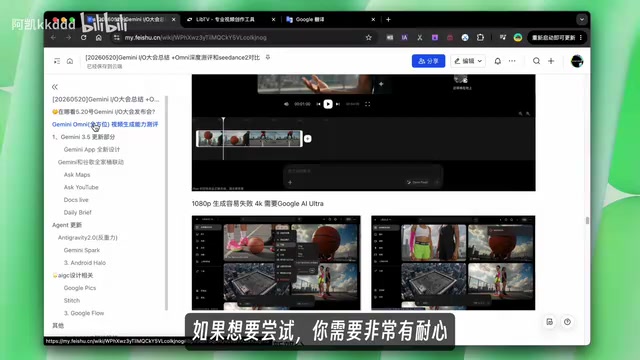
Interestingly, Omni currently suffers from severe compute capacity shortages. During testing, multiple attempts at different times (10 AM, 9 AM, 7 AM) were made, with successful video generation only at 7 AM. If you fail to get through the queue, it's recommended to wait a few hours or switch IP addresses. This is a significant drawback for creators with time-sensitive needs.
This compute bottleneck isn't unique to Google — it's a common challenge across the entire AI video generation industry. Video generation requires far more computation than text or image generation. Generating a 10-second 720p video can cost hundreds of times more compute than generating a single image at the same resolution, involving multiple bottlenecks including GPU memory usage, inference time, and concurrent processing capacity. Even Google, with its world-class compute infrastructure, experiences queuing when large numbers of users submit requests simultaneously. This also explains why video generation services commonly adopt credit-based pricing — using economic mechanisms to regulate compute allocation.
In-Depth Review: Omni vs. Seedance 2.0
Test 1: Fur Texture (Cat Generation)
In a comparison of cat videos generated from prompts, the Omni model produced fur that looked unnatural, with an overall stiff texture. Seedance 2.0, on the other hand, generated a much more natural-looking cat, with superior layering and light-shadow rendering of the fur. For fine detail rendering like animal fur, Seedance 2.0 has a clear advantage.
Fur rendering has long been a classic challenge in computer graphics due to the extremely high geometric complexity (a single cat may have tens of millions of individual hairs) and complex optical properties (semi-transparency, anisotropic scattering, etc.). For AI video generation models, the ability to accurately reproduce the fluffiness, sheen, and physical behavior of fur during motion serves as an important benchmark for evaluating a model's fine-detail generation capabilities.
Test 2: Start-End Frame Control (Basketball Scene)
This was a more complex test scenario: the first frame shows a full basketball court, the last frame shows a person spinning a basketball, and the camera is required to rapidly rotate and descend toward the basketball player.
Start-End Frame Control is one of the core metrics for evaluating a video generation model's controllability. In actual film production, directors and cinematographers need precise control over the opening and closing shots, with the camera movement in between expressing creative intent. For AI video models, the ability to automatically generate physically plausible, smoothly animated transition video from given start and end frame images directly determines the model's practical value in professional creative workflows. This capability requires the model to have deep understanding of 3D spatial relationships, camera motion trajectories, and object kinematics.
Omni's performance: Since Omni doesn't natively support start-end frame functionality, the tester simulated it using the edit feature to set the first and last frame images separately. The results showed that after the first frame was established, there was only a very brief rotation transition in the middle. The end frame was reached, but the overall camera movement felt weak.
Seedance 2.0's performance: The rotation process had a strong cinematic feel, with smooth and natural camera movement, accurately landing on the end frame showing the spinning basketball.
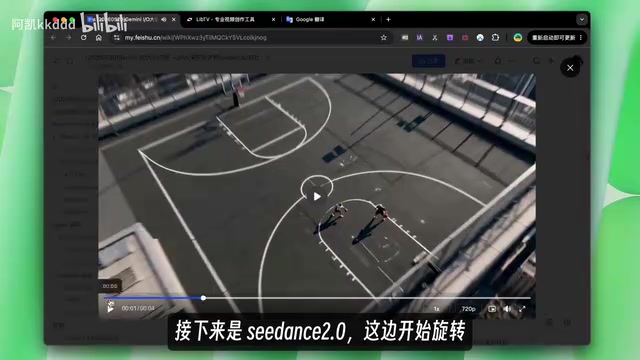
In terms of camera motion control, Seedance 2.0 clearly outperformed Omni, especially in the fluidity and cinematic quality of complex camera movements.
Test 3: Sketch-to-Video Generation (Fish Animation)
The test involved uploading a sketch of a fish, asking the model to reference the fish's appearance and swimming trajectory from the sketch, and generate a realistic-style video of the fish swimming in the ocean, leaping out of the water, and diving back in.
Both models performed poorly on this test:
- Omni: Arrow markers suddenly appeared in the frame (likely misinterpreting trajectory annotations in the sketch), though the fish's movement sequence was roughly correct
- Seedance 2.0: Added extra fish on its own; only one out of four generated results didn't include arrows
Both models showed significant shortcomings in understanding sketch intent, requiring multiple generations ("rolling the gacha") to get satisfactory results. Sketch-to-video generation is particularly difficult because the model must simultaneously accomplish two tasks: understanding the semantic information in the sketch (which lines represent object contours vs. motion trajectory annotations) and converting the simple sketch style into realistic visual content. This cross-domain transformation places extremely high demands on the model's multimodal understanding capabilities.
Review Summary
Overall, Omni currently suffers from insufficient compute capacity and difficult queuing, with a high barrier to entry and inconsistent user experience. In terms of generation quality, Seedance 2.0 performs better in fur texture and camera motion control. For creators in China, Seedance 2.0 is currently the more practical choice in both accessibility and output quality.
Google I/O Conference Core Updates at a Glance
Gemini 3.5 Model Upgrade
Google released two models — Gemini 3.5 and 3.5 Flash:
- Better value: Cheaper than version 3.1
- Enhanced coding ability: Coding benchmark scores improved by 6 percentage points over 3.1
- Knowledge update: World knowledge cutoff is January 2025
- Context window: Supports 1 million Tokens
- Important preview: 3.5 Pro will be released next month
A brief explanation of Tokens and context windows: A Token is the basic unit that large language models use to process text. A single Chinese character is typically encoded as 1–2 Tokens, while an English word is roughly 1–1.5 Tokens. The context window refers to the maximum number of Tokens a model can "remember" and process in a single conversation. One million Tokens means Gemini 3.5 can process approximately 500,000–700,000 Chinese characters at once — roughly the length of a full novel. This capability is significant for code review, long document analysis, and complex multi-turn conversations. For comparison, GPT-4 Turbo has a context window of 128K Tokens, and Claude 3.5 has 200K Tokens — Gemini maintains a substantial lead in this dimension.
The app design has been completely refreshed, with new "Quick Answer Mode" and "Comprehensive Help Mode," along with thinking level settings (Standard mode for most questions, Extended mode for complex problems but consuming more Tokens). The thinking level setting essentially lets users make a tradeoff between response speed and reasoning depth — in Extended mode, the model performs more steps of Chain of Thought reasoning, similar to how humans deliberate repeatedly when facing difficult problems. This yields more accurate answers at the cost of longer wait times and higher compute consumption.
Google Ecosystem Integration
- Google Maps integration: Built-in Gemini voice Q&A for direct queries like restaurant recommendations
- YouTube integration: Uses the entire YouTube library as a knowledge base (Ask YouTube feature, requires YouTube membership, launching next quarter)
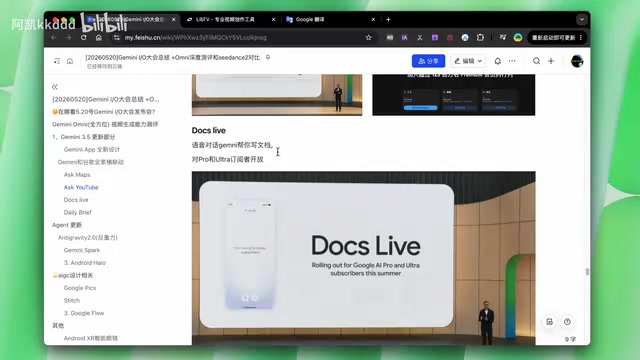
- Google Docs integration: Supports voice-to-document writing with automatic organization of spoken content
- Daily briefing: Automatically pushes a personalized daily briefing every morning
- Notes integration: Supports multimodal conversions like text-to-video
Google's strategy of using YouTube as a knowledge base is particularly noteworthy. With over 500 hours of video uploaded every minute, YouTube has accumulated the largest video knowledge repository in human history. Through Gemini's multimodal understanding capabilities, Google can transform this video content into searchable, queryable structured knowledge — a unique data advantage that other AI companies cannot easily replicate.
Agents and Developer Tools
- Standalone desktop app: The coding tool previously hosted on Cloud (similar to Cursor's anti-gravity feature) is now available as an independent desktop application
- TwinEye Spark: Google's version of an automated Agent that runs 24/7 on Google Cloud virtual machines, integrating with Gmail and other ecosystem services (requires Ultra subscription with a US IP)
- Hero (Android): A "cyber supervisor" app that lets you monitor AI work progress in real time
AI Agents are one of the hottest development directions in the AI industry for 2024–2025, representing a paradigm shift from "passively answering questions" to "proactively executing tasks." Unlike traditional chatbots, Agents can autonomously plan task steps, invoke external tools, interact with real environments, and adjust strategies based on feedback. TwinEye Spark is essentially a cloud VM-based autonomous Agent that runs 24/7, automatically handling emails, document organization, and other routine tasks. In this space, OpenAI's Operator, Anthropic's Computer Use, and various domestic Agent frameworks are all iterating rapidly in fierce competition. Google's unique advantage lies in its ecosystem — Agents can seamlessly invoke Gmail, Google Calendar, Google Drive, and other services to create truly closed-loop workflows.
Design and Creative Tools
- Google Pix: A poster creation product, currently requiring beta access application
- Stitch: Major product update with a new icon and extensive promotional videos
- Flow platform: Updated with various creative tools beyond video generation
Other Announcements
Google also showcased smart glasses, new chips, and Gemini's collaboration plans with the scientific research community.
Conclusion
This I/O conference demonstrated Google's ambition in building a full AI ecosystem, with significant progress in both model capabilities and product integration. However, in the specific arena of video generation, the Omni model is still in its early stages — compute bottlenecks and feature limitations constrain its practicality. In comparison, Seedance 2.0 is more competitive in both accessibility and generation quality, making it worth trying first for creators in China.
It's worth noting that the AI video generation field is in a period of rapid iteration. From Sora's stunning debut in early 2024 to today's flourishing landscape of competing models, the competitive dynamics in this space shift significantly every few months. For creators, staying informed about multiple platforms and flexibly choosing tools based on specific needs is likely wiser than betting on a single model.
Key Takeaways
- Gemini Omni video generation requires a Pro subscription, with each 720p video costing 20 credits, but suffers from severe compute shortages and queuing issues
- In comparative testing, Seedance 2.0 outperformed Omni in fur texture and camera motion control; both models performed poorly on sketch understanding
- Gemini 3.5 improves coding ability by 6%, supports a 1-million-Token context window (~500K–700K Chinese characters), with 3.5 Pro launching next month
- Deep Gemini integration across Google's ecosystem including Maps, YouTube, Docs, and Notes — YouTube as a knowledge base is a unique data advantage
- Google launched a standalone desktop coding tool, TwinEye Spark automated Agent, and Hero Android monitoring app, marking AI's paradigm shift from conversation to autonomous task execution
Related articles
 Product Reviews
Qoder vs Cursor Real-World Comparison: Which $20/Month AI IDE Is Better?
Hands-on comparison of Qoder vs Cursor AI IDEs: Agent autonomy, human interaction count, and architecture decisions. Qoder needed only 2 interactions vs Cursor's 8.
 Product Reviews
Cursor Cloud Agent Demo: Eliminating Bottlenecks Across the Entire Software Development Lifecycle
Deep analysis of Cursor's Cloud Agent demo showing how cloud VMs, automated test artifacts, and a full-chain control plane systematically eliminate human bottlenecks across the software development lifecycle.
 Product Reviews
Cursor 3.0 Deep Dive: Multi-Agent Parallelism, Design Mode, and Best-of-N Model Comparison
Cursor 3.0 evolves from an AI coding assistant into an Agent fleet command center. Explore multi-agent parallelism, Design Mode, and Best-of-N model comparison.