Google AI Studio Build 2.0 Deep Dive: A Comprehensive Breakdown of Five Core Upgrades

Google AI Studio Build gets a major upgrade with intelligent agents and full-stack support, becoming a free productivity coding platform.
Google AI Studio Build received a milestone upgrade, introducing the Anti-Gravity agent to solve long-conversation memory loss, migrating app generation to server-side for disconnect-resume and full-stack development, adding Firebase integration for automatic data persistence and authentication configuration, and expanding framework support to React, Next.js, and Angular. Completely free, it has transformed from a toy tool into a genuinely productive AI coding platform.
Google recently rolled out a milestone update to AI Studio Build, introducing the Anti-Gravity agent, Firebase integration, full-stack application support, and a series of other major features. As a completely free AI coding platform, this update transforms it from a "fun toy to tinker with" into a genuinely productive development platform. Based on a month of in-depth beta testing, this article provides a detailed breakdown of the core changes in this upgrade.
Anti-Gravity Agent: A Quantum Leap for AI Coding Assistants
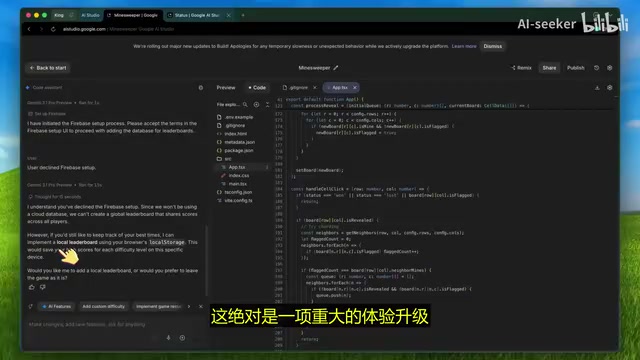
The most significant change in this update is the introduction of the Anti-Gravity agent. In the previous version, AI Studio Build's code assistant was usable but fairly limited in capability—especially in long conversation scenarios where the assistant would quickly lose context, forget the application architecture, and make repetitive mistakes, resulting in a subpar experience.
Now, all instructions given to the code assistant are handled by the Anti-Gravity agent. This is a far more capable coding agent that leverages technology similar to the Anti-Gravity AI editor.
Technical Background: Agent Architecture and Context Management The Anti-Gravity agent represents a new-generation architectural paradigm in the AI coding agent space. Traditional code assistants (like early Copilot) were essentially single-prompt completion tools lacking cross-turn state management capabilities. The agent architecture introduces a plan-execute-reflect loop mechanism that can decompose complex tasks into multiple sub-steps and dynamically adjust strategies during execution. Context window management is the core challenge—as conversation turns increase, token consumption skyrockets, and early solutions often employed simple truncation, causing the AI to lose critical architectural information. The Anti-Gravity agent employs a more refined context compression and retrieval strategy, retaining the most critical code structure information within a limited context window. This is the fundamental reason it significantly outperforms its predecessor in long-session scenarios.
After a month of real-world testing, its context handling capabilities have improved dramatically: conversation history management has been comprehensively optimized, and handling large codebases is now much more effortless. This means you can continuously iterate within a longer development session without worrying about the AI assistant "losing its memory."
Server-Side Generation and Full-Stack Support: Farewell to the Client-Only Era
Another change that seems minor but has far-reaching implications: application generation has moved from the browser to the server side.
This change solves a long-standing pain point—previously, if you accidentally closed a browser tab or lost your internet connection during the app building process, all progress would be completely lost.
Technical Background: From Stateless to Stateful Architecture Migration Moving application generation from client to server is essentially a transition from a stateless architecture to a stateful architecture. The biggest limitation of browser-side execution is that its lifecycle is tightly bound to the tab—once the page closes, the JavaScript runtime is destroyed, and all in-memory state vanishes with it. Server-side generation hosts build tasks in persistent cloud containers, pushing real-time progress back to the client via WebSocket or Server-Sent Events (SSE). This architecture not only solves the disconnect-and-resume problem but also provides the necessary server environment for full-stack applications—Node.js runtime, file system access, database connections, and other capabilities that are impossible in a pure browser environment. This is also the technical prerequisite for supporting Next.js SSR and real-time multiplayer interactions.
Now everything runs on the server side. You can safely close your browser, even switch to a different device and reopen it—the application state remains perfectly intact, whether it's still building or already complete.
More importantly, the brand-new full-stack runtime means AI Studio Build is no longer limited to client-only applications. You can now build complete full-stack applications with backend logic, and even implement real-time multiplayer interactions—something that was virtually impossible before.
Multi-Framework Support: React, Next.js, and Angular All Covered
On the framework front, AI Studio Build has expanded from React-only support to three major mainstream frameworks:
- React: Original support. A pure UI library with one-way data flow and virtual DOM, offering high flexibility and ideal for projects that need freedom to compose their own tech stack.
- Next.js: Newly added. A full-stack framework built on React, supporting SSR (Server-Side Rendering), SSG (Static Site Generation), and ISR (Incremental Static Regeneration). SEO-friendly and suitable for content-driven websites and applications with first-paint performance requirements.
- Angular: Most recently added. A Google-led enterprise-grade full-featured framework with built-in dependency injection and TypeScript strong typing support, offering clear architectural standardization advantages in large team collaboration scenarios.
Different projects have different technical requirements, and having more framework choices is undoubtedly a good thing. You can freely switch in the advanced settings menu, making the most appropriate technology choice based on project scale, team background, and performance needs—rather than being locked into a single tech stack by the platform.
Firebase Integration: A Game-Changing Breakthrough for Data Persistence
If the previous updates were "icing on the cake," then Firebase integration is the most exciting feature of this entire upgrade.
Before this, all data in AI Studio Build was stored temporarily—once you refreshed the page, the data would disappear. This severely limited its value in real application development. Now, you can directly instruct the AI agent to configure a database for your application. For example, you simply issue a command like:
"Build me a to-do app and use a Firestore database"
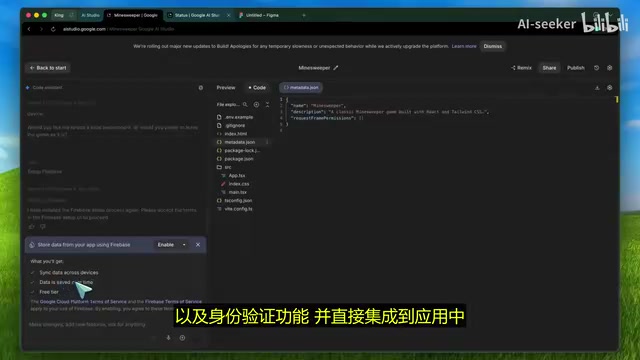
The AI agent will automatically set up a Firebase database, configure authentication, and integrate it directly into the application. The entire process requires zero manual configuration—the system pops up a configuration card that handles everything for you.
Technical Background: Core Capabilities of Firebase and Firestore Firebase is Google's Backend as a Service (BaaS) platform, and Firestore is its core NoSQL document database. Unlike traditional relational databases, Firestore uses a collection-document hierarchical structure to store data and natively supports real-time listeners (onSnapshot)—clients can subscribe to data changes, and when the database updates, all subscribers receive immediate push notifications without polling. This makes it particularly well-suited for building collaboration tools, real-time chat, and multiplayer interaction scenarios. Firebase Authentication provides out-of-the-box identity verification services supporting Google, GitHub, email/password, and other login methods, deeply integrated with Firestore's Security Rules for fine-grained control over each user's read/write permissions. The AI agent automatically completing this configuration means developers don't need to deeply understand Firebase SDK initialization flows or security rule syntax, dramatically lowering the barrier to full-stack application development.
Seamless Support for Existing Projects
This feature also works with existing projects. If you've previously developed an application in AI Studio Build and now want to add data persistence, simply tell the AI agent: "Add Firebase database and authentication to this app," and it will automatically complete all the integration work.
With Firestore database, your data persists across different sessions; with authentication, each user gets their own independent data space. For developing real-world usable applications, this is a truly game-changing advancement.
Practical Improvements at the Tooling Level
Beyond the core features above, the platform also brings several practical improvements at the development tooling level:
-
Secrets Management Panel: A dedicated secrets management panel has been added for properly managing API keys, avoiding hardcoding them into frontend code, and significantly improving security.
Why is key security so important? Hardcoding API keys into frontend code is one of the most common security anti-patterns in web development. Since browser-side JavaScript code is completely transparent to users (viewable directly through developer tools), any keys embedded within face exposure risk. Once obtained by attackers, this could lead to API quota abuse, data breaches, or even massive bills. The proper approach is to store keys in server-side environment variables and proxy third-party service calls through backend APIs. AI Studio Build's secrets management panel builds this best practice into the platform level, storing keys in encrypted form on the server side—particularly important for applications that need to call third-party APIs like OpenAI, Stripe, etc.
-
Asset System Upgrade: The image upload workflow is more streamlined, and storage quotas for static assets have been increased—especially suitable for projects that need to handle large volumes of images or media files.
-
Storage Method Change: Applications are no longer shared via Google Drive but stored directly within the AI Studio platform, making sharing and collaboration simpler and more reliable.
Known Limitations
Despite the massive scope of upgrades, there are still some limitations to be aware of:
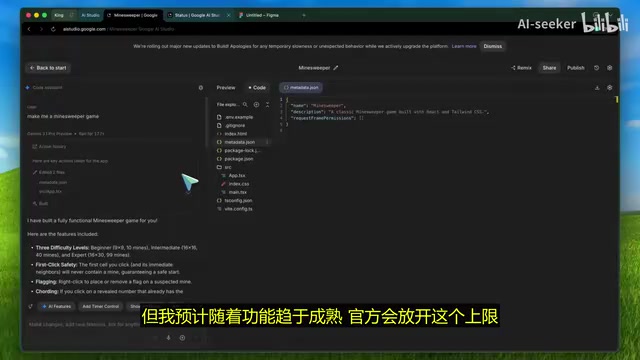
- Build Speed: The agent may take slightly longer than before when creating or updating applications. The team has stated they are optimizing latency issues.
- Active App Limit: Currently, the number of active applications is limited to 5. This cap is expected to be raised in future updates.
- Deployment Limitations: Applications using frameworks like Express are not yet supported for deployment to Cloud Run.
- Authentication Delay: Applications published via Cloud Run cannot use login functionality by default—you need to manually add the domain to the allowlist. Authentication settings may also take about a minute to take effect after configuration.
Conclusion: A Powerful Transformation for a Free AI Coding Platform
Google AI Studio Build 2.0's upgrade brings together the Anti-Gravity agent, full-stack support, server-side generation, multi-framework options, and Firebase integration into a highly competitive AI coding platform. Most crucially—all of this is completely free.
From hands-on experience, it has grown from an "underrated vibe coding tool" into a productivity platform capable of competing with industry heavyweights. If you tried it before and found it lacking, now is the perfect time to give it another shot. Google has finally invested the effort this product deserves, and the results are truly remarkable.
Key Takeaways
- The Anti-Gravity agent employs a plan-execute-reflect agent architecture, dramatically improving context handling and solving the pain point of AI assistants "losing memory" in long conversation scenarios.
- Application generation has moved to server-side execution, supporting disconnect-and-resume through persistent cloud containers while providing the necessary server environment for full-stack development and real-time multiplayer interactions.
- Firebase integration enables data persistence and authentication. Firestore's real-time listener capability is naturally suited for collaboration scenarios, and the AI agent can automatically complete database configuration without manual intervention.
- Framework support has expanded from React alone to three major mainstream frameworks—React, Next.js, and Angular—covering the full spectrum from lightweight SPAs to enterprise-grade applications.
- The platform is completely free to use, though current limitations include an active app cap (5) and some deployment restrictions.
Related articles
 Product Reviews
Qoder vs Cursor Real-World Comparison: Which $20/Month AI IDE Is Better?
Hands-on comparison of Qoder vs Cursor AI IDEs: Agent autonomy, human interaction count, and architecture decisions. Qoder needed only 2 interactions vs Cursor's 8.
 Product Reviews
Cursor Cloud Agent Demo: Eliminating Bottlenecks Across the Entire Software Development Lifecycle
Deep analysis of Cursor's Cloud Agent demo showing how cloud VMs, automated test artifacts, and a full-chain control plane systematically eliminate human bottlenecks across the software development lifecycle.
 Product Reviews
Cursor 3.0 Deep Dive: Multi-Agent Parallelism, Design Mode, and Best-of-N Model Comparison
Cursor 3.0 evolves from an AI coding assistant into an Agent fleet command center. Explore multi-agent parallelism, Design Mode, and Best-of-N model comparison.