Google Antigravity IDE Deep Dive: Can This Free AI Coding Tool Replace Cursor?
Google launches free AI coding tool Antigravity IDE, challenging Cursor with an agent-first approach.
After acquiring the Windsurf team for $2.4 billion, Google launched Antigravity IDE powered by the Gemini 3 Pro model. The tool features an "agent-first" development paradigm supporting parallel multi-agent task processing, shifting the developer's role from coder to architect. Completely free during public beta, it directly challenges paid tools like Cursor. Built on VS Code's open-source foundation with minimal migration costs, though real-world testing reveals issues with agent stalling and inaccurate verification.
Google recently launched its brand-new AI coding tool — Antigravity IDE — alongside the latest Gemini 3 model. Built by the original Windsurf team, this "agent-first" development platform directly challenges paid tools like Cursor with its free pricing strategy, sparking widespread attention in the developer community. This article provides an in-depth analysis covering product background, core features, hands-on experience, and more.
The Story Behind a $2.4 Billion Acquisition: Antigravity's Origins
To understand Antigravity, you first need to know its backstory. This isn't some casually incubated side project from within Google — it's a carefully orchestrated strategic move.
Google spent $2.4 billion to acquire Windsurf — previously one of the most advanced AI coding tools on the market. This acquisition didn't just secure technology licensing; more importantly, it brought Windsurf's CEO Varun Mohan and approximately 40 core engineers into the fold. In other words, Google saw what Windsurf was building, decided "we want that," and bought the entire team.
Windsurf (formerly Codeium) was an AI coding startup founded in 2022 that rose rapidly thanks to its deeply integrated code generation and context understanding capabilities. Before the acquisition, Windsurf had already accumulated over a million developer users. Its core technical advantage lay in semantic understanding of entire code repositories — not just comprehending the currently open file, but perceiving the project's overall architecture, dependency relationships, and coding style. The AI coding tools market experienced explosive growth in 2024-2025, with major players including GitHub Copilot (Microsoft/OpenAI), Cursor (Anysphere), Windsurf, and various open-source solutions. Google previously had relatively weak presence in this space, mainly relying on Gemini's integration within Google Cloud and lacking a standalone desktop-level IDE product — which explains why Google was willing to pay such a premium for this acquisition.
This "acquisition-as-product" strategy isn't uncommon in the tech industry, but the $2.4 billion price tag speaks volumes about Google's commitment to the AI coding space. Antigravity is essentially a deep fusion of Windsurf's technology with Google's Gemini model capabilities.
Core Feature Analysis: More Than Just Code Completion
The Agent-First Development Paradigm
Antigravity's most fundamental conceptual shift is this — developers are no longer people who write code line by line, but rather architects and project managers. AI agents handle the actual planning, coding, and testing work, while developers are responsible for review and guidance.
The technical foundation for this paradigm shift stems from the qualitative leap in large language model capabilities from "completion" to "reasoning and execution." Traditional AI coding assistants (like early GitHub Copilot) were essentially autocomplete tools that predicted the next code segment based on current context. AI Agents, however, possess capabilities for goal decomposition, tool invocation, environment interaction, and self-correction. This paradigm draws from project management principles in software engineering — breaking large tasks into subtasks, assigning them to different execution units, and ensuring quality through feedback loops. Key technologies supporting this paradigm include the ReAct (Reasoning + Acting) framework and Tool-Augmented Generation, enabling AI to invoke terminal commands, browsers, file systems, and other external tools during reasoning, rather than merely outputting text.
The platform runs on the latest Gemini 3 Pro model, delivering impressive results on key benchmarks:
- SWE-Bench: 76.2% (measuring ability to solve real GitHub issues)
- Terminal Bench 2.0: 54.2% (measuring end-to-end complex development task completion)
SWE-Bench is an authoritative benchmark created by a Princeton University research team that extracts real Issues and corresponding Pull Requests from actual GitHub open-source projects, requiring AI systems to automatically generate correct code fixes given a problem description. A score of 76.2% means the model can correctly solve more than three-quarters of real software engineering problems — a level that was unimaginable just a year ago, when the best systems in early 2024 scored only around 30%. Terminal Bench 2.0 focuses more on end-to-end development capability assessment, including environment configuration, multi-step reasoning, file operations, and complete development workflows. The 54.2% score indicates significant room for improvement on complex multi-step tasks, but already demonstrates practical value.
These numbers mean Antigravity has the fundamental capability to handle real development scenarios, rather than remaining at demo level.
Agent Manager: A Control Center for Parallel Multi-Tasking
The Agent Manager is a key feature that distinguishes Antigravity from AI coding tools like Cursor. It provides a task control panel that supports simultaneously managing multiple AI agents working on different tasks.
Here's a practical scenario: when developing a large application, you can have one agent handle the frontend interface while another simultaneously builds the backend API, all while monitoring every agent's progress from a unified interface. Each agent generates a live plan before execution — a detailed task breakdown that developers can review beforehand, approving if satisfied or requesting modifications if not.
Dual-Mode Switching and Browser Verification
The platform offers two working modes:
- Planning Mode: Takes longer but uses deeper reasoning to solve complex tasks
- Fast-Paced Mode: Uses faster agents to complete simple tasks, prioritizing efficiency
Another noteworthy feature is browser control — agents can directly open Chrome, interact with web applications during development, and verify their output through screenshots or even screen recordings. This represents a significant efficiency boost for frontend development debugging workflows.
Antigravity's Free Strategy: Targeting Cursor's Pricing Weakness
Antigravity is currently in public beta and completely free to use, with usage limits resetting every 5 hours. This means developers can use one of the most powerful AI models available for programming at zero cost.
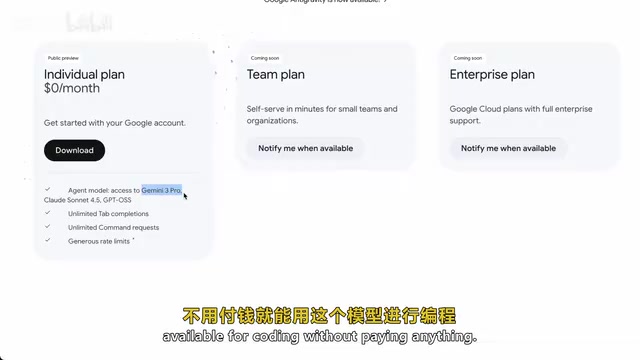
By comparison, Cursor's Pro plan costs $20 per month. While the free strategy may only be a temporary arrangement during the testing period, it undoubtedly puts enormous pressure on competitors.
Google's free strategy isn't simply "burning cash to acquire users" — it's deeply tied to their overall cloud computing and AI ecosystem strategy. By attracting developers to use Gemini models through a free IDE, Google can cultivate dependency on the Gemini API and ultimately funnel traffic toward Google Cloud Platform's paid services. This is consistent with Google's historical playbook — Chrome's free distribution solidified its search entry point, and Android's free open-source model secured mobile advertising revenue. For startups like Cursor, the $20 monthly subscription is their core revenue source, while Google can treat the IDE as a customer acquisition tool rather than a profit center. This asymmetric competitive landscape poses an existential threat to independent developer tool companies. Google has sufficient resources and motivation to rapidly capture market share through free or low-cost strategies — an advantage that startups simply cannot match.
Hands-On Experience: A Mix of Surprises and Shortcomings
Extremely Low Barrier to Entry
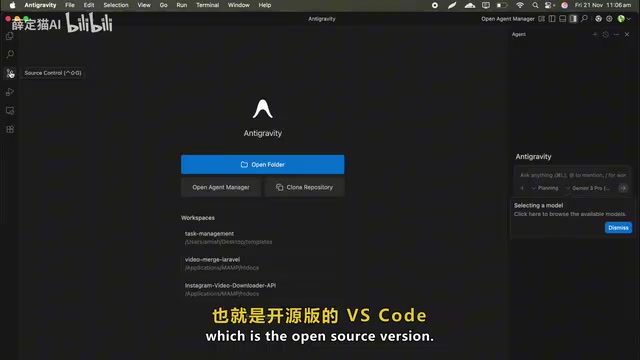
Built on the open-source version of VS Code (Code OSS), Antigravity's interface feels very familiar to most developers. Code OSS is the open-source base version of Microsoft's Visual Studio Code, licensed under MIT. Microsoft's released VS Code adds telemetry, proprietary extension marketplace access, and some closed-source components on top of Code OSS. Many third-party IDEs (including Cursor, Windsurf, and now Antigravity) choose to build on Code OSS because it allows them to inherit VS Code's massive extension ecosystem and familiar interface while freely adding custom features without Microsoft licensing restrictions. This strategy dramatically reduces user migration costs — developers don't need to relearn keyboard shortcuts or reconfigure their work environment; they only need to adapt to the new AI features.
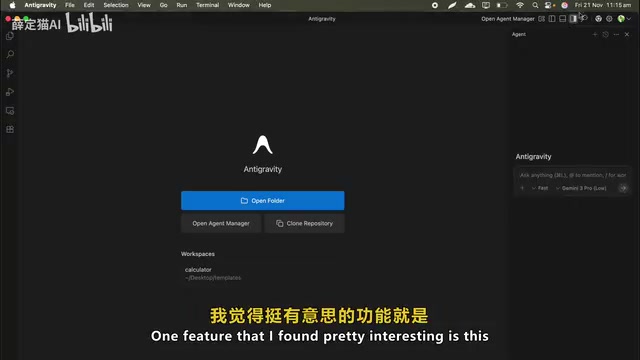
File explorer on the left, editor in the center, agent panel on the right — the layout is intuitive and well-organized. It supports importing settings, themes, and keyboard shortcuts from VS Code or Cursor, making migration costs virtually zero.
The platform also fully integrates Git support, allowing you to commit changes and manage Pull Requests directly within the IDE, and VS Code's entire extension ecosystem is largely compatible.
Real-World Testing Results
In actual testing, the Antigravity experience can be described as "mixed":
When things go smoothly: A single prompt can have the agent scaffold a complete application with correct file structure and functionality. For example, asking it to create a "calculator webpage with a clean, modern interface" — the agent automatically plans the HTML structure, CSS styling, and JavaScript functionality, begins coding immediately upon approval, and provides a live preview through the browser. Follow-up modifications (like adding dark mode) feel very natural, like having a conversation.

When things don't go smoothly: The agent occasionally gets stuck, or generated code doesn't run as expected. Sometimes, to save tokens, responses are overly brief, leading to subpar results. More interestingly, the browser verification feature sometimes reports "everything looks good" when there are obvious UI issues or errors — meaning you can't fully rely on automated verification, and manual review remains essential.
A Balanced Perspective: Is Antigravity Revolutionary or Iterative?
Some say Antigravity is a "knockoff of Windsurf," and there's some truth to that — after all, the core technology indeed comes from the Windsurf team. But a more accurate understanding is that Google combined mature technology with its most powerful AI model and lowered the barrier to entry through a free strategy.
From an industry trend perspective, the "agent-first" development paradigm that Antigravity represents is indeed an important direction. Upgrading AI from a code completion assistant to a collaborative partner capable of independently planning and executing tasks doesn't just change the tool's form — it's redefining the developer's role.
However, at this stage, it's advisable to treat AI agents as a "junior developer" who needs guidance — they can handle a large volume of foundational work, but critical decisions and quality control still require human developers.
Conclusion and Recommendations
Antigravity currently supports Mac, Windows, and Linux across all platforms, with a simple and straightforward installation process. Whether or not you're already using Cursor or other AI coding tools, it's worth downloading to experience this new agent-centric development paradigm. Start with simple tasks — like having it build a basic webpage or utility script — familiarize yourself with the agent's planning and execution workflow, then gradually attempt more complex projects.
After all, during the free testing period, the cost of experimentation is zero.
Related articles
 Product Reviews
Qoder vs Cursor Real-World Comparison: Which $20/Month AI IDE Is Better?
Hands-on comparison of Qoder vs Cursor AI IDEs: Agent autonomy, human interaction count, and architecture decisions. Qoder needed only 2 interactions vs Cursor's 8.
 Product Reviews
Cursor Cloud Agent Demo: Eliminating Bottlenecks Across the Entire Software Development Lifecycle
Deep analysis of Cursor's Cloud Agent demo showing how cloud VMs, automated test artifacts, and a full-chain control plane systematically eliminate human bottlenecks across the software development lifecycle.
 Product Reviews
Cursor 3.0 Deep Dive: Multi-Agent Parallelism, Design Mode, and Best-of-N Model Comparison
Cursor 3.0 evolves from an AI coding assistant into an Agent fleet command center. Explore multi-agent parallelism, Design Mode, and Best-of-N model comparison.