Google Stitch 2.0 Deep Dive: A Free AI Frontend Code Generation Tool Powered by Gemini

Google Stitch 2.0 launches with Gemini 3.0 Pro, enabling a complete AI workflow from design to deployable code.
Google released Stitch 2.0, a major update introducing Gemini 3.0 Pro as its reasoning engine to significantly improve UI code generation quality through chain-of-thought processing. The new version adds a variant generation panel for multi-dimensional design exploration, connects to AI Studio and Jules for direct React+TypeScript project generation, and includes multi-screen prototyping, predictive heatmaps, and a command palette—building a complete free pipeline from natural language to deployable code.
Google recently released a major update to Stitch 2.0, bringing a quantum leap to this AI-powered UI design and frontend code generation tool. Leveraging the reasoning capabilities of Gemini 3.0 Pro, Stitch is no longer just a simple design tool—it has become a complete workflow starting point from design to code, from prototype to product—and it's currently completely free.
Gemini 3.0 Pro Integration: Significantly Improved Code Quality
The most fundamental change in Stitch 2.0 is the introduction of Gemini 3.0 Pro as the default reasoning engine. Gemini 3.0 Pro is a multimodal large language model from Google DeepMind, representing the flagship reasoning-tier version of the Gemini series. Unlike earlier generative models that directly output results, reasoning models perform "Chain-of-Thought" processing before generating the final answer, breaking complex tasks into multiple intermediate steps for sequential derivation. In the UI code generation context, this means the model first analyzes the page's information hierarchy, component relationships, and responsive breakpoint requirements before outputting HTML/CSS structures, rather than directly mapping text descriptions to code snippets. This "think before you write" mechanism significantly reduces common issues like layout misalignment and chaotic component nesting—the fundamental reason behind Stitch 2.0's code quality leap.
Previously, Stitch's generation capabilities were quite limited. Now, the platform performs "reasoning" before generating code, producing frontend code with more logical structure and precise layouts.
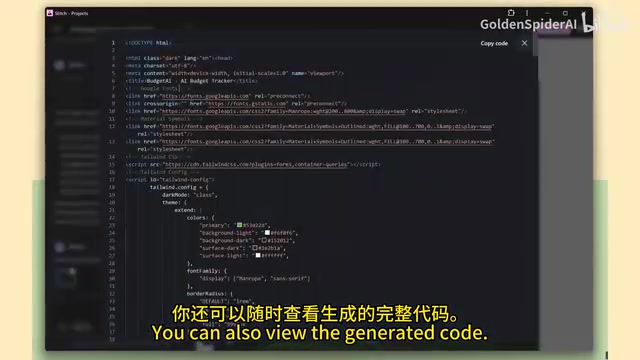
Users simply input a text prompt, and Stitch generates a complete responsive page. The default output format is HTML + Tailwind CSS—Tailwind CSS is a "utility-first CSS" framework whose core philosophy is composing styles directly on HTML tags using a large number of fine-grained utility classes, such as class="flex items-center gap-4 bg-blue-500 rounded-lg" to fully define a blue rounded flex container. This approach is extremely AI-friendly for code generation: the model doesn't need to maintain context for external CSS files since all styling information is inline within the DOM structure, dramatically reducing the difficulty of generating consistent code. Additionally, Tailwind's built-in responsive prefixes (like md:, lg:) allow AI to express cross-breakpoint layout logic in a structured manner—another key reason Stitch defaults to this format. After generation, you can directly download a complete source code folder containing UI screenshots and HTML files. In testing, the generated SaaS landing pages rendered beautifully in the browser, with visual reasoning and DOM structure advantages particularly evident in complex interfaces (such as dashboards and multi-screen flows).
Notably, Stitch 2.0 now supports switching between different generation modes within the same project—Fast Mode (quick export to Figma), Gemini 3.0 Pro (focused on reasoning quality), and NanoBanana Pro-powered Redesign mode—something impossible in previous versions.
Diverse Variant Generation: From Fine-Tuning to Bold Innovation
Stitch 2.0 introduces a powerful variant generation panel that makes design exploration more flexible than ever.
Users can set the number of design alternatives to generate and control how conservative or experimental the output is through a "creativity range" slider—from Refine, Medium, to YOLO (go wild), covering everything from subtle optimization to bold innovation.
Additionally, you can fine-tune the dimensions of variation: layout direction, color scheme, color balance, and more can all be adjusted independently. Users can even add custom instructions, such as enforcing a specific design style, font, or text content. This level of granular control means designers can obtain dozens of high-quality design alternatives in minutes, rather than repeatedly making manual adjustments.
Fully Connected Export Ecosystem: AI Studio + Jules
Stitch 2.0 has built a complete workflow ecosystem around the export process—arguably the most practically valuable part of this update.
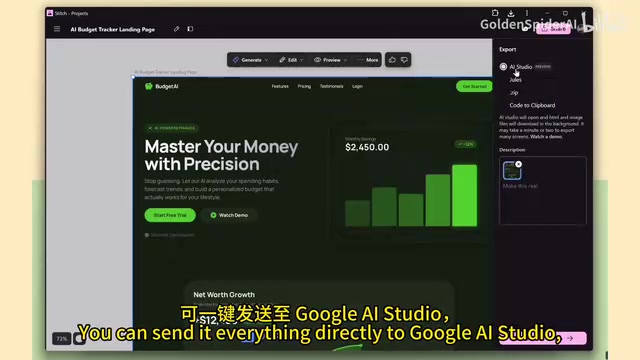
Direct Connection to Google AI Studio
When you select "Build with AI Studio," Stitch automatically opens AI Studio and downloads HTML and image assets in the background. AI Studio is essentially a Gemini API interaction and prototyping platform for developers, but in this workflow it serves as a "code architecture upgrader"—restructuring single-file HTML into multi-file projects that conform to engineering standards. This conversion process involves component splitting (identifying HTML fragments as independent React components), type definition generation (adding TypeScript interfaces for Props and state), and folder structure planning (standard directory organization like components/, pages/, hooks/). AI Studio transforms the single HTML file into a structured React + TypeScript codebase—a combination that has become the de facto standard for modern frontend engineering, offering stronger maintainability, team collaboration friendliness, and IDE intellisense support. Even more impressively, AI Studio sometimes automatically enhances the UI—for example, automatically adding an annual billing option to a pricing page.

Jules Autonomous Coding Assistant
Jules is Google's asynchronous AI coding agent (Agentic Coding Assistant). Unlike real-time completion tools like GitHub Copilot, Jules operates in a "task-level" mode: users submit a high-level requirement description, and Jules autonomously plans the implementation path, breaks down subtasks, invokes the toolchain, and submits code changes—all executing asynchronously in the background without requiring continuous user supervision. Jules deeply integrates with GitHub, capable of creating branches directly on code repositories, submitting PRs, and attaching detailed execution logs for developer review. In the Stitch workflow, Jules serves as the last-mile executor that "activates" static UI prototypes into real runnable projects—users simply connect their code repository, add a brief description, and let Jules handle the specific implementation steps, bridging the gap between design mockups and production codebases. This dramatically lowers the barrier for developers who want to quickly transition from static UI to a real codebase.
Of course, traditional export methods are still available: ZIP download, code copy to clipboard, and direct export to Figma, accommodating different workflow needs.
Prototype Interaction and Real-Time Editing Capabilities
Multi-Screen Prototype Linking
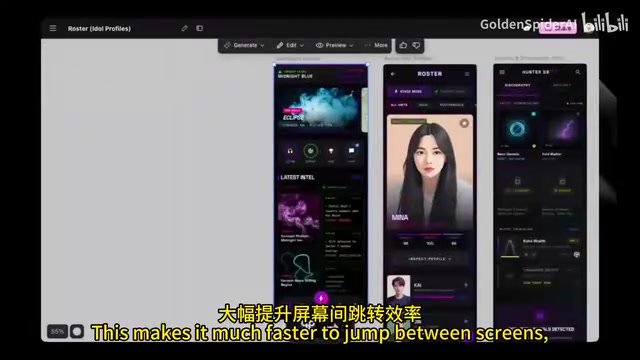
Stitch 2.0's new Prototypes feature allows users to link multiple screens into interactive flows. You can click through screen transitions, test transition effects, and validate the overall user journey—all within Stitch, without exporting any files. This enables teams to identify UX issues before entering the development phase, significantly reducing rework costs.
Reference Designs and Smart Annotations
By uploading images or entering website URLs, users can use existing designs as references to regenerate UI in Stitch. Testing shows that generated layouts closely match reference websites. Combined with NanoBanana-powered annotation functionality, users can mark areas directly on design mockups to specify adding, removing, or adjusting specific layout elements.
Efficiency Tools: Command Palette and Heatmaps
Command Palette for Quick Actions
For power users, Stitch 2.0 includes a command palette feature. Press Command/Ctrl + K to trigger actions by typing text directly, without navigating through nested menus. For large or multi-screen projects, this significantly improves operational efficiency.
Predictive Heatmaps for Visual Hierarchy Validation
Stitch 2.0 introduces a predictive heatmap feature—a UX analysis technique based on computer vision and cognitive science models that simulates eye attention distribution without requiring real user participation. The underlying technology typically employs saliency detection models that analyze visual features in images such as contrast, color saturation, edge density, and text size to predict where users' gaze will land on a page—industry research shows such models can achieve over 90% correlation with real eye-tracking data. Embedding this functionality within a design tool means designers can instantly verify critical visual hierarchy questions like "Is the above-the-fold CTA prominent enough?" and "Is the navigation hierarchy clear?" at zero user testing cost, compressing what traditionally required days of user research into seconds-level feedback. This feature is accessible directly from the generation menu, helping designers confirm visual hierarchy validity before writing any code.
Summary: A Complete Pipeline from Creativity to Deployable Code
The scope of Stitch 2.0's update far exceeds expectations. It's no longer a simple "text-to-UI" tool—it has built a complete pipeline from creative ideation to deployable code:
- Input: Text prompts, sketches, screenshots, reference websites
- Processing: Gemini 3.0 Pro reasoning + variant generation + heatmap validation
- Output: Figma design files, React/TypeScript code, runnable projects
Stitch is currently completely free to use, making it an extremely attractive option for indie developers and small teams. Of course, AI-generated code still requires human review and optimization for production environments, but as a starting point for rapid prototyping and MVP development, Stitch 2.0 has demonstrated considerable practical value.
As Google continues investing in its AI programming toolchain (Stitch + AI Studio + Jules), a full-stack development workflow centered on AI is gradually taking shape—starting from natural language descriptions, generating prototypes through reasoning models, and then landing as engineering-grade codebases through autonomous coding agents. The human intervention points along this entire pipeline are being systematically compressed. For frontend developers and designers, now is a great time to start exploring these tools.
Related articles
 Product Reviews
Qoder vs Cursor Real-World Comparison: Which $20/Month AI IDE Is Better?
Hands-on comparison of Qoder vs Cursor AI IDEs: Agent autonomy, human interaction count, and architecture decisions. Qoder needed only 2 interactions vs Cursor's 8.
 Product Reviews
Cursor Cloud Agent Demo: Eliminating Bottlenecks Across the Entire Software Development Lifecycle
Deep analysis of Cursor's Cloud Agent demo showing how cloud VMs, automated test artifacts, and a full-chain control plane systematically eliminate human bottlenecks across the software development lifecycle.
 Product Reviews
Cursor 3.0 Deep Dive: Multi-Agent Parallelism, Design Mode, and Best-of-N Model Comparison
Cursor 3.0 evolves from an AI coding assistant into an Agent fleet command center. Explore multi-agent parallelism, Design Mode, and Best-of-N model comparison.