Hlopix AI Free Canvas Experience: A Complete Game Art Workflow from UI Generation to Sprite Slicing
Hlopix AI Free Canvas Experience: A Co…
Hlopix AI Free Canvas provides indie game developers with an all-in-one AI art production toolchain.
Hlopix AI's "Free Canvas" feature is purpose-built for game art, integrating core capabilities including UI interface generation, automatic sprite sheet splitting, concept art, level generation, and poster and Logo design. Users can generate UI interfaces with one click by simply entering a game genre and reference image, then automatically slice them into transparent PNG assets, forming a complete closed loop from generation to usable assets that dramatically lowers the art production barrier and costs for indie game developers.
For indie game developers, creating art assets is often the most time-consuming and frustrating part of the process. From UI interface design to character concept art, from scene concepts to poster creation, every step demands significant professional skills and time investment.
The art cost dilemma in indie game development has persisted for years. The indie game ecosystem has experienced explosive growth over the past decade, with Steam seeing over ten thousand indie titles published annually. However, the cost of producing art assets remains one of the core bottlenecks constraining independent developers. According to game industry research data, art production typically accounts for 40% to 60% of the total development budget for a mid-scale 2D indie game. For solo developers or small teams of two or three, outsourcing art is often prohibitively expensive, while self-learning art skills requires years of practice. This structural contradiction has created strong market demand for AI-assisted art tools, and is the fundamental reason why AI image generation tools like Midjourney and Stable Diffusion have rapidly gained popularity in game development communities.
Hlopix AI (Hallopix AI) launched its "Free Canvas" feature to address exactly this pain point — it's purpose-built for game art, covering the complete workflow from concept art to asset slicing.
Free Canvas: An All-in-One AI Workstation for Game Art
Hlopix AI itself is a feature-rich AI image generation software supporting basic capabilities like text-to-image and image-to-image generation, capable of creating characters, UI, scenes, posters, and various other game assets. The "Free Canvas" feature represents a major upgrade on top of this foundation, integrating multiple game art-related AI capabilities into a unified canvas interface.
The evolution of AI image tools in game development has gone through several distinct phases. Early GAN (Generative Adversarial Network) technology was primarily used for texture generation and style transfer, with limited practical utility. The 2022 breakthrough in diffusion model technology, represented by Stable Diffusion, dramatically improved the quality and controllability of AI-generated images, and the game development community quickly saw an explosion of game-style-specific models based on LoRA fine-tuning. Subsequently, commercial products like Midjourney and Adobe Firefly further lowered the barrier to entry. However, a clear gap still exists between these general-purpose AI image tools and game development workflows — generated images often require extensive post-processing before they can actually be used in an engine. The "verticalized, workflow-integrated" direction represented by Hlopix AI Free Canvas is precisely an attempt to bridge this gap, embedding AI capabilities directly into the game art production pipeline.
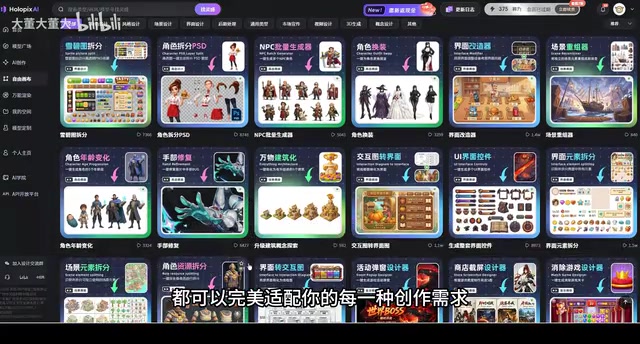
The core functional modules covered by Free Canvas include:
- UI Interface Space Generation: One-click generation of complete game UI interfaces
- Sprite Sheet Splitting: Automatically splitting sprite atlases into individual transparent PNG assets
- Concept Art and Scene Design: AI-assisted character and scene design
- Level Generation: AI-powered level visual design
- Poster Design and Logo Generation: Automatically generating promotional materials based on game visuals
- Batch Action Generation: Efficiently producing character action sequences
Whether you're a professional artist or a creative beginner with zero foundation, this toolchain aims to lower the barrier to game art production.
UI Interface Space: Generate a Complete UI Set by Entering Your Game Genre
One of the most eye-catching features in Free Canvas is the "UI Interface Space." Its workflow is remarkably simple: users only need to fill in the game genre (such as simulation management, RPG, etc.), select the necessary interface space types, and import a reference image to generate multiple UI interface designs with one click.
It's worth noting that game UI design is itself a highly specialized subfield that differs significantly from regular application UI design. Game UI must not only fulfill the functional requirements of information delivery but also deeply integrate with the game's world-building, art style, and interaction logic. For example, RPG game UIs often need to convey the texture of medieval parchment or magical crystals, while sci-fi shooters require a sleek holographic projection aesthetic. Professional game UI designers need to master prototyping tools like Figma and Adobe XD, while also being familiar with game engine UI frameworks (such as Unity's UGUI or Godot's Control node system), and understanding technical details like resolution adaptation and 9-slice stretching. These compound skill requirements make game UI design one of the hardest aspects for indie developers to handle on their own, and precisely where AI intervention can deliver the most value.
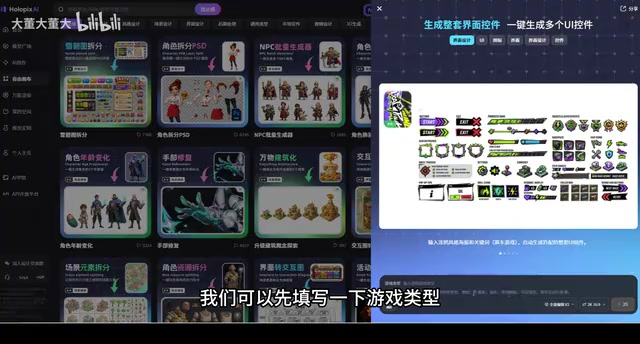
Looking at the actual generation results, the quality of AI-produced UI interfaces is quite impressive — the overall layout is reasonable, the visual style is consistent, and it can basically meet the initial needs of game art. If you're not satisfied with a particular result, you can regenerate repeatedly until you find a suitable design, and export the image directly once generation is complete.
This feature is particularly valuable for indie game developers. The traditional UI design workflow requires artists to individually draw interface elements and repeatedly adjust layouts, taking days or even weeks. With AI-generated game UI, you can at least quickly obtain a usable design foundation, then fine-tune and optimize from there, dramatically shortening the time from zero to one.
Sprite Sheet Splitting: Say Goodbye to Tedious Manual Slicing
If UI generation solves the "from nothing to something" problem, then the "Sprite Sheet Splitting" feature addresses the critical step of "from something to usable."
Sprite Sheet is a long-standing graphics optimization technique in game development, originating from the early arcade game era. Its core concept is combining multiple independent image elements (such as character animation frames, UI buttons, icons, etc.) into a single large image to reduce the number of Draw Calls the game engine makes during rendering, thereby improving performance. In mainstream game engines like Unity, Cocos2d, and Godot, sprite sheets remain the standard asset format for 2D game development today. In traditional workflows, artists need to use tools like TexturePacker or Photoshop to manually pack and split texture atlases — a process that is not only time-consuming but also prone to in-game display issues caused by coordinate offsets or improper alpha channel handling.
In game development, the UI interfaces produced by artists are typically complete images, and developers need to individually cut out each button, icon, panel, and other element to generate independent transparent PNG files before they can be used in a game engine. This process is called "slicing" — a tedious and time-consuming task.
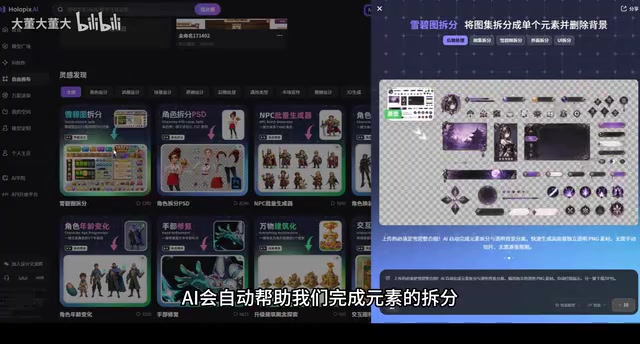
Hlopix AI's sprite sheet splitting feature can automatically complete this process. Users simply upload a UI interface image (such as the one just generated by AI), and the AI will automatically identify the various elements within it, splitting them into independent transparent PNG game assets. After splitting, users can click "Ungroup" to freely drag, delete, or adjust each component.
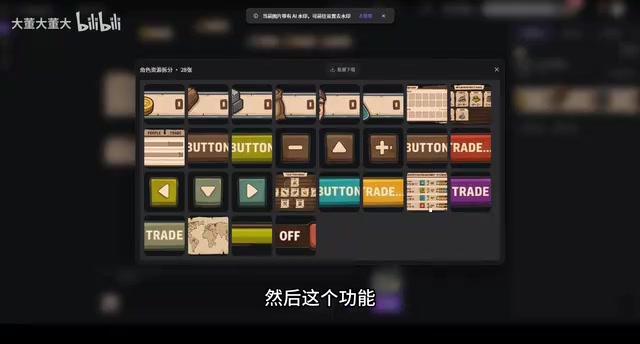
All split UI components can be viewed in the right panel, with support for individual or batch downloads. This feature forms a perfect closed loop with UI generation — first use AI to generate a complete interface set, then use AI to automatically slice it. The entire process requires virtually no manual work in Photoshop or similar tools, making it extremely friendly for developers with limited art skills.
Posters and Logos: AI Assistants for Game Marketing Materials
Beyond core art production features, Hlopix AI also provides auxiliary tools for game marketing and promotion.
The poster design feature can automatically generate game promotional posters based on game visuals, helping developers showcase their work on social media, app stores, and other channels. For indie developers lacking graphic design experience, this means no longer needing to spend extra effort (or budget) creating promotional materials.
The game Logo design feature goes even further, designing custom Logos for games based on game screenshots, striving to maintain consistency with the game's overall style. While AI-generated Logos may still need further refinement before official release, their value as rapid prototypes and inspiration references is undeniable.
What This Means for Indie Game Developers
From a product positioning perspective, Hlopix AI Free Canvas targets
Related articles
 Product Reviews
Qoder vs Cursor Real-World Comparison: Which $20/Month AI IDE Is Better?
Hands-on comparison of Qoder vs Cursor AI IDEs: Agent autonomy, human interaction count, and architecture decisions. Qoder needed only 2 interactions vs Cursor's 8.
 Product Reviews
Cursor Cloud Agent Demo: Eliminating Bottlenecks Across the Entire Software Development Lifecycle
Deep analysis of Cursor's Cloud Agent demo showing how cloud VMs, automated test artifacts, and a full-chain control plane systematically eliminate human bottlenecks across the software development lifecycle.
 Product Reviews
Cursor 3.0 Deep Dive: Multi-Agent Parallelism, Design Mode, and Best-of-N Model Comparison
Cursor 3.0 evolves from an AI coding assistant into an Agent fleet command center. Explore multi-agent parallelism, Design Mode, and Best-of-N model comparison.