How Codex Tracked Down a Bug: From Error Message to Open Source Fix
How Codex Tracked Down a Bug: From Err…
Codex traced a Chrome extension sleep bug to its source code and auto-generated a report driving an open-source fix.
A user facing a recurring "extension not connected" error handed the problem to OpenAI Codex. Through systematic debugging and source code analysis, Codex identified the root cause: Chrome's Service Worker sleep mechanism left the extension unable to reconnect after waking. Beyond providing a temporary fix, Codex auto-generated a professional bug report for the open-source project, ultimately prompting developers to work on a fix — demonstrating AI's full-loop capability as a technical collaborator.
A Recurring, Annoying Bug
Many developers have been there: a tool works great overall, but one small issue keeps coming back. Reinstalling fixes it temporarily, only for it to return shortly after.
Recently, a user ran into exactly this situation — a browser extension he used daily would throw the same error almost every time he opened it: "Extension not connected." Reinstalling would fix it momentarily, but by the next day the error was back. After several rounds of this, he decided to hand the problem over to OpenAI's Codex.
What happened next far exceeded his expectations.
Codex's Debugging Process: From Symptoms to Root Cause
After receiving the error information, Codex didn't simply suggest "try restarting." Instead, it launched a systematic debugging workflow.
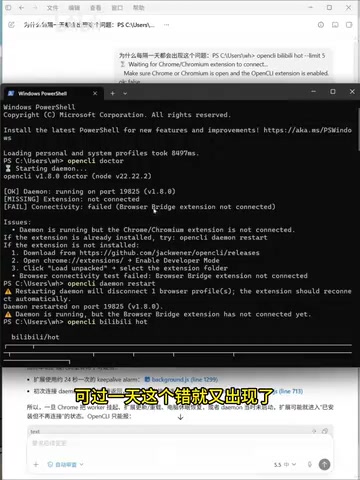
Step 1: Check Local Runtime Status
Codex first checked the extension's runtime status on the user's machine and quickly confirmed one fact: restarting alone wouldn't solve the problem. This meant the issue wasn't with the user's setup or environment, but something deeper.
Step 2: Dive Into the Extension's Source Code
After ruling out local environment issues, Codex took a critical step — it went straight to reading the extension's source code. This is something most regular users and even some developers wouldn't do, but Codex automatically made the leap from "investigating symptoms" to "analyzing code."
OpenAI Codex is a large language model based on the GPT architecture, fine-tuned specifically for code tasks, and serves as the underlying technology behind GitHub Copilot. Unlike general-purpose language models, Codex was trained on massive amounts of open-source code from GitHub, giving it cross-language capabilities in code reading, comprehension, and generation. In debugging scenarios, Codex can correlate error messages with code logic, performing a process similar to "static analysis" — inferring execution paths and potential defects by reading source code without actually running it. This capability makes it particularly effective for bugs where symptoms are obvious but root causes are hidden, allowing it to cut through the user interface straight to the code-level essence of the problem.
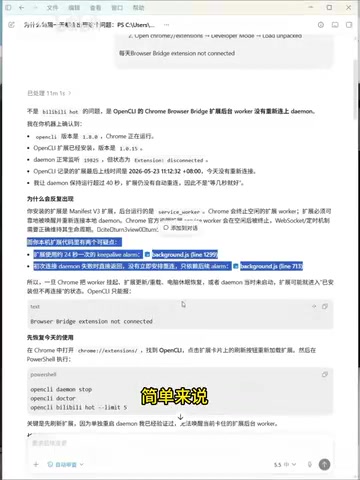
Step 3: Pinpoint the Real Cause
Through source code analysis, Codex identified the root cause:
Chrome puts inactive extensions into a dormant state, and this extension lacked the logic to re-establish its connection after being woken up, leaving it stuck in a "not connected" state.
In short, this was a classic lifecycle management defect — the extension didn't properly handle Chrome's Service Worker sleep and wake mechanism.
To understand the context, you need to know about a major change in Chrome's extension specification. Chrome's Manifest V3 is a major version upgrade to the browser extension development spec, enforced starting in 2023. One of its most significant changes was replacing the long-running Background Page with a Service Worker. A Service Worker is essentially an event-driven, short-lived script that the browser actively terminates after roughly 30 seconds of inactivity to save memory and CPU. This is fundamentally different from the old Background Page model of "always in memory, always responsive." For extension developers, this means all logic relying on persistent connections (like WebSocket or long-polling) must be redesigned, with state and connections re-initialized in Service Worker lifecycle events such as onStartup and onInstalled. This is a common pitfall after migrating to Manifest V3 — Chrome aggressively sleeps background scripts to save resources, but if an extension doesn't re-initialize connections in its wake events, you get this "awake but not really" state.
Beyond Problem-Solving: Auto-Generating a Bug Report
After identifying the cause, Codex provided a temporary workaround for immediate use. But what was truly unexpected was that Codex didn't stop there.
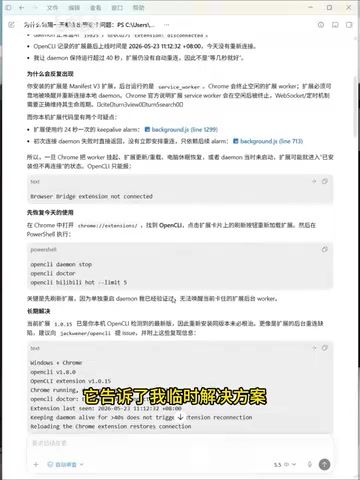
It proactively suggested that the user submit a Bug report to the open-source project — and rather than just saying "you could file an issue," it drafted a complete Bug Report, including:
- Problem description: Extension fails to auto-reconnect after Chrome puts it to sleep
- Reproduction steps: Detailed trigger conditions
- Root cause analysis: Code-level problem identification
- Suggested fix direction: Add reconnection logic in wake events
It's worth noting that in open-source communities, a high-quality Bug Report is key to getting issues fixed. On GitHub Issues — the most widely used defect tracking platform — communities typically expect reports to include: a clear problem description, reliably reproducible steps, environment details (OS, browser version, extension version), a comparison of expected vs. actual behavior, and relevant logs or screenshots. In practice, however, many users give up on filing reports because they're unfamiliar with these conventions, unsure whether the issue is actually a bug, or face language barriers. As a result, valuable defect information stays on the user's end and never feeds back into project quality. Codex auto-generating a complete report that meets community standards bridges exactly this gap — the user simply needs to submit it to the project's GitHub Issues page.
Follow-Up: The Bug Is Being Fixed
The story doesn't end there. Some time later, the user asked Codex to check on the bug's progress and learned that a developer was already working on a fix.
This means Codex completed a full closed loop:
- Discover the problem → User reports an error
- Investigate the cause → From runtime status to source code analysis
- Identify the root cause → Chrome sleep mechanism + extension not handling reconnection
- Temporary workaround → Keep the user unblocked
- Drive the fix → Generate a professional Bug report and submit to the open-source community
- Track progress → Confirm someone is working on the fix
From one user's personal frustration to driving code improvements in an open-source project, Codex's role in this process went far beyond that of a "Q&A assistant" — it acted more like a technical collaborator with engineering thinking.
Takeaways
This case gives us several points worth reflecting on:
First, AI's debugging depth is improving. Codex doesn't stop at search-engine-style "keyword matching" — it proactively reads source code, understands code logic, and pinpoints deep-rooted causes.
Second, AI can serve as a bridge to open-source communities. Many users who encounter bugs in open-source tools choose to live with them or give up because they don't know how to write an Issue or aren't sure the problem isn't on their end. AI can lower this barrier, channeling more valuable feedback into open-source communities.
Third, complete context matters. This user's approach is worth emulating — he gave Codex the full error information rather than just describing a vague symptom. Providing AI with sufficient context is the prerequisite for getting high-quality answers.
Next time you encounter a recurring technical problem that you just can't solve, try handing the complete error information and context to an AI and let it dig to the bottom. It might not only solve your problem but also help make the entire project better.
Related articles
 Product Reviews
Qoder vs Cursor Real-World Comparison: Which $20/Month AI IDE Is Better?
Hands-on comparison of Qoder vs Cursor AI IDEs: Agent autonomy, human interaction count, and architecture decisions. Qoder needed only 2 interactions vs Cursor's 8.
 Product Reviews
Cursor Cloud Agent Demo: Eliminating Bottlenecks Across the Entire Software Development Lifecycle
Deep analysis of Cursor's Cloud Agent demo showing how cloud VMs, automated test artifacts, and a full-chain control plane systematically eliminate human bottlenecks across the software development lifecycle.
 Product Reviews
Cursor 3.0 Deep Dive: Multi-Agent Parallelism, Design Mode, and Best-of-N Model Comparison
Cursor 3.0 evolves from an AI coding assistant into an Agent fleet command center. Explore multi-agent parallelism, Design Mode, and Best-of-N model comparison.