Kiro IDE In-Depth Review: Can Amazon's AI Editor Replace Cursor?
Kiro IDE In-Depth Review: Can Amazon's…
Amazon's AI editor Kiro has a visionary approach but lacks the stability to replace Cursor yet.
Amazon's AI editor Kiro features a Spec-driven structured development workflow that transforms vague requirements into systematic development plans through a three-step process: requirements → design → tasks — conceptually superior to Cursor's conversational programming. However, after a week of intensive use, Kiro reveals frequent bugs and low efficiency from sequential task execution. The author's overall ranking is Claude Code > Kiro > Cursor, recommending developers try its innovative workflow for free but hold off on adopting it as a primary tool.
Amazon's AI editor Kiro generated widespread buzz in the developer community the moment it launched. As a product from the company of former world's richest man Jeff Bezos, Kiro comes with built-in hype — but how does it actually perform? After a week of intensive use, this article delivers an honest review of Kiro across three dimensions: workflow design, real-world performance, and competitor comparison.
Kiro's Core Highlight: Spec-Driven Structured Development
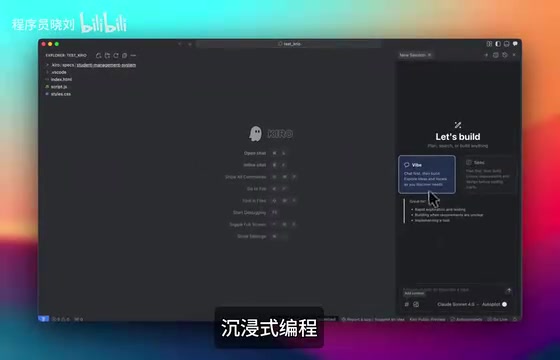
The biggest difference between Kiro and AI editors like Cursor is that Kiro offers a structured development workflow rather than simple conversational programming. When you open Kiro's interface, you'll find it clean and minimal, primarily offering two working modes:
Industry Context: Spec-Driven Development (Specification-Driven Development) isn't an entirely new concept — it evolved from the "specification-first" philosophy in software engineering. In traditional software engineering, requirements documents (PRDs), system design documents (SDDs), and Work Breakdown Structures are standard processes for large projects. However, after the rise of AI programming tools, this workflow was often replaced by "conversational programming," leading to AI-generated code that lacks overall architectural consistency. Kiro's Spec mode essentially combines traditional software engineering best practices with LLM capabilities, aiming to solve common problems in "Vibe Coding" such as code fragmentation and architectural chaos.
Vibe Mode: Immersive Conversational Programming
The first mode is Vibe mode, similar to the AI conversational programming experience we're already familiar with. You can ask any question directly in the chat box, with image input support, currently powered by the Claude 4.0 model under the hood. This mode is ideal for quick questions and small-scale code modifications.
Claude Model Background: The Claude 4.0 model powering Kiro was developed by Anthropic. Anthropic was founded in 2021 by Dario Amodei, former VP of Research at OpenAI, with a focus on AI safety research. The Claude model family is renowned for its long-context processing capabilities (supporting a 200K token context window) and code generation quality, which is why multiple AI programming tools (including Cursor, GitHub Copilot, etc.) have chosen Claude as their underlying engine. Notably, Amazon AWS is a major strategic investor in Anthropic, with cumulative investments exceeding $4 billion — which explains why Kiro has priority access to deep Claude model integration.
Spec Mode: Document-Driven Systematic Development
The second mode is Spec mode (document mode), and this is where Kiro truly differentiates itself from Cursor and other AI editors. In this mode, the development process is broken down into three clear stages:
- Requirement (Requirements Document): You simply describe your need in one sentence — for example, "Create a student management system" — and Kiro automatically generates a complete requirements document
- Design (Design Document): Based on the requirements document, it further generates the system's architectural design
- Task (Implementation Tasks): The design is broken down into concrete, executable tasks that are implemented step by step
This means you don't need to write extensive rule files like you would in Cursor. Through this three-step approach, Kiro automatically transforms vague requirements into a structured development plan.
Hands-On Demo: From One Sentence to a Complete Project
Let's use creating a "logistics management system" as an example to see how Kiro's Spec mode actually performs.
In Spec mode, entering a simple description like "Create a logistics management system," Kiro first breaks down the input and generates a complete design document. The document covers the system's functional modules, data structures, interface designs, and more.
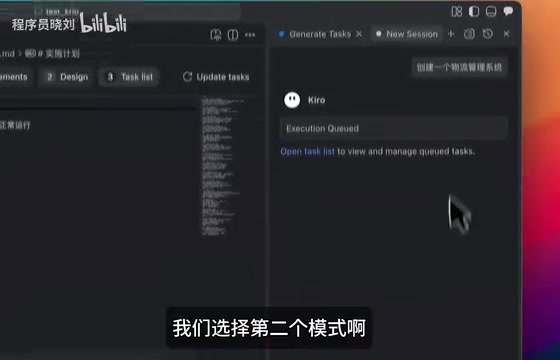
After generating the design document, you can progressively move to steps two and three. During the task execution phase, you can flexibly add new tasks, refresh the task list, or even adjust existing tasks.
Characteristics of Task Execution
You might not have noticed, but Kiro's task execution is sequential — it processes tasks one after another in a queue, unlike Cursor which supports parallel execution. This means the next task only begins after the previous one is completed.
Technical Differences Between Sequential and Parallel Execution: Sequential Execution and Parallel Execution represent two fundamentally different task scheduling strategies in AI programming tools. The advantage of sequential execution is that dependencies between tasks are clear — the output of one step can serve as precise input for the next, reducing context conflicts. The downside is that total time equals the sum of all task durations. Parallel execution allows multiple independent tasks to run simultaneously, significantly reducing overall completion time. Cursor's Agent mode leverages this mechanism to maintain high efficiency when working with large codebases. For Kiro's Spec mode, since the requirement → design → task stages have strong dependencies, sequential execution is reasonable at the macro workflow level. However, for sub-task execution within a single stage, the sequential mechanism does create an efficiency bottleneck.
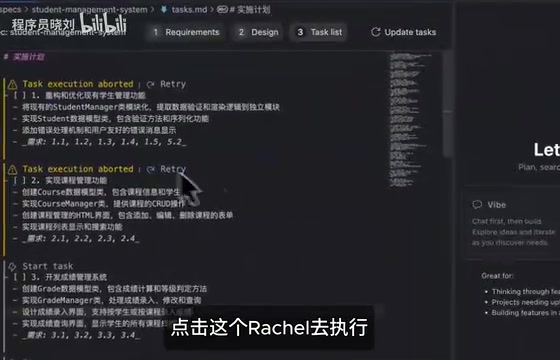
During execution, there's an interesting little detail in Kiro's interface: a small eye icon next to the code area that sways left and right. While the design is novel, it tends to be distracting in actual use — a minor gripe worth mentioning.
Kiro's Main Issues: Stability and Execution Efficiency
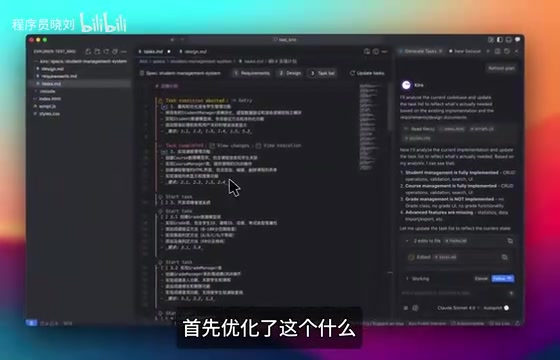
Despite Kiro's appealing design philosophy, real-world usage reveals quite a few problems, and it's too early to say it can replace Cursor.
Stability Concerns
Kiro is currently nicknamed the "Bug King" by the developer community. While many bloggers gave positive reviews in their initial assessments, a week of deep usage reveals that various bugs and unstable behavior significantly impact development efficiency. As a newly launched product, this is somewhat understandable, but for developers looking to adopt it as their primary tool, it's not mature enough yet.
Low Sequential Execution Efficiency
The sequential task execution mechanism mentioned earlier noticeably slows things down when handling complex projects. In comparison, Cursor's parallel execution has a clear efficiency advantage, which is one of the main reasons Kiro feels less smooth than Cursor in day-to-day development.
Quality Gap in Generated Output
While Kiro generates better-looking frontend pages than Cursor, there's still a noticeable gap compared to Claude Code. A student management system generated from a single sentence can run, but it's limited to a static local project with limited complexity.
AI Editor Comparison: Kiro vs Cursor vs Claude Code
After a week of intensive experience, combined with my usage of other AI programming tools, here are my personal rankings:
AI Editor Competitive Landscape: The AI programming editor market is currently in a period of intense competition. Cursor, developed by Anysphere, reached a $2.5 billion valuation in 2024 with over 360,000 monthly active paying users, making it the highest market-share AI-native editor. Claude Code is a command-line AI programming tool launched by Anthropic in 2025, focused on deep code understanding and complex task execution, positioned as a professional developer tool. GitHub Copilot, representing the Microsoft/OpenAI camp, has the broadest user base thanks to the VS Code ecosystem. Amazon previously had CodeWhisperer (now renamed Amazon Q Developer), and Kiro's launch marks Amazon's strategic upgrade in the AI programming tool space from "assistant plugin" to "complete development environment," directly targeting Cursor's core market.
| Rank | Tool | Assessment |
|---|---|---|
| 🥇 First | Claude Code | Strongest overall capabilities, highest code quality |
| 🥈 Second | Kiro | Excellent structured workflow design, but too many bugs |
| 🥉 Third | Cursor | Mature and stable, high parallel execution efficiency |
It's important to emphasize that this ranking is quite subjective. Kiro ranks above Cursor primarily because its Spec mode's design philosophy is genuinely ahead of the curve — systematizing and documenting the process from requirements to implementation is extremely valuable for large-scale project development. However, from a stability and daily usability perspective, Cursor remains the more reliable choice.
Conclusion and Recommendations: Who Is Kiro For?
Kiro represents a new direction for AI editors: not just helping you write code, but helping you systematically complete the entire development workflow starting from requirements analysis. This Spec-driven development approach reduces the cognitive burden on developers during the project planning phase.
However, Kiro is still in its early stages — bugs are frequent and execution efficiency needs optimization. I'd recommend developers sign up to try it (currently free) and experience its Spec mode workflow, but hold off on making it your primary development tool for now. As Amazon continues to invest resources in iterating on the product, Kiro's future is worth watching.
Key Takeaways
- Kiro offers two modes — Vibe and Spec — where Spec mode enables structured development through a three-step process: requirements → design → tasks
- Kiro's task execution is sequential, making it less efficient than Cursor's parallel execution mechanism
- After a week of deep usage, numerous bugs were discovered, earning it the community nickname "Bug King" — stability needs improvement
- Personal ranking: Claude Code > Kiro > Cursor, though Kiro's advantage lies mainly in its design philosophy rather than current usability
- Kiro is currently free to use and worth trying for its innovative Spec workflow, but is not yet recommended as a primary development tool
Related articles
 Product Reviews
Qoder vs Cursor Real-World Comparison: Which $20/Month AI IDE Is Better?
Hands-on comparison of Qoder vs Cursor AI IDEs: Agent autonomy, human interaction count, and architecture decisions. Qoder needed only 2 interactions vs Cursor's 8.
 Product Reviews
Cursor Cloud Agent Demo: Eliminating Bottlenecks Across the Entire Software Development Lifecycle
Deep analysis of Cursor's Cloud Agent demo showing how cloud VMs, automated test artifacts, and a full-chain control plane systematically eliminate human bottlenecks across the software development lifecycle.
 Product Reviews
Cursor 3.0 Deep Dive: Multi-Agent Parallelism, Design Mode, and Best-of-N Model Comparison
Cursor 3.0 evolves from an AI coding assistant into an Agent fleet command center. Explore multi-agent parallelism, Design Mode, and Best-of-N model comparison.