Kiro vs Cursor Hands-On: Can Amazon's AI Coding Tool Hold Its Own?
Kiro vs Cursor Hands-On: Can Amazon's …
Kiro vs Cursor hands-on test: the gap is small, but Cursor edges ahead slightly.
A hands-on comparison of Amazon's Kiro and Cursor through a student management system development task shows the gap between the two is smaller than expected — both completed basic features successfully. Cursor holds a slight edge in UI cleanliness, code quality, and detail handling, while Kiro shows a tendency to cut corners. Both tools produced code with minor bugs requiring manual debugging, but the entry of tech giants is reshaping the AI coding tool competitive landscape.
A New Challenger in AI Coding Tools
In the AI coding tool space, Cursor has long been the recognized benchmark. AI coding assistants are development support systems built on large language models (LLMs), with core capabilities derived from models trained on massive code corpora that can understand natural language requirements and generate corresponding code. Cursor is deeply built on the VSCode architecture, integrating cutting-edge models like Claude and GPT-4, while Amazon's Kiro leverages AWS cloud infrastructure and the Amazon Bedrock platform, with access to multiple foundation models including Claude and Titan.
Previously, when domestic Chinese AI coding tools were compared against Cursor, the gap was often quite noticeable. But with the emergence of new overseas tools like Amazon's Kiro, the competitive landscape is shifting. Notably, the essence of this competition is a battle for the developer workflow — following GitHub Copilot (Microsoft/OpenAI) and Gemini Code Assist (Google), Amazon's entry marks the official beginning of a new era where tech giants are fully competing in the AI coding tool market.
This test uses identical prompts and the same time constraints, pitting Kiro and Cursor head-to-head on the same task to see whether this new challenger can truly compete.
Test Task: Student Management System Development
The test task required both AI coding tools to generate a complete student management system, including basic features like student information management and course management. Both tools used Auto mode (automatic model selection) under identical conditions. Auto mode means the tool automatically selects the most suitable underlying model based on task complexity — a standard capability in today's mainstream AI coding tools.
A student management system is a classic exercise project in software engineering, covering CRUD (Create, Read, Update, Delete) operations, relational data modeling, and front-end/back-end interaction — core development capabilities that make it a common benchmark for AI coding tools. This test focused on whether AI tools could generate a basically usable system prototype in a single pass with zero human intervention — the current core battleground for AI coding tools as they evolve from code completion to full application generation.
Kiro's Performance: Solid but Conservative
Kiro's student management system ran on port 8011. Overall, the system included basic functional modules such as student lists, course management, and data refresh.
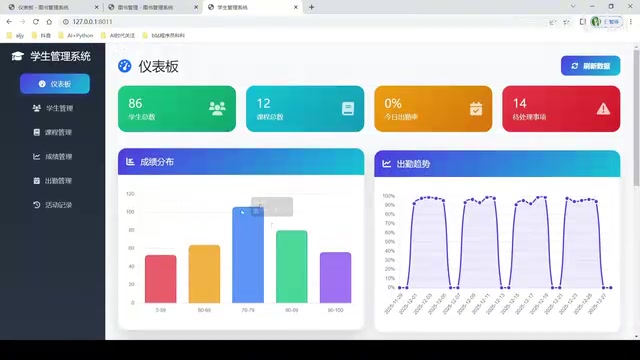
However, Kiro gave off a "by-the-book" impression — all features were implemented, but nothing stood out. The interface used a mishmash of colors, resulting in a mediocre visual experience. More notably, there was a telling detail: Kiro seemed to have a tendency to "cut corners" — it could do better, but didn't bother completing every detail.
This phenomenon has technical roots in AI code generation. Large language models suffer from so-called "attention decay" when generating long text — as context length increases, the model's adherence to earlier instructions decreases, causing the completeness and detail handling of later code to fall short compared to earlier sections. Additionally, since the model's training objective is to maximize prediction accuracy rather than code completeness, it may tend to generate code that "looks reasonable" but omits edge case handling. This feeling of "I could do it but I won't finish it for you" can increase the workload for subsequent adjustments in real-world development.
Cursor's Performance: Clean and Polished, Slightly Ahead
Cursor's system ran on port 8012. From the first visual impression, Cursor's interface was noticeably cleaner and more polished.
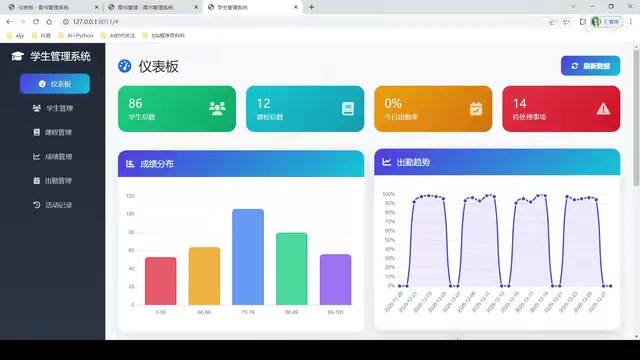
The background colors were more unified, and the overall layout conveyed a clean, professional feel. Feature-wise, Cursor also implemented core modules including student management, course management, and data refresh, with pagination working properly. Through more refined system Prompt Engineering and multi-round self-checking mechanisms, Cursor mitigated the model's attention decay problem to some extent — a key reason for its superior detail handling. From a code quality perspective, Cursor's output was "cleaner," with better UI design consistency.
Feature Detail Comparison: Both Have Flaws
When diving deeper into feature details, both AI coding tools revealed some minor issues.
Data Operation Testing
Using Cursor as an example, the following operations were tested:
- Refresh: Worked normally; both student and course data could be refreshed
- Pagination: Logic was correct, but the effect was not obvious due to limited test data
- Edit: Student information could be modified normally
- Delete: Delete operations executed correctly
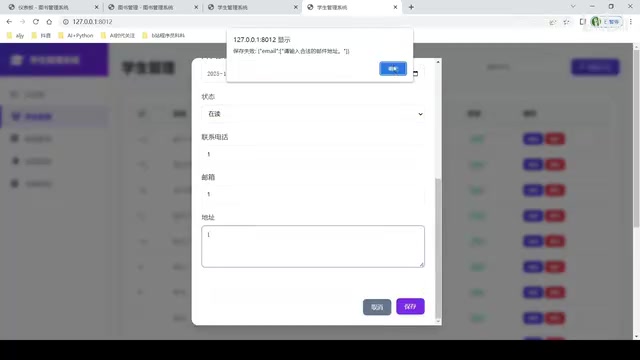
However, an interesting issue appeared when adding a student: although the prompt didn't explicitly require field restrictions, Cursor automatically added form validation — a demonstration of AI coding tools' ability to "proactively infer user intent," stemming from the model learning numerous best-practice code patterns during training. However, after saving, an email field display anomaly appeared — the email information "disappeared."
This type of bug reveals a typical pain point of AI-generated code: when generating front-end form components, the model may produce inconsistencies in State Management or data binding logic — for example, failing to properly reset field states after form submission, or mapping field names incorrectly during data display. These issues are particularly common in modern front-end frameworks like React and Vue, because component lifecycles and reactive data flows represent complex logic chains that are difficult for models to reason about completely. This confirms the current positioning of AI coding tools: powerful prototype generators, not production-ready code factories.
System Completeness Analysis
In terms of system completeness, both tools generated only a basic admin-side version, still far from a truly usable management system:
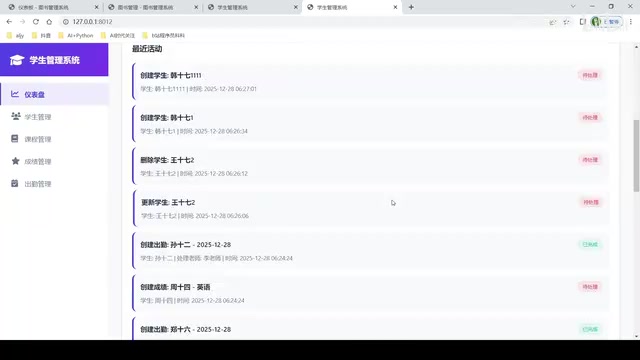
- Missing multi-role interfaces: No separate teacher or student portals
- Missing authentication system: No login/registration functionality (production systems typically require JWT authentication and RBAC permission frameworks)
- Missing business workflows: No approval processes (e.g., leave request approval, approve/reject flows)
- Missing data visualization: No charts, statistics, or dashboard modules
To develop this into a real production management system, continuous iteration would be needed to add these feature modules.
Overall Assessment and Recommendations
The Gap Between Kiro and Cursor Is Smaller Than Expected
After this hands-on test, the core takeaway is: the gap between Kiro and Cursor is not as large as expected. Unlike the obvious gap between domestic Chinese AI coding tools and Cursor, Kiro — as an Amazon product — has already achieved near-parity with Cursor in terms of feature implementation completeness. This is closely tied to the advantages that tech giants bring to the table — powerful cloud service infrastructure, rich model resource orchestration capabilities, and enterprise-grade engineering investment — enabling Kiro to reach near-leading product levels in a relatively short time.
Kiro vs Cursor: Pros and Cons at a Glance
| Dimension | Kiro | Cursor |
|---|---|---|
| Visual Design | Mixed colors, average | Clean and polished, more professional |
| Feature Completeness | Basic features complete | Basic features complete |
| Code Quality | Average | Relatively cleaner |
| Detail Handling | Tendency to cut corners | Proactively adds validation and other details |
Should You Choose Kiro or Cursor?
For developers, Cursor currently still holds a slight edge in overall experience, especially in code cleanliness and UI generation quality. However, Kiro has performed impressively as a newcomer and is worth keeping an eye on.
Further testing across more scenarios is needed — such as using different models and more complex system requirements (e.g., production-level prompts) — to more comprehensively evaluate the true capabilities of both tools. The competition among AI coding tools is just getting started — from Cursor's rise to Microsoft, Google, and Amazon entering the arena one after another, this battle for the developer workflow is heating up across the board. Ultimately, it's developers who will benefit the most.
Related articles
 Product Reviews
Qoder vs Cursor Real-World Comparison: Which $20/Month AI IDE Is Better?
Hands-on comparison of Qoder vs Cursor AI IDEs: Agent autonomy, human interaction count, and architecture decisions. Qoder needed only 2 interactions vs Cursor's 8.
 Product Reviews
Cursor Cloud Agent Demo: Eliminating Bottlenecks Across the Entire Software Development Lifecycle
Deep analysis of Cursor's Cloud Agent demo showing how cloud VMs, automated test artifacts, and a full-chain control plane systematically eliminate human bottlenecks across the software development lifecycle.
 Product Reviews
Cursor 3.0 Deep Dive: Multi-Agent Parallelism, Design Mode, and Best-of-N Model Comparison
Cursor 3.0 evolves from an AI coding assistant into an Agent fleet command center. Explore multi-agent parallelism, Design Mode, and Best-of-N model comparison.