Link CC MCP 1.3.4 in Action: AI Fully Automates Development of a Cocos Match-3 Game
Link CC MCP 1.3.4 in Action: AI Fully …
AI plugin Link CC MCP builds a complete Match-3 game with zero code via a single prompt
Cocos Creator's AI plugin Link CC MCP 1.3.4 uses 81 tool interfaces to let AI build a complete Match-3 game from scratch—including multiple levels, animations, and a scoring system—in approximately 10 minutes from a single prompt, without writing a single line of code. The experiment required 3 rounds of human feedback to reach a playable state, demonstrating the practical value of AI-automated game development while exposing mid-to-low tier models' limitations in instruction following and complex logic handling.
Introduction: Can AI Build a Complete Game Without Writing a Single Line of Code?
The barrier to game development is being rapidly lowered by AI. Recently, the AI-assisted plugin for Cocos Creator — Link CC MCP — was updated to version 1.3.4. The author used a single prompt to have AI build a complete Match-3 game from scratch — including scene construction, script writing, animation creation, and level design — all without writing a single line of code or manually operating the editor. The results of this experiment are both exciting and revealing of the true boundaries of current AI-automated development.
Link CC MCP is built on MCP (Model Context Protocol), an open protocol introduced by Anthropic. Released in late 2024, MCP is a standardized protocol designed to enable AI models to interact with external tools, data sources, and applications in a structured way — allowing models to go beyond text conversations and directly operate IDEs, editors, databases, and other development environments. By exposing 81 tool interfaces, Link CC MCP enables AI models to create nodes, attach components, adjust properties, and save scenes within the Cocos editor just like a human developer, extending AI's "perceive-decide-execute" capabilities into concrete game development workflows.
Experiment Setup: A Single Prompt Drives Match-3 Game Development
The art assets used in this experiment came from a free candy Match-3 asset pack available in the Cocos Store. After importing the assets into the project, the author gave AI a structured prompt in Cursor with the following core requirements:
- Create a candy Match-3 game
- Find the candy images and sprite frame sequences in the assets
- Create explosion/elimination animations
- Design 3 levels
- Build a "Start Game" scene and level selection interface
- Implement core Match-3 gameplay logic
Interestingly, the author deliberately chose a mid-to-low tier AI model for testing, aiming to showcase the plugin's own capability ceiling rather than relying on a top-tier model's reasoning power. The asset pack itself was also quite disorganized, with no standardized naming or categorization, posing an additional challenge to the AI's resource comprehension abilities.
It's worth noting that Match-3 is a game genre that appears simple but is actually algorithm-intensive. Its core logic involves multiple technical challenges: board initialization must avoid pre-existing matches (preventing elimination at the start); swap detection must determine whether swapping two adjacent elements produces a three-in-a-row; "gravity fill" after elimination requires recursive handling of cascade eliminations; and special power-up trigger logic. Handling these edge cases demands strong code reasoning capabilities from the AI, which is the fundamental reason why multiple rounds of fixes were needed in the subsequent experiment.
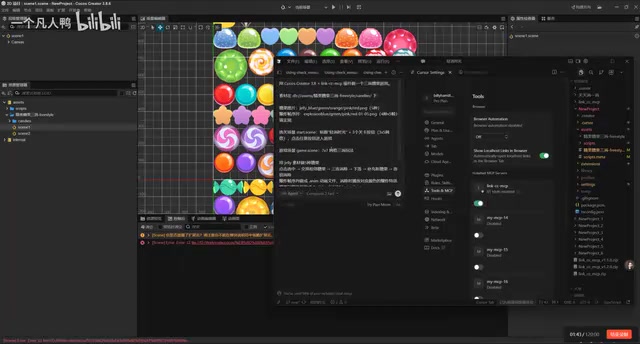
Fully Automated Construction: From Scripts to Scenes in One Flow
Code Generation and Self-Correction
Once started, the AI first opened the asset images for analysis, then quickly wrote multiple game scripts. Throughout the process, the AI demonstrated solid autonomous capability — when it discovered issues in its own scripts, it would proactively make corrections without requiring human intervention. This self-correction ability is a notable improvement in version 1.3.4.
The speed of script writing was impressive, with the AI continuously generating code for multiple modules including core game logic, level management, and UI control.
Scene Construction and Component Mounting
The AI then switched to the scene construction phase, automatically creating the Game scene and laying out UI elements and adjusting node positions. Cocos Creator uses a Component-Based architecture, where Prefabs are a core asset concept — they package node trees, component configurations, and script bindings into reusable template assets. In a Match-3 game, each candy type typically corresponds to a Prefab, which is dynamically instantiated and recycled at runtime through an Object Pool to avoid frequent memory allocation overhead. The AI's ability to automatically create Prefabs and correctly mount script components demonstrates how Link CC MCP encapsulates these underlying editor operations into atomic tools callable by AI.
The AI performed excellently in constructing complex components, including:
- Creating 4 elimination animations
- Generating Prefabs
- Automatically mounting script components
- Building the folder structure
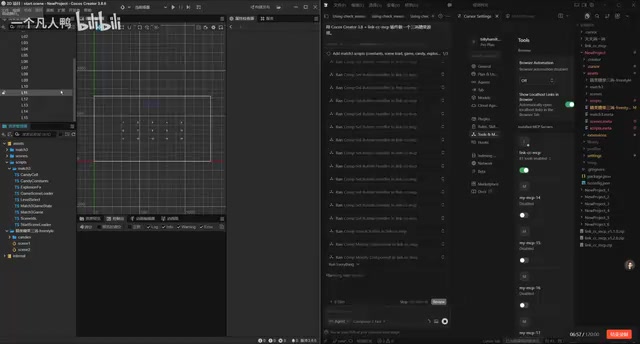
The entire process was not artificially accelerated in any way — the AI independently completed animation creation, component mounting, scene switching, and a series of other operations. However, the AI made an interpretation error regarding the number of levels — despite being asked for 3 levels, it created 16, reflecting current models' shortcomings in precise instruction following.
Testing and Iteration: Three Rounds of Fixes to Reach Playable State
Round 1: No Response on Click
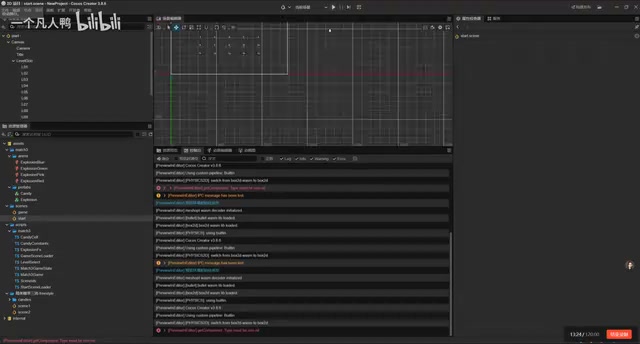
On the first run, the game interface was fully constructed, but clicking buttons had no effect. The console was already showing warning messages. The author fed the problem directly back to the AI, letting it troubleshoot and fix the issue on its own.
Round 2: Error Fixes
After the fix, running again still revealed problems. The author pasted the specific error messages to the AI, which located the issue and made targeted modifications. This exposed the limitations of mid-to-low tier models — weaker comprehension requires multiple rounds of interaction to accurately locate problems.
This phenomenon is closely related to AI model capability tiers. In terms of reasoning ability, top-tier models like Claude 3.5 Sonnet and GPT-4o excel at complex logical reasoning, long-context understanding, and multi-step planning; while mid-to-low tier models tend to experience logical gaps when handling cross-file dependencies exceeding hundreds of lines. For tasks like game development that require maintaining global state consistency, a model's context utilization efficiency and instruction-following precision directly determine the first-attempt success rate.
Round 3: Features Largely Complete
After the fixes, the game reached a playable state:
- ✅ Level selection works properly, allowing switching between different levels
- ✅ Core Match-3 gameplay functional — candies can be swapped and eliminated
- ✅ Elimination animation effects complete, all 4 animations correctly implemented
- ✅ Scoring system working properly
- ✅ Back button fixed and returns to level selection interface correctly
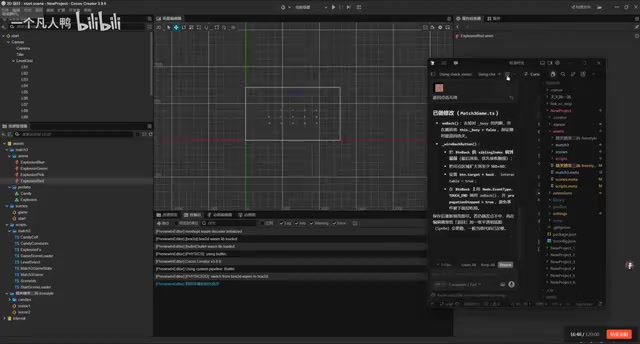
Looking at the final result, the AI accurately extracted animation resources and candy images from the assets, built a reasonable folder structure, and implemented a complete game flow. The entire process took approximately 10 minutes, with 3 rounds of human feedback iteration.
Plugin Upgrade Highlights: 81 Tools Covering the Full Workflow
Link CC MCP version 1.3.4 features several key improvements over previous versions:
| Dimension | Improvement |
|---|---|
| Tool Count | Increased from 70+ to 81 tools |
| Comprehension | Significantly improved understanding of asset structure and requirements |
| Scene Construction | Optimized speed and accuracy |
| Stability | More stable and reliable scene saving |
The author revealed that the next version's optimization focus will be on execution speed, as accuracy has already reached a satisfactory level.
Realistic Assessment: An Efficient Prototyping Tool, Not a Universal Replacement
This experiment provides a clear conclusion: AI-automated game development already has practical value, but still requires human oversight and iteration.
From an efficiency perspective, in traditional indie game development, a Match-3 prototype with multiple scenes, an animation system, and level design would take even an experienced developer 4-8 hours to complete a basic playable version. AI compressed this to approximately 10 minutes (about 30 minutes including iteration), essentially reducing the time cost of the "editor operation execution layer" to near zero. This aligns with the historical pattern of "abstraction layer elevation" in software engineering — from assembly to high-level languages, from native development to game engines, each leap in abstraction has delivered comparable magnitudes of productivity gains. Even with 3 rounds of fixes needed, the overall efficiency improvement remains significant.
However, limitations must also be acknowledged:
- Model quality determines the ceiling: Using stronger models (such as Claude 4, GPT-4o) would dramatically improve both results and speed — the author estimates completion in under 10 minutes in a single pass
- Complex logic still requires guidance: Core Match-3 algorithms and edge case handling are difficult for mid-to-low tier models to get right on the first try
- Asset comprehension has gaps: When facing disorganized asset packs, AI's resource identification and selection still lacks precision
For indie developers and small teams, MCP plugins like this are becoming genuine productivity multipliers — they don't replace developers, but rather delegate repetitive editor operations, basic code writing, and scene construction to AI, allowing developers to focus on creativity and core gameplay refinement.
Key Takeaways
- Link CC MCP version 1.3.4 increased its tool count to 81, with significantly improved scene construction and comprehension capabilities
- Without writing a single line of code, AI built a complete Match-3 game with multiple levels, animations, and a scoring system in approximately 10 minutes using a single prompt
- The experiment required 3 rounds of human feedback iteration to reach a playable state, exposing mid-to-low tier models' limitations in precise instruction following and complex logic handling
- Final results are highly dependent on the AI model quality used — stronger models can dramatically improve speed and first-attempt success rate
- The tool is positioned as an efficiency multiplier, suitable for delegating repetitive editor operations and basic code writing to AI while developers focus on core creativity
Related articles
 Product Reviews
Qoder vs Cursor Real-World Comparison: Which $20/Month AI IDE Is Better?
Hands-on comparison of Qoder vs Cursor AI IDEs: Agent autonomy, human interaction count, and architecture decisions. Qoder needed only 2 interactions vs Cursor's 8.
 Product Reviews
Cursor Cloud Agent Demo: Eliminating Bottlenecks Across the Entire Software Development Lifecycle
Deep analysis of Cursor's Cloud Agent demo showing how cloud VMs, automated test artifacts, and a full-chain control plane systematically eliminate human bottlenecks across the software development lifecycle.
 Product Reviews
Cursor 3.0 Deep Dive: Multi-Agent Parallelism, Design Mode, and Best-of-N Model Comparison
Cursor 3.0 evolves from an AI coding assistant into an Agent fleet command center. Explore multi-agent parallelism, Design Mode, and Best-of-N model comparison.