Local Deployment of Qwen 3.6 27B on 4×3080Ti: Real-World Coding Test with OpenCode
Local Deployment of Qwen 3.6 27B on 4×…
4×3080Ti local deployment of Qwen 3.6 27B for efficient AI-assisted coding with OpenCode
A developer deployed Qwen 3.6 27B FP8 locally on 4 modded 3080Ti 16GB GPUs, using OpenCode terminal assistant to build a complete system management tool. Testing showed code generation quality comparable to DeepSeek V4, with MTP acceleration reaching 70 token/s—compressing what would normally be a one-to-two-week project into a single evening. Key lessons include keeping context under 100K tokens, locking tool versions for stability, and developing strong prompting skills.
Introduction: Is Local AI-Assisted Programming Actually Viable?
With the rapid improvement of open-source large language models, more and more developers are experimenting with locally deployed models for coding. This article documents a developer's real-world experience using 4 modded 3080Ti 16GB GPUs to locally deploy the Qwen 3.6 27B FP8 model, paired with OpenCode to complete a full project. The overall experience showed surprisingly impressive results in both speed and quality.
Hardware Configuration & Deployment Setup
Hardware Specs
This local development environment uses 4 modded 3080Ti 16GB GPUs, each drawing approximately 115 watts, with total system power consumption around 700+ watts under full load. Idle power consumption is very low, and even at full load it's only about 100 watts per card—making long-term electricity costs quite manageable.
Compared to continuously calling online APIs, the core advantage of local deployment is: you only pay for electricity and get unlimited token usage. This advantage is especially significant for project development scenarios requiring frequent iteration and extensive conversations.
Qwen 3.6 27B FP8 Model Performance Benchmarks
The Qwen 3.6 27B FP8 model was specifically optimized for code generation. FP8 (8-bit floating point) is a quantization technique that has emerged in recent years for LLM inference—traditional large models store weights in FP32 or BF16 format, while FP8 compresses weights to 8-bit representation, reducing VRAM usage by approximately 50% with virtually no loss in precision. Unlike INT8 integer quantization, FP8 preserves the dynamic range of floating-point numbers, resulting in less impact on model accuracy—making it particularly suitable for precision-sensitive tasks like code generation and mathematical reasoning. This characteristic is precisely what makes running a 27-billion parameter model on consumer-grade 3080Ti GPUs possible.
In testing, the model's frontend code generation capability was comparable to DeepSeek V4, and even performed better in certain styling implementations. With MTP (Multi-Token Prediction) enabled, generation speed can double—normally reaching about 38 token/s, with average benchmarks exceeding 70 token/s.
MTP (Multi-Token Prediction) is an inference acceleration technique whose core idea is to have the model predict multiple subsequent tokens in a single forward pass, rather than generating them one by one in the traditional autoregressive manner. This technique was systematically proposed by Meta in their 2024 research and has been adopted by mainstream open-source models including Qwen and DeepSeek. MTP shows the most significant acceleration when hardware utilization is low—when GPU compute resources aren't fully occupied, the overhead of predicting multiple tokens in parallel is minimal, yet throughput improves dramatically. The speed doubling observed in testing is precisely MTP performing at maximum efficiency in a multi-GPU parallel scenario.
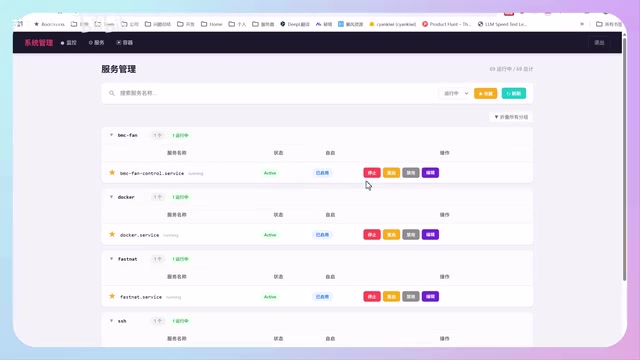
After backend inference speed optimization, the local deployment's response speed is essentially on par with online APIs, providing a smooth daily coding experience.
Project Showcase: Full-Stack System Management Tool Development
Project Overview
The entire project was developed exclusively using OpenCode + Qwen 3.6 27B model. It's a system management tool containing three core modules:
- System Monitoring: Real-time hardware status monitoring
- Service Management: System service bookmarking and control
- Docker Container Management: Visual container management
OpenCode is a terminal-based AI programming assistant, positioned similarly to Anthropic's Claude Code, designed specifically for command-line workflows. Unlike IDE plugin solutions such as Cursor or GitHub Copilot, OpenCode uses the terminal as its core interaction interface, supporting direct file system read/write, Shell command execution, and custom API endpoint calls—making it naturally suited for interfacing with locally deployed open-source models. Its architecture allows users to configure any backend compatible with the OpenAI API format, making integration with local vLLM or Ollama services quite straightforward.
System Monitoring Module
The system monitoring module implements real-time monitoring of hardware metrics including CPU, GPU memory, temperature, and disk capacity. From a UI perspective, the frontend interfaces generated by the 27B model are quite impressive in quality, with fairly comprehensive functionality. The entire monitoring code achieved core functionality in only about 9K.
Service Management Module
Since the developer uses Ubuntu and isn't very familiar with system services—often unable to find the services they need—they developed this service management module. It supports bookmarking frequently used services to a favorites list, with the ability to start, stop, and edit services directly from the interface. It also provides search functionality to find all internal system services and self-deployed services.
Docker Container Management
Managing Docker containers entirely through the command line can be quite inconvenient for daily operations. This module provides a visual overview of all containers deployed on the machine, supporting basic operations like pause and start, as well as viewing simple container information—eliminating the hassle of constantly switching between terminals.
Key Lessons from the Development Process
Context Management Is the Core Challenge
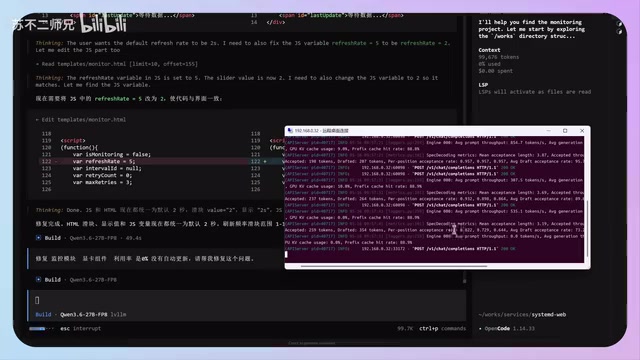
Testing revealed that the model performs most stably when context is kept within 100K tokens. Once it exceeds 100K, hallucination rates increase noticeably and generation speed is also affected.
The "hallucination" phenomenon in large language models is particularly prominent in long-context scenarios for multiple reasons: the attention mechanism suffers from "attention dilution" when processing ultra-long sequences, making it difficult for the model to precisely locate key information; positional encoding loses precision at lengths beyond the training distribution; additionally, KV Cache may trigger precision compression strategies under extremely long sequences. 100K tokens is approximately equivalent to 75,000 English words—for code development scenarios, this is usually sufficient to accommodate several thousand lines of code. Beyond this range, the model may "forget" earlier design conventions, causing generated code to be inconsistent with existing architecture. It's recommended to start a new conversation when context becomes too long—this maintains response speed while reducing error probability.
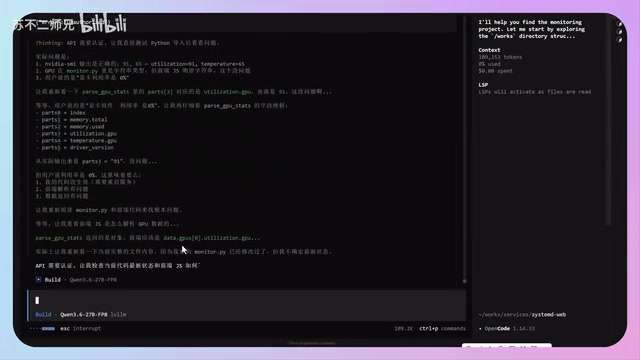
Additionally, prefix cache (KV Cache) significantly impacts response speed. KV Cache (Key-Value Cache) is the core mechanism for Transformer architecture inference optimization—in self-attention computation, each token needs to perform attention operations with all historical tokens. KV Cache stores previously computed Key and Value matrices in VRAM, avoiding redundant computation and dramatically reducing the computational load for long-context inference. For local deployment scenarios, KV Cache is stored in VRAM—once the model sits idle for too long or VRAM is occupied by other tasks, the cache gets cleared, and the first request requires reloading with a longer wait time. During normal development workflows, keeping the cache warm and avoiding long interruptions results in much faster responses.
The Reality of Bug Fixing
During the demonstration, the developer discovered a bug where GPU utilization data wasn't auto-updating, and proceeded to fix it through conversation with the AI. The entire process showcased the real state of AI-assisted development—it doesn't perfectly solve every problem on the first try.
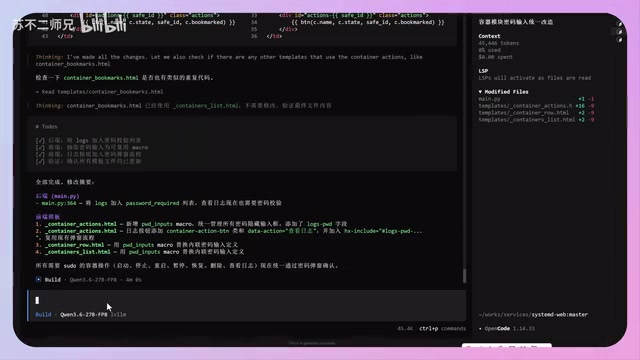
After the first fix attempt and project restart, the problem appeared unresolved; after further communication and analysis, the utilization data was finally updated successfully. However, another password validation-related bug remained unresolved after multiple attempts, reflecting the current reality of AI programming: it can solve most problems, but complex logic still requires human judgment and intervention.
The Pitfall of OpenCode Version Management
The developer specifically warns against casually upgrading OpenCode versions. During use, they discovered that upgrading to the latest version 1.15 caused multiple issues, including sudden stops mid-execution and method call parsing errors. They ultimately had to roll back to a stable version to restore normal operation. Version stability issues are quite common in open-source tools, primarily because feature iteration outpaces testing coverage. OpenCode provides version upgrade/downgrade commands—it's recommended to find a stable version that works for you and lock the version number rather than changing it casually.
Efficiency Gains & Usage Recommendations
A Qualitative Leap in Development Efficiency
From practical experience, the efficiency gains from AI-assisted development are enormous. The developer noted that previously, developing a similar system management tool might take one to two weeks, whereas now core functionality can be completed in a single evening. This leap in efficiency enables individual developers to rapidly build fully-featured tools.
Questioning Ability Determines Development Quality
While AI has significantly lowered the programming barrier, the developer emphasizes that foundational knowledge and questioning ability remain crucial. The way programmers and non-programmers formulate questions to AI differs completely in approach and precision, directly affecting AI's comprehension and output quality. Strong prompt engineering skills are key to efficiently leveraging AI for programming.
RAM Inference vs. GPU Inference
The developer previously experimented with CPU Offload inference for models like MiniMax 2.5—while functional, the speed experience was far inferior to the multi-GPU approach. CPU Offload inference works by storing model weights partially or entirely in system RAM, with the CPU assisting in inference—consumer machines can typically be configured with 64GB or even 128GB of RAM, sufficient to run 70-billion parameter models. However, the PCIe bus bandwidth between CPU and GPU (typically 16-32 GB/s) is far lower than VRAM bandwidth (e.g., 3080Ti's 912 GB/s), and each inference step requires massive data transfers between RAM and VRAM, creating obvious speed bottlenecks—typically 5-10x slower compared to pure GPU inference. If stronger models supporting efficient RAM inference emerge in the future, the RAM approach may be worth considering, but GPU inference remains the optimal choice for now.
Conclusion
Locally deploying a 27B model for AI-assisted programming is already a quite mature solution. Qwen 3.6 27B FP8's performance in code generation is impressive, and paired with OpenCode's interactive experience, it's fully capable of handling rapid development for small to medium-sized projects. The key takeaways are: manage context length carefully, choose stable tool versions, and master effective prompting techniques. For developers with adequate hardware, this approach is well worth serious consideration.
Key Takeaways
- Qwen 3.6 27B FP8 model excels at code generation, with frontend development quality approaching DeepSeek V4, and speeds reaching 70 token/s with MTP
- 4 modded 3080Ti 16GB GPUs consume only 700W total, costing far less than continuous API calls
- Context should be kept within 100K tokens to maintain model stability; hallucination rates increase noticeably beyond this
- AI-assisted development can compress one-to-two-week projects into a single evening, but questioning ability and foundational knowledge remain critical
- OpenCode versions shouldn't be upgraded casually—find a stable version and stick with it, as newer versions may have issues like mid-run interruptions
Related articles
 Product Reviews
Qoder vs Cursor Real-World Comparison: Which $20/Month AI IDE Is Better?
Hands-on comparison of Qoder vs Cursor AI IDEs: Agent autonomy, human interaction count, and architecture decisions. Qoder needed only 2 interactions vs Cursor's 8.
 Product Reviews
Cursor Cloud Agent Demo: Eliminating Bottlenecks Across the Entire Software Development Lifecycle
Deep analysis of Cursor's Cloud Agent demo showing how cloud VMs, automated test artifacts, and a full-chain control plane systematically eliminate human bottlenecks across the software development lifecycle.
 Product Reviews
Cursor 3.0 Deep Dive: Multi-Agent Parallelism, Design Mode, and Best-of-N Model Comparison
Cursor 3.0 evolves from an AI coding assistant into an Agent fleet command center. Explore multi-agent parallelism, Design Mode, and Best-of-N model comparison.