Major Claude Code Update: A Complete Guide to Agent View and the Goal System
Major Claude Code Update: A Complete G…
Claude Code adds Agent View and Goal system, evolving into a full agentic development platform
Anthropic released major updates for Claude Code: Agent View provides a centralized agent management dashboard supporting multi-task parallelism and background sessions; the Goal system enables result-oriented autonomous multi-round execution without step-by-step confirmation; and an optimized prompt compression mechanism ensures long-session consistency. However, token consumption from parallel multi-agent execution remains the primary bottleneck.
Overview
Anthropic recently released a series of major updates for Claude Code, with the most notable being the brand-new Agent View and Goal system. These features mark Claude Code's evolution from a terminal coding assistant toward a full-fledged agentic development management platform. This article provides an in-depth analysis of the core value and usage of these new features.
Agent View: Centralized Agent Management
From Terminal Assistant to Orchestration Platform
Agent View is the most significant workflow change in this update. It transforms Claude Code into a centralized agent management system — you get a unified dashboard where you can monitor all active Claude Code sessions in real time.
Agent Orchestration refers to the technical architecture for coordinating multiple AI agents working together. In traditional development tools, each AI assistant session operates independently, requiring developers to manually switch between multiple terminal windows. The core value of an orchestration platform lies in providing a unified control layer — similar to how Kubernetes manages containers — enabling multiple autonomously running agents to be centrally monitored, scheduled, and intervened upon. The introduction of Agent View marks Claude Code's evolution from a single-conversation tool to a development platform with "command center" capabilities.
With Agent View, developers can run multiple coding tasks simultaneously without each one occupying a separate terminal tab. Each Agent runs independently in the background, while you manage everything from a single interface.
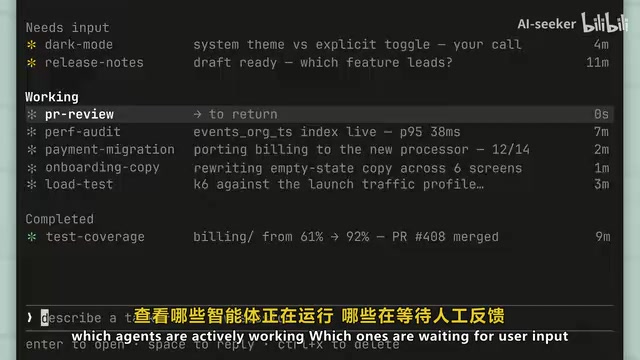
Specifically, you can intuitively see:
- Which agents are currently running
- Which are waiting for human feedback
- Which tasks have been completed
How It Works
Agent View's operational logic is quite intuitive:
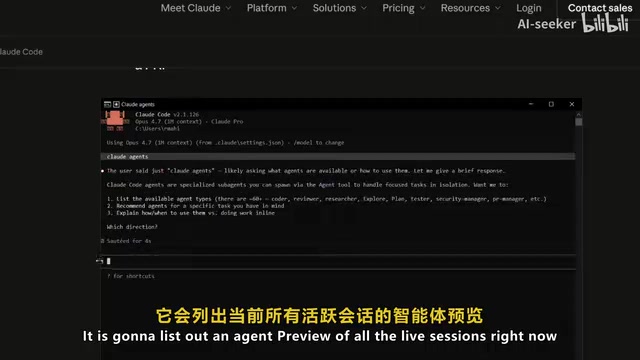
- Overview all processes: Press the left arrow key in any active session, or run the
claude agentcommand directly in the terminal to view all running Agents - Quick preview and reply: Without leaving your current workflow, select a session preview to directly respond to agents awaiting decisions
- Seamless switching: Press Enter to access the full conversation history and quickly jump between sessions
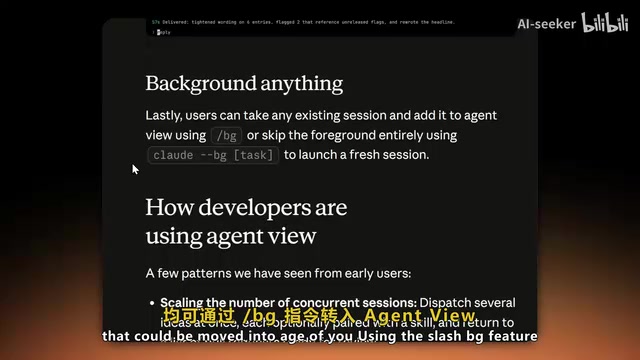
Background Session Functionality
Claude Code now supports fully background sessions. For any existing workflow, you can transfer it to Agent View via the BG command, or use the claude bg command directly to skip the foreground interface and input a task, immediately launching a new autonomous session for parallel processing.
However, it's important to note that running multiple agents simultaneously consumes a significant amount of tokens. Tokens are the basic unit of measurement for how large language models process text — typically about 4 English characters or 1.5 Chinese characters correspond to 1 token. When multiple agents run in parallel, each Agent independently consumes input/output tokens, with costs scaling linearly. Taking Claude 3.5 Sonnet as an example, API pricing is approximately $3/million tokens for input and $15/million tokens for output. A complex background coding task might consume tens of thousands to hundreds of thousands of tokens, and with multiple Agents running simultaneously, hourly API costs could reach several dollars or more. This feature is therefore particularly suited for:
- Long-running autonomous agents (e.g., PR monitoring)
- Updating dashboards
- Handling recurring background tasks
This feature is currently in research preview and is available to Pro, Max, Team, Enterprise, and Claude API users.
Goal System: Result-Oriented Autonomous Execution
Moving Beyond Step-by-Step Confirmation
The Goal system is another major feature in this update, with its design philosophy drawing inspiration from OpenAI Codex's goal-directed execution system. It introduces a persistent result-oriented execution mechanism natively built into Claude Code.
OpenAI Codex (especially its CLI version) introduced the concept of "goal-driven execution": developers describe the desired end state, and the model autonomously plans and executes multi-step operations until the goal is achieved, rather than waiting for instructions at each step. This stands in stark contrast to the traditional REPL (Read-Eval-Print Loop) interaction model, which requires users to actively intervene at every step. Claude Code's Goal system further distinguishes three execution paradigms on this foundation, reflecting the paradigm shift from "conversational AI" to "autonomously executing AI."
The core change is this: instead of manually prompting the model at every step, you can now set completion conditions directly, and Claude will autonomously work through multiple rounds until the goal is achieved.
Use Cases and Workflow Mode Comparison
The Goal system works in any scenario — whether in interactive sessions, CLI mode, or remote control. The agent no longer needs to constantly wait for user commands or stop for confirmation at every step.
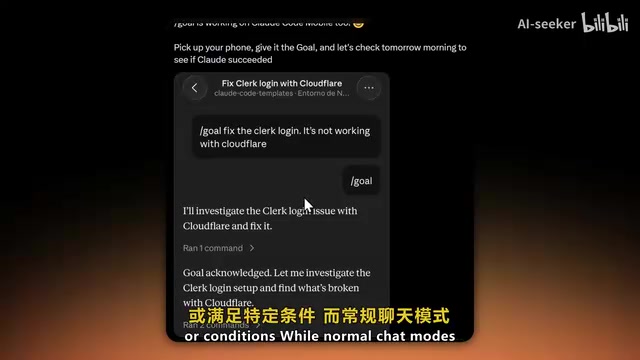
Anthropic has made clear distinctions between different working modes:
| Mode | Behavior |
|---|---|
| Goal | Executes continuously until a specific result is achieved |
| Loop | Runs based on time intervals, stop hooks, or waits for external conditions |
| Regular Chat | Waits for manual user input after each response |
These three modes cover the complete automation spectrum from fully autonomous to fully interactive, allowing developers to flexibly choose based on the risk level and complexity of the task.
Mobile Remote Control Support
A noteworthy highlight is that Anthropic now allows mobile access to Claude Code. This means you can start long-running autonomous tasks on your phone, set a goal for Claude, let it run overnight, and check the results when you return.
Prompt Compression Optimization: Enhanced Long-Session Experience
Beyond the two major features above, Claude Code has also updated its system prompt compression approach.
The necessity of Prompt Compression stems from the context window limitations of large language models. For example, Claude 3.5's context window is 200K tokens, and during extended coding sessions, conversation history continuously accumulates until it eventually exceeds the window limit. Earlier compression implementations often led to "context drift" — where the model forgets important early instructions or constraints (such as code style requirements or architectural constraints), resulting in inconsistent behavior. The core of this optimization establishes an information priority mechanism that reduces historical context through summarization and redundancy removal while ensuring the user's core intent is preserved with priority.
Key improvements include:
- Silent compression: No more obvious pop-up notifications; the process is now seamless
- Priority preservation of key instructions: The compression prompt itself has been optimized to ensure the model prioritizes retaining important user intent during compression
- Reduced context drift: Helps maintain consistency during long-running agent workflows
This is a substantial experience improvement for developers who frequently engage in extended coding sessions, especially when running autonomous tasks for hours in Goal mode, where maintaining context consistency is particularly critical.
Summary and Outlook
Anthropic's series of updates represents a qualitative leap in Claude Code's agent orchestration capabilities. Agent View solves the pain points of multi-task management, the Goal system makes autonomous execution possible, and prompt compression optimization ensures quality in long sessions.
However, token consumption and usage quota limitations remain the primary bottlenecks. While multi-agent parallel execution is powerful, it also multiplies quota consumption. We look forward to Anthropic further raising usage quota limits in future versions, allowing these powerful features to truly reach their full potential.
Key Takeaways
- Agent View upgrades Claude Code from a terminal coding assistant to a centralized agent orchestration management platform, supporting multi-task parallelism and unified dashboard management
- The Goal system draws from Codex's goal-driven execution philosophy, enabling result-oriented autonomous multi-round execution without step-by-step manual confirmation
- New mobile support allows setting long-running autonomous tasks on your phone and remotely monitoring execution results
- The prompt compression system has been optimized to silent mode, preserving key instructions and user intent through an information priority mechanism, reducing context drift in long sessions
- Token costs scale linearly when running multiple agents in parallel, and usage quota limitations remain the primary bottleneck
Related articles
 Product Reviews
Qoder vs Cursor Real-World Comparison: Which $20/Month AI IDE Is Better?
Hands-on comparison of Qoder vs Cursor AI IDEs: Agent autonomy, human interaction count, and architecture decisions. Qoder needed only 2 interactions vs Cursor's 8.
 Product Reviews
Cursor Cloud Agent Demo: Eliminating Bottlenecks Across the Entire Software Development Lifecycle
Deep analysis of Cursor's Cloud Agent demo showing how cloud VMs, automated test artifacts, and a full-chain control plane systematically eliminate human bottlenecks across the software development lifecycle.
 Product Reviews
Cursor 3.0 Deep Dive: Multi-Agent Parallelism, Design Mode, and Best-of-N Model Comparison
Cursor 3.0 evolves from an AI coding assistant into an Agent fleet command center. Explore multi-agent parallelism, Design Mode, and Best-of-N model comparison.