Major Gemini CLI Update: Three Core Upgrades to This Free, Open-Source AI Agent Tool
Major Gemini CLI Update: Three Core Up…
Gemini CLI gets a major update with multimodal, agentic AI, and MCP protocol — a free open-source automation engine.
Google has shipped a milestone update for Gemini CLI, its free open-source terminal AI tool, adding three core capabilities: multimodal processing (images, PDFs, audio/video), enhanced agentic intelligence (evolving from Q&A to goal-driven autonomous execution), and MCP protocol integration (directly connecting to Notion, GitHub, Slack, and other external tools for automated distribution). Powered by Gemini 2.5 Pro's 1-million-token context window, it's transforming from a chat assistant into an end-to-end business automation engine.
Google recently rolled out a milestone update for Gemini CLI, introducing three major capabilities: multimodal processing, enhanced agentic intelligence, and MCP protocol integration. This open-source AI agent tool that runs in the terminal is evolving from a "chat assistant" into a true "business automation engine." And the best part — it's completely free.
What Is Gemini CLI? And Why Is It Different
Most AI tools today run in the browser: open a tab, type a prompt, copy the result, paste it somewhere else. This workflow technically works, but it's inefficient and context is easily lost — close the tab, and the AI's memory is wiped clean.
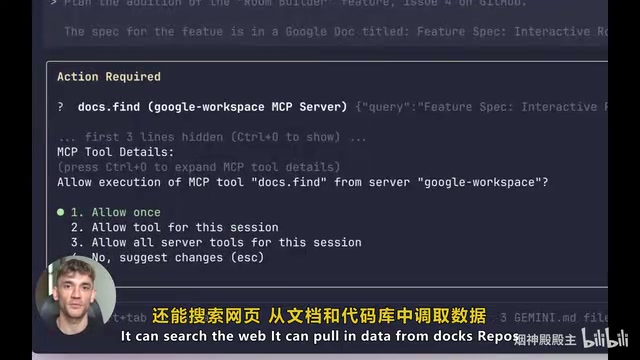
Gemini CLI takes a fundamentally different approach. It runs directly in the terminal, deeply embedded in your development and work processes rather than existing as a side tool. Under the hood, it's powered by Gemini 2.5 Pro — one of the most powerful AI models in the world. Gemini 2.5 Pro is Google DeepMind's flagship multimodal large language model released in 2025, ranking at the top of authoritative benchmarks including MMLU, HumanEval, and MATH. Its most notable technical feature is support for a 1-million-token context window. For reference, GPT-4's standard context window is approximately 128K tokens, and the average book contains about 100,000 tokens — meaning Gemini 2.5 Pro can process the equivalent of 10 books in a single conversation while maintaining complete semantic understanding and logical coherence throughout. Whether it's reading and writing files, executing commands, searching the web, or pulling data from codebases and spreadsheets, everything can be done in one place within the terminal.
Deep Dive into the Three Core Updates
Multimodal Support: No Longer Limited to Plain Text
The most visible change in this update is that Gemini CLI can now process images, PDFs, audio, video, and text — completely breaking free from the text-only input limitation.
The practical use cases are extensive: you can feed it a screenshot of a data dashboard and ask it to analyze trends, throw in a competitor's PDF document for key takeaway extraction, or hand it an entire video transcript to generate a news briefing. Everything happens within the terminal — no tool-switching required. For entrepreneurs and content creators who need to process information from multiple sources, this represents a substantial leap in efficiency.
Agentic Intelligence: From Q&A to Autonomous Execution
Gemini CLI can now independently execute more complex multi-step tasks. You simply set a goal, and it automatically breaks it down into specific steps, executes them one by one while checking progress in real time, and doesn't stop until the task is complete — unless it needs your input.
There's a critical mindset shift here: this isn't a chatbot — it's a true AI agent. The AI Agent concept originates from "autonomous agent" theory in artificial intelligence research, with its core characteristic being a complete closed-loop capability of perceiving the environment, formulating plans, executing actions, and self-evaluating. Unlike the "single-turn Q&A" mode of traditional chatbots, agents employ the ReAct (Reasoning + Acting) framework: first reasoning to decompose the goal, then calling tools to execute, then observing results and deciding the next action, iterating until the task is complete. This architecture transforms AI from a passive responder into an active executor. Current mainstream agent implementation frameworks include LangChain, AutoGen, and others, while Gemini CLI embeds this capability directly into the command-line environment, dramatically lowering the barrier to using agent technology. Traditional AI tools follow a "Q&A" pattern of back-and-forth exchanges, while agent mode is "goal-driven" with autonomous planning and execution — this distinction means AI can save you not just typing time, but the time of entire automated workflows.
MCP Protocol Integration: Connecting to All External Tools
MCP (Model Context Protocol) is a standardized way for AI to connect with external tools. This protocol was proposed and open-sourced by Anthropic in late 2024, designed to solve the "last mile" connection problem between AI models and external tools and data sources. Before MCP, every AI application needed to develop separate integration interfaces for different tools, resulting in massive duplication of effort and a fragmented ecosystem. MCP defines a unified server-client communication specification that allows any AI model supporting the protocol to plug-and-play with external tools. Major AI vendors including Google and OpenAI have announced MCP support, and it's becoming the industry standard for AI tool integration — similar in significance to the HTTP protocol in web development.
This integration means Gemini CLI can directly connect to your calendars, project management tools, databases, APIs, and even social platforms.
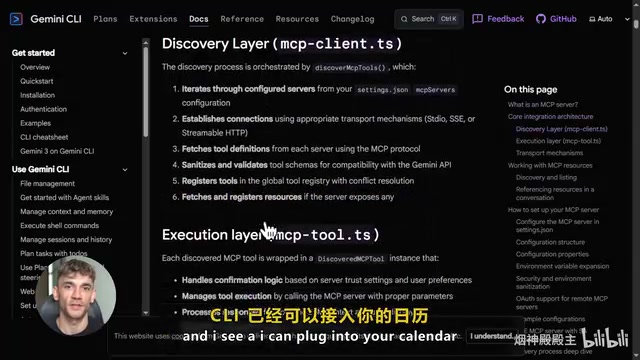
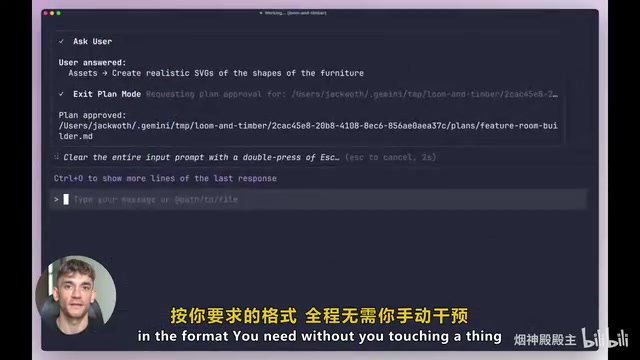
It's no longer limited to reading local files — it can actively reach out to and operate your existing tools: Notion, Airtable, GitHub, Slack, and more. After the AI agent generates content, it can automatically place it precisely in the corresponding tool, in the format you specified, with zero manual intervention. This is what true automation looks like: not just generating text, but generating text and delivering it to the right place.
Hands-On Demo: Automated Content Pipeline
Let's look at a real content creation scenario to see how Gemini CLI compresses hours of work into minutes.
Step 1: Research and Writing. Enter a command in the terminal: "Research the top 5 AI tool updates this week, write an analysis briefing that's practical, concise, and focused on enterprise automation solutions." Gemini CLI will search the web for the latest news, study the search results, understand the target audience's priorities, and then produce a well-structured, ready-to-use piece of content. The entire process takes less than two minutes.
Step 2: Content Repurposing. Follow up with: "Transform this content into 5 short community posts." Done instantly — same information, different formats, content repurposed on the spot.
Step 3: Strategy Generation. Continue with: "Based on this week's AI developments, recommend 3 automation workflows that can be built." It delivers detailed proposals including use cases, required tools, and specific execution logic. A week's worth of content material generated in seconds.
Step 4: MCP Auto-Distribution. With MCP protocol, have Gemini CLI automatically format the written content and send it directly to a newsletter draft in Notion — no copy-pasting, no constant tab-switching, the entire workflow flows seamlessly.
Free, Open-Source, and Extremely Low Barrier to Entry
Gemini CLI is a completely free, open-source AI tool. With just a Google account, you get a generous daily free request quota. You don't need a hefty budget — just a terminal and a Google account to get started.
CLI (Command Line Interface) tools have deep historical roots in developer culture — from the Unix philosophy of "do one thing and do it well" to the heavy reliance on automation scripts in modern DevOps workflows, the terminal has always been the most efficient work interface for technical professionals. Gemini CLI is hosted on GitHub under the Apache 2.0 open-source license, meaning any developer can audit the source code, submit improvements, or build customized tools on top of it. Another key advantage of the open-source model is the community-driven MCP plugin ecosystem — developers can create specialized connectors for specific industries or toolchains, allowing Gemini CLI's capabilities to continuously expand with community contributions. This is a fundamental difference from closed-source commercial tools. For individual developers and small teams, Gemini CLI may be the lowest-barrier, fastest-to-start AI agent tool currently available.
The Mindset Shift: From "AI Search Engine" to "AI Agent"
The significance of this Gemini CLI update goes far beyond features — it reflects a fundamental shift in the paradigm of AI tool usage.
Most people still use AI in "search engine mode": ask a question, get an answer, and that's it. This is certainly useful, but it fundamentally underutilizes AI's potential. AI's true power lies in using it as an agent — accepting goals, autonomously planning steps, invoking existing tools, and completing tasks end-to-end.
For different roles, this means different value:
- Content Creators: Fully automate research, copywriting, content repurposing, and cross-platform distribution
- Business Managers: Auto-generate reports, sync client progress, and optimize content workflows
- Community Managers: Automate research processes, email newsletters, and member engagement
The core signal from this Gemini CLI update is clear: the terminal is becoming the AI-native work interface, and agent mode is replacing the traditional Q&A paradigm. For any professional looking to leverage AI for greater efficiency, now is the best time to seriously evaluate this free, open-source AI agent tool.
Related articles
 Product Reviews
Qoder vs Cursor Real-World Comparison: Which $20/Month AI IDE Is Better?
Hands-on comparison of Qoder vs Cursor AI IDEs: Agent autonomy, human interaction count, and architecture decisions. Qoder needed only 2 interactions vs Cursor's 8.
 Product Reviews
Cursor Cloud Agent Demo: Eliminating Bottlenecks Across the Entire Software Development Lifecycle
Deep analysis of Cursor's Cloud Agent demo showing how cloud VMs, automated test artifacts, and a full-chain control plane systematically eliminate human bottlenecks across the software development lifecycle.
 Product Reviews
Cursor 3.0 Deep Dive: Multi-Agent Parallelism, Design Mode, and Best-of-N Model Comparison
Cursor 3.0 evolves from an AI coding assistant into an Agent fleet command center. Explore multi-agent parallelism, Design Mode, and Best-of-N model comparison.