Multica Open-Source Platform: A Self-Hosted Solution for Unified Management of Multiple AI Coding Agents

Multica is an open-source platform for coordinating multiple AI coding Agents with full self-hosting support.
Multica is an open-source Agent management platform that solves the pain point of lacking unified coordination when using multiple AI coding assistants (like Claude Code, Codex, etc.) simultaneously. It separates management from execution layers, provides kanban boards, Issue assignment, and progress tracking, supports distributed runtimes and fully self-hosted deployment, and enables team knowledge accumulation through reusable skills.
What Is Multica? An Open-Source Platform Solving AI Coding Agent Management Pain Points
Multica is an open-source agent management platform designed specifically for coordinating multiple AI coding assistants. If you regularly use AI coding tools like Claude Code, Codex, OpenClaw, or OpenCode, you've likely experienced a common pain point: each Agent runs as an independent terminal session, requiring you to babysit them one by one, manually copy-paste prompts, with no unified coordination mechanism.
The AI coding assistant space is currently undergoing a paradigm shift from "single conversations" to "persistent agents." Claude Code is Anthropic's command-line coding assistant that can understand codebases and execute modifications directly in the terminal; Codex is OpenAI's similar offering; OpenClaw and OpenCode are open-source community alternatives. These tools share a common trait: they run as CLI (Command Line Interface) applications with the ability to read files, execute commands, and modify code. However, when teams use multiple such Agents simultaneously for different tasks, the lack of unified task assignment, progress tracking, and context-sharing mechanisms means human developers become the bottleneck—switching between multiple terminal windows and manually coordinating each Agent's work boundaries.
Multica's core philosophy is to transform these coding Agents from "terminal sessions you need to babysit individually" into "true team members." It provides a shared workspace where Agents can have personal profiles, be assigned Issues, post progress updates, report blockers, and appear on kanban boards just like real team members.
In short, Multica isn't a chatbot wrapper—it's an open-source management infrastructure for coding Agents.
Architecture Design: Complete Separation of Management and Execution Layers
Multica's tech stack includes the following core components:
- Frontend: Next.js web application
- Backend: Written in Go
- Database: PostgreSQL 17 + pgvector extension
- Agent Daemon: Runs on machines that actually execute coding tasks
pgvector is a vector similarity search extension for PostgreSQL that allows storing and querying high-dimensional vectors within a relational database. In Multica's context, the inclusion of pgvector means the platform leverages vector embeddings for semantic search—for example, matching relevant historical Issues, code snippets, or skill definitions based on natural language descriptions. This is far more suitable for AI workflows than traditional keyword search, since Agent-generated content and human queries are often semantically related rather than literally matching. PostgreSQL 17 is the latest major version of the database, bringing improvements like incremental sort optimization and enhanced JSON handling.
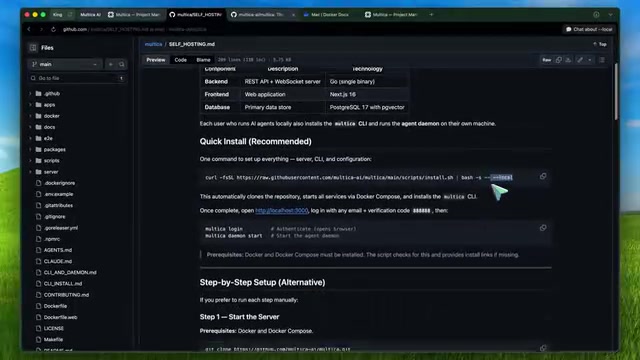
The elegance of this architecture lies in the complete separation of management and execution layers. The kanban board, Issues, comments, workspaces, and real-time updates all run within the web application and backend, while actual coding work still happens on machines you control—whether that's your laptop, desktop, Mac Mini, or a Linux server in your office.
A daemon is a process in Unix/Linux systems that runs continuously in the background without being tied to any terminal session. Multica's daemon design borrows from traditional system management tools (like systemd, Docker daemon): it runs persistently in the background, maintains a WebSocket long connection to the central server, and listens for task assignment events. When the server dispatches a task, the daemon is responsible for launching the appropriate Agent CLI process locally, capturing its output, and relaying status updates back to the server. The advantage of this design is that even if the network is briefly interrupted, local tasks can continue executing, with state synchronization resuming once the connection is restored.
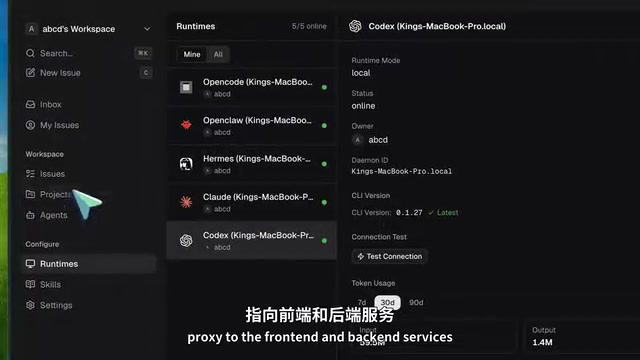
The daemon detects which Agent CLI tools are installed on your machine and automatically executes them when the server assigns tasks. The platform is centralized, but the runtime can be distributed—teams can spread computational load across multiple machines, avoiding single-point performance bottlenecks.
Fully Self-Hosted Deployment: Breaking Free from Cloud Service Dependencies
Key Differences Between Default and Self-Hosted Paths
There's a very important caveat here: if you use the default installation path without any special flags, it will connect to Multica's hosted service. If your goal is to be completely independent of Multica Cloud, you must use the self-hosted path from the very beginning.
The simplest approach is to use the official installer with the --local flag, or clone the repository and run make self-host. The latter automatically creates .env from example files, generates random JWT keys, and starts the Docker Compose stack, with the frontend running on localhost:3000 and the backend on localhost:8888 by default.
Local Development vs. Production Environment Configuration
For non-production environments, you can log in with any email address and the universal verification code 888888—this is a shortcut for local development. The key point: this login flow is for your self-hosted Multica instance, not the Multica.ai cloud service.
For production deployment, you'll need:
- Your own PostgreSQL 17 database (with pgvector extension)
- Properly configured JWT keys
- Reverse proxy + TLS (official docs provide Caddy and Nginx examples)
- Email authentication service (via Resend API)
- Optional S3 object storage
JWT (JSON Web Token) is a stateless authentication standard where the server issues encrypted tokens containing user identity information, and clients include these tokens in subsequent requests to prove their identity without the server maintaining session state. Multica uses randomly generated JWT keys to sign tokens, ensuring they cannot be forged. Magic Link authentication is a passwordless login method: after entering their email, users receive an email containing a one-time link—clicking it completes authentication. Resend is a developer-friendly email sending API service offering high deliverability and clean integration interfaces. This authentication system avoids the complexity of password management while maintaining security in self-hosted environments.
Production authentication uses Resend to send email magic links, with Google OAuth as optional. If you don't configure an S3 bucket, the system falls back to local file storage.
Practical Workflow: From Installation to Automated Agent Task Execution
Every machine that needs to run Agents requires the Multica CLI and at least one supported Agent CLI installed. The configuration process is as follows:
# One-click setup (recommended)
multica setup --local

# Or manual configuration
multica config local
multica login
multica daemon start
multica daemon status
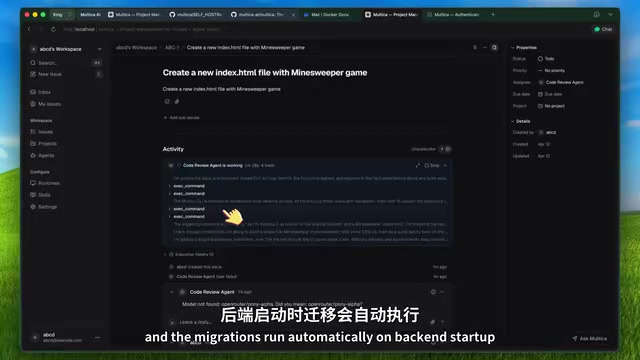
Once the daemon is online, you can see your machine in the web app under "Settings > Runtimes." Then create a new Agent in "Settings > Agents," select the runtime, and assign it to a workspace. After that, create an Issue and assign it to the Agent—it will automatically pick up the task and start working.
Reusable Skills: The Compound Interest Effect of Team Engineering Knowledge
Multica introduces the concept of "Reusable Skills," which is an extremely valuable design choice. If your team has developed solid deployment procedures, database migration patterns, or code review standards, this knowledge can compound over time rather than having each Agent start from scratch every time.
The concept of "Reusable Skills" is similar to design pattern libraries in software engineering or Runbooks in operations, but specifically designed for AI Agents. Traditionally, team knowledge exists in the form of documentation, wikis, or oral tradition, requiring relearning every time a new member (whether human or AI) joins. Multica's skills mechanism makes this tacit knowledge explicit and structured, allowing Agents to directly consume and execute it. This shares similarities with RAG (Retrieval-Augmented Generation) technology—improving task execution quality by injecting organizational knowledge into an Agent's context window. The compound interest effect manifests as follows: as the team continuously accumulates skills, each new Agent starts from a higher baseline, with marginal efficiency increasing over time.
This means team engineering practices can be encoded as Agent capabilities, forming organization-level knowledge accumulation.
Multica's Limitations: What to Know Before Using It
Self-Hosting Doesn't Mean Self-Hosting Models
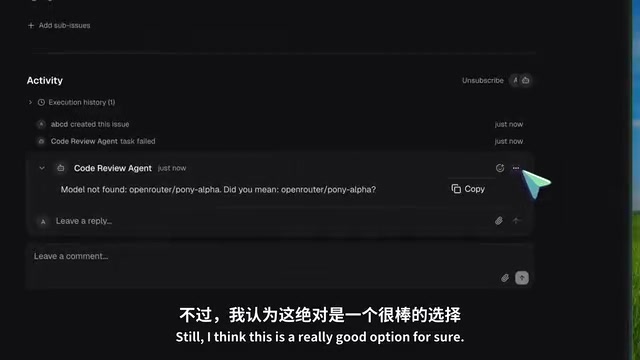
Self-hosting Multica doesn't mean self-hosting the underlying models. The orchestration layer is self-hosted—the issue tracker, dashboard, workspaces, Agent assignments, and runtime management all run on your infrastructure. But the actual coding Agents may still depend on Anthropic, OpenAI, or other model providers. If you're pursuing complete air-gap isolation, Multica alone won't get you there.
Air Gap is an information security term referring to a system being completely physically disconnected from external networks, commonly seen in military, financial, and government high-security environments. In AI coding scenarios, complete air-gap isolation means code and prompts never leave the internal network—critical for organizations handling sensitive intellectual property or regulated data. To achieve full isolation, you need not only a self-hosted management platform (which Multica addresses) but also self-hosted large language models (e.g., deploying open-source models via tools like vLLM or Ollama). Currently, tools like Claude Code must call cloud APIs, meaning code snippets are sent to external servers, which poses limitations for certain compliance scenarios.
Runtime Cost Considerations
Open-source software is great, but you still bear: infrastructure costs, production email service costs, and most importantly—the fees for underlying Agent tools or model usage. This isn't "completely free" but rather "more flexible and controllable."
Determining Applicability
If you just want to use Codex on your own machine to edit a single repository, you don't need an entire Agent management platform. But if you're coordinating multiple repositories, multiple Agents, or multiple people collaborating with Agents, Multica starts to demonstrate its value.
Conclusion: Multica's Unique Value in AI Coding Collaboration
Multica's core advantages are:
- Vendor Neutral: Supports multiple coding CLIs without locking you into a single Agent provider
- Truly Self-Hostable: Not one of those "pretends to be open-source but core features still depend on SaaS" projects
- Flexible Distributed Runtimes: Team members can have different machines, different configurations, even different Agent preferences, while collaborating through a unified control plane
- Simple Upgrades: Pull the latest code, rebuild Docker Compose, and migrations run automatically on backend startup
As AI coding tools evolve from "personal assistants" to "team collaboration," Multica provides a structured solution. It's not perfect, but in the direction of "managed coding Agents," it's one of the most solid open-source options available today.
Related articles
 Product Reviews
Qoder vs Cursor Real-World Comparison: Which $20/Month AI IDE Is Better?
Hands-on comparison of Qoder vs Cursor AI IDEs: Agent autonomy, human interaction count, and architecture decisions. Qoder needed only 2 interactions vs Cursor's 8.
 Product Reviews
Cursor Cloud Agent Demo: Eliminating Bottlenecks Across the Entire Software Development Lifecycle
Deep analysis of Cursor's Cloud Agent demo showing how cloud VMs, automated test artifacts, and a full-chain control plane systematically eliminate human bottlenecks across the software development lifecycle.
 Product Reviews
Cursor 3.0 Deep Dive: Multi-Agent Parallelism, Design Mode, and Best-of-N Model Comparison
Cursor 3.0 evolves from an AI coding assistant into an Agent fleet command center. Explore multi-agent parallelism, Design Mode, and Best-of-N model comparison.