OpenAI Codex Role-Specific Plugins Explained: Reshaping Team Collaboration Workflows
OpenAI Codex Role-Specific Plugins Exp…
OpenAI launches Codex role-specific plugins, shifting AI from general assistant to deep role-matched capabilities.
OpenAI has released Codex role-specific plugins covering data analysis, creative production, product design, and other functional areas. Designed with input from domain experts, these plugins come pre-configured with workflows and integrate 60+ enterprise systems, enabling non-technical users to quickly gain role-based AI empowerment. The product design plugin supports a complete closed loop from ideation to prototype publication, marking the shift in AI competition from model capabilities to scenario depth.
Overview: From General-Purpose AI to Role-Based AI Assistants
OpenAI has officially launched a new wave of Codex Role-specific Plugins, built and used by OpenAI's internal teams. These plugins cover multiple functional areas including sales, data analysis, financial services, product design, and creative production. Unlike traditional general-purpose AI tools, these plugins bundle specific role workflows, skills, and tool contexts together, giving Codex the right working context from the start.
OpenAI's Codex was originally known as a code generation model—a product of fine-tuning the GPT series for programming tasks. But as enterprise AI adoption deepened, Codex gradually evolved into a broader AI work platform. The concept of Role-based AI originates from the long-standing "role permissions" design philosophy in enterprise software—different positions require different tools, data, and workflows. Traditional SaaS products achieve this through permission management, while role-based AI goes further by customizing the AI's reasoning capabilities, output style, and tool-calling logic for each role. This stands in stark contrast to the previously popular "general assistant + prompt engineering" approach, which required users to handle context construction themselves.
This marks AI tools transitioning from the stage of "can do everything but excels at nothing" to a new phase of "deeply understanding specific role requirements."
Codex Plugin Directory: Precise Matching by Work Type
In the Codex plugin directory, users can browse and select plugins based on the type of work they want to accomplish. Each plugin comes pre-configured with relevant workflows, professional skills, and connected tools, eliminating the need for users to configure AI capabilities from scratch.

From a technical implementation perspective, Codex plugins rely on OpenAI's Function Calling mechanism and tool-use protocols. Function Calling allows large language models to identify user intent during conversations and invoke predefined external functions or APIs to complete specific tasks. Each role plugin is essentially a combination of pre-configured system prompts, callable tool lists, and workflow orchestration logic. This architecture resembles the "Domain-Driven Design" (DDD) philosophy in microservices—decomposing complex systems by business domain, with each domain having its own context boundaries and dedicated capabilities.
The core principle behind this design: letting functional experts (not engineers) shape how AI works. Sales team plugins are designed with input from sales experts, data analysis plugins are refined with input from analysts, ensuring AI outputs truly meet the actual needs of each role.
Core Use Cases Explained
Data Analysis: From Metric Diagnostics to Visual Reports
The data analysis plugin enables Codex to help teams diagnose metric changes, build KPI reports, or create dashboard-style visualizations from connected data tools. Data analysts no longer need to manually stitch together outputs from various tools—Codex can start directly from data sources and generate deliverable analytical results.
The traditional KPI report creation process typically involves multiple steps: extracting data from data warehouses (usually with SQL), cleaning and computing in Excel or Python, then creating visualizations with tools like Tableau or Power BI. The data analysis plugin compresses these steps into natural language interactions, with AI automatically handling data queries, anomaly detection, and chart generation. "Metric diagnostics" here refers to when a business metric (such as user retention rate or conversion rate) shows abnormal fluctuations—the AI can automatically perform attribution analysis to identify which dimensions (channels, regions, user segments) caused the change.

Creative Production: From Design Concepts to Multi-Option Presentations
The creative production plugin supports users in building design briefs or product photos and generating a set of creative directions for team review. This isn't simple image generation—it integrates the complete creative production workflow, from requirement understanding to multi-option presentation, into a single workflow.
This plugin leverages multiple generative AI capabilities in the visual domain, including Text-to-Image generation, image editing, and style transfer. "Multi-option presentation" corresponds to the standard workflow in the creative industry—designers typically prepare 3-5 different creative concept directions for clients to choose from. AI's value here isn't just generating a single image, but understanding the brand tone, target audience, and communication objectives in a Creative Brief, then generating multiple sets of stylistically diverse options that all align with the strategic direction. This capability previously required days of work from design teams.
Product Design: From Ideas to Interactive Prototypes
The product design plugin can start from an idea, a screenshot, or an actual URL and help transform it into a collaborative prototype. Users can even publish prototypes directly as websites for team members to access and provide feedback.
From a technical perspective, this plugin's "idea to interactive prototype" capability is essentially a combination of AI code generation and frontend frameworks. When users describe a product idea or provide a screenshot, the AI generates corresponding HTML/CSS/JavaScript code or builds interactive interfaces using frameworks like React. This capability compresses the traditional product design process—where designers create static prototypes in Figma, then frontend engineers implement interactions—from two steps into a single natural language instruction.
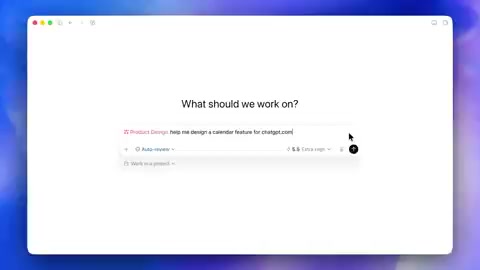
From Prototype to Publication: Completing the Closed-Loop Workflow
A particularly noteworthy feature: Codex supports publishing built prototypes directly as accessible websites. Users can hand prototypes to the Sites feature for publication, enabling team feedback. This completes the full closed loop from "ideation → prototype creation → team review → iterative optimization."

The Sites feature is similar to a simplified version of modern deployment platforms like Vercel or Netlify—one-click deployment of generated frontend code as a publicly accessible URL. This "zero deployment friction" design eliminates the biggest bottleneck in traditional product validation workflows: waiting for engineering teams to schedule prototype development. In Lean Startup methodology, rapidly building an MVP (Minimum Viable Product) and collecting user feedback is a core step, and this plugin compresses MVP construction time from weeks to minutes.
This capability means product managers or designers can turn an idea into an interactive demo within minutes, without waiting for engineering resources. For rapid idea validation and feedback collection, this represents a massive efficiency gain.
Technical Foundation: Deep Integration with 60+ Systems
These plugins are powered by applications across more than 60 different systems, covering the various tools teams already use daily. This integration strategy ensures Codex doesn't operate in a closed environment but can truly connect to an enterprise's existing tool ecosystem, read real data, and produce directly usable results.
Integration with over 60 systems means Codex needs to establish API connections with enterprise SaaS products like Salesforce, HubSpot, Slack, Jira, Google Workspace, Snowflake, Figma, and more. This integration is typically implemented through the OAuth 2.0 authorization protocol, ensuring data access security and controllable permissions. In enterprise IT architecture, such integration platforms are called iPaaS (Integration Platform as a Service), with representative products including Zapier, Workato, and MuleSoft. OpenAI embedding integration capabilities within the AI platform means AI is no longer just a "chat window" but becomes a central node connecting enterprise data silos, capable of pulling information across systems and coordinating workflows.
Industry Significance and Future Outlook
This release sends a clear signal: competition among AI tools is shifting from "model capabilities" to "scenario depth." Whoever better understands the working context of specific roles can provide more valuable AI assistance.
This trend reflects the maturation process the enterprise AI market is undergoing. In 2023, AI companies primarily competed on foundation model parameter scale and benchmark scores; by 2024-2025, the competitive focus shifted to who can better embed AI capabilities into specific business processes. This mirrors the development trajectory of the cloud computing industry—early competition focused on IaaS infrastructure capabilities, while later competition centered on SaaS vertical scenario solutions. Microsoft Copilot, Google Duet AI, and Anthropic's Claude for Work are all taking similar paths, but OpenAI is attempting to establish a more granular scenario coverage advantage through its role-based plugin system.
OpenAI has also opened user feedback channels, inviting users to suggest which plugin workflows they'd like to see next. This model of "user demand-driven plugin development" could accelerate Codex's penetration into enterprise scenarios.
For enterprise users, role-specific plugins reduce the learning and configuration costs of AI tools, enabling non-technical personnel to quickly gain AI empowerment. This may be the critical step for AI to truly enter the daily work of every position.
Key Takeaways
- OpenAI launches Codex role-specific plugins covering data analysis, creative production, product design, and other functional areas
- Plugins are designed with input from functional experts, pre-configured with workflows and tool connections, providing role-specific AI context
- The product design plugin supports a complete closed loop from idea to prototype to website publication
- The underlying layer integrates with 60+ commonly used enterprise systems, ensuring seamless connection with existing tool ecosystems
- Marks the shift in AI tool competition from general model capabilities to vertical scenario depth
Related articles
 Product Reviews
Qoder vs Cursor Real-World Comparison: Which $20/Month AI IDE Is Better?
Hands-on comparison of Qoder vs Cursor AI IDEs: Agent autonomy, human interaction count, and architecture decisions. Qoder needed only 2 interactions vs Cursor's 8.
 Product Reviews
Cursor Cloud Agent Demo: Eliminating Bottlenecks Across the Entire Software Development Lifecycle
Deep analysis of Cursor's Cloud Agent demo showing how cloud VMs, automated test artifacts, and a full-chain control plane systematically eliminate human bottlenecks across the software development lifecycle.
 Product Reviews
Cursor 3.0 Deep Dive: Multi-Agent Parallelism, Design Mode, and Best-of-N Model Comparison
Cursor 3.0 evolves from an AI coding assistant into an Agent fleet command center. Explore multi-agent parallelism, Design Mode, and Best-of-N model comparison.