OpenCLI: Wrapping Websites and Desktop Apps into Reusable CLI Commands for AI

OpenCLI wraps websites and apps into CLI commands for stable, reusable AI Agent automation.
OpenCLI is an open-source tool that wraps websites, desktop apps, and local tools into reusable CLI commands, solving the instability of AI Agents repeatedly operating web pages. It offers three paths: 90+ pre-built adapters for direct use, browser primitives for operating logged-in pages, and Agents automatically writing new adapters. Supporting multiple structured output formats and serving as a CLI Hub for GitHub CLI, Docker, and more, its core value lies in crystallizing ad-hoc operations into stable, reusable commands.
The Problem
In the era of increasingly prevalent AI Agents, an awkward reality persists: most websites don't offer public APIs, critical data requires authentication to access, and having Agents guess buttons from screenshots or parse pages every time is neither stable nor efficient. OpenCLI is an open-source tool built to solve exactly this problem — it wraps websites, desktop applications, and local tools into reusable CLI commands that humans, Agents, and scripts can all reliably invoke.
The Core Pain Point: Repetitive Operations and Fragile Automation
If you frequently ask AI Agents to check Bilibili trending lists, read Zhihu answers, or repeatedly interact with the same admin panel, the frustration isn't the operation itself — it's that every time requires re-opening, re-observing, and re-guessing the page structure.
Traditional solutions boil down to two paths: manual copy-paste, or handling cookies, tokens, and page structures yourself. The former is inefficient; the latter is extremely fragile — a single site redesign can break everything. For AI Agents, the problem is even worse: they might complete a task once via screenshots, but can hardly guarantee consistent results next time.
Technical Background: The Challenge of AI Agents and Web Automation
The core challenge AI Agents face when executing web tasks stems from the heterogeneity of the Web. Modern websites heavily use dynamic rendering (SPA single-page applications), anti-scraping mechanisms (like Cloudflare, reCAPTCHA), and session-based authentication systems, making traditional scraping solutions highly prone to failure. Current mainstream Agent web operation approaches fall into two categories: vision-based approaches (like GPT-4V screenshots + coordinate clicking) and DOM-based approaches (like Playwright, Selenium). The former is flexible but unstable; the latter is stable but requires maintaining selectors for each website individually. OpenCLI attempts to find a balance between the two — using browser primitives for exploration, then solidifying stable paths into command interfaces.
OpenCLI's core philosophy is: first make real browsers and real applications into operable interfaces, then crystallize successful workflows into commands. One exploration becomes reusable capability for next time.
Three Paths: From Out-of-the-Box to Custom Extensions
OpenCLI provides three progressively deeper usage paths, covering needs from beginners to advanced users.
Path One: Use Pre-built Adapters Directly
OpenCLI currently ships with 90+ adapters, covering Bilibili, Zhihu, Xiaohongshu, Reddit, Hacker News, Twitter/X, and other popular sites. Usage is straightforward:
- First run
opencli listto see all available capabilities - Then directly execute commands like
hackernews toporbilibili hot
These commands return structured data, supporting JSON, YAML, Markdown, or CSV output formats. For Agents, this means receiving stable fields rather than guessing from page content every time.
Why CLI Is the Ideal Interface for Agent Tools
Wrapping tools as CLI commands is an important design pattern in the AI Agent tool-calling domain. Compared to directly manipulating browser DOM or calling REST APIs, CLI interfaces offer several unique advantages: standardized I/O formats (stdin/stdout/stderr), native support for pipe composition, clear error code semantics, and language-agnostic invocation. Across mainstream Agent tool frameworks like MCP (Model Context Protocol), LangChain Tools, and OpenAI Function Calling, CLI wrapping is one of the lowest-cost integration methods. OpenCLI's structured output (JSON/YAML/CSV) further reduces the cognitive burden on Agents when parsing results, avoiding hallucination risks that come from extracting information from unstructured HTML.
Path Two: Operate Logged-in Pages via Browser Primitives
Agents can use opencli browser to operate an already-logged-in Chrome browser, performing navigation, clicking, typing, reading structured page content, and inspecting network requests when needed. This path reuses your browser's login state, eliminating the need to handle authentication separately.
Technical Principles of Browser Bridge
OpenCLI's Browser Bridge extension leverages Chrome Extension APIs like
chrome.debuggerandchrome.tabs, essentially establishing a local WebSocket or HTTP channel on the user's already-logged-in browser instance, translating external CLI commands into internal browser operations. This is similar to Playwright's CDP (Chrome DevTools Protocol) approach, but with a key difference: Playwright typically launches a separate browser instance, while Browser Bridge reuses the user's everyday Chrome process, naturally inheriting all logged-in Cookies, LocalStorage, and Session states. This design bypasses complex login scenarios like OAuth flows and two-factor authentication, but also means the tool's runtime state is deeply coupled with the user's browser environment.
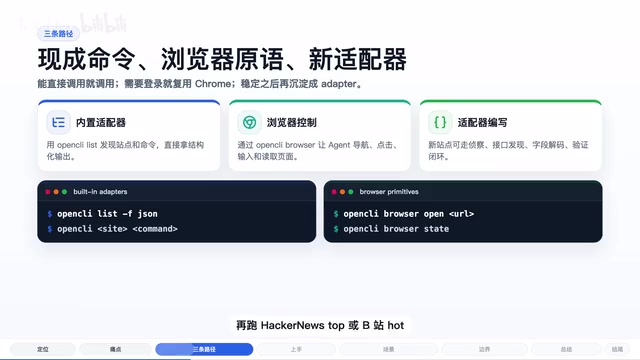
Path Three: Let Agents Automatically Write New Adapters
When encountering uncovered websites, Agents can leverage the built-in Adapter Author skill to automatically wrap new sites into reusable adapters — from site reconnaissance, API discovery, and field decoding all the way to verification. This means OpenCLI's capability boundary can continuously expand.
The Adapter Pattern and Automated Engineering Crystallization
OpenCLI's Adapter design draws from the Adapter Pattern in software engineering, abstracting heterogeneous interfaces from different websites into standardized CLI commands. This "explore-then-solidify" workflow holds significant importance in automation engineering: it transforms one-off fragile scripts into version-controlled, testable, shareable engineering artifacts. Similar approaches appear in the RPA (Robotic Process Automation) domain, such as UiPath's Activity libraries and Automation Anywhere's Bot Store. OpenCLI's differentiation lies in bringing LLM capabilities into the adapter generation process — the Adapter Author skill is essentially an LLM-driven reverse engineering workflow that analyzes network requests, page structures, and API responses to automatically generate adapter code, dramatically reducing the manual cost of expanding the tool library.
Practical Usage: Installation and Getting Started
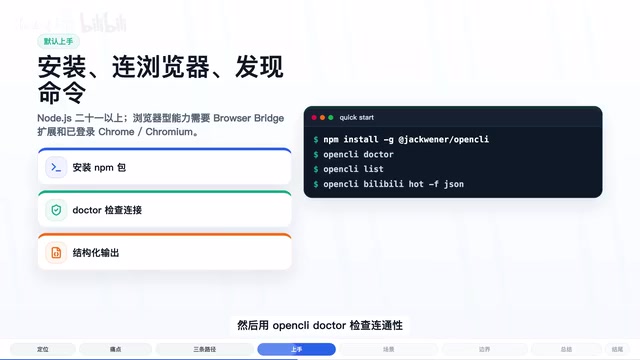
The default onboarding path is quite clear:
- Install OpenCLI globally via npm (requires Node.js 21 or higher)
- If browser-related commands are needed, install the Browser Bridge extension and keep Chrome logged into target websites
- Run
opencli doctorto check connectivity - Use
opencli listto discover available capabilities and start using them
Here's a concrete scenario: you want an Agent to compile content highlights daily. Previously, the Agent might need to open a browser, search websites, scroll pages, and extract titles from page text. With pre-built adapters, a direct command call returns structured tables or JSON data. If a particular site doesn't have an adapter yet, there's no need to immediately write a scraper — first let the Agent explore the real page using browser primitives, then solidify the workflow into an adapter once it's stable.
Beyond Websites: CLI Hub as a Unified Command-Line Entry Point
OpenCLI's positioning goes beyond web automation. It can also serve as a CLI Hub, integrating local tools like GitHub CLI, Docker, and Obsidian, while also supporting Electron desktop apps like Cursor, Codex, ChatGPT, and Notion. This means it aims to become a unified command-line entry point, aggregating operational capabilities from various tools and applications.
This positioning aligns closely with the "unified tool orchestration" trend in the current AI Agent ecosystem. As standards like Anthropic's MCP protocol and OpenAI's Plugin system advance, enabling Agents to invoke heterogeneous tools at low cost and high reliability has become a core challenge in Agent engineering. OpenCLI's CLI Hub approach offers a pragmatic answer: rather than depending on each party to provide standard APIs, it builds a unified abstraction layer on top of existing tools' command-line interfaces.
Usage Boundaries: Limitations to Be Aware Of
Every tool has boundaries, and OpenCLI is no exception. Here are key points to understand before use:
Login state reuse ≠ bypassing authentication. OpenCLI reuses the login state already present in your browser. For sites requiring login, you still need to manually complete the login in your browser first.
Browser-type commands depend on environment state. Extensions, daemons, and page states can all affect results. If you get empty data, first check whether you're logged into the target site.
"Zero LLM cost" has prerequisites. The zero-cost claim primarily refers to adapter commands not consuming model tokens at runtime. However, having Agents explore new websites and write new adapters still consumes model resources.
Websites change. OpenCLI addresses this through diagnostic workflows like Verify, Doctor, and Autofix, pursuing more verifiable automation rather than promising all sites will never break. This aligns with the "Contract Testing" philosophy in software engineering — rather than assuming external dependencies will always be stable, build continuous verification mechanisms to quickly detect and fix changes.
Summary: From Ad-hoc Operations to Engineering Crystallization
OpenCLI's most noteworthy value is that it places ad-hoc browser operations and stable command interfaces on the same evolutionary path. If you only occasionally check a webpage, it might not be essential. But if you repeatedly have humans or Agents perform the same type of website operations, OpenCLI provides an engineering approach to crystallization: first complete tasks with real login states, then turn successful paths into reusable commands.
For developers interested in how AI Agents can more reliably invoke web and desktop applications, OpenCLI deserves a spot on your tool watchlist. Start by trying the opencli doctor and opencli list commands.
Key Takeaways
- OpenCLI wraps websites, desktop apps, and local tools into reusable CLI commands, solving stability issues when AI Agents repeatedly operate web pages
- Offers three paths: 90+ pre-built adapters for direct use, browser primitives for operating logged-in pages, and Agents automatically writing new adapters
- Supports structured output in JSON/YAML/Markdown/CSV, giving Agents stable fields instead of page guessing
- Goes beyond websites to serve as a CLI Hub integrating GitHub CLI, Docker, Electron apps, and other local tools
- Core value lies in engineering crystallization of ad-hoc browser operations into stable commands, with caveats around login state reuse, environment dependencies, and site redesigns
Related articles
 Product Reviews
Qoder vs Cursor Real-World Comparison: Which $20/Month AI IDE Is Better?
Hands-on comparison of Qoder vs Cursor AI IDEs: Agent autonomy, human interaction count, and architecture decisions. Qoder needed only 2 interactions vs Cursor's 8.
 Product Reviews
Cursor Cloud Agent Demo: Eliminating Bottlenecks Across the Entire Software Development Lifecycle
Deep analysis of Cursor's Cloud Agent demo showing how cloud VMs, automated test artifacts, and a full-chain control plane systematically eliminate human bottlenecks across the software development lifecycle.
 Product Reviews
Cursor 3.0 Deep Dive: Multi-Agent Parallelism, Design Mode, and Best-of-N Model Comparison
Cursor 3.0 evolves from an AI coding assistant into an Agent fleet command center. Explore multi-agent parallelism, Design Mode, and Best-of-N model comparison.