OpenCode: A Deep Dive into the Terminal AI Coding Tool Built with Go
OpenCode: A Deep Dive into the Termina…
OpenCode is a Go-based terminal AI coding tool that outperforms Claude Code and Aider in speed and experience.
OpenCode is a next-generation terminal AI coding tool built with Go, featuring blazing-fast startup, multi-model support (OpenAI, Anthropic, Gemini, and more), SQLite session management, a built-in Vim editor, LSP code diagnostics, and MCP server extensions. It comprehensively outperforms Claude Code and Aider in both performance and functionality, with Gemini 2.5 Pro recommended as the optimal pairing for the best experience.
A New Choice for Terminal AI Coding Tools
For developers who prefer working in the terminal, Claude Code and Aider have long been the go-to AI coding assistants. They eliminate the need to open bulky editors, allowing you to write code directly in the terminal and reducing friction in your workflow. However, both tools have their pain points: Claude Code can't use models from other providers, while Aider is slow to start and has high memory usage.
The tool we're introducing today—OpenCode—is a next-generation terminal AI coding tool built specifically to solve these problems. Built with Go, it delivers significant improvements in both performance and user experience.
Core Advantages of OpenCode
Blazing-Fast Startup and Response Performance
OpenCode's most impressive feature is its speed. Written in Go, it starts almost instantaneously with extremely smooth operational response. Some developers have compared it to "the Z of terminal AI coding tools" (analogous to Zsh's position relative to Shell). By comparison, Claude Code feels less polished, and Aider feels clunky and poorly organized.
Why does Go provide such a significant performance advantage? Go (Golang), released by Google in 2009, is a compiled language that produces native machine code without requiring a virtual machine or interpreter. Compared to Python (Aider's tech stack) or Node.js (the runtime for some AI tools), Go programs typically have cold start times in the millisecond range with much more modest memory usage. Go's goroutine concurrency model excels at handling multiple concurrent I/O operations (such as simultaneously calling AI APIs, watching file changes, and responding to user input)—which is precisely the core performance bottleneck for terminal AI coding tools. This explains why OpenCode feels dramatically smoother than Python-based Aider for equivalent functionality.
Multi-Model Support: No More Vendor Lock-in
Unlike Claude Code, which only works with Anthropic models, OpenCode supports virtually all major AI providers:
- OpenAI
- Anthropic Claude
- Google Gemini
- AWS Bedrock
- Groq
- Azure OpenAI
- OpenRouter
Among these, pairing it with Gemini 2.5 Pro is considered the optimal combination, balancing response quality and cost-effectiveness.
Robust Session Management
OpenCode uses a SQLite database to store conversations and sessions, making session management highly reliable. You can create new sessions with Ctrl+N and navigate between different sessions with Ctrl+S. This solves a long-standing pain point with session management in both Claude Code and Aider.
SQLite: Why It's the Ideal Choice for Session Storage SQLite is an embedded relational database that stores data as a single file without requiring a separate database server process. For AI coding tool session management, SQLite offers significant advantages over plain text or JSON file storage: transaction support ensures data consistency (preventing data corruption from unexpected session interruptions), complex queries enable fast retrieval of historical sessions, and concurrent read/write operations are safe. By contrast, Aider uses YAML/JSON files for history storage, which tends to suffer from performance degradation and data management chaos during long sessions or frequent switching. The choice of SQLite reflects OpenCode's engineering rigor.
Feature Deep Dive
Interactive Terminal UI (Built on BubbleTea)
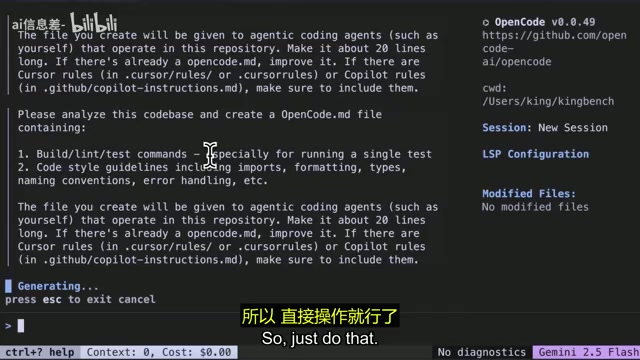
OpenCode features a beautifully crafted terminal UI built on the BubbleTea framework. The main interface includes:
- Main chat window
- Current working directory details
- Session information and LSP configuration
- List of files modified in the current session
- Current model, context, and cost information in the bottom-right corner
BubbleTea: The Standard for Terminal UIs in the Go Ecosystem BubbleTea is a Go TUI (Terminal User Interface) framework developed by Charm, designed around the Elm Architecture (Model-Update-View pattern). It has become the de facto standard for building beautiful terminal applications in the Go ecosystem, adopted by well-known open-source projects like gh (GitHub's official CLI) and Soft Serve. BubbleTea's core strengths lie in its declarative UI update mechanism and fine-grained control over terminal colors and layout, enabling near-GUI visual effects in pure text terminals while maintaining extremely low resource usage. By choosing BubbleTea, OpenCode's UI layer was built on Go terminal development best practices from the start.
Built-in Vim Editor
OpenCode includes a built-in Vim editor, allowing you to browse files and make manual edits directly within the tool, or let the AI modify the code. This workflow is similar to an AI editor experience but happens entirely in the terminal. If you're not a Vim fan, you can also press Ctrl+E to open your preferred editor for writing prompts.
LSP Integration: Code Diagnostics in the Terminal
OpenCode integrates LSP (Language Server Protocol), displaying real-time error information in your code just like VS Code. This means you get full code diagnostic capabilities without ever leaving the terminal, significantly boosting development efficiency.
LSP: Fully Decoupling Editors from Language Analysis LSP (Language Server Protocol) was introduced by Microsoft in 2016 alongside VS Code, aiming to decouple editors from language analysis logic. Traditionally, each editor needed to implement code completion, error diagnostics, go-to-definition, and other features separately for each programming language—an extremely high maintenance cost. LSP defines a standard JSON-RPC communication protocol that allows a single language server (such as rust-analyzer, pyright, or clangd) to be reused by any LSP-compatible client. By integrating LSP into a terminal tool, OpenCode means developers can get the same quality of static analysis and error diagnostics without opening VS Code or Neovim—a relatively rare advanced feature among terminal AI coding tools and an important technical differentiator from competitors.
Custom Commands
Similar to workflow features in Windsurf or Kline, OpenCode supports creating custom commands. You can write Markdown files to define automated workflows—for example, creating a "commit and push" command that has the AI automatically stage files, commit, and push in a complete workflow.
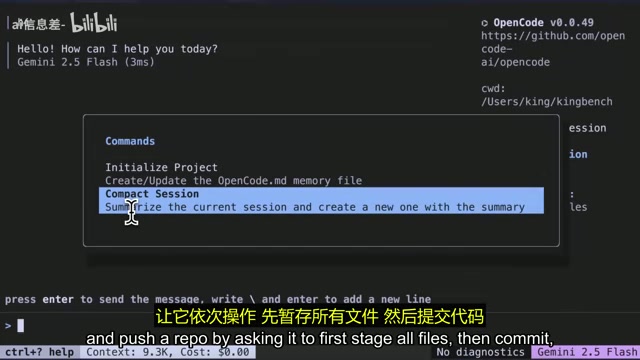
The tool provides two default commands:
- Initialize: Initialize a project
- Compact Session: Compress the current session context, summarize it, and create a new session to continue working
MCP Server Support
OpenCode also supports MCP (Model Context Protocol) server configuration, which can be set up directly in the configuration file to extend the tool's capabilities.
MCP: The Next Standard for AI Tool Integration MCP (Model Context Protocol) is an open standard protocol released by Anthropic in late 2024, designed to address the fragmentation of integrations between AI models and external tools/data sources. Before MCP, every AI application had to implement its own connection logic for databases, APIs, file systems, and other external resources, resulting in massive duplication of effort. MCP defines a standardized server-client architecture: MCP servers expose Tools, Resources, and Prompts, while AI clients call them through a unified interface. Hundreds of MCP server implementations now exist, covering GitHub, Slack, databases, browser automation, and more. OpenCode's MCP support means users can directly leverage the entire MCP ecosystem, dramatically expanding the AI coding assistant's capabilities without waiting for OpenCode to officially integrate each external service one by one.
Real-World Usage Experience
Installation and Configuration
Installation is very flexible: Mac users can install via Homebrew, or use the Go package manager. After installation, you need to set up API keys—either by exporting environment variables or writing them into the OpenCode configuration file for permanent storage.
On first launch with a new project, OpenCode will ask to initialize, creating a Markdown context file (similar to the .claude file in Claude Code) along with associated databases.
Code Modification Demo
Using the example of adding a light theme option to a KingBench application, the entire process was very smooth: the AI analyzed the requirements and began editing files, requesting user confirmation before each change, with excellent results.
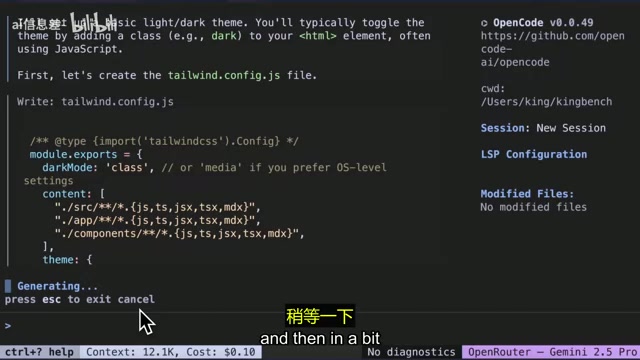
The entire interaction demonstrates OpenCode's core advantage—ultimate fluidity. File editing, change tracking, and result presentation all happen within a unified and aesthetically pleasing interface.
Keyboard Shortcuts at a Glance
| Shortcut | Function |
|---|---|
| Ctrl+? | View all shortcuts |
| Ctrl+L | View message log |
| Ctrl+N | Create new session |
| Ctrl+S | Navigate between sessions |
| Ctrl+F | Select files to upload |
| Ctrl+O | Switch models |
| Ctrl+E | Open external editor |
| Ctrl+C | Exit |
Conclusion and Recommendation
OpenCode represents an important evolutionary direction for terminal AI coding tools. While maintaining the lightweight advantages of terminal tools, it delivers a user experience far superior to Claude Code and Aider through Go's performance advantages and thoughtfully designed UI. Multi-model support further ensures users are never locked into a single ecosystem.
From a technical architecture perspective, every core decision in OpenCode has been carefully considered: Go guarantees the performance baseline, BubbleTea provides a mature TUI framework, SQLite solves data persistence reliability, LSP integration fills the last piece of the professional development tool puzzle, and MCP support reserves ample room for future capability expansion. This systematic engineering mindset is the fundamental reason OpenCode has gained developer recognition in such a short time.
If you're a heavy terminal user looking for a fast, beautiful, and fully-featured AI coding assistant, OpenCode is absolutely worth trying. Paired with Gemini 2.5 Pro, it delivers the best terminal AI coding experience currently available.
The project is open source on GitHub, with simple installation and configuration—interested developers can get started immediately.
Related articles
 Product Reviews
Qoder vs Cursor Real-World Comparison: Which $20/Month AI IDE Is Better?
Hands-on comparison of Qoder vs Cursor AI IDEs: Agent autonomy, human interaction count, and architecture decisions. Qoder needed only 2 interactions vs Cursor's 8.
 Product Reviews
Cursor Cloud Agent Demo: Eliminating Bottlenecks Across the Entire Software Development Lifecycle
Deep analysis of Cursor's Cloud Agent demo showing how cloud VMs, automated test artifacts, and a full-chain control plane systematically eliminate human bottlenecks across the software development lifecycle.
 Product Reviews
Cursor 3.0 Deep Dive: Multi-Agent Parallelism, Design Mode, and Best-of-N Model Comparison
Cursor 3.0 evolves from an AI coding assistant into an Agent fleet command center. Explore multi-agent parallelism, Design Mode, and Best-of-N model comparison.