OpenCode vs Cursor Real-World Comparison: Can Open-Source AI Coding Tools Really Replace Commercial Solutions?
OpenCode vs Cursor Real-World Comparis…
Real-world test shows Cursor decisively outperforms OpenCode in feature completeness and stability.
Through a real-world test building a full-stack Django student management system, we compared the AI coding capabilities of open-source tool OpenCode against commercial product Cursor. OpenCode generated code faster (~8 min 40 sec) but achieved only about 30% feature completeness with serious feature truncation issues; Cursor was slightly slower but completed all features in one go with virtually zero bugs. The conclusion: production projects should still use mature solutions like Cursor, while OpenCode is suitable for learning and experimentation.
Test Background and Design
With the rapid development of AI coding tools, the open-source community has produced quite a few projects claiming to be "alternatives to Claude Code," and OpenCode is one of them.
Technical Background of AI Coding Tools: Most mainstream AI coding tools today are built on Large Language Models (LLMs), generating corresponding code snippets or complete files by feeding code context, user instructions, and project structure into the model. Claude Code is Anthropic's command-line AI coding assistant, powered by the Claude model series; Cursor is a commercial IDE deeply integrated with AI capabilities on top of VS Code, supporting multiple model backends including GPT-4 and Claude. As an open-source alternative, OpenCode's core architecture allows users to connect different LLM backends, which is the technical foundation of its "switchable model" feature.
But how do open-source tools actually perform in practice? This article conducts a head-to-head comparison between OpenCode and the industry benchmark Cursor through a complete project development test, evaluating them across multiple dimensions including generation speed, code quality, frontend styling, and bug count.
Test Task: A Full-Stack Student Management System
For this test, we chose a full-stack student management system as the test project. Compared to simple single-page applications, this task is significantly more challenging. Specific requirements include:
- Complete frontend and backend development (based on the Django framework)
- Multiple functional modules including student management, course management, grade management, attendance management, and a dashboard
- Professional UI design for the frontend, including shadows, animations, rounded corners, and other details
- Seed data population
Why Django Was Chosen as the Test Framework: Django is one of the most mature full-stack web frameworks in the Python ecosystem, using the MTV (Model-Template-View) architectural pattern with built-in ORM, Admin backend, form validation, user authentication, and other complete components. Choosing Django as the test project framework is representative: it requires the AI tool to simultaneously handle database model design, serialization layers, view logic, URL routing, and frontend templates across multiple layers, comprehensively testing the tool's understanding and generation capabilities for complex engineering structures. This is much closer to real production scenarios than pure frontend or scripting tasks.
Key Prompt Engineering Techniques
In prompt design, the following techniques summarized from extensive AI coding practice are worth noting:
- Require a task list: Have the AI create a To-Do List first to track the entire development process and avoid missing features
- Unified file directory: Require all files to be placed in a specified directory to avoid chaotic file creation
- Use systematic commands for initialization: Don't let the AI create files one by one; instead, use framework commands to batch-generate the project structure — this aligns with the real-world approach of using scaffolding tools
- Define a design role: Require the AI to approach interface beautification from the perspective of a "professional frontend designer and frontend development engineer"
These techniques can be written into system-level configurations (such as .cursorrules), ensuring all projects follow unified rules.
Prompt Engineering and .cursorrules Configuration Explained: Prompt Engineering refers to the methodology of systematically designing input instructions to optimize AI model output quality. In AI coding scenarios,
.cursorrulesis a project-level system prompt configuration file provided by Cursor. When placed in the project root directory, it's automatically injected into the system context of every conversation, essentially setting persistent "work specifications" for the AI. Similar mechanisms exist in other tools, such as Claude Code'sCLAUDE.mdfile. By writing task decomposition rules, file organization conventions, and tech stack preferences into such configurations, you can maintain consistency in AI behavior throughout the entire project lifecycle, avoiding the need to repeat basic rules in every conversation.
OpenCode vs Cursor: Real-World Test Process Comparison
Both tools used exactly the same prompts and started development simultaneously in their own independent directories.
OpenCode Test Results
After receiving the task, OpenCode automatically created a 10-step To-Do List: create project structure → create individual apps → configure Settings → database Models → Serializer → Views → templates → routing → seed data → testing. The overall planning logic was clear and largely aligned with actual development workflows.
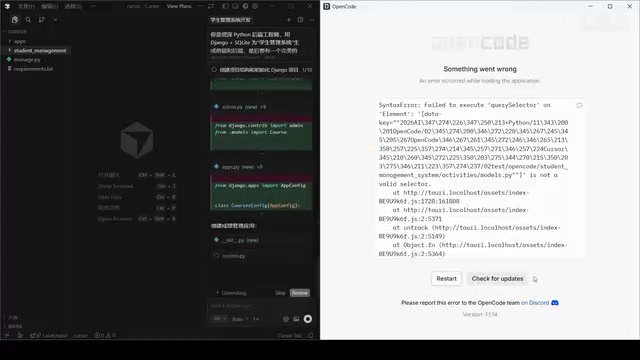
In terms of speed, OpenCode completed the project generation in approximately 8 minutes and 40 seconds — quite impressive. However, problems followed — the project threw errors immediately upon startup, and the frontend pages couldn't open properly. Investigation revealed the issue was static file tags not being properly imported.
Django Static File Handling Mechanism: Django's Static Files system is one of the framework's more error-prone areas. When referencing static resources like CSS and JavaScript in templates, you need to declare
{% load static %}at the top of the HTML file and use{% static 'path/to/file' %}syntax to generate correct file URLs. If AI-generated templates omit this declaration, the browser cannot load styles and scripts, resulting in blank pages or broken layouts. This type of error is common in manual development too, but for AI tools, whether they can maintain template syntax consistency when generating complete projects is an important indicator of their engineering maturity.
Although it was a minor bug, it required manually feeding the error information back to the AI for fixing.
The more serious problem was that OpenCode exhibited obvious "corner-cutting" behavior. In the final delivered project, only the student add and filter functions were fully functional — edit, delete, and detail view features were not implemented, and modules like course management and grade management were essentially empty shells. In other words, it only completed a small portion of the requirements.
Technical Reasons Behind AI Tool "Feature Truncation": The "feature truncation" phenomenon when AI tools generate complex projects is fundamentally related to LLM context window limitations and generation strategies. When task complexity exceeds the model's effective processing range, the model may prioritize generating a framework structure that "looks complete" while simplifying or skipping concrete CRUD (Create, Read, Update, Delete) implementations. This phenomenon is known in the industry as "Hallucinated Completion" and is a common challenge for current AI coding tools in large projects — it's also a key dimension for distinguishing tool maturity. CRUD operations form the foundational operation set for data management applications; missing any one of them renders the system unusable in practice.
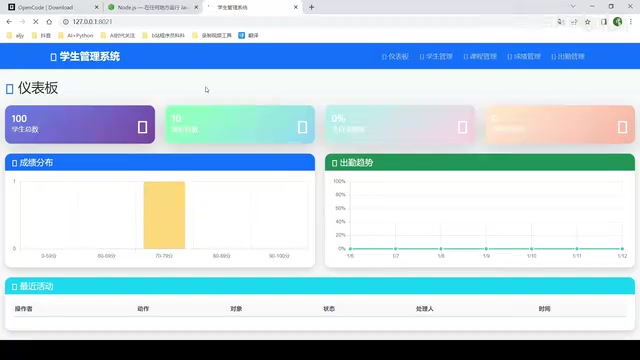
That said, the parts OpenCode did complete were of decent quality — the search and filter functions worked properly, and the frontend styling was fairly attractive.
Cursor Test Results
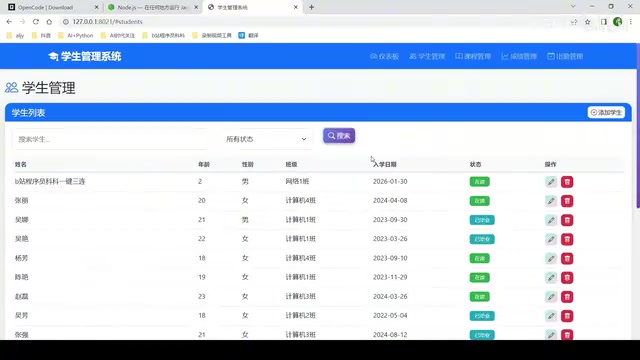
Cursor's development process was relatively smoother. Although it also encountered a minor database migration issue midway (requiring a database reset and re-migration), the overall functionality was generated completely in one go with no missing features.
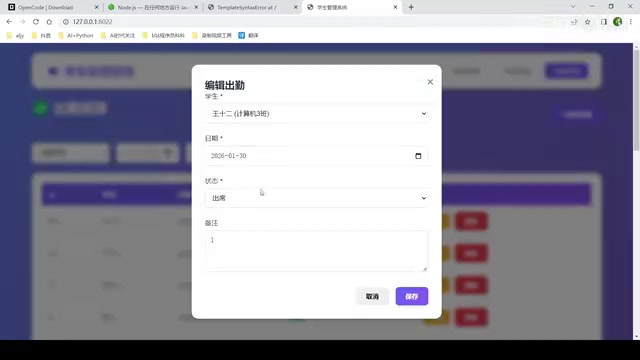
The final delivered system included a complete dashboard (with bar charts and line charts), student CRUD operations, course management, grade management, attendance management, and all other functional modules. All CRUD operations worked, and after data import, all charts rendered correctly.
Frontend Data Visualization Implementation: The bar charts and line charts in the dashboard are typically implemented using frontend charting libraries such as Chart.js, ECharts, or D3.js. In Django full-stack projects, chart data is generally provided through backend API endpoints in JSON format, with frontend JavaScript asynchronously fetching data and rendering charts after page load. Whether an AI tool can correctly handle frontend-backend data interface integration, chart library initialization configuration, and dynamic data binding is an important dimension for evaluating its full-stack engineering capability — this is also one of the areas where Cursor demonstrated a clear advantage over OpenCode in this test.
Five-Dimension Comprehensive Evaluation Results
| Evaluation Dimension | OpenCode | Cursor |
|---|---|---|
| Generation Speed | ~8min 40sec ⭐⭐⭐⭐ | Slightly slower ⭐⭐⭐ |
| Feature Completeness | Only ~30% completed ⭐⭐ | 100% completed ⭐⭐⭐⭐⭐ |
| Code Quality | Completed parts are usable ⭐⭐⭐ | Overall stable ⭐⭐⭐⭐ |
| Frontend Styling | Good ⭐⭐⭐⭐ | Good ⭐⭐⭐⭐ |
| Bug Count | Minor bugs requiring manual fixes ⭐⭐⭐ | Essentially bug-free ⭐⭐⭐⭐⭐ |
From the overall scores, Cursor has a clear advantage in feature completeness and stability, while OpenCode has a slight edge in generation speed.
Conclusion: Should You Choose OpenCode or Cursor?
OpenCode's Strengths and Weaknesses
Based on the test results, OpenCode shows some potential as a free open-source tool. Its code generation speed is fast, the quality of completed portions is decent, and the frontend styling could even be called attractive. However, feature completeness is its biggest shortcoming — in complex projects, there's obvious "cutting corners," which is unacceptable in actual development.
OpenCode may be slightly better than another open-source tool, Trae, but the gap isn't large. Its performance may be related to the default model used, and switching to a more powerful model might improve results.
Cursor Remains the AI Coding Tool Benchmark
Cursor demonstrated the stability expected of a commercial product — one-click generation, complete functionality, and virtually zero bugs. While it's a paid product, when choosing productivity tools, stability and completeness are often more important than price.
Recommendations for Different Scenarios
- Production project development: Continue using mature solutions like Cursor or Claude Code
- Learning and experimentation: OpenCode is perfectly adequate as a free alternative
- Improving AI coding results: Regardless of which tool you use, well-designed prompts (including task lists, file organization rules, batch initialization, etc.) can significantly improve output quality
- Model selection: OpenCode supports switching between different models; try stronger models for better results
Key Takeaways
- OpenCode generates fast (~8 min 40 sec) but only achieves about 30% feature completeness, with obvious missing functionality
- Cursor performs stably, completing all features in one go with virtually zero bugs, remaining the benchmark for AI coding tools
- Prompt engineering is crucial for AI coding effectiveness: techniques like establishing task lists, unifying file directories, and using framework commands for batch initialization can significantly improve output quality
- OpenCode has potential as a free open-source tool with decent code quality and frontend styling in completed portions, but still falls short of commercial products
- AI coding tool selection should be scenario-dependent: prioritize mature commercial solutions for production projects; use open-source alternatives for learning and experimentation
Related articles
 Product Reviews
Qoder vs Cursor Real-World Comparison: Which $20/Month AI IDE Is Better?
Hands-on comparison of Qoder vs Cursor AI IDEs: Agent autonomy, human interaction count, and architecture decisions. Qoder needed only 2 interactions vs Cursor's 8.
 Product Reviews
Cursor Cloud Agent Demo: Eliminating Bottlenecks Across the Entire Software Development Lifecycle
Deep analysis of Cursor's Cloud Agent demo showing how cloud VMs, automated test artifacts, and a full-chain control plane systematically eliminate human bottlenecks across the software development lifecycle.
 Product Reviews
Cursor 3.0 Deep Dive: Multi-Agent Parallelism, Design Mode, and Best-of-N Model Comparison
Cursor 3.0 evolves from an AI coding assistant into an Agent fleet command center. Explore multi-agent parallelism, Design Mode, and Best-of-N model comparison.