Pixel Video: An Open-Source Short Video Automation Tool That Produces Videos in Three Minutes

Open-source Pixel Video automates the entire short video pipeline from topic to finished video in three minutes.
Pixel Video is an open-source project with 15K GitHub Stars that compresses short video production from topic input to finished output in just three minutes. It automatically handles script writing, AI visual generation, voice synthesis, BGM matching, and video compositing across the entire workflow. Supporting multiple LLMs including GPT and DeepSeek, replaceable TTS engines, and ComfyUI workflow integration, it's ideal for social media matrix batch production and knowledge-based content creation.
The Pain Points of Short Video Creation
The most painful part of making short videos has never been clicking the "generate" button — it's the lengthy preparation work beforehand: writing scripts, finding visuals, recording voiceovers, sourcing BGM, and finally editing everything together. This complete production pipeline often takes hours or even days, representing a massive time cost for individual creators and small teams.
Short video production may seem simple, but it actually involves four major stages: content planning, visual design, audio processing, and post-production compositing. In traditional workflows, creators need to switch between multiple tools — using document editors for scripts, Midjourney or Stable Diffusion for generating visuals, CapCut or Premiere for editing, and music libraries for selecting BGM. Each stage has its own learning curve and time cost. Especially for creators who post daily or distribute across multiple platforms, a 2-4 hour production cycle per video severely limits output efficiency. This is why "end-to-end automation" has become the core competitive track for AI video tools.
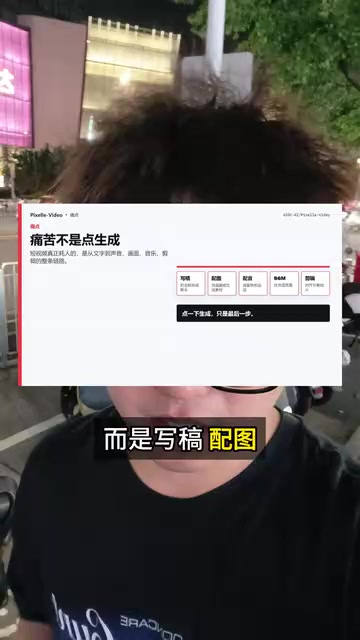
Now, an open-source project called Pixel Video is attempting to completely streamline this pipeline, compressing short video production to under three minutes. The project has already amassed 15,000 Stars on GitHub, with popularity continuing to climb.

Pixel Video Core Features: End-to-End Automated Production
Pixel Video's core capability is automating the entire short video production workflow. You only need to input a topic, and it will sequentially complete the following steps:
- Auto-generate video scripts — Creates structured scripts based on the topic
- Generate AI visuals or video clips — Matches visual assets to each paragraph
- Synthesize voice narration — Converts scripts into natural voiceovers
- Add background music — Automatically matches style-appropriate BGM
- Final video compositing — Outputs a complete video ready for publishing
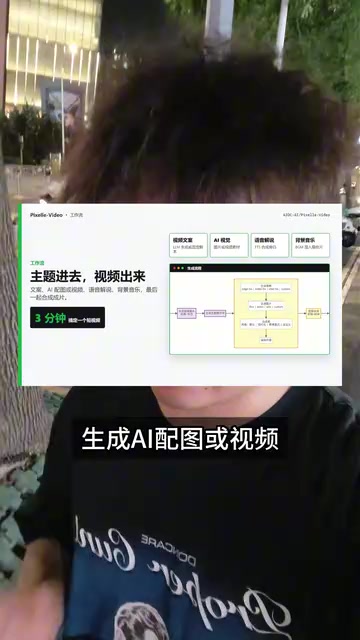
The entire process from inputting a topic to outputting a finished product takes only about three minutes. For creators who need to produce content at scale, this represents an order-of-magnitude improvement in efficiency.
Open Architecture Design: A Highly Customizable Modular System
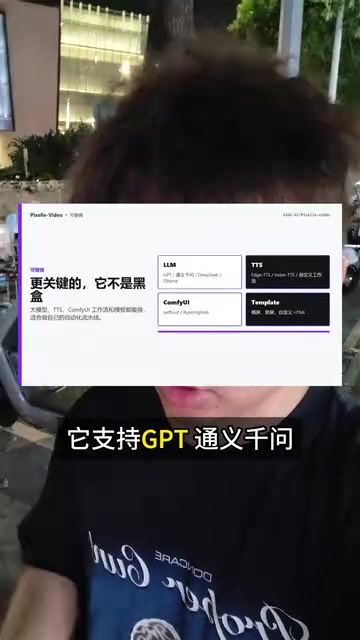
Pixel Video's most noteworthy feature is its openness. Unlike many closed AI video tools, it's not a black-box system but rather provides a highly customizable architecture:
- Multi-LLM support: Compatible with GPT, Tongyi Qianwen, DeepSeek, Ollama, and many other large language models
- Replaceable TTS engines: The voice synthesis module supports swapping different TTS services
- ComfyUI workflow integration: Can connect to ComfyUI's image/video generation workflows
- Template system: Supports custom video templates to accommodate different style requirements
Diverse Choices for Large Language Models (LLMs)
Large Language Models are generative AI models trained on Transformer architectures that can understand and generate natural language text. In video production scenarios, LLMs are responsible for expanding a user's brief topic input into structured video scripts, including opening hooks, body paragraph divisions, transition cues, and closing summaries. GPT-4o, Tongyi Qianwen (Alibaba Cloud), DeepSeek, and other models each have their strengths: the GPT series excels at English creative writing, Tongyi Qianwen has deeper understanding of Chinese language contexts, and DeepSeek is known for its high cost-effectiveness. Ollama is a framework for running open-source models locally, supporting private deployment of models like Llama and Mistral — ideal for users with data privacy requirements or those looking to reduce API call costs.
Technical Foundation of TTS Voice Synthesis
TTS (Text-to-Speech) technology has evolved through three generations: concatenative synthesis, parametric synthesis, and neural network synthesis. Early TTS had noticeably mechanical-sounding voices, while current mainstream neural network TTS (such as Microsoft Azure Speech, OpenAI TTS, Fish Speech, ChatTTS, etc.) can generate natural speech approaching human quality, with support for emotion control, speed adjustment, and multi-voice switching. In short video scenarios, TTS quality directly affects viewer experience — overly mechanical voices lead to decreased completion rates. Pixel Video's design supporting replaceable TTS engines allows users to choose the most appropriate voice style based on content type.
Deep Integration with ComfyUI Workflows
ComfyUI is a node-based image/video generation workflow editor that is widely popular in the AI art community. Unlike traditional WebUI, ComfyUI breaks down each processing step of Stable Diffusion (such as loading models, setting samplers, adding ControlNet, post-processing, etc.) into visual nodes that users can freely combine through connections to create complex generation pipelines. Pixel Video's integration with ComfyUI means users can leverage existing image generation workflows — such as specific-style illustration generation or AI video clip generation (through models like AnimateDiff or SVD) — directly as video asset production pipelines, achieving highly customized visual styles.
This modular design means users can flexibly choose the AI models and services for each stage based on their needs and budget. Want to use locally deployed open-source models to reduce costs? You can. Want to use the most powerful commercial APIs for maximum quality? That works too.
Use Cases and Value Analysis
Who Needs Pixel Video Most?
- Social media matrix operators: Teams that need to produce content at scale can use it to build automated short video pipelines
- Knowledge-based content creators: Production efficiency for educational, news, and tutorial videos will dramatically improve
- Independent developers/tech enthusiasts: Its open-source nature makes it an excellent project for secondary development and learning AI workflows
The Practical Logic of Social Media Matrices and Automation Pipelines
Social media matrix operation refers to simultaneously managing multiple accounts or platforms (Douyin, Kuaishou, WeChat Channels, Bilibili, etc.), maximizing traffic acquisition through content differentiation and scaled distribution. Under this model, a single operator may need to produce 10-50 short videos per day — a volume that traditional manual production methods simply cannot support. The core value of automation pipelines lies in separating "creative decisions" from "production execution" — humans handle topic selection and quality control, while AI handles batch execution of script writing, asset generation, and video compositing. Pixel Video's end-to-end automation capability precisely matches this use case.
Limitations to Consider
Fully automated video production currently still falls short of carefully crafted manual work in terms of creative depth and personalized expression. AI-generated scripts may lack unique perspectives, and the match between visuals and content still requires human review. Pixel Video is better suited as an efficiency tool to assist creation, rather than completely replacing human creators' judgment.
Summary
Pixel Video represents an important direction for AI video tools: rather than making single-point breakthroughs, it connects the entire pipeline from conception to finished product. Its open-source nature and modular architecture make it not just a tool, but a platform that can continuously evolve. For developers and creators looking to explore automated AI short video production, this project is worth deep investigation.
Related articles
 Product Reviews
Qoder vs Cursor Real-World Comparison: Which $20/Month AI IDE Is Better?
Hands-on comparison of Qoder vs Cursor AI IDEs: Agent autonomy, human interaction count, and architecture decisions. Qoder needed only 2 interactions vs Cursor's 8.
 Product Reviews
Cursor Cloud Agent Demo: Eliminating Bottlenecks Across the Entire Software Development Lifecycle
Deep analysis of Cursor's Cloud Agent demo showing how cloud VMs, automated test artifacts, and a full-chain control plane systematically eliminate human bottlenecks across the software development lifecycle.
 Product Reviews
Cursor 3.0 Deep Dive: Multi-Agent Parallelism, Design Mode, and Best-of-N Model Comparison
Cursor 3.0 evolves from an AI coding assistant into an Agent fleet command center. Explore multi-agent parallelism, Design Mode, and Best-of-N model comparison.