Qwen 3.6 vs Gemma 4: In-Depth Comparison of Local AI Coding Models Through Real-World Development
Qwen 3.6 vs Gemma 4: In-Depth Comparis…
Head-to-head test of Qwen 3.6 vs Gemma 4 building a desktop app from scratch reveals distinct strengths.
A developer tested Qwen 3.6 (27B) and Gemma 4 (31B) by having each build a Tauri-based Markdown editor from scratch. Gemma 4 showed a clear speed advantage (20 min vs 46 min), fewer startup errors, and better code organization. Qwen 3.6 produced more detailed planning and demonstrated self-correction during reasoning. Both successfully completed the task, and the author recommends choosing flexibly based on task requirements.
Introduction: Finding the Best Local AI Coding Model
As local large language models become increasingly capable, every developer faces a practical question: which model should be their daily workhorse? After extensively testing Qwen 3.6, one developer believed it had the potential to replace their current go-to model, Gemma 4. So they designed a highly challenging real-world test—having both models independently build the same desktop application from scratch in a head-to-head showdown.
This isn't an abstract benchmark test, but a comprehensive comparison based on real needs, real hardware, and real development workflows. The results were both surprising and expected.
Test Design: Building a Markdown Editor with the Tauri Framework
Why This Task
The test was inspired by a real pain point: the author couldn't find a satisfactory Markdown file viewer on macOS. They decided to use "developing a Markdown viewer with editing capabilities" as the test task—a project with both practical value and sufficient complexity to push the models to their limits.
The chosen tech stack was the Tauri framework. Tauri is a cross-platform desktop application development framework built on Rust, which officially released version 1.0 in 2022. Compared to Electron, Tauri's biggest advantage lies in its extremely small application size and lower memory footprint—an app with the same functionality typically packages to just a few MB with Tauri, while Electron apps often reach hundreds of MB. Tauri's architecture has two layers: the frontend uses the system's native WebView to render HTML/CSS/JS interfaces, while the backend uses Rust to handle system calls, file operations, and other native functionality. This dual-layer architecture requires developers to master both frontend technologies and the Rust language, making it a rigorous test of an AI model's full-stack code generation capabilities. Notably, Tauri v2 introduced significant changes to API naming and the plugin system compared to v1, which is the root cause of Qwen's API version errors during testing.
Model and Hardware Configuration
The two contestants were:
- Qwen 3.6: A 27-billion parameter dense model
- Gemma 4: A 31-billion parameter dense model
The author's emphasis on choosing dense models rather than MoE models deserves deeper understanding. Large language models are primarily divided into two architectural categories: Dense Models and Mixture of Experts (MoE) models. Dense models activate all parameters during every inference pass, with computational cost proportional to parameter count. MoE models, on the other hand, divide parameters into multiple "expert" sub-networks, activating only a small subset of experts per inference (typically 1/8 to 1/4 of total parameters), thereby reducing per-inference computational cost while maintaining a large parameter count. MoE's advantage lies in high parameter efficiency and fast inference speed, but for tasks requiring deep reasoning and code generation, dense models often perform more stably and precisely because all parameters participate in computation. This is the core logic behind choosing dense models for this test—in scenarios like code generation that require precise logical reasoning, dense models are typically the more reliable choice.
Both models ran sequentially on the same desktop computer, called over the local network from a MacBook. The most critical hardware parameter for running local LLMs is GPU VRAM. Model parameters need to be fully loaded into VRAM for GPU-accelerated inference; otherwise, you're stuck with much slower CPU memory. Using common 4-bit quantization as an example: a 27B parameter model requires approximately 14GB of VRAM, while a 31B parameter model needs about 16GB. Quantization precision directly affects output quality—more aggressive quantization means faster inference but greater capability loss.
Test Method: Stress-Test Style Development
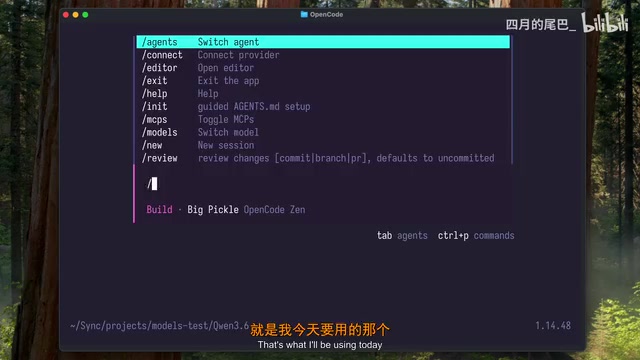
The test used OpenCode, which belongs to the category of "AI Coding Agents," representing the latest paradigm in AI-assisted programming. Unlike earlier code completion tools, AI coding agents can understand complete project context, autonomously plan development steps, generate multi-file code, execute terminal commands, and self-correct based on error feedback. These tools typically interact with the file system and terminal through structured "Tool Calling" mechanisms, enabling the model to read and write files, run commands, and view output just like a real developer.
The test workflow was divided into two phases:
- Planning Phase: Have the model analyze the requirements description, create a detailed implementation plan, and break the task into small steps
- Implementation Phase: Require the model to complete all tasks according to the plan, making autonomous decisions as much as possible
Interestingly, the author deliberately used a "implement the entire plan at once" approach rather than iterative development. This was an intentional stress test designed to observe how models perform during extended independent handling of complex projects—requiring the model to maintain context consistency and logical coherence over tens of minutes of reasoning without human intervention.
Qwen 3.6 Test Results
Planning Ability: Thorough and Comprehensive
Qwen 3.6 spent approximately 4 minutes on the planning phase, generating a very detailed development plan. The entire plan was divided into multiple phases, each broken down into specific tasks with technical details and implementation notes. Compared to Gemma 4, Qwen's plan contained nearly twice as many development phases and more task items, demonstrating stronger task decomposition ability.
Implementation Process: Time-Consuming but Self-Correcting
The code implementation phase took approximately 46 minutes. While lengthy, the author observed a positive signal: the model was able to identify its own errors and actively think through fixes during reasoning, which is an important capability for extended autonomous development.
Startup and Debugging
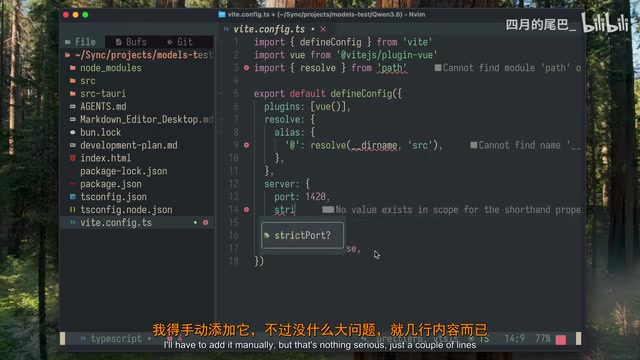
The generated code didn't run successfully on the first attempt, with two issues:
- Missing frontend startup configuration: The code block responsible for starting the development server was completely absent, requiring manual addition of a few lines
- Tauri API version error: Qwen used Tauri v1's old method names, while the current version had changed the interface naming
After fixing these two minor issues, the application launched successfully. The dual-pane interface worked correctly, the editor responded to text input, and the live preview functioned properly. The author even opened their own development plan file in the editor—an interesting "recursive test"—and the file displayed perfectly. However, toolbar buttons had missing functionality, with editing-related buttons showing no response.
Gemma 4 Test Results
Planning Ability: Efficient and Concise
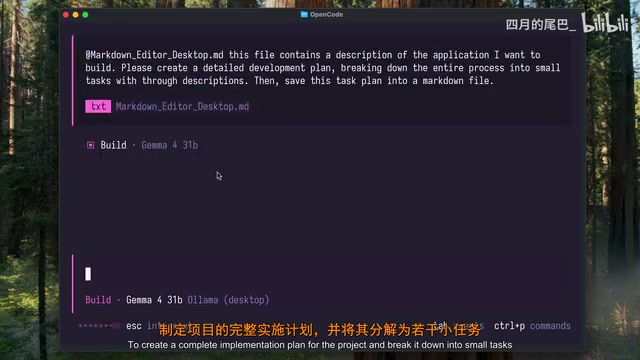
Gemma 4's planning phase took only 2 minutes and 30 seconds, nearly half the time of Qwen. The generated plan also used a phased, task-based structure with specific implementation descriptions and notes. While it had fewer phases and tasks than Qwen, it covered the core functional requirements.
Implementation Process: Clear Speed Advantage
The code implementation phase took only 20 minutes, less than half of Qwen's time. The author specifically noted that Gemma listed all completed tasks after finishing, making the work results immediately clear.
Startup and Debugging
Gemma's generated code also failed to launch on the first attempt, encountering a Rust-side file system access error.
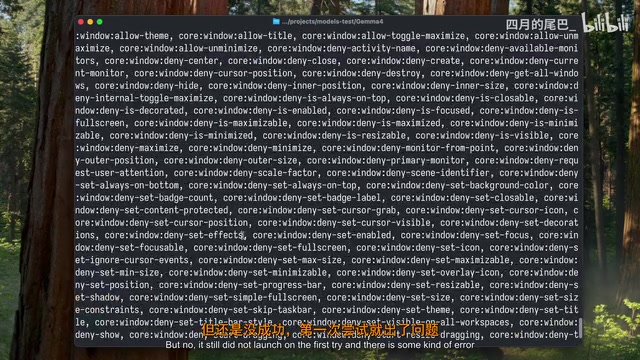
The problem was: the configuration file was missing the file system plugin declaration, even though the code correctly used these plugin APIs. After fixing the configuration, the application ran successfully.
The dual-pane interface worked correctly, text input and rendering performed well, and the edit/preview mode toggle buttons functioned properly. Opening and displaying Markdown files worked without any issues.
An additional highlight: Gemma proactively organized the project description file and development plan into a separate documentation folder, even though the author never requested this—making the repository structure cleaner.
Comparison Summary: Each Has Its Strengths
| Dimension | Qwen 3.6 (27B) | Gemma 4 (31B) |
|---|---|---|
| Planning Time | ~4 minutes | ~2.5 minutes |
| Plan Detail Level | More detailed, more phases and tasks | Concise, covers core features |
| Implementation Time | ~46 minutes | ~20 minutes |
| Startup Errors | 2 | 1 |
| Toolbar Functionality | Buttons present but non-functional | Edit/preview toggle works, but missing formatting buttons |
| Code Organization | Standard | Proactively organized documentation directory |
| Self-Correction | Self-corrects during reasoning | Not specifically noted |
Practical Recommendations: How to Choose the Right Local Model
From this test, both models successfully completed a fairly complex desktop application development task, which is impressive in itself. But their strengths differ:
- For thorough planning and comprehensive task coverage: Qwen 3.6 has stronger planning capabilities, suitable for complex projects requiring detailed decomposition
- For development efficiency and rapid iteration: Gemma 4's speed advantage is clear, completing the task in only 43% of Qwen's time
- For code engineering quality: Gemma demonstrated better engineering instincts in project organization
Another easily overlooked factor is power consumption. The energy cost of running large language models locally is often underestimated by developers—taking a high-end consumer GPU with 250W TDP as an example, running continuously for 46 minutes consumes approximately 1.9 kWh, while running for 20 minutes consumes only about 0.83 kWh. If you perform multiple similar tasks daily, the annual electricity cost difference could reach several hundred yuan. Additionally, prolonged high-load GPU operation accelerates hardware aging and generates significant heat. The author specifically mentioned that long-term local model usage noticeably increases electricity bills. Gemma 4's faster completion speed means lower energy costs, which is a practical consideration for daily use.
The author's final conclusion: they will use both models simultaneously for now, choosing the more suitable one based on specific task characteristics, while hoping to eventually settle on a primary model through long-term use. For most developers, this is probably the most pragmatic strategy right now—in an era of rapidly iterating local AI models, maintaining flexibility is wiser than betting on a single model.
Key Takeaways
- Both Qwen 3.6 (27B) and Gemma 4 (31B) successfully completed the task of building a Tauri desktop application from scratch, but each has distinct advantages and disadvantages
- Gemma 4's development speed was more than twice that of Qwen 3.6 (20 minutes vs 46 minutes), with fewer startup errors
- Qwen 3.6 produced more thorough task planning, generating nearly twice as many development phases and task items, and demonstrated self-correction ability during reasoning
- Neither model's generated code ran successfully on the first attempt, but the required fixes were minor configuration-level issues—core functional code was essentially correct
- The author recommends flexibly using both models based on task characteristics rather than betting on a single one
Related articles
 Product Reviews
Qoder vs Cursor Real-World Comparison: Which $20/Month AI IDE Is Better?
Hands-on comparison of Qoder vs Cursor AI IDEs: Agent autonomy, human interaction count, and architecture decisions. Qoder needed only 2 interactions vs Cursor's 8.
 Product Reviews
Cursor Cloud Agent Demo: Eliminating Bottlenecks Across the Entire Software Development Lifecycle
Deep analysis of Cursor's Cloud Agent demo showing how cloud VMs, automated test artifacts, and a full-chain control plane systematically eliminate human bottlenecks across the software development lifecycle.
 Product Reviews
Cursor 3.0 Deep Dive: Multi-Agent Parallelism, Design Mode, and Best-of-N Model Comparison
Cursor 3.0 evolves from an AI coding assistant into an Agent fleet command center. Explore multi-agent parallelism, Design Mode, and Best-of-N model comparison.