Tencent CodeBuddy IDE Hands-On Review: Full-Stack AI Platform Development Experience

Tencent CodeBuddy IDE hands-on review: building a full-stack website from scratch
Tencent upgraded CodeBuddy to a standalone IDE with free access to top LLMs like Claude 4 and GPT-5, offering Chat, Craft, and Plan work modes plus Figma design integration. A content creator used it with CloudBase to build the full-stack "Xiaohe Architecture AI Smart Platform," achieving near-professional front-end quality and seamless back-end connectivity via cloud functions. Key takeaways: use official templates, plan before coding, and leverage CloudBase for back-end integration.
Introduction: A New Contender in Homegrown IDEs
Tencent has officially upgraded CodeBuddy from a VS Code plugin to a standalone IDE product. How does this programming tool — built around the core concept of "real-time fusion of design and development" — actually perform? A Bilibili content creator used a Tencent hackathon as the opportunity to build a full-stack website called "Xiaohe Architecture AI Smart Platform" from scratch using CodeBuddy combined with CloudBase cloud development, giving us a thorough, hands-on reference.
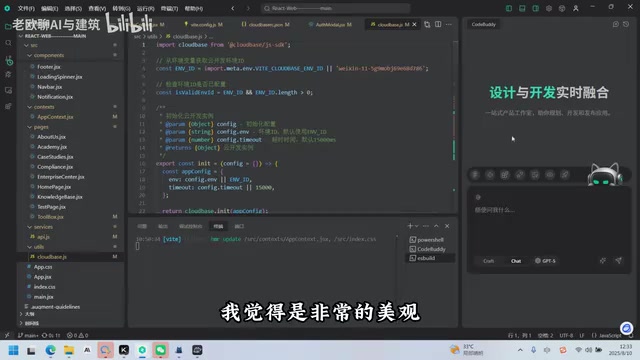
CodeBuddy IDE's Product Layout and Core Capabilities
LLM Integration: Free Access to Claude 4 and GPT-5
CodeBuddy takes an aggressive approach to large model support. It offered free access to Claude 4 right at launch, and integrated GPT-5 almost immediately after its release. For developers, being able to call top-tier LLMs at no extra cost is an extremely attractive selling point.
Three Work Modes, Each Serving a Distinct Purpose
CodeBuddy offers three core work modes:
- Chat Mode: Q&A interaction, ideal for consulting on technical questions and discussing solutions — it doesn't directly modify code
- Craft Mode: A true coding Agent that can autonomously write and replace code — this is the primary development mode
- Plan Mode: Planning mode, used to map out product requirements and development paths before writing any code
The logic behind these three modes is clear — use Plan mode for planning, Craft mode for coding, and Chat mode for discussing problems. Additionally, CodeBuddy includes a built-in prompt optimization feature to help developers interact with AI more efficiently.
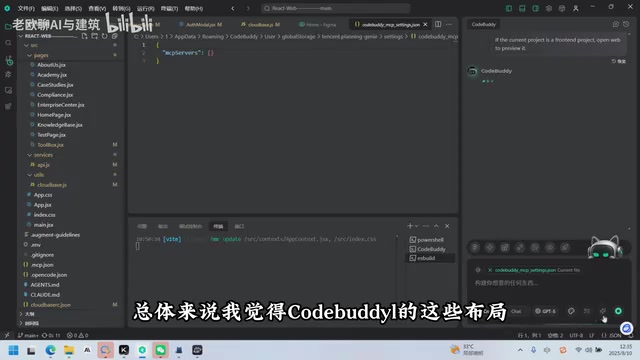
Fusion of Design and Development
One of CodeBuddy's key differentiators is its integrated Figma functionality. Developers can interact with Figma web pages in real time directly within the IDE, complete their designs, and then convert them into code — creating a seamless pipeline from design to development. It also includes built-in component libraries like "Tiling Station" (提灵站), with pre-built design components specifically for WeChat Mini Program scenarios, lowering the barrier to front-end development.
Other practical features include: image upload (you can paste error screenshots directly for debugging), live preview, one-click deployment, and MCP configuration.
Hands-On Project: Building the Xiaohe Architecture AI Smart Platform
Front-End Development Results
The creator used CodeBuddy to complete the entire website's front-end development, and the results are impressive. The website includes multiple functional modules:
- Homepage: Professional imagery and layout, with visual quality approaching that of professional designers
- Academy Section: Includes open courses, corporate training camps, certification systems, and more — the training enrollment flow is clean and visually appealing
- ToolBox: Displays download links, feature highlights, and other information for various tools
- Enterprise Center: Private knowledge base, success case showcases, and more
The creator commented that the front-end code quality generated by CodeBuddy is "pretty much on par with what a professional would build" — quite high praise for an AI coding tool.
Back-End Development: CloudBase Integration
The back end was built using Tencent's CloudBase cloud development service, a Serverless backend solution from Tencent Cloud. Its core functionality includes three major modules:
- Cloud Database: Stores data for users, tools, courses, enterprises, and more
- Cloud Storage: Handles files and media resources
- Cloud Functions: Processes business logic such as tool APIs, enterprise APIs, user APIs, etc.
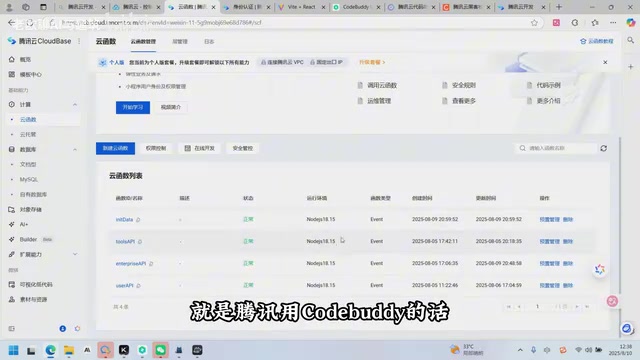
The biggest advantage of CloudBase is that you can launch applications without setting up your own servers. CodeBuddy can automatically generate cloud function code that interfaces with CloudBase, along with corresponding dataset documentation covering data structures for user login information, tool information, course information, and more.
End-to-End Verification
The creator demonstrated the full flow live: on the website's Enterprise Academy page, they filled out a corporate training request form (company name, contact person, phone number, etc.) and clicked submit. The data was successfully written to the CloudBase cloud database. The newly submitted request record was visible in real time on the cloud backend, verifying complete front-to-back-end connectivity.
Three Key Tips for Efficient Development
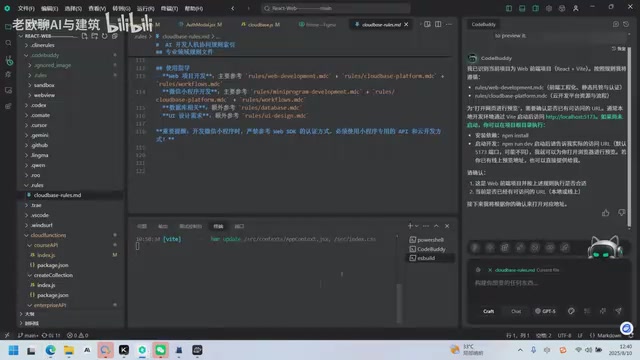
Based on this hands-on experience, the creator summarized three core recommendations for developing with CodeBuddy + CloudBase:
First, always use official templates. Tencent provides multiple built-in templates for the hackathon, including web application + cloud development templates, WeChat Mini Program templates, and more. These templates come with pre-configured, high-quality prompt rules (such as LUAS rule files) that help developers quickly unlock CodeBuddy's full potential. The creator estimated that using templates can boost development efficiency by over 50%.
Second, plan before you code. Before starting actual development, use Plan mode to write a PRD (Product Requirements Document), clearly outlining functional requirements, page structure, data models, and more. Then switch to Craft mode for development.
Third, leverage CloudBase for back-end integration. Build your back-end logic directly on CloudBase, taking advantage of its out-of-the-box capabilities like authentication, database, and cloud functions to dramatically reduce back-end development workload. For example, login and registration functionality can be implemented directly using CloudBase's authentication templates, supporting SMS verification, email verification, username/password login, and more — even details like privacy policy checkboxes are pre-built.
Overall Assessment of CodeBuddy IDE
Based on this hands-on experience, CodeBuddy demonstrates impressive capabilities for a newly launched standalone IDE. High-quality front-end code generation, smooth back-end integration with CloudBase, and a clean, intuitive product interface are all clear strengths.
Of course, the creator acknowledged that the product isn't perfect yet. But he believes Tencent's strategy is sound — "get it to 70% and ship it, let users try it, then iterate rapidly." From actual experience, CodeBuddy's iteration speed is indeed fast, with version updates rolling out essentially every day.
In today's fiercely competitive AI coding tool market, CodeBuddy is rapidly building its differentiated advantage through deep integration with Tencent's cloud ecosystem (CloudBase, WeChat Mini Programs, etc.) and its strategy of offering top-tier LLMs for free. For developers already using Tencent Cloud services, the CodeBuddy + CloudBase combination is well worth a serious try.
Related articles
 Product Reviews
Qoder vs Cursor Real-World Comparison: Which $20/Month AI IDE Is Better?
Hands-on comparison of Qoder vs Cursor AI IDEs: Agent autonomy, human interaction count, and architecture decisions. Qoder needed only 2 interactions vs Cursor's 8.
 Product Reviews
Cursor Cloud Agent Demo: Eliminating Bottlenecks Across the Entire Software Development Lifecycle
Deep analysis of Cursor's Cloud Agent demo showing how cloud VMs, automated test artifacts, and a full-chain control plane systematically eliminate human bottlenecks across the software development lifecycle.
 Product Reviews
Cursor 3.0 Deep Dive: Multi-Agent Parallelism, Design Mode, and Best-of-N Model Comparison
Cursor 3.0 evolves from an AI coding assistant into an Agent fleet command center. Explore multi-agent parallelism, Design Mode, and Best-of-N model comparison.