UE5.7 AI Assistant Plugin Hands-On: What Can It Do? What Can't It Do?
UE5.7 AI Assistant Plugin Hands-On: Wh…
UE5.7's built-in AI Assistant plugin tested: answers engine questions but can't analyze project code.
Unreal Engine 5.7 Preview introduces a built-in AI Assistant plugin, currently in the experimental stage. Hands-on testing reveals that the assistant cannot access or analyze user project files and code — it only functions as an engine knowledge Q&A tool, performing reasonably well on conceptual questions. While not accessing project code protects intellectual property, it also significantly limits the assistant's practical value.
Article
Unreal Engine 5.7 Preview 1 has officially launched, and one of the most eye-catching new features is the built-in AI Assistant plugin. Previously in version 5.6, Epic Games had released an AI assistant for Fortnite that could generate code, but this time the AI Assistant is embedded directly into the Unreal Engine editor itself.
How well does this AI Assistant actually work? Can it review your Blueprints? Can it generate code? This article walks you through hands-on testing to cover the plugin's activation process, real capabilities, and current limitations.
How to Enable the UE5.7 AI Assistant Plugin
First, it's important to note that this plugin is only available for UE 5.7 and above — earlier versions are not supported. Here's how to enable it:
- Open the Unreal Engine 5.7 editor
- Go to Edit → Plugins
- Search for "AI Assistant"
- Enable the plugin (it's still in the experimental stage)
- Restart the editor
After restarting, find the AI Assistant Window in the menu bar to open the AI Assistant panel. This window can be docked and rearranged just like any other panel in the editor.
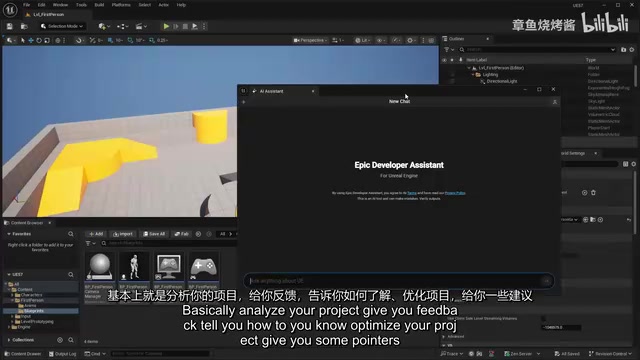
What Can the AI Assistant Do? Feature-by-Feature Testing
Project Analysis: Completely Unavailable
The question most developers care about is: can this AI Assistant analyze your project, review code, and provide optimization suggestions?
The answer is: no. Through hands-on testing, the AI Assistant currently has no access to your project files whatsoever. When asked to review a first-person character Blueprint, it could only provide generic checklists and best-practice suggestions rather than analysis of your actual code. When explicitly asked to "please reference my project directory," it responded directly: "Direct access to your project directory is not available."
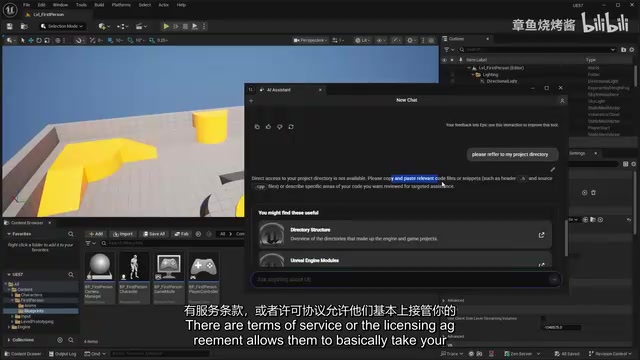
This design choice is actually a double-edged sword. From a privacy and security standpoint, not accessing project code means your intellectual property won't be used for AI training — a particularly important consideration in commercial game development. Submitting code to cloud-based AI services for analysis raises complex intellectual property and data security concerns in commercial projects. Mainstream AI coding tools like GitHub Copilot and Cursor have all faced controversy over vague language in their terms of service regarding code data usage, and some enterprise users have even switched to locally deployed open-source LLMs (such as Code Llama and DeepSeek Coder) to mitigate data leakage risks. Some third-party AI plugins on the market do carry real risks of code being used for training in their terms of service. Epic's decision to prevent the AI Assistant from accessing project files sacrifices functional depth but provides clear guarantees on compliance and IP protection — effectively serving as a security endorsement for developers working on confidential commercial projects. However, from a practical standpoint, the inability to analyze project code significantly limits the AI Assistant's real-world value.
Unreal Engine Knowledge Q&A: Adequate
As an engine-integrated Q&A tool, the AI Assistant can answer conceptual questions about Unreal Engine. For example:
- "What is a Data Asset?" — It accurately explains that a Data Asset is an asset type in UE5 for storing structured data, along with relevant details
- "Explain the difference between Soft Object References and Hard References" — It clearly explains that Soft Object References store paths as strings rather than direct pointers, which benefits on-demand loading and reduces memory usage, and provides a comparison of use cases
Regarding the difference between soft and hard references, it's worth adding some engineering context here: In Unreal Engine's asset management system, a Hard Reference means the referenced asset is forcibly loaded into memory along with its owner, forming a dependency chain. A Soft Reference (TSoftObjectPtr) only stores the asset's path string and doesn't actually load the asset until an asynchronous loading interface is explicitly called. This distinction is critical in large-scale projects: poorly managed hard references can lead to "asset spider webs"
Related articles
 Product Reviews
Qoder vs Cursor Real-World Comparison: Which $20/Month AI IDE Is Better?
Hands-on comparison of Qoder vs Cursor AI IDEs: Agent autonomy, human interaction count, and architecture decisions. Qoder needed only 2 interactions vs Cursor's 8.
 Product Reviews
Cursor Cloud Agent Demo: Eliminating Bottlenecks Across the Entire Software Development Lifecycle
Deep analysis of Cursor's Cloud Agent demo showing how cloud VMs, automated test artifacts, and a full-chain control plane systematically eliminate human bottlenecks across the software development lifecycle.
 Product Reviews
Cursor 3.0 Deep Dive: Multi-Agent Parallelism, Design Mode, and Best-of-N Model Comparison
Cursor 3.0 evolves from an AI coding assistant into an Agent fleet command center. Explore multi-agent parallelism, Design Mode, and Best-of-N model comparison.