Unified Management Tool for Claude Code and Codex: One-Click Multi-AI Programming Environment Setup
Unified Management Tool for Claude Cod…
A unified configuration client solves the fragmented management challenge of AI programming tools.
As AI programming tools like Claude Code and Codex multiply, developers face pain points including tedious configuration, high switching costs, and fragmented management. A unified configuration client has emerged to consolidate multi-tool configuration, switching, MCP management, and usage monitoring onto a single platform, supporting automatic fallback and one-click environment setup to dramatically lower entry barriers and switching costs. Users should be mindful of API Key security when adopting such tools.
The Pain Point: More AI Programming Tools, More Fragmented Management
If you've recently started using Claude Code or Codex to assist with programming, you've likely encountered several headache-inducing problems:
- Tedious configuration: Install Node, then the corresponding CLI, then set environment variables, handle authentication, and finally test if everything works
- High switching costs: Want to use Claude Code today and Codex tomorrow? Each switch requires changing a bunch of configurations
- Fragmented management: Connecting MCP, installing Skills, monitoring usage, calculating costs — the entire workflow is increasingly scattered
These problems may not be obvious when using a single tool, but when you need to flexibly switch between multiple AI programming tools for different tasks, the pain multiplies exponentially.
Notably, "tool fragmentation" has become a universal challenge in the current AI developer ecosystem. With models like GPT-4, Claude, Gemini, and Llama flourishing, and programming tools like Cursor, Windsurf, Copilot, Claude Code, and Codex CLI emerging one after another, developers' cognitive burden and configuration costs have skyrocketed. This has given rise to a new category of "AI tool management layer" products, whose business logic resembles early cloud computing era multi-cloud management platforms (like Terraform and Pulumi) — they don't provide underlying compute themselves, but reduce users' switching costs and management complexity through a unified abstraction layer. In the IDE plugin space, Continue.dev and Cline are doing similar things: letting users freely switch backend models within the same interface. This trend indicates that the "infrastructuralization" of AI toolchains is accelerating, and management efficiency itself has become an important dimension of productivity competition.
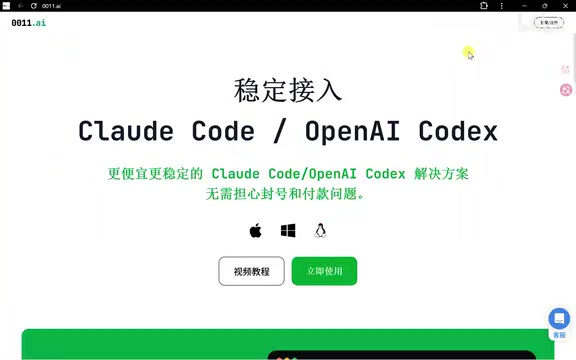
Unified Configuration Client: Focused on Solving AI Programming Tool Management Challenges
A tool has recently attracted considerable attention. It's not a new AI model, but rather a unified configuration client specifically designed to solve the management problems described above. Its core positioning is clear: unify the configuration, integration, and management of Claude Code and Codex onto a single platform.
Before diving deeper into this tool, it's helpful to understand the technical background of the two core tools it integrates. Claude Code is a command-line AI programming tool from Anthropic, based on the Claude 3.x/4.x model series. It's known for its ultra-long context window (supporting up to 200K tokens) and powerful code comprehension capabilities, excelling particularly at global analysis of large codebases, cross-file refactoring, and complex architecture planning. OpenAI Codex is OpenAI's model series optimized specifically for code generation, with its CLI tool also supporting direct file system operations and command execution within the terminal. The core difference between them: Claude Code has stronger advantages in long-chain reasoning and context retention, while Codex offers faster responses and lower costs for quick completions and lightweight tasks. This differentiated positioning is precisely why developers need to flexibly switch between the two.
Core Features Overview
Based on the video introduction, this tool provides the following key capabilities:
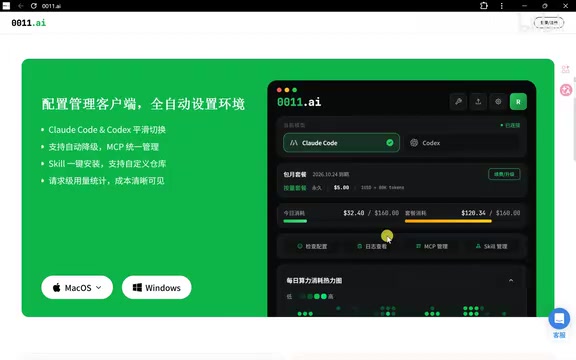
- Fully automated environment setup: Complete environment configuration with one click in the client management panel, eliminating tedious steps like manually installing Node, configuring environment variables, and handling authentication
- Smooth switching between Claude Code and Codex: Freely switch between the two tools without reconfiguring everything each time
- Automatic fallback support: When the primary model is unavailable, automatically switch to an alternative to ensure workflow continuity
- Universal MCP management: Unified management of MCP (Model Context Protocol) integrations
- One-click Skill installation: Quickly install and manage various Skill extensions
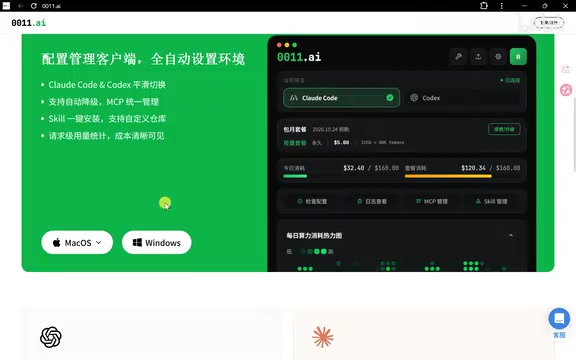
- Usage statistics dashboard: Clearly view request counts and usage consumption for cost control
Among these, MCP (Model Context Protocol) is an open protocol standard introduced by Anthropic in late 2024, designed to solve the fragmentation problem of connections between AI models and external tools/data sources. Before MCP, every AI application needed to write separate integration code for different data sources (such as databases, file systems, APIs), making maintenance costs extremely high. MCP defines a unified "host-client-server" architecture that allows AI models to invoke any external tool in a standardized way. Official MCP Servers are now available from mainstream platforms including GitHub, Slack, and Google Drive, and the developer ecosystem is expanding rapidly. For Claude Code users, MCP means the AI can directly read local files, query databases, or call custom scripts, greatly expanding the capability boundaries of programming assistants. Therefore, the ability to uniformly manage MCP integrations is a significant value proposition of such tools.
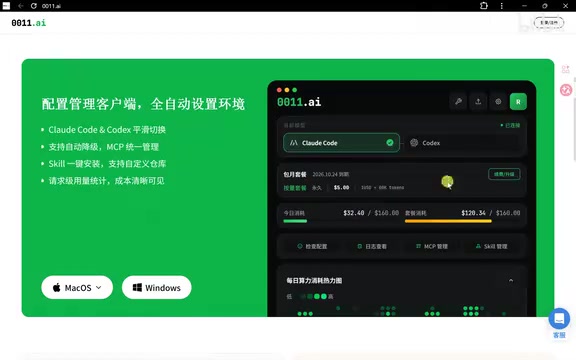
The tool provides both macOS and Windows versions, covering the system requirements of mainstream developers.
Why Unified AI Programming Tool Management Matters
Lowering the Entry Barrier
Many developers get stuck on the first few steps when first encountering CLI-based AI programming tools. From installing Node to configuring environment variables to authentication testing, the entire process isn't beginner-friendly. This configuration client chains these steps together, dramatically reducing the difficulty of getting started.
Adapting to Multi-Tool Collaborative Workflows
More and more developers no longer rely on a single tool, but flexibly choose based on task characteristics:
- Complex engineering comprehension, long-chain planning → Choose models with stronger reasoning capabilities (like Claude Code, which can understand an entire codebase's architectural structure at once with its 200K ultra-long context window)
- Quick generation, local patches → Choose models with faster response or better cost-effectiveness (like Codex, which has lower latency in single-file completion and small-scope modification scenarios)
Different task scenarios correspond to different optimal tool choices. If you have to reconfigure everything each time you switch, the experience becomes terrible. A unified management platform makes this "on-demand switching" seamless.
Cost Visualization and Usage Monitoring
For developers who frequently use AI programming tools, usage and cost visualization is crucial. Being able to see statistical data for all requests in a single dashboard helps with rational usage planning and avoiding unnecessary expenses.
Installation and Getting Started
Based on the video demonstration, the entire installation and configuration process is quite streamlined:
- Download the installation package for your system from the official website
- Extract and double-click to install
- Register an account and log in
- Complete authorization verification in the client
- Configuration complete — ready to use
The entire process requires virtually no manual handling of environment configuration issues, making it especially friendly for users in China.
Summary and Reflections
As AI programming tools rapidly iterate, developers face more choices than ever, but management costs are rising in parallel. The emergence of these "management layer" tools is essentially solving the problem of tool fragmentation — they don't replace any AI model, but help you use them more efficiently.
For developers who use both Claude Code and Codex simultaneously, especially those who need to switch frequently and care about cost control, these unified management tools are worth trying. However, it's important to note that any third-party management platform involves API Key hosting and data flow. Before using one, it's advisable to thoroughly understand its security mechanisms and privacy policies.
API Keys are the core credentials for accessing AI services. Once leaked, they could lead to account hijacking, massive unexpected charges, or data breaches. When using third-party unified management platforms, security should focus on several dimensions: First, storage method — quality tools should encrypt and store Keys locally (such as using the system Keychain) rather than uploading them to cloud servers. Second, data flow path — confirm whether requests go directly to Anthropic/OpenAI's official endpoints or pass through third-party relay servers. Third, principle of least privilege — it's recommended to create permission-restricted API Keys specifically for management tools and set usage caps. Reviewing the privacy policy and open-source status of any third-party AI tool management platform before use is an essential security practice.
Related articles
 Product Reviews
Qoder vs Cursor Real-World Comparison: Which $20/Month AI IDE Is Better?
Hands-on comparison of Qoder vs Cursor AI IDEs: Agent autonomy, human interaction count, and architecture decisions. Qoder needed only 2 interactions vs Cursor's 8.
 Product Reviews
Cursor Cloud Agent Demo: Eliminating Bottlenecks Across the Entire Software Development Lifecycle
Deep analysis of Cursor's Cloud Agent demo showing how cloud VMs, automated test artifacts, and a full-chain control plane systematically eliminate human bottlenecks across the software development lifecycle.
 Product Reviews
Cursor 3.0 Deep Dive: Multi-Agent Parallelism, Design Mode, and Best-of-N Model Comparison
Cursor 3.0 evolves from an AI coding assistant into an Agent fleet command center. Explore multi-agent parallelism, Design Mode, and Best-of-N model comparison.