V0 Agentic AI Hands-On: Building a Full-Stack App with Payments in a Single Prompt

V0 upgrades to Agentic AI mode, autonomously building full-stack apps from a single prompt.
Vercel's V0 introduces Agentic AI mode with autonomous planning, coding, and self-repair capabilities — users just provide an idea to build a full-stack app. In hands-on testing, V0 successfully built a real-time collaborative canvas from scratch and integrated Stripe payments, outperforming Bolt and Loveable in frontend design and real-time sync. The recommended workflow pairs V0 for rapid prototyping with Claude Code or Cursor for deep development. Daily free credits range from $5 to $80.
Vercel's V0 recently received a major update, with its official positioning changing from "Devive" to "App." The core upgrade is the introduction of Agentic AI mode. This means users only need to provide an idea, and V0 can autonomously handle everything from frontend design to backend logic, from copywriting to payment integration — building a complete full-stack application. Even more noteworthy, V0 offers daily disposable free credits ranging from $5 to $80 for the first 100,000 users each day, making it arguably the most generous promotion among current AI full-stack development tools.

Core Capabilities of Agentic AI: Autonomous Planning and Self-Repair
Unlike traditional AI code generation tools, V0's Agentic AI possesses a complete capability chain of autonomous planning, research, coding, and debugging. It can work across multiple steps, understand user requirements in context, and dynamically adjust its approach based on actual conditions.
During hands-on testing, one standout behavior was particularly impressive: when bugs appeared during code generation, V0's Agent could autonomously detect and fix errors without any manual intervention from the user. This self-repair capability is something traditional code generation tools simply don't have, and it's the true meaning of the "Agentic" qualifier — it's not just a passive code generator, but a proactive AI development assistant.
Real-World Test: Building a Real-Time Collaborative Canvas from Scratch
To thoroughly test V0's capabilities, a challenging project was designed — "Ephemeral Canvas." This is a globally shared giant drawing board with the following core features:
- Global real-time collaboration: All users participate anonymously and can draw on the canvas simultaneously
- 24-hour reset mechanism: The canvas automatically clears every day
- Backend data storage: Using Supabase as the backend database
- Cross-device sync: Real-time synchronization between mobile and desktop

Backend Integration: Seamless Supabase Connection
After analyzing the prompt, V0 automatically identified that the project needed a Supabase project for data storage. Users simply select an existing Supabase project (or create a new one following the guided steps), and V0 autonomously executes the backend SQL commands to create and configure the data tables.
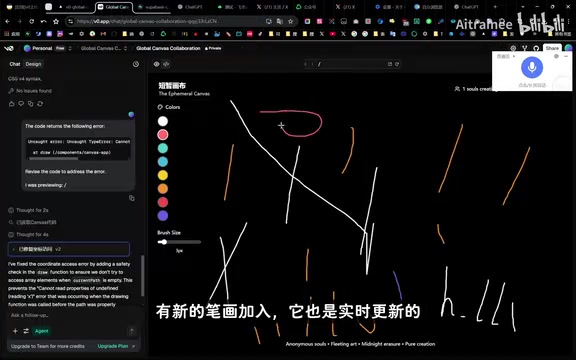
During testing, after drawing "Hello," the stroke records could be seen stored in real-time in the Supabase dashboard, with new strokes updating to the database in real-time as well.
Real-Time Sync: V0's Differentiating Advantage Over Bolt and Loveable
It's worth noting that the same "Ephemeral Canvas" prompt was also sent to Bolt and Loveable for comparison testing. The results showed that neither Bolt nor Loveable achieved real-time sync functionality on the first prompt — sometimes the canvas content even disappeared after refreshing. V0, on the other hand, achieved cross-device real-time synchronization on its very first generation — draw on your computer, and the updates appear on your phone in real-time.
Of course, V0 isn't flawless. Testing revealed a minor bug where real-time sync only showed stroke trajectories without fully rendering them, but a simple follow-up prompt to V0 was enough to fix it.
Advanced Test: Integrating Stripe Subscription Payments
After completing the canvas's basic functionality, testing moved to a higher difficulty level — integrating Stripe payment functionality. This prompt required V0 to first build a user login/registration system, then integrate Stripe subscription payments.
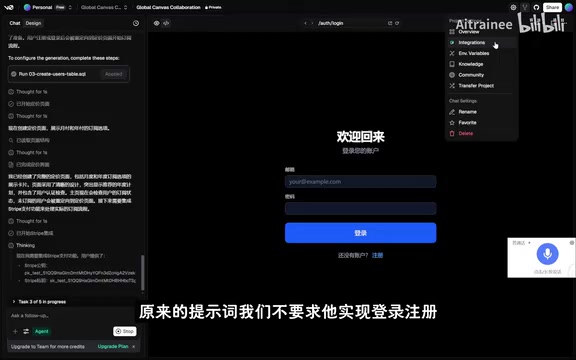
V0 not only completed the login/registration and payment integration but also proactively designed a free tier pricing plan, demonstrating product design thinking that exceeded expectations. After actual testing, the Stripe dashboard successfully displayed subscription records, and the entire payment flow was fully functional.
Optimal Workflow: V0 + Claude Code/Cursor
Although V0 excels at full-stack application generation, the recommended approach in practice is to use V0 as the first step in your workflow.

The recommended optimal workflow is as follows:
- Step One: Use V0 to rapidly generate a prototype — Leverage V0's excellent frontend aesthetics and full-stack generation capabilities to quickly produce a beautifully designed application prototype with basic functionality
- Step Two: Switch to professional development tools — Use V0's high-quality frontend design as a starting point and continue deep development in Claude Code or Cursor
The logic behind this workflow is clear: V0's strengths lie in design aesthetics and rapid prototyping, while Claude Code and Cursor excel at deep feature implementation and complex logic handling. Combining both is the current best practice for AI-assisted development.
Free Credits and Other New Features
The free credit policy following V0's Agent mode launch is worth paying attention to:
| User Tier | Daily Free Credits |
|---|---|
| Free Users | $5 |
| Premium Users | $20 |
| Team Users | $80 |
Additionally, V0 has introduced several new practical features:
- Image generation: Can directly generate UI assets for applications, replacing the previous workflow that required Replicate MCP
- Screen cloning: Supports cloning existing interfaces from screenshots
- Vertical scenario optimization: Specialized optimizations for common scenarios like SaaS websites and landing pages
Conclusion
V0's Agentic AI update marks a new phase for AI full-stack development tools. Compared to Bolt and Loveable, V0 demonstrates clear advantages in frontend aesthetics, real-time feature implementation, and autonomous debugging capabilities. While it can't fully replace a professional development toolchain, as a "first mile" tool for going from idea to prototype, V0 is currently perhaps the best choice available. While the free credits are still available, it's well worth trying out for yourself.
Related articles
 Product Reviews
Qoder vs Cursor Real-World Comparison: Which $20/Month AI IDE Is Better?
Hands-on comparison of Qoder vs Cursor AI IDEs: Agent autonomy, human interaction count, and architecture decisions. Qoder needed only 2 interactions vs Cursor's 8.
 Product Reviews
Cursor Cloud Agent Demo: Eliminating Bottlenecks Across the Entire Software Development Lifecycle
Deep analysis of Cursor's Cloud Agent demo showing how cloud VMs, automated test artifacts, and a full-chain control plane systematically eliminate human bottlenecks across the software development lifecycle.
 Product Reviews
Cursor 3.0 Deep Dive: Multi-Agent Parallelism, Design Mode, and Best-of-N Model Comparison
Cursor 3.0 evolves from an AI coding assistant into an Agent fleet command center. Explore multi-agent parallelism, Design Mode, and Best-of-N model comparison.