WaLiCode v0.2.0: Indie AI IDE Adds Multi-Project Chat and Task Decomposition

Indie AI IDE WaLiCode v0.2.0 launches with multi-project chat and task decomposition features.
Independent developer "Xiao Fu Ge" has released WaLiCode v0.2.0, an AI IDE featuring simultaneous multi-project chat, task decomposition execution mode, and Ollama local model and DeepSeek V4 integration. The multi-project chat addresses a key pain point of mainstream AI IDEs that only support single-project conversations, making it ideal for microservice and Monorepo scenarios. The task decomposition mode adopts a "plan first, execute later" Human-in-the-Loop design to improve code modification controllability. While still in early stages, the product demonstrates keen insight into frontline engineers' real needs.
An independent developer (Bilibili creator "Xiao Fu Ge") has released v0.2.0 of his self-built AI IDE — WaLiCode. This tool demonstrates ambitious feature iteration, adding multi-project chat, task decomposition execution, local model integration, and several other practical capabilities, attempting to carve out its own position in the competitive landscape dominated by Cursor, Trae.ai, Codex, and other mainstream AI IDEs.
AI IDE Landscape: AI IDEs (AI-integrated development environments) have been one of the fastest-growing segments in software engineering over the past two years. Products like Cursor have redefined the paradigm of human-AI collaborative programming by deeply embedding large language models into code editors — Cursor is built on the VS Code open-source core and has surpassed one million monthly active users; Trae.ai is a ByteDance product targeting the Chinese developer market; and OpenAI's Codex leans more toward the API service layer. The core competitive advantages of these products lie in context understanding, code completion accuracy, and workflow integration depth. Independent developers entering this space face extremely high technical barriers, but this also makes it easier for them to focus on vertical scenario needs that big-company products overlook.
Settings and Model Configuration: A More Flexible Personalized Experience
The new version includes several improvements at the basic settings level. First is font customization — users can freely adjust the editor's font type and size. While this is a small feature, a comfortable visual experience is crucial for developers who code for extended periods.
More noteworthy is the Skills folder auto-import mechanism. Users can copy multiple Skills files to a designated directory, and the system will automatically detect and prompt for import upon opening, supporting one-click switching between different skill configurations. This design allows users to quickly switch AI behavior modes for different development scenarios.
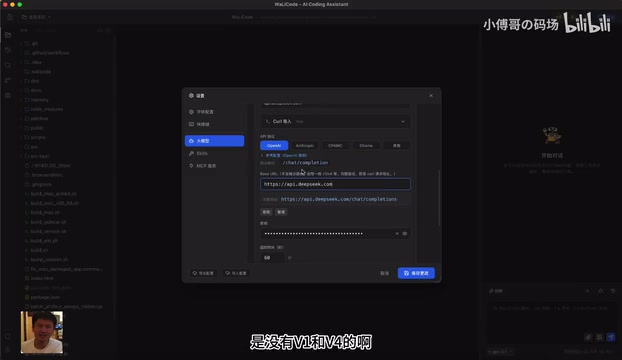
Regarding LLM support, v0.2.0 adds Ollama local model integration. Ollama is currently one of the most popular local LLM runtime frameworks, supporting one-click local deployment of dozens of open-source models including Llama, Mistral, DeepSeek, and Qwen. Its core value lies in encapsulating complex model quantization and inference engine configuration into simple command-line tools — ordinary developers can run models ranging from 7B to 70B parameters locally without deep knowledge of CUDA or model quantization techniques. If you have open-source models deployed locally, you simply import the address in the specified format and use them directly through the OpenAI protocol compatibility layer — this protocol has become the de facto industry-standard interface specification for LLM services. Anthropic's Claude, Google's Gemini, China's DeepSeek, and other major model providers all offer compatible modes. This "one interface, multiple models" design dramatically reduces the cost of switching models in AI applications.
Additionally, DeepSeek V4 support has been added, including its unique Sync analysis feedback mechanism. DeepSeek is a series of large language models from DeepSeek (the company), which has gained widespread attention in the global developer community through its extremely competitive cost-performance ratio and open-source strategy. It performs close to GPT-4o on multiple programming benchmarks while costing only a fraction of the API call price. Its Sync analysis feedback mechanism is a reasoning process visualization capability that allows clients to receive the model's intermediate reasoning steps in real-time rather than waiting only for the final answer — developers can observe the AI's analytical logic and intervene earlier when potential understanding deviations are detected. This means WaLiCode is rapidly catching up with mainstream products in model ecosystem coverage — supporting both cloud-based commercial models and local private deployments.
Multi-Project Chat: Breaking Single-Project Limitations
This is one of the most differentiated features in this update. Xiao Fu Ge explicitly identified an industry pain point in his video: existing AI IDE tools are essentially all single-project chat mode, while in actual development, engineers frequently need to work on multiple related projects simultaneously.
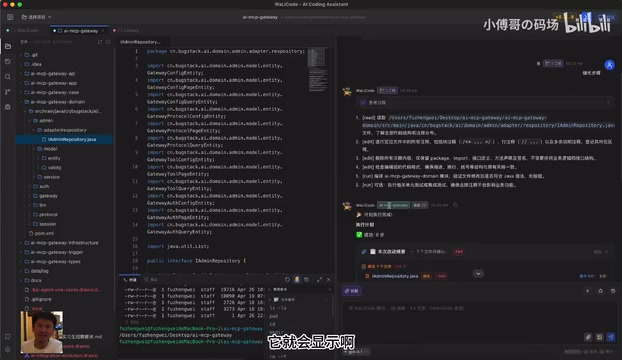
WaLiCode v0.2.0 supports opening multiple projects simultaneously and conducting cross-project conversations. The demo showcased a scenario with three projects open simultaneously — users can select domain layer code from one project as a reference and have the AI optimize the corresponding module in another project. Going further, users can select two projects and ask questions simultaneously, such as "What are the differences in domain design between these two projects," and the AI will provide a comprehensive comparative analysis.
The practical value of this feature lies in: in microservice architectures (splitting monolithic applications into multiple independently deployed small services, each typically corresponding to an independent code repository) or Monorepo projects (storing multiple related projects in a single code repository, as extensively used internally at Google and Meta, managed through toolchains like Nx and Turborepo for inter-module dependencies), developers frequently need to review code across services, align interface designs, or migrate implementation logic in their daily work. Traditional AI IDEs designed with single workspace boundaries create an obvious context fragmentation in these scenarios, forcing developers to manually copy-paste code snippets to "feed" the AI. Multi-project chat dramatically simplifies this process — the interface clearly indicates at the top which project the current conversation involves, avoiding context confusion.
It's worth noting that implementing simultaneous multi-project chat faces significant context management challenges at the technical level: LLM inputs have token limits, and a single large project's codebase often already approaches this limit. In multi-project scenarios, RAG (Retrieval-Augmented Generation) techniques are typically needed, using code vectorization and semantic retrieval to dynamically filter the most relevant code segments for context injection. The quality of this retrieval mechanism will be key to the feature's stability on large codebases.
Task Decomposition Mode: Making AI Coding More Controllable
Another important update is Decompose Mode. Unlike traditional "one-click execution," decompose mode first breaks down the user's requirements into multiple steps, displays the execution plan, and then executes step by step.
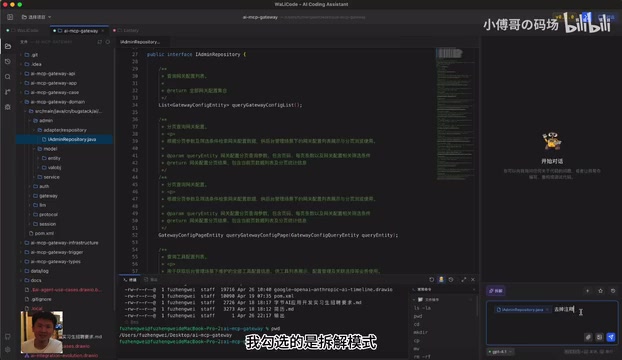
From a technical paradigm perspective, decompose mode is essentially the concrete implementation of AI Agent workflows in the code editing scenario — adopting the Plan-and-Execute paradigm: the LLM first generates a structured execution plan, which is then executed step by step using code editing tools after user review and confirmation. This "Human-in-the-Loop" design significantly improves output predictability and safety while sacrificing some degree of automation.
The specific workflow is as follows:
- Requirements Analysis: The user submits a modification request (e.g., "remove comments"), and the AI first decomposes it into several steps
- Step Review: Users can view the specific content of each step and request "refine steps" or add reference information if they feel it's not precise enough
- Step-by-Step Execution: After confirmation, clicking execute triggers the AI to complete code modifications step by step
- Diff Comparison: After execution, the left side displays a code comparison (diff view) with split-pane support, allowing users to review item by item or accept all changes at once
This design philosophy shares similarities with Cursor's "Plan" mode (GitHub Copilot Workspace is also exploring similar task planning mechanisms), but WaLiCode makes it more explicit. For complex code refactoring tasks, this "plan first, execute later" approach can significantly reduce the risk of AI producing uncontrollable code, keeping developers in control at every step.
Terminal Integration and Smart Commands
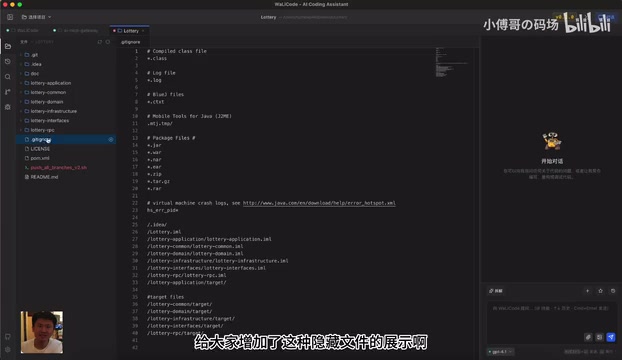
Terminal functionality has also been enhanced. Users can open the corresponding path directly in the terminal from the file tree, with the terminal automatically navigating to the target directory. WaLiCode also includes quick-access shortcuts for common commands, supporting direct invocation of Maven, Node.js, Docker, and other toolchains.
More interesting is the terminal's smart mode: when users input standard commands, the system executes them directly; when the input is a natural language question (e.g., "what can you do"), the system switches to AI analysis mode, intelligently determining user intent and providing suggestions or directly executing operations. This fusion of command line and AI conversation reduces the cost of switching back and forth between the terminal and AI assistant.
An Independent Developer's AI IDE Exploration
From a product maturity perspective, WaLiCode still has gaps compared to products like Cursor and Trae.ai that are backed by large companies, particularly in ecosystem completeness and stability. The video also mentioned fixing a previous copy-paste bug, indicating the product is still in the rapid iteration early stage.
But WaLiCode's value lies in providing an independent developer's perspective on AI IDE thinking. Features like multi-project chat and task decomposition execution precisely address the real pain points that frontline engineers experience when using existing AI IDEs. The multi-project chat feature, in particular, is rarely offered by mainstream AI IDEs today.
For developers who want to try it out, WaLiCode supports an auto-update mechanism — after the initial download, subsequent versions will automatically prompt for upgrades. As a personal project, its iteration speed and feature roadmap are worth continued attention. In the AI IDE space, perhaps it's precisely these independent works from frontline developers that can spark innovations overlooked by big-company products.
Key Takeaways
- WaLiCode v0.2.0 adds simultaneous multi-project chat, supporting cross-project code analysis and comparison, solving the pain point of existing AI IDEs only supporting single-project conversations — especially suitable for microservice architecture and Monorepo project scenarios
- Introduces task decomposition mode based on the Plan-and-Execute AI Agent paradigm, where AI first breaks requirements into steps for user review and refinement before step-by-step execution, improving code modification controllability through Human-in-the-Loop design
- Adds Ollama local model and DeepSeek V4 support, enabling flexible multi-model switching through the OpenAI protocol compatibility layer (now the industry-standard interface for LLM services), accommodating both cloud commercial models and local private deployments
- Terminal integration with smart command recognition automatically distinguishes between standard commands and natural language questions, merging command-line operations with AI conversation capabilities
- As an indie developer's self-built product, it demonstrates unique engineering-minded thinking on differentiated features like multi-project collaboration
Related articles
 Product Reviews
Qoder vs Cursor Real-World Comparison: Which $20/Month AI IDE Is Better?
Hands-on comparison of Qoder vs Cursor AI IDEs: Agent autonomy, human interaction count, and architecture decisions. Qoder needed only 2 interactions vs Cursor's 8.
 Product Reviews
Cursor Cloud Agent Demo: Eliminating Bottlenecks Across the Entire Software Development Lifecycle
Deep analysis of Cursor's Cloud Agent demo showing how cloud VMs, automated test artifacts, and a full-chain control plane systematically eliminate human bottlenecks across the software development lifecycle.
 Product Reviews
Cursor 3.0 Deep Dive: Multi-Agent Parallelism, Design Mode, and Best-of-N Model Comparison
Cursor 3.0 evolves from an AI coding assistant into an Agent fleet command center. Explore multi-agent parallelism, Design Mode, and Best-of-N model comparison.