Web Studio: Open-Source Local AI Coding Workbench Integrating Three Major Agents
Web Studio: Open-Source Local AI Codin…
Open-source desktop tool Web Studio unifies three major AI Agents into a local-first coding workbench
Web Studio is an open-source desktop application by an independent developer that unifies Cloud Code, Gemini CLI, and Codex into a single AI coding workbench. Built on Tauri 2 + Next.js 16 + SQLite with a local-first design, it offers multi-repository workspace management via Git Worktree, structured Diff code review with human-AI feedback loops, AI-generated commit messages with one-click PR creation, and terminal plus external editor integration—balancing privacy and development efficiency.
Project Overview
An independent developer has created a desktop AI development workbench called Web Studio that integrates three major AI Agents—Cloud Code, Gemini CLI, and Codex—into a single local-first application, fully open-sourced. This tool targets local code repositories and provides complete development workflow support from workspace management and AI-assisted coding to code review and PR submission.
In today's era of flourishing AI coding tools, developers often need to switch frequently between multiple tools. Web Studio aims to solve this pain point with a unified desktop application—aggregating scattered AI coding capabilities into a lightweight, local-first workbench.
Background: Three AI Agents with Different Strengths Cloud Code, Gemini CLI, and Codex represent three mainstream approaches to AI coding agents: Cloud Code is Anthropic's Claude model-powered command-line coding assistant, known for its strong code comprehension and multi-step task execution capabilities; Gemini CLI is Google's terminal AI tool based on the Gemini model, deeply integrated with the Google ecosystem; Codex represents OpenAI's code-specialized model evolution product line. Each has its own focus, and developers often need to choose based on task type, model capabilities, and cost—which is precisely the core value of a unified access layer.
Core Feature Analysis
Multi-Repository Workspace Management
Web Studio's homepage provides an intuitive workspace dashboard where recent projects, repository clone status, and workspace overview are all visible at a glance. It supports quick workspace creation and can mount multiple code repositories, automatically creating Git Worktrees and task branches, enabling developers to efficiently switch between different projects and tasks.
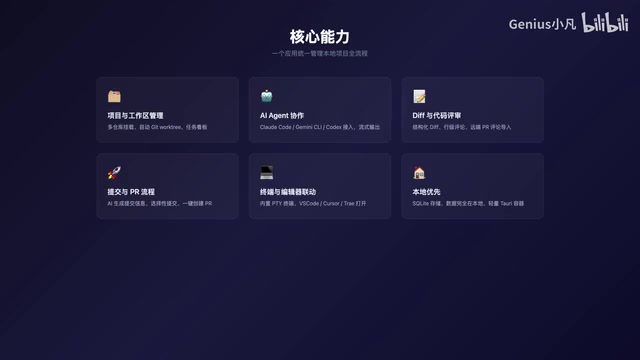
Technical Deep Dive: The Concurrency Advantage of Git Worktree Git Worktree is a feature introduced in Git 2.5 that allows a single Git repository to simultaneously check out multiple independent working directories. In traditional development, switching branches requires stashing or discarding current changes, but Worktree allows developers to maintain multiple branches in parallel across different directories without interference. In AI-assisted development scenarios, this feature is particularly critical—it enables different AI Agents to work in parallel on different tasks in independent working directories, avoiding file conflicts and significantly improving multi-task concurrency efficiency. Web Studio encapsulates this underlying Git capability into visual workspace management, lowering the barrier to entry.
This design philosophy is similar to the workspace concept in IDEs but is more focused on AI-assisted development scenarios. Each workspace can independently configure Agents and manage branches, preventing interference between different tasks.
Unified Access to Three Major AI Agents
Web Studio's core capability lies in unifying three mainstream AI coding Agents—Cloud Code, Gemini CLI, and Codex—into a single interface. It supports automatic local discovery of installed Agents, provides streaming conversation output, and multi-turn continuous dialogue capabilities.

This means developers no longer need to open different terminals or applications to use different AI tools. Within the same interface, you can choose the most suitable Agent based on task characteristics, or even have multiple Agents collaborate on complex development tasks. Streaming Output technology ensures real-time visibility of AI responses—developers can start reading and evaluating without waiting for the complete reply, significantly improving the interaction experience.
Structured Diff Code Review
Web Studio includes built-in structured Diff display functionality, supporting line-level review comments and review context management. More importantly, review comments can be fed back directly to AI Agents, forming a closed-loop workflow of "human review → AI modification → re-review."
Deep Dive: The Human-AI Collaboration Feedback Loop Traditional code review is a core component of software engineering quality assurance, but it's also one of the most time-consuming bottlenecks in the development process. Structured Diff display presents code changes in hierarchical layers by file, function, and line level, helping reviewers quickly locate the scope and impact of changes. Web Studio's design of feeding review comments back to AI Agents is essentially building a human-AI collaboration Feedback Loop: humans provide high-level business judgment and architectural understanding, while AI handles specific code modifications and detail optimization. This pattern is highly aligned with the design direction of cutting-edge tools like GitHub Copilot Workspace and Cursor Agent mode, representing an important trend in AI-assisted development evolving from "code completion" to "task execution agents."
This design transforms code review from a passive inspection process into an active improvement process through human-AI collaboration. Developers only need to point out issues, and the AI Agent can automatically modify code based on review comments.
Smart Commits and PR Workflow
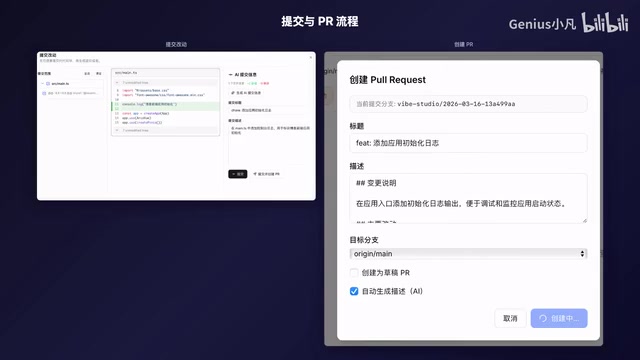
Web Studio supports AI-generated commit messages, allows developers to selectively stage and commit files, and create Pull Requests or Merge Requests with one click.
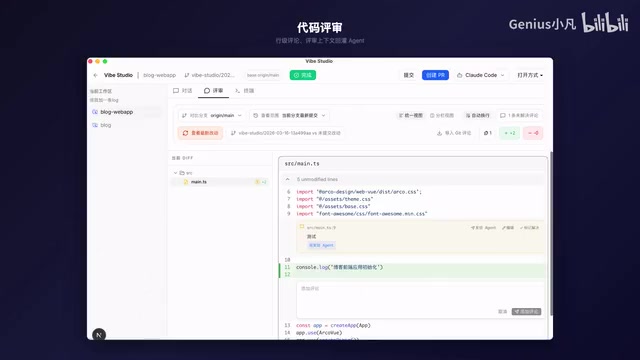
Additionally, it can pull PR comments from GitHub and GitLab remotes and import them into the local review workflow with one click. This allows developers to complete all code review work in their local environment without frequently switching to the browser. AI-generated Commit Messages are based on analysis of actual code changes and follow the Conventional Commits specification, helping maintain clear project history.
Terminal and Editor Integration
Web Studio includes a built-in PTY terminal (Pseudo Terminal) and supports integration with external editors like VS Code, Cursor, and Trae. The difference between a PTY terminal and a regular terminal emulator is that it fully supports interactive programs (like vim, htop, etc.) and colored output, providing an experience consistent with native terminals. Developers can achieve a fluid "chat, edit, and verify" experience within the same workbench—getting suggestions from AI conversations, modifying code in the editor, and running verification in the terminal, all seamlessly connected.
Technical Architecture
Web Studio adopts a modern tech stack:
- Desktop Framework: Tauri 2 (Rust-powered, lightweight and efficient)
- Frontend: Next.js 16 + React 19
- Data Storage: SQLite (local-first)
Deep Comparison: Why Tauri Over Electron? Tauri is a rapidly rising cross-platform desktop application framework whose core advantage lies in using Rust for backend logic and calling the operating system's native WebView for frontend rendering (WKWebView on macOS, WebView2 on Windows, WebKitGTK on Linux), rather than bundling a complete Chromium browser engine like Electron. This architectural difference brings significant performance advantages: Tauri application installers are typically only a few MB, while Electron applications often exceed 100MB; in terms of memory usage, Tauri is generally 50% or more lower than Electron. Rust's memory safety features also eliminate an entire class of common security vulnerabilities at the foundational level. For developer tool applications, this lightweight characteristic means faster startup times and lower system resource consumption, with advantages particularly evident during extended development sessions.
SQLite as the local database ensures all data is stored locally on the user's machine without relying on cloud services, protecting code privacy while guaranteeing offline availability. SQLite is the world's most widely deployed database engine, known for zero configuration, single-file storage, and high reliability—naturally suited for desktop application data persistence.
Why It Deserves Attention
The local-first design philosophy is Web Studio's greatest differentiating advantage. Local-first is an important movement in software design in recent years, systematically proposed by the Ink & Switch research team in 2019. Its core principle is that an application's primary data and computation should occur locally on the user's device, with the cloud serving only as an auxiliary means for synchronization and backup. The combination of this philosophy with AI coding tools is particularly fitting—code often contains core enterprise assets and sensitive business logic, and developers generally have concerns about uploading code to third-party cloud services.
In today's world where cloud-based AI tools dominate, bringing AI capabilities down to local desktop applications means:
- Privacy & Security: Code doesn't need to be uploaded to third-party servers; sensitive business logic stays entirely local
- Response Speed: Local operations have no network latency; workspace switching and file operations respond instantly
- Flexibility: Freedom to choose and switch between different AI Agents without being locked into a single platform
- Control: All workflows are completed locally, unaffected by cloud service limitations or outages
As the work of an independent developer, Web Studio demonstrates individual developers' creativity in the AI tools space. It's not simply wrapping an AI API—it's designed from the perspective of development workflows as a complete local AI coding solution.
Summary
Web Studio represents an important direction for AI coding tools: integrating scattered AI capabilities into a unified local workbench, allowing developers to fully leverage multiple AI Agents while maintaining data privacy and work efficiency. From Git Worktree's concurrent task management to structured Diff's human-AI collaborative review loop, to the lightweight experience enabled by the Tauri framework, Web Studio demonstrates clear engineering judgment in its technology choices. The project is open-sourced, and interested developers can follow and contribute.
Key Takeaways
- Web Studio integrates Cloud Code, Gemini CLI, and Codex into a single local desktop application
- Supports multi-repository workspace management with automatic Git Worktree and task branch creation for parallel multi-tasking without interference
- Built-in structured Diff code review with feedback loop to AI Agents forming a "review → modify → re-review" cycle
- Built on Tauri 2 + Next.js 16 + SQLite, offering smaller size and lower memory usage compared to Electron
- Local-first design philosophy protects code privacy, with integration support for VS Code, Cursor, and other external editors
Related articles
 Product Reviews
Qoder vs Cursor Real-World Comparison: Which $20/Month AI IDE Is Better?
Hands-on comparison of Qoder vs Cursor AI IDEs: Agent autonomy, human interaction count, and architecture decisions. Qoder needed only 2 interactions vs Cursor's 8.
 Product Reviews
Cursor Cloud Agent Demo: Eliminating Bottlenecks Across the Entire Software Development Lifecycle
Deep analysis of Cursor's Cloud Agent demo showing how cloud VMs, automated test artifacts, and a full-chain control plane systematically eliminate human bottlenecks across the software development lifecycle.
 Product Reviews
Cursor 3.0 Deep Dive: Multi-Agent Parallelism, Design Mode, and Best-of-N Model Comparison
Cursor 3.0 evolves from an AI coding assistant into an Agent fleet command center. Explore multi-agent parallelism, Design Mode, and Best-of-N model comparison.