Windsurf Wave 3 Deep Dive: MCP Support, Turbo Mode & Multi-Model Integration
Windsurf Wave 3 Deep Dive: MCP Support…
Windsurf ships Wave 2 & Wave 3 with MCP, Turbo mode, and multi-model support, emerging as a strong AI coding rival.
Windsurf's AI code editor delivered two major updates with Wave 2 and Wave 3, introducing web search, a memory system, MCP protocol support, Turbo auto mode, DeepSeek/O3 Mini/Gemini multi-model integration, and Tab to Jump smart navigation. Its credit-based pricing is more transparent than Cursor's, the UI is more polished, and feature iteration is rapid. MCP support bridges the tool ecosystem while Turbo mode boosts automation, elevating Windsurf from a promising newcomer to a truly competitive AI coding tool.
Windsurf, an AI-powered code editor that has been gaining significant attention recently, released two major updates in quick succession — Wave 2 and Wave 3 — bringing a series of heavyweight features including MCP protocol support, Turbo auto mode, and DeepSeek model integration. These updates have helped it carve out a differentiated advantage in its competition with Cursor. This article provides a comprehensive overview of these new features, along with honest impressions from extended real-world use.
Wave 2: Laying the Foundation with Web Search and Memory
Web Search Capability
Wave 2 added web search capabilities to Windsurf's AI assistant, Cascade. Cascade is Windsurf's built-in core AI coding assistant, developed by the Codeium team. Unlike traditional code completion tools, Cascade is designed as an Agentic AI with deep contextual awareness — it doesn't just understand the code in the current file but can automatically index the entire project's codebase structure, dependency relationships, and cross-file reference chains. Cascade supports Write mode (directly generating and modifying code) and Chat mode (conversational Q&A and solution discussions). Its core technical advantage lies in Codeium's proprietary code indexing engine, which provides the model with precise project-level context without consuming excessive tokens.
Users can explicitly trigger a search using the @web command, or simply ask a question that requires real-time information — Cascade will automatically determine whether a search is needed and initiate one. Additionally, pasting a URL directly allows Cascade to use the webpage content as contextual reference.
This feature is extremely practical in real-world development — for example, when checking the latest version of a framework or looking up documentation for a third-party library. It's worth noting that each web search consumes one Flow Action credit, and reading URL page content incurs additional credit costs. Flow Action is Windsurf's proprietary billing unit, designed to quantify each atomic operation performed by Cascade. Unlike Cursor, which charges by request count or model invocation count, Flow Action maps different types of operations (such as code generation, file editing, terminal command execution, web search, URL reading, etc.) into a unified credit consumption system, with different models consuming different amounts of credits per invocation. The advantage of this design is that users can flexibly choose models based on task complexity — use low-cost models for simple tasks and switch to high-performance models for complex ones — achieving optimal allocation of their credit budget.
Memories Feature
Another important feature introduced in Wave 2 is the memory system. Cascade can automatically generate memories during conversations, retaining context across different conversation threads. This means content discussed in previous conversations can be referenced in subsequent new ones.
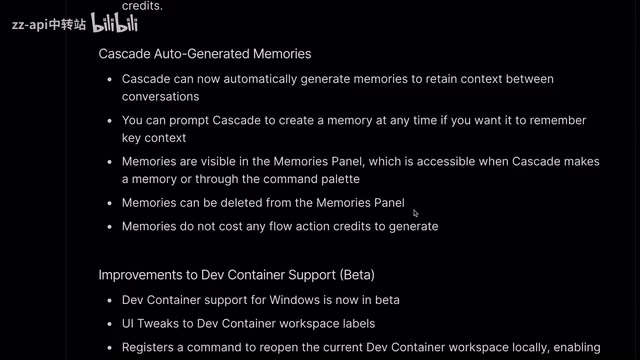
Users can also proactively prompt Cascade to create memories, ensuring critical context is saved. All memories can be viewed and managed in the memories panel, and generating memories doesn't consume any Flow Action credits — a genuinely generous touch.
Wave 3: A Comprehensive Core Upgrade
Multi-Model Support: DeepSeek, O3 Mini, Gemini 2.0 Flash
One of the most notable changes in Wave 3 is comprehensive support for multiple popular models:
- DeepSeek V3 and R1: Self-hosted by Windsurf, avoiding downtime issues from third-party services, with very low credit consumption
- Gemini 2.0 Flash: Credit consumption on par with DeepSeek V3/R1
- O3 Mini: Credit consumption equal to Claude 3.5 Sonnet
Some background on the DeepSeek model series is worth sharing. DeepSeek is a large language model series developed by the Chinese company DeepSeek. DeepSeek V3 is its third-generation foundation model, employing a Mixture of Experts (MoE) architecture with a total of 671 billion parameters but only activating approximately 37 billion per inference pass, dramatically reducing inference costs while maintaining high performance. DeepSeek R1 is a reasoning-focused model trained with reinforcement learning to develop chain-of-thought reasoning capabilities, excelling in math, code, and logical reasoning tasks. Both models are released as open source, with training costs far below comparable closed-source models — a key reason Windsurf can offer them at such low credit costs.
O3 Mini is a reasoning model released by OpenAI in early 2025, a lightweight version of the o3 series. Unlike traditional generative models such as GPT-4o, o3 series models perform multi-step internal reasoning (i.e., "thinking") before answering questions, trading additional inference compute time for higher-quality outputs. O3 Mini supports low, medium, and high reasoning intensity settings, with performance on coding, math, and scientific reasoning tasks approaching or even surpassing the full o3 model, but at significantly reduced inference costs.
From a cost-effectiveness perspective, DeepSeek V3 is the go-to choice for everyday development — it's stronger than Gemini 2.0 Flash at the same low credit cost. For higher-quality outputs, O3 Mini outperforms Claude 3.5 Sonnet in certain scenarios, though Claude remains more reliable in terms of consistency.
MCP Protocol Support: Bridging the Tool Ecosystem
Wave 3 added Model Context Protocol (MCP) support — a milestone update. MCP is a standardized protocol open-sourced by Anthropic in late 2024, designed to solve the fragmentation problem of connecting large language models with external tools and data sources. Before MCP, every AI application that needed to interface with different tools (such as databases, APIs, file systems) required custom integration code, creating a complex M×N integration matrix. MCP simplifies this to an M+N linear relationship by defining a unified client-server communication standard — any MCP-compatible AI client can directly invoke tool capabilities provided by any MCP server. The protocol uses JSON-RPC 2.0 as its underlying communication format, supports both stdio and HTTP+SSE transport methods, and has been adopted by mainstream AI coding tools including Cursor, Claude Desktop, and Windsurf, making it the de facto standard for the AI tool ecosystem.
MCP allows users to add custom tool servers to Cascade, dramatically expanding the AI assistant's capability boundaries.
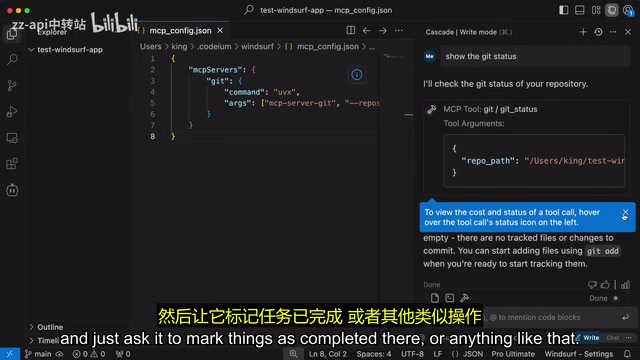
The configuration process is straightforward: find the desired service (such as a Git operations server) in the MCP server's GitHub repository, copy its JSON configuration, then open the configuration file in Windsurf's tools options and paste it in. The practical use cases are extensive:
- Integrate Git operations, letting AI directly execute version control commands
- Connect to Notion, letting AI help manage task statuses
- Interface with database tools for data querying and manipulation
This brings Windsurf's tool integration capabilities on par with competitors like Cline and Roo Code. It's worth noting that Cline (formerly Claude Dev) and Roo Code are two open-source AI coding assistants built as VS Code extensions. Cline was originally built around the Claude API and later expanded to support multiple models. Its standout feature is a complete Agentic workflow — the AI can autonomously read and write files, execute terminal commands, browse the web, and automatically debug and fix errors. Roo Code is a community fork of Cline that adds more flexible custom modes and finer-grained permission controls. Since both tools are VS Code plugins, users need to configure their own API keys and bear model invocation costs, whereas Windsurf and Cursor bundle model invocation costs into their subscription pricing, lowering the barrier to entry.
Tab to Jump: Smart Navigation for Editing
This is a practical feature that boosts coding efficiency. When you modify a variable name in a file and that variable is referenced multiple times in subsequent code, Windsurf automatically predicts the locations that need synchronized changes and displays suggestions. Simply press Tab to jump to the next location that needs editing and apply the change.
This feature is similar to Cursor's Tab autocomplete and Copilot's Next Edit Suggestion, but it integrates smoothly into Windsurf's overall workflow. This type of "predict the next edit" functionality represents the evolution of AI coding tools from passive completion to proactive assistance — the AI no longer just waits for you to type code before offering completions, but understands your editing intent, proactively anticipates where you'll need to make changes next, and automates repetitive synchronization work.
Turbo Mode: Fully Automated Execution for Faster Development
Turbo Mode is another highlight feature of Wave 3. When enabled, Cascade no longer requires users to approve terminal commands or file edit operations step by step — instead, it autonomously iterates through all steps, including command execution.
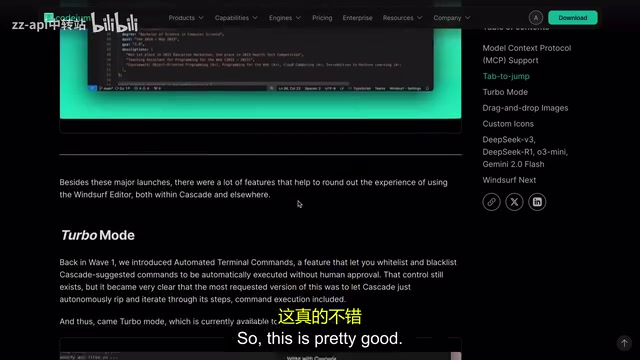
This is similar to the auto modes in Cline and Roo Code, and can significantly accelerate the development pace for developers who trust AI output. The core philosophy behind this fully automated execution mode is "Agentic Coding" — making AI not just a code suggestion tool, but an intelligent agent capable of independently completing multi-step development tasks. The AI autonomously plans task steps, writes code, runs tests, analyzes error output, and performs fixes, forming a complete autonomous development loop. Of course, caution is advised when working in production environments or making critical code changes, as the AI may make inappropriate file modifications or execute terminal commands with side effects when lacking sufficient context.
Other Useful Updates
- Image Drag & Drop: Supports dragging images directly as references, particularly useful for generating code from design tools like Figma. This feature relies on multimodal models' visual understanding capabilities — the AI can parse layout structures, color schemes, and component hierarchies from design mockups and convert them into corresponding frontend code
- Custom Icons: Multiple icon styles available for user personalization
- Windsurf Next Editor: A preview version similar to VS Code Insiders, allowing early access to features not yet officially released
Windsurf Pricing Strategy: Transparent and Competitive
Windsurf currently offers three pricing tiers:
| Plan | Price | Core Benefits |
|---|---|---|
| Free | $0 | Basic features + basic models |
| Standard | $10-15/mo | 500 premium model credits + 1500 Flow Action credits |
| Pro | $60/mo | Higher credit quotas |
The Standard plan's 500 credits are sufficient for most developers' daily use. Compared to Cursor's pricing model, Windsurf's credit system is more transparent — you know exactly how many credits each operation consumes, and the cost differences between models are crystal clear. Cursor currently offers a $20/month Pro plan that includes 500 "fast" premium model requests (throttled but unlimited after depletion), plus unlimited slow requests. The core difference between the two: Cursor's billing granularity is "request count," while Windsurf's is "operation type × model cost" — the latter gives users more room to optimize their model selection and usage strategy.
Long-Term Usage Impressions: Windsurf vs Cursor
After extended continuous use, Windsurf outperforms Cursor in several areas:
- More Elegant UI Design: The overall interface is cleaner, with more intuitive interaction logic
- More Transparent Pricing: The credit system gives users clearer cost expectations
- Rapid Feature Iteration: The update cadence from Wave 2 to Wave 3 was fast, with each release delivering substantive improvements
There are some shortcomings as well — for instance, after adjusting the VS Code zoom level, the quick settings panel may display incorrectly. These UI adaptation issues still need fixing. Additionally, both Windsurf and Cursor are standalone editors built on the VS Code open-source codebase (Code OSS), meaning they inherit VS Code's vast extension ecosystem and familiar user interface, but also face the technical challenge of staying in sync with upstream VS Code updates.
Conclusion
The Wave 3 update has transformed Windsurf from a "promising newcomer" into a genuinely competitive AI coding tool. MCP support bridges the tool ecosystem, Turbo Mode enhances automation, and multi-model support gives users more choices. For developers looking for a Cursor alternative or wanting to try something new, now is an excellent time to give Windsurf a serious try.
Related articles
 Product Reviews
Qoder vs Cursor Real-World Comparison: Which $20/Month AI IDE Is Better?
Hands-on comparison of Qoder vs Cursor AI IDEs: Agent autonomy, human interaction count, and architecture decisions. Qoder needed only 2 interactions vs Cursor's 8.
 Product Reviews
Cursor Cloud Agent Demo: Eliminating Bottlenecks Across the Entire Software Development Lifecycle
Deep analysis of Cursor's Cloud Agent demo showing how cloud VMs, automated test artifacts, and a full-chain control plane systematically eliminate human bottlenecks across the software development lifecycle.
 Product Reviews
Cursor 3.0 Deep Dive: Multi-Agent Parallelism, Design Mode, and Best-of-N Model Comparison
Cursor 3.0 evolves from an AI coding assistant into an Agent fleet command center. Explore multi-agent parallelism, Design Mode, and Best-of-N model comparison.