Windsurf Wave 6 Deep Dive: One-Click Deploy Brings AI Coding to Full-Stack
Windsurf Wave 6 Deep Dive: One-Click D…
Windsurf Wave 6 launches one-click Deploy, evolving from AI coding assistant to end-to-end dev platform.
Windsurf releases Wave 6, headlined by a Netlify-powered one-click Deploy feature that publishes web apps to public domains with persistent URLs, directly competing with Bolt and Lovable. Additional updates include automatic Git commit message generation, conversation table of contents, and long conversation performance optimization. Compared to Cursor, Windsurf is building advantages in pricing transparency, feature completeness, and iteration speed, transforming from an AI coding assistant into a full-stack development platform.
Overview
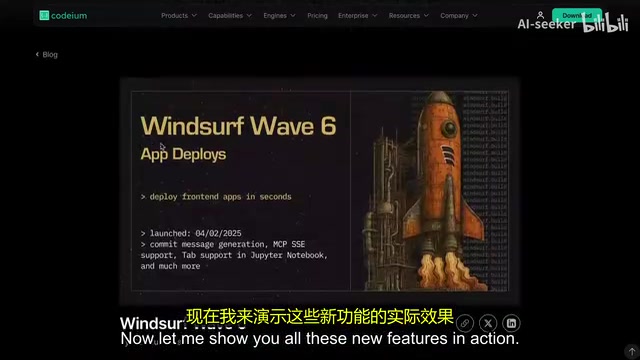
Windsurf recently released its Wave 6 upgrade, introducing the most anticipated new feature — one-click Deploy. This update transforms Windsurf from a pure AI coding assistant into an end-to-end solution covering development through deployment, directly competing with app generation platforms like Bolt and Lovable. Combined with the context-enhanced autocomplete from Wave 5, Windsurf is rapidly widening the gap with its competitors.
Deploy: From Development to Production in One Step
Core Capabilities
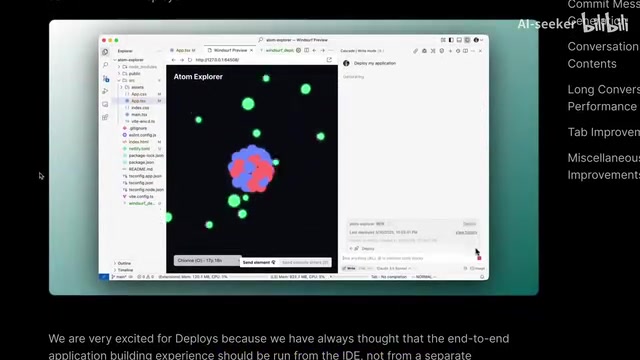
The biggest update in Wave 6 is the brand-new Deploy option. This feature allows users to deploy websites or JavaScript web application projects to a public domain with a single click, maintaining the same URL across subsequent iterations. It uses Netlify under the hood and generates a shareable link once deployment is complete.
Netlify is one of the world's most popular hosting platforms for static sites and frontend applications, used by millions of developers to deploy JAMstack websites. It offers automated CI/CD pipelines, global CDN distribution, automatic HTTPS certificates, form handling, and Serverless Functions. Windsurf's choice of Netlify as its underlying deployment service means that user-deployed applications inherently benefit from enterprise-grade infrastructure capabilities like global acceleration and high availability — without needing to configure servers or DNS resolution manually.
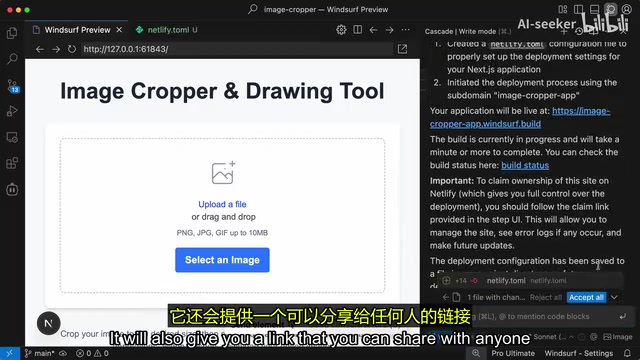
This means Windsurf can now almost entirely replace tools like Bolt — you not only get a Preview feature but can also generate an app and instantly share it with anyone within seconds. Bolt (developed by the StackBlitz team) and Lovable are AI app generation platforms that have emerged in recent years. Their core philosophy is enabling users to describe requirements in natural language and generate complete web applications in the browser with one-click deployment. These platforms primarily target non-technical users or rapid prototyping scenarios, but they typically run in sandbox environments with limited support for complex projects. Windsurf's Deploy feature achieves similar capabilities directly within the local IDE environment while preserving the full code control that professional developers need. For developers who need quick prototype demos or small project deployments, this is a massive efficiency boost.
Usage Limits and Technical Details
The Deploy feature is currently in Beta with the following limitations:
- Rate limit: All users are limited to 10 deployments per hour
- Site creation: Free users can create 1 new site per day; paid users get 2 per day
- Both new project deployments and existing project updates count toward the quota
- Users can claim deployed links to their own Netlify accounts for full control
On the technical side, Windsurf has introduced a dedicated deployment tool for Cascade that automatically adds or modifies Netlify configuration files, uploads code to Windsurf servers, and completes the deployment in a claimable manner. Cascade is Windsurf's core AI Agent engine, distinct from simple code completion or Q&A-style Copilots. Cascade uses an Agent architecture capable of autonomously planning task steps, reading project files, executing terminal commands, searching codebases, and performing multi-step reasoning. Each user interaction is called a "flow action," and Cascade continuously tracks context state across multiple operations. This Agent mode enables it to handle complex tasks like cross-file refactoring and bug diagnosis, rather than just generating code line by line.
It's worth noting that since code needs to be uploaded to Windsurf servers, the Deploy feature is only available to individual plan users who have enabled code snippet telemetry. Code Snippet Telemetry refers to the practice of sending partial code snippets to remote servers during tool operation, used to improve model quality or enable specific features. This is a sensitive topic in the AI coding tool space, as enterprise code often contains trade secrets and intellectual property. Windsurf's restriction of Deploy to individual users with telemetry enabled is essentially because the deployment process requires uploading complete code to servers for building. This also explains why enterprise users may need to claim deployments to their own Netlify accounts to maintain full control over their code and deployments.
Other Notable Upgrades
Automatic Git Commit Message Generation
Wave 6 introduces automatic Git commit message generation. In VS Code's Git panel, a single button click generates descriptive commit messages based on the current staged and unstaged change diffs. This small feature delivers a very noticeable efficiency boost to daily development workflows. Writing high-quality commit messages has always been a minor pain point for developers — good commit messages should concisely and accurately describe what changed and why, but under the pressure of frequent commits, many developers tend to write low-information descriptions like "fix bug" or "update." The AI auto-generation feature analyzes code diffs to produce structured, semantically clear commit messages, which provides tangible benefits for team collaboration and code review.
Conversation Table of Contents
The new Table of Contents feature for conversations solves the pain point of finding information in long conversations. The system automatically generates a directory structure based on each of your prompts, allowing you to quickly jump to any position in the conversation.
Long Conversation Performance Optimization
The Windsurf team has invested significant effort into improving long conversation performance, using checkpoint and summarization techniques to maintain high-quality output even as conversations grow longer. The core challenge here lies in the context window limitations of large language models — even the most advanced models can only process a finite number of tokens. When a conversation accumulates extensive code modifications, discussions, and decision history, the raw conversation content may far exceed the model's context capacity. Windsurf's checkpoint mechanism saves project state snapshots at key nodes, while summarization techniques compress earlier conversations into concise context summaries, preserving the most critical information within the limited context window.
Enhanced Tab Autocomplete
The autocomplete feature now has access to more editor context — for example, what you're searching for in a file is now taken into consideration. Additionally, the Tab completion experience has seen notable improvements in Jupyter Notebooks. Jupyter Notebooks are the most commonly used interactive development environment in data science and machine learning, and their cell-based code organization differs significantly from traditional code files, creating unique context-understanding challenges for AI completion. The Tab completion improvements in Jupyter mean Windsurf is extending its AI capabilities to broader development scenarios.
Windsurf vs Cursor: Which AI Coding Tool Is Worth Choosing?
Looking at the current market landscape, Windsurf is building advantages across multiple dimensions:
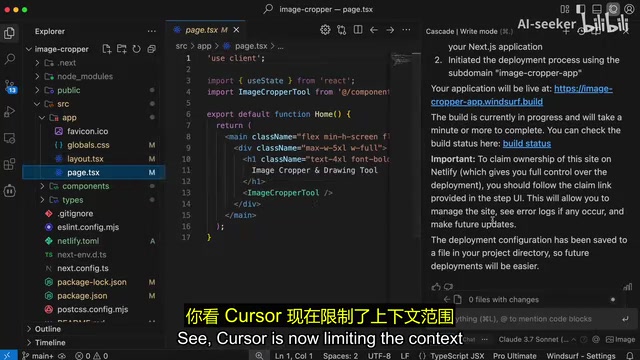
Pricing Transparency: Cursor now requires users to pay for Max models to get full context, with regular models having severely limited context. In recent pricing adjustments, Cursor introduced a tiered context strategy: regular subscribers are limited in the context window size their models can process, and only by paying for Max mode (charged per request) can users access full long-context capabilities. Context window size directly determines how much code the AI can "see" — in large projects, limited context means the AI may fail to understand cross-file dependencies, leading to degraded generation quality. This strategy has sparked widespread community dissatisfaction and is seen as a disguised price increase. Windsurf, on the other hand, clearly labels the credits consumed by each model and the cost of each flow action, so users know exactly what they're paying for.
Feature Completeness: Windsurf integrates Preview, Deploy, a more powerful Cascade Agent, context-aware autocomplete, and other features to form a more complete development ecosystem. The Enterprise edition also adds MCP support, Turbo mode, and other features. MCP (Model Context Protocol) is an open standard proposed by Anthropic that aims to provide AI models with a unified way to access external tools and data sources. Through MCP, AI Agents can connect to databases, API services, file systems, and other external resources, greatly expanding the model's capability boundaries. Windsurf Enterprise's MCP support means enterprise users can seamlessly integrate internal toolchains and private data sources into the Cascade Agent for deeper customized development workflows.
Iteration Speed: Windsurf's update frequency is high. The upgrade pace from Wave 5 to Wave 6 demonstrates the team is rapidly advancing product evolution with a clear direction.
Of course, Windsurf isn't without shortcomings. Support for custom APIs and key configuration would make its advantages even more pronounced. Currently, some developers primarily use Kline (another AI coding tool) and only occasionally use Windsurf for basic tasks. Custom API key support would mean users could connect their own OpenAI, Anthropic, or other model provider APIs, bypassing the tool's built-in usage limits while also being able to use privately deployed enterprise models. This is crucial for advanced users with strict data privacy requirements or those who want fine-grained control over model selection.
Conclusion: AI Coding Tools Are Now Competing on "Full-Stack Experience"
Wave 6's Deploy feature marks Windsurf's transformation from an AI coding assistant to a full-stack development platform. It can not only help you write code but also preview, deploy, and share — this kind of end-to-end experience is exactly where AI coding tools are heading.
For developers who also subscribe to platforms like Bolt or Lovable, Windsurf's Deploy feature could mean saving on a subscription. And for users torn between Cursor and Windsurf, Wave 6's upgrades undoubtedly add more weight to Windsurf's side.
As Beta limitations are gradually lifted, the Deploy feature's practicality will continue to improve. Competition among AI coding tools is shifting from "who generates better code" to "who delivers a more complete development experience" — and Windsurf is clearly leading the way. This trend also reflects a deeper shift across the software development industry: as AI capabilities advance, the value of development tools is no longer just about the code-writing phase, but about whether they can connect the entire pipeline from ideation to delivery, truly lowering the barriers and timelines of software development.
Related articles
 Product Reviews
Qoder vs Cursor Real-World Comparison: Which $20/Month AI IDE Is Better?
Hands-on comparison of Qoder vs Cursor AI IDEs: Agent autonomy, human interaction count, and architecture decisions. Qoder needed only 2 interactions vs Cursor's 8.
 Product Reviews
Cursor Cloud Agent Demo: Eliminating Bottlenecks Across the Entire Software Development Lifecycle
Deep analysis of Cursor's Cloud Agent demo showing how cloud VMs, automated test artifacts, and a full-chain control plane systematically eliminate human bottlenecks across the software development lifecycle.
 Product Reviews
Cursor 3.0 Deep Dive: Multi-Agent Parallelism, Design Mode, and Best-of-N Model Comparison
Cursor 3.0 evolves from an AI coding assistant into an Agent fleet command center. Explore multi-agent parallelism, Design Mode, and Best-of-N model comparison.