Zion No-Code Platform Hands-On: Building a Production-Ready E-commerce Mini Program from Scratch Without Writing a Single Line of Code
Zion No-Code Platform Hands-On: Buildi…
Zion no-code platform enables building complete production-ready mini programs with AI capabilities—zero coding required.
This article reviews the no-code development platform Zion, showcasing its full-stack capabilities from visual page building, built-in databases, and workflow orchestration to deep LLM integration and one-click multi-platform publishing—enabling non-technical users to independently build production-ready e-commerce mini programs. While the coding barrier has disappeared, product logic design remains the core challenge, and the article recommends entrepreneurs use no-code tools for rapid MVP validation.
Can No-Code Development Really Produce a Production-Ready Mini Program?
When people think of AI-powered development, the first thing that comes to mind is usually AI generating a bunch of code that immediately throws errors, or slapping a template together and changing some text—essentially just a shell. But a no-code development platform called Zion has recently prompted a fresh look at what's truly possible when it comes to "building products without writing code."
A Chinese video creator shared their complete process of building an e-commerce mini program from scratch using Zion—without writing a single line of code, yet producing a fully functional mini program system that integrates AI, accepts payments, runs real business logic, and can be deployed directly to production. Is this just marketing hype, or have no-code tools genuinely evolved to a new stage?
Industry Context: No-Code and Low-Code development platforms are not new concepts. As early as the 2000s, tools like Dreamweaver and FrontPage attempted to let non-technical users participate in web development. However, the modern no-code platform wave truly began in the mid-2010s with the rise of tools like Bubble and Webflow. Gartner predicts that by 2025, 70% of new applications will be built using low-code or no-code technologies. The driving force behind this trend is the global software developer shortage—estimated at over 40 million developers worldwide—while business demand growth far outpaces developer supply.
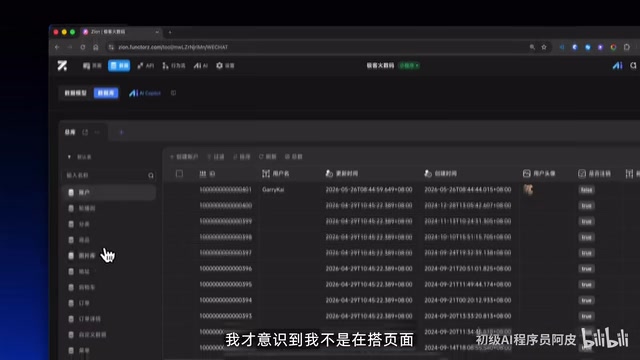
Zion Isn't Just About Dragging Pages—It's About Building Complete Business Systems
Templates Are a Starting Point, Not a Limitation
Zion offers various templates including e-commerce ones. The interface looks like a prototyping design tool when you open it. But it differs fundamentally from traditional template tools: you can modify not just text and images, but also page structure, data models, and business logic.
Specifically, users can create different pages, drag and drop various components onto them, and change font styles—all layouts are essentially built through drag-and-drop. It's also WYSIWYG—changes are visible immediately without waiting for compilation or refresh.
This means templates are just a quick-start point, not an insurmountable framework. For people with product ideas but no coding skills, this entry point is extremely approachable.
Built-in Visual Database That Beginners Can Handle
An e-commerce mini program requires substantial data support behind the scenes: product information, category systems, carousel images, user data, order records... None of these are simple static content hardcoded into pages.
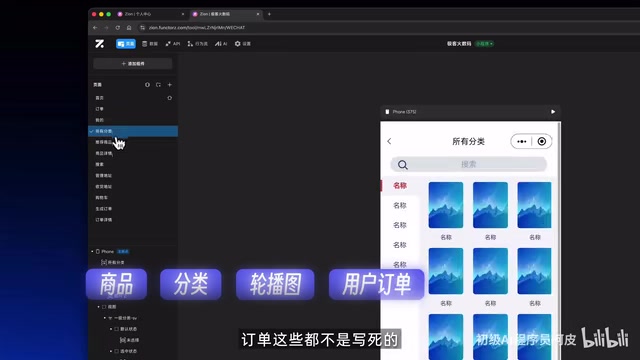
Zion's approach is a built-in visual database. In the data section at the top of the editor, templates come with pre-configured complete database structures. Users can build and modify data tables directly through the visual interface, and can even leverage AI assistance to generate data structures.
In plain terms, this data is the mini program's "brain." In traditional development, database design is one of the core responsibilities of backend engineers, requiring SQL to define table structures and establish relationships—an almost insurmountable barrier for non-technical users. The core innovation of visual database tools (like Airtable and Notion Database) lies in mapping underlying database concepts—field types, primary/foreign key relationships, indexes—into a spreadsheet-style visual interface. Zion's built-in database continues this approach and goes further by implementing data binding with frontend components, allowing CRUD operations to be completed through drag-and-drop and configuration rather than writing ORM code or SQL queries. This makes it accessible even to complete beginners with no database knowledge.
Visual Workflows: Business Logic You Can "Assemble"
Pages and data are just the foundation. What truly makes a mini program "run" is business logic. For example, after a user places an order, the system needs to automatically create the order, check payment status, and update inventory—a series of operations that require extensive backend code in traditional development.
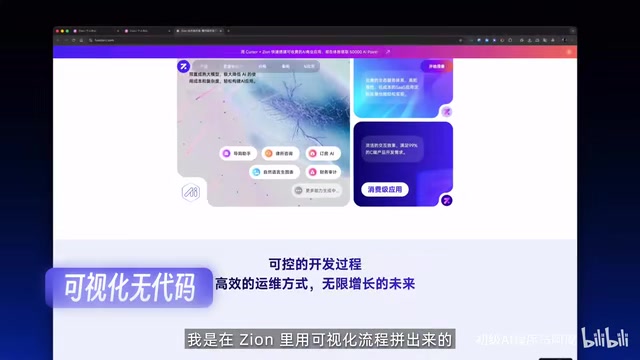
In Zion, this logic is implemented through visual workflows. Users can connect nodes like "create order," "check condition," and "update data" like building blocks to form complete business processes. If you're unsure how to build something, you can directly ask the platform's built-in AI assistant, which will provide specific step-by-step instructions.
Technical Background: The concept of visual workflows originated from enterprise-level BPM (Business Process Management) systems, such as early IBM BPM and Oracle BPM Suite. These tools use flowchart-style node orchestration to describe business logic, initially serving large enterprises for approval process automation. In recent years, tools like Zapier, Make (formerly Integromat), and n8n have brought this capability down to SMBs and individual users, primarily for cross-application automation integration. Zion's innovation lies in embedding the workflow engine directly into the mini program development environment, allowing frontend interaction events (like button clicks) to directly trigger backend business logic chains—bridging the frontend-backend disconnect that plagues traditional no-code tools.
At this point, Zion is no longer a simple prototyping tool—it's a full-stack no-code development platform encompassing frontend, backend, and database.
Deep AI Integration: Built-in Multi-Model Support
Quickly Build an AI Agent Assistant
Another highlight of Zion is its deep AI integration. Users can build an AI assistant directly within the mini program:
- Create an AI Agent: Set up a new AI agent within the platform
- Choose a Large Language Model: Zion has integrated GPT, Gemini, DeepSeek, and other mainstream LLMs
- Write Prompts: Define the AI assistant's role and behavior
- Bind to Database: Allow the AI to read business data like product information, find answers from the knowledge base, and respond to users
This means you can add intelligent customer service, product recommendations, and other AI features to your mini program without writing any code.
Technical Principles: An AI Agent refers to an AI system capable of perceiving its environment, making decisions, and executing actions. In the era of Large Language Models (LLMs), AI Agents typically use LLMs as their core reasoning engine, combined with tool calling (Function Calling), memory management, and knowledge base retrieval (RAG—Retrieval-Augmented Generation) to complete complex tasks. Zion's feature of binding AI to business databases is essentially a lightweight RAG implementation—when answering user questions, the AI first retrieves relevant information from the product database, then combines it with the LLM's language capabilities to generate responses. This avoids the model "hallucination" problem and ensures the AI assistant's answers align closely with actual business data. GPT (OpenAI), Gemini (Google), and DeepSeek represent the current global mainstream commercial LLM tiers, and multi-model support allows developers to flexibly switch based on cost and performance requirements.
Third-Party API Extension Capabilities
Beyond its built-in AI capabilities, Zion also supports third-party API integration, including maps, payments, weather, logistics, and other services. This extends its application scenarios from simple display pages to genuine business systems.
One-Click Publishing with Multi-Platform Deployment
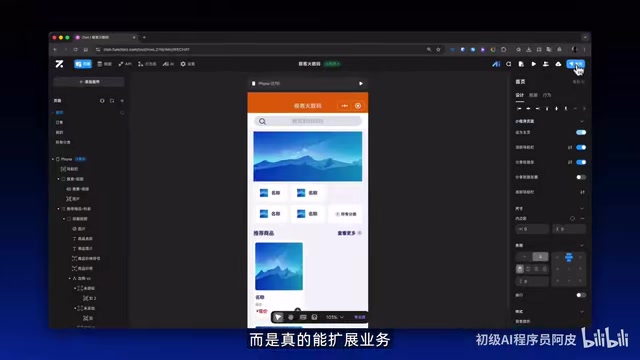
Once all design is complete, Zion supports one-click publishing—and it's multi-platform publishing, covering both web and mini programs. The entire process requires no servers, no deployment environments, and no backend configuration, dramatically lowering the barrier to going live.
Technical Challenges: WeChat Mini Programs, Alipay Mini Programs, and Web H5 have significantly different underlying tech stacks: WeChat Mini Programs use a proprietary framework of WXML/WXSS/JS, while Web uses standard HTML/CSS/JavaScript. Each platform has different API calling methods, component specifications, and review mechanisms. In traditional development, multi-platform adaptation often requires maintaining multiple codebases or using cross-platform frameworks like Taro or uni-app for compilation and conversion. The core technical challenge of achieving "one-click multi-platform publishing" for a no-code platform lies in building an abstraction layer that automatically compiles the platform's internal component models and business logic into the native code required by each platform. The maturity of this capability directly determines whether a no-code platform can truly replace traditional development workflows in production environments.
Currently, the platform also offers a bonus: new projects receive AI Points that can be used directly to call GPT, Gemini, and other LLMs, further reducing the cost of experimentation.
A Balanced Perspective: The Barrier Is Lower, But It Hasn't Disappeared
While Zion achieves "zero code" on the technical level, it's not entirely zero-barrier. Users still need to think through several core questions:
- How should pages navigate? User path design requires product thinking
- How should data be stored? Data structure planning requires logical thinking
- How should business processes flow? Workflow design requires deep understanding of the business
In other words, the challenge is no longer code—it's product logic. For entrepreneurs and product managers with business experience but lacking technical backgrounds, this is actually good news—business logic design is precisely what they excel at.
Conclusion: No-Code Development Has Entered the Full-Stack Era
After years of development, no-code tools have evolved from "toys that can only modify templates" to "platforms capable of building complete business systems." Zion represents the latest advancement in this trend: visual building, built-in databases, workflow orchestration, deep AI integration, and multi-platform publishing—the combination of these capabilities makes it a reality for "one person to build a fully functional business mini program."
For entrepreneurs looking to quickly validate ideas, consider using no-code tools like this to build and test your product first, then decide whether you need to rewrite it in code. This advice is backed by solid methodology: the MVP (Minimum Viable Product) concept from Lean Startup, systematically articulated by Eric Ries in 2011. The core idea is to build testable product prototypes at minimal cost, rapidly collect user feedback, and avoid investing heavily in unvalidated assumptions. No-code tools are a natural fit for the MVP approach—they compress the cycle from idea to testable version from months to days, enabling entrepreneurs to complete "Build-Measure-Learn" iteration loops with extremely low sunk costs. After all, validating demand before investing in development is the smartest approach.
Key Takeaways
- Zion is a no-code development platform that supports visually building complete mini program systems, including frontend pages, databases, and business logic
- The platform features built-in visual databases and workflow orchestration, enabling users without coding skills to design complex business processes
- Deep integration with multiple AI LLMs including GPT, Gemini, and DeepSeek, with RAG technology supporting the creation of business-data-aware AI assistants directly within mini programs
- Supports one-click multi-platform publishing (Web and mini programs) without servers or deployment environments
- While the technical barrier has been reduced to zero, product logic design ability remains the core challenge, aligning with Lean Startup MVP validation methodology
Related articles
 Product Reviews
Qoder vs Cursor Real-World Comparison: Which $20/Month AI IDE Is Better?
Hands-on comparison of Qoder vs Cursor AI IDEs: Agent autonomy, human interaction count, and architecture decisions. Qoder needed only 2 interactions vs Cursor's 8.
 Product Reviews
Cursor Cloud Agent Demo: Eliminating Bottlenecks Across the Entire Software Development Lifecycle
Deep analysis of Cursor's Cloud Agent demo showing how cloud VMs, automated test artifacts, and a full-chain control plane systematically eliminate human bottlenecks across the software development lifecycle.
 Product Reviews
Cursor 3.0 Deep Dive: Multi-Agent Parallelism, Design Mode, and Best-of-N Model Comparison
Cursor 3.0 evolves from an AI coding assistant into an Agent fleet command center. Explore multi-agent parallelism, Design Mode, and Best-of-N model comparison.