3.5 Hours and $47: Building an AI Agent Village Step by Step
Using Claude Code and Higgs Field, build an AI Agent village capable of delegating affairs in 3.5 hours for about $47.
A creator used Claude Code for logic and behavior control and Higgs Field for art assets, integrated through MCP connectors, to rebuild an AI Agent village in 3.5 hours at a cost of about $47. A dozen or so agents live, work, and hold meetings in their own houses, while humans serve as "Chief Human Officer" retaining final approval authority. The project unfolds in seven steps: building the world, the human avatar, recruiting directors, setting behavior rules, connecting real tools, designing interaction methods, and retaining human decision-making authority. The author emphasizes establishing rules in prompts in advance (no pay-per-call APIs, credit spending requires approval, unified art style) and recommends starting with "connect one tool, assign only one job" and expanding gradually. His inventory shows that about 67% of personal affairs can be delegated to agents.
Title
3.5 Hours and $47: Building an AI Agent Village Step by Step
Meta Description
A Bilibili creator built an AI Agent village in 3.5 hours for about $47: Claude Code handles logic and behavior, Higgs Field generates art. Seven steps cover the map and buildings, chief of staff and director roles, walkable areas and behavior rules, connecting to real tools like email and calendars, the proving ground meetings, and retaining final human approval—including a cost ledger and prompt design thinking.
Article Content
A creator on Bilibili shared his full process of rebuilding an AI Agent village from scratch: 3.5 hours, about $47 in cost, using Claude Code to build the logic and Higgs Field to generate art assets, letting a dozen or so agents live, work, and hold meetings in their own houses. This system is not a toy—it genuinely delegates everyday affairs to AI directors, while humans retain final approval authority.
Why It's Worth Paying Attention To: AI Agents Moving from Tools to Organizations
Most people still use AI Agents for single conversations. This project takes a different approach: it places agents in a world with a sense of space, hierarchy, and behavior rules, using organizational structure to manage task flow. Humans serve as the "Chief Human Officer," the chief of staff coordinates, and each domain director advances work with their own AI employees.
The data the author mentions is worth noting: after inventorying his monthly personal affairs, he found that about 67% of tasks could be handed off to agents. He emphasizes that this is the result of a task inventory, not a strictly measured efficiency gain. But even discounted, this proportion shows that there is a large amount of structured, delegable work in personal affairs.
The value of this system is not in showing off technical prowess, but in providing an actionable template: how to establish rules through prompts, how to control costs, how to connect agents to real tools, and how to retain human control.
Seven Steps Broken Down
Step 1: Build the World
First, give the agents a village they can live in. The author uses Claude Code (either the terminal version or the desktop app works), demonstrating throughout with the Opus 5.5 model. Image generation is handled by Higgs Field, connected via Claude's "custom connector" using its MCP address.
The key prompt's role is to establish rules in advance: the author is the director, Claude is the builder; the village runs as a webpage on the local computer; agent work uses the Claude subscription, image generation uses the Higgs Field subscription, and no pay-per-call API keys are connected; any credit spending must first obtain consent. This is the core means of controlling costs.
For art style, the requirements are a top-down perspective and a 16-bit role-playing game style, with every subsequent asset reusing the same style description to ensure visual consistency. The map first generates 5 versions to try different historical period styles, costing about 21 credits (about $1), but the author was not satisfied. The author recommends first trying repeatedly with low-resolution drafts, then generating 4K versions once satisfied.
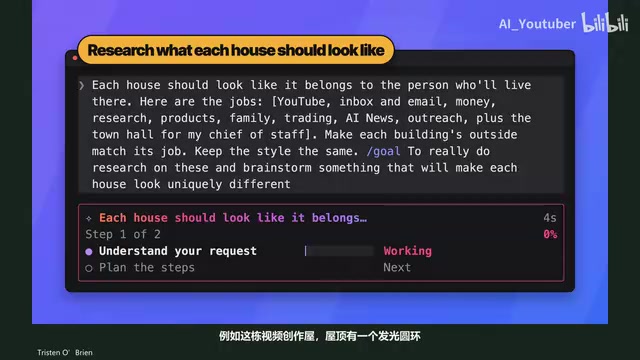
The exterior of each house should reflect the work of the agent living inside—for example, the video creation house has a glowing ring on its roof, inspired by the ring light used in filming. There are also clear requirements for indoor proportions: a standing character's height is one-twelfth of the room height.
MCP (Model Context Protocol) is an open protocol launched by Anthropic at the end of 2024 to standardize how AI models connect to external tools and data sources. You can think of it as the "USB interface" of the AI world: as long as a service provider implements an MCP server according to the protocol, any MCP-compatible client (such as Claude Code or the Claude desktop app) can call it in a unified way, without writing separate integration code for each tool. The "custom connector" mentioned in the article is the MCP client entry point provided on the Claude side; filling in the MCP address lets the model perceive and operate external capabilities. This is exactly the technical foundation that allows the agents in this project to read email, access calendars, and call Higgs Field for image generation—the model itself does not possess these capabilities; they are "attached" through MCP.
Step 2: Move the Chief of Staff into the Village
Use a photo of the author to generate a game character representing himself, then create an action sheet containing 12 poses—three frames each for facing forward, facing right, facing left, and facing away, requiring a large stride and pronounced movements, otherwise the character will look like it is sliding on the ground. Use the arrow keys to control the character, and hold Shift to run.
The chief of staff, Matt, wears professional attire, has a normal walking action sheet and a set of phone-holding actions, because he needs to contact people in the village at any time and stay by the protagonist's side. New characters reuse action sheets of the same specifications to ensure consistent sizing.
Step 3: Recruit Directors
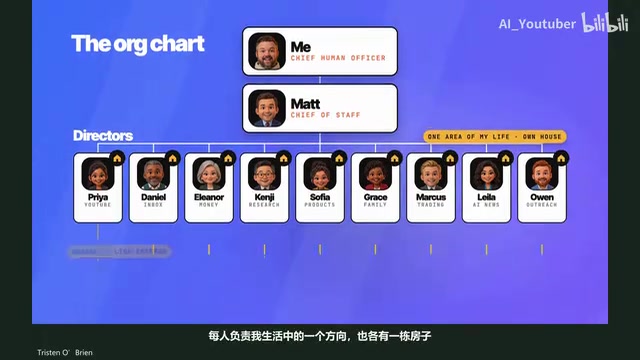
The organizational structure is: Chief Human Officer → Chief of Staff → Domain Directors → Employees. Each director is responsible for one direction in life, and each has a house. The directors' names, appearances, and personalities are first left to Claude to freely develop, with intervention only when there are issues such as duplicate names.
Each director has an independent folder specifying identity, responsibilities, and reporting relationships, and a notes file is created to save what is learned during work. Each director is first assigned one employee, and employees wear yellow safety vests for easy identification. Directors use Opus 5.5, employees use Sonnet 5.5, and directors can also enable the Advisor feature to consult Fable 5.1 when encountering difficulties.
The Advisor feature is a collaboration model in which "the primary model consults a stronger model on demand": everyday reasoning is handled by a cheaper, faster model, and when it judges that a task exceeds its capabilities or requires higher-quality judgment, it proactively calls a stronger model for advice and then integrates that advice into its own output. In the article, directors use Opus 5.5, employees use Sonnet 5.5, and directors can consult Fable 5.1 when facing difficulties—this is a typical tiered model strategy that matches cost and capability to task difficulty. The significance of this approach is that it avoids cost blowouts from routing every request through the most expensive model, while still obtaining high-quality decisions at key moments. It is a common means of controlling overhead when building multi-agent systems.
Step 4: Make the Characters Move
First have Claude define walkable areas based on the scene image—green for passable, red for impassable. If something is marked incorrectly, take a screenshot, circle the correct location, and send it back for modification.
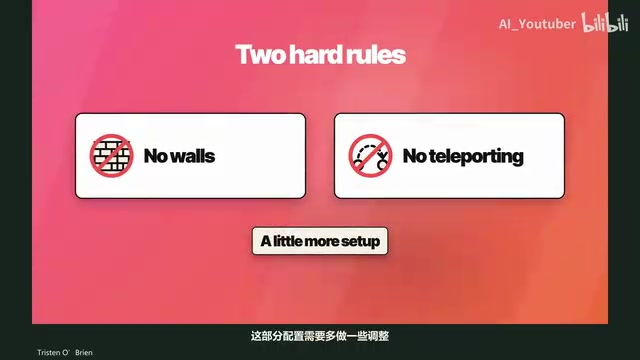
Behavior rules include: return to one's own building when there is work; directors may move around the yard; face the protagonist when the protagonist approaches, to make conversation easier; employees may walk around town, and when they meet, ask what the other is doing and note down the information for future collaboration; no walking through walls or teleporting. The author emphasizes that these constraints should be written into the prompt as early as possible.
Walkable area marking is a foundational concept in 2D games and spatialized agent systems: the map image itself is only pixels, and the program needs to know which pixels can support a person and which are walls or furniture. A common approach is to mark them with a color mask—green for passable, red for blocking—and the engine checks whether the target point falls within the green area when moving, thereby enabling pathfinding and collision. Letting Claude automatically define areas based on the scene image essentially hands the task of "understanding the spatial semantics of the image" to a multimodal model, and humans only need to circle corrections with screenshots when something is marked wrong. This step directly determines whether subsequent behavior rules such as "no walking through walls" can be enforced, and it is also the prerequisite for agents to have a "sense of space."
Step 5: Connect to Real Work
Walk up to the email director, Daniel, and ask how many unread emails there are. At first he cannot answer because he has not yet been connected to real tools. Return to Claude and, through the already configured connector, let him access email and calendar; ask again and he can answer that there are five unread emails.
This is the simple way to start an agent: connect one tool first and assign only one job. Other directors are gradually connected as well. The to-do list in the toolbar makes it convenient to enter tasks when they come to mind during the day, and Matt will review the tasks and call the appropriate director. The author once had them find vacation spots on the U.S. East Coast for ten people, with a series of conditions, and ultimately received a complete report including dates, accommodations, and booking order.
Step 6: Talk to Everyone
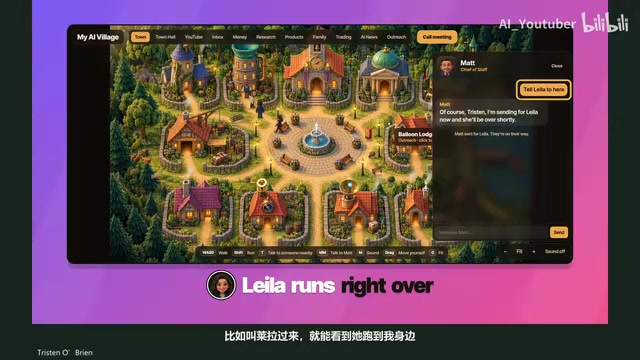
Walk up to a character and press T to open a chat box; press M twice in succession to reach Matt no matter where he is. You can also ask Matt to call a certain director over—for example, call Lyra, and you can see her run over.
The most interesting part is the proving ground meeting: press the meeting button, and all directors walk into the proving ground and sit in their respective seats, with the protagonist in the main seat. You can ask everyone questions to learn about progress, or click a name to speak with someone individually.
Step 7: Retain Human Decision-Making Authority
The system must ultimately be overseen by humans. When a director needs help, Matt finds candidates; you can interview them at the proving ground and, after deciding to hire, generate a new employee wearing a yellow vest. Constraints must be written clearly: emails only generate drafts; spending money, consuming credits, publishing, or posting must all be approved first.
The author mentions that the original creator once encountered an agent sending emails without authorization, so this step is especially emphasized. Text prompts themselves cannot prove that control across the board is reliable; final approval still needs to be carried out by humans.
Human-in-the-loop is a design pattern in automated systems that returns key decision points to humans for confirmation, and it is especially important in agent scenarios. A common implementation is "action tiering": read-type operations can be executed automatically, while write-type operations (sending emails, placing orders, publishing content, consuming paid quota) generate drafts or requests pending approval, which only take effect after human confirmation. "Emails only generate drafts; spending money and posting must be approved first" in the article is exactly the implementation of this pattern. What needs to be clearly understood is that constraints at the prompt level cannot constitute a reliable security boundary—models may misunderstand instructions or ignore rules in long contexts—so approval should be implemented as much as possible at the tool-call layer (such as connector permissions and secondary confirmation), not merely written in prompts.
Cost and Time: The Real Ledger of a Single Build
Higgs Field credits dropped from 1307 to 381, consuming 926 credits, about $44 at the then-current plan. Claude used the Max subscription, and this session occupied about 6% of the weekly quota, which the author converts to less than $3. Total: about $47, taking 3.5 hours.
This is the record for this build, not a fixed cost for future operation. The key to controlling costs lies in: using subscriptions rather than pay-per-call APIs, obtaining consent before spending credits, and trying repeatedly with drafts before generating high-resolution versions.
Who This System Is For
The author's advice is very practical: there is no need to complete everything in one night, and the system will not be finalized in one go. New needs will continue to emerge as it is used, and he himself adds features almost every week. Prompts are only a starting point; modify them according to your own needs.
Start by connecting one tool to complete one real task, then expand gradually. For creators and independent workers who want to systematically delegate personal affairs to AI, the real value of this project lies in the seven-step structure itself: spatial foundation, human avatar, organizational hierarchy, behavior rules, real tool integration, interaction methods, and approval control. Each step can be reused independently or combined at your own pace.
One-line Summary
Using Claude Code and Higgs Field, build an AI Agent village capable of delegating affairs in 3.5 hours for about $47.
Paragraph Summary
A creator used Claude Code for logic and behavior control and Higgs Field for art assets, integrated through MCP connectors, to rebuild an AI Agent village in 3.5 hours at a cost of about $47: a dozen or so agents live, work, and hold meetings in their own houses, while humans serve as "Chief Human Officer" retaining final approval authority. The project unfolds in a seven-step structure—building the world, the human avatar, recruiting directors, setting behavior rules, connecting real tools, designing interaction methods, and retaining human decision-making authority. The author emphasizes establishing rules in prompts in advance (no pay-per-call APIs, credit spending requires approval, unified art style) and recommends starting with "connect one tool, assign only one job" and expanding gradually. His inventory shows that about 67% of personal affairs can be delegated to agents.
Related articles

DeepSeek Open-Sources DeepInfer: What Is an Inference Framework Actually For?
DeepSeek open-sources its inference framework DeepInfer under Apache 2.0, supporting DeepSeek V4.1 Flash offline inference. This article explains its request scheduling, FlashMLA/DeepGEMM compute optimization, DSPark speculative verification acceleration, and what it means for developers and ordinary users.

Open-Source AI Learning Agent: A Full Workflow Experience from Topology Graphs to Exam Generation
Explore an open-source AI learning agent: built on DeepSeek API, it constructs knowledge systems via topology graphs, with automatic document generation, notes, super documents, and exams. Learn about its Agent workflow and design highlights.

DeepSeek Whale Girl Open-Source MV Meme: AI Industry Coded Slang About Pivoting to Closed Source
Bilibili's DeepSeek Whale Girl rap MV uses fictional memes to tease the AI open-source vs. closed-source debate, with lyrics full of industry slang. This article explains the meme culture, the Whale Girl symbol, and the open/closed tension.