5 Most Practical MCP Servers: Browser, Repo, Files, Web Pages, and Memory
Five one-command MCP Servers give AI assistants hands-on capabilities across browser, repositories, files, web pages, and memory.
Aimed at readers getting started with MCP (Model Context Protocol), this article selects five official or well-known community MCP Servers covering five high-frequency needs: browser operation (Playwright), code repository management (GitHub), local file access (File System), web page body extraction (Fetch), and long-term memory (Memory). All install with one command and require no integration code, taking under five minutes total. The article explains each Server's typical uses and capability boundaries—for example, Playwright reads page structure directly so it's fast and stable but can't handle CAPTCHAs or login states; GitHub permissions follow your account; File System and Memory emphasize directory isolation and transparent local storage. It closes with security principles: only install well-known projects, give tokens minimum permissions, and list items before any deletion.
MCP (Model Context Protocol) is becoming the standard interface for connecting AI assistants to the outside world. Last time we covered what MCP is—this time we're getting hands-on with five official or well-known community MCP Servers, covering five areas: browser, repository, files, web pages, and memory. Each one installs with a single command, with zero integration code to write.
Why These Five MCP Servers?
The core value of MCP is giving AI assistants external capabilities: install one Server with a single command, and a whole set of new abilities with badge markers appears in the tool list. The five projects selected here each map to one of five high-frequency needs—operating a browser, managing code repositories, accessing local files, scraping web page body content, and maintaining long-term memory. Once installed, your AI assistant transforms from a simple chat box into a workbench that can actually get things done.
According to a demo by Bilibili creator "AAI," all five Servers come from official or well-known community projects, and the total installation time is under five minutes.
MCP uses a client-server architecture: the AI assistant (Host, such as Claude Desktop, Cursor, etc.) acts as the client, connecting to individual MCP Servers through a standard protocol. Each Server declares its provided "Tools," "Resources," and "Prompts" to the outside world in a structured manner. When the client starts up, it pulls the capability list from the Server, and the model uses it to determine which tool to call in which scenario, passing call parameters back as JSON for execution. Because the interface is unified, users don't need to write adapter code for each service—once a Server is installed, new capabilities automatically appear in the tool list, which is the technical premise behind "one-line installation, zero integration code" mentioned in this article.
Playwright: Outsourcing Repetitive Browser Work
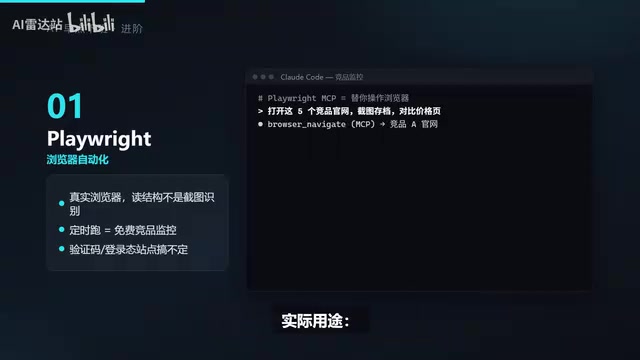
Playwright MCP Server is an "old friend" that appeared in the previous article. It can operate the browser for you: open web pages, fill out forms, take screenshots, click buttons.
The practical uses are concrete: have it automatically open five competitor websites every Monday, take screenshots for archiving, and pick out changes on pricing pages to tell you about. Because it operates a real browser and directly reads the page structure rather than relying on screenshot recognition, it's fast and stable.
Note the boundaries: it can't handle CAPTCHAs or login states, so don't push it on those sites. But when it comes to repetitive clicking and form-filling in the browser, you can basically hand all of that over to it.
Playwright is Microsoft's open-source browser automation framework, supporting the three major engines Chromium, Firefox, and WebKit, and capable of driving real browsers in headless or headed mode. Unlike solutions based on pixel recognition of screenshots, Playwright reads the DOM structure, accessibility tree, and element attributes directly through the browser debugging protocol, so it locates elements precisely, executes quickly, and isn't affected by resolution or rendering differences. Playwright MCP Server packages this capability into a set of tools the model can call, letting the AI operate pages through "semantic locating" rather than "guessing positions from images."
GitHub: Let AI Manage Repositories Directly
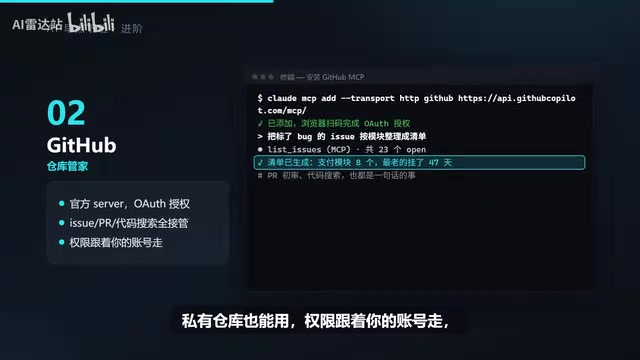
Once connected to the official GitHub MCP Server, it can manage all your repositories—issues, PRs, and code search are all within its capabilities.
A typical use is a one-sentence instruction: have it compile all issues labeled "bug" into a list organized by module, along with the "culprit" files it suspects; or have it write review comments for each PR and post them directly to the PR discussion.
Private repositories work too—permissions follow your account, so it can't see anything you can't see. In remote connection mode, you just authorize in the browser.
File System: Organize Files Within a Specified Directory
By default, the AI assistant can't touch files outside your project. File System Server allows it to access directories you specify, such as the "Downloads" folder.
Practical use: have it archive the hundreds of files that accumulated in your Downloads folder last month by type, and list duplicates first—waiting for your confirmation before deleting.
The permission boundary is very clear—whichever directory you grant during installation is the only one it can touch. For operations involving deletion, always require it to list items first; don't get into the habit of just letting it go ahead. Finally, organizing your computer can be handed off to someone else.
Fetch: One-Click Web Page Body Extraction
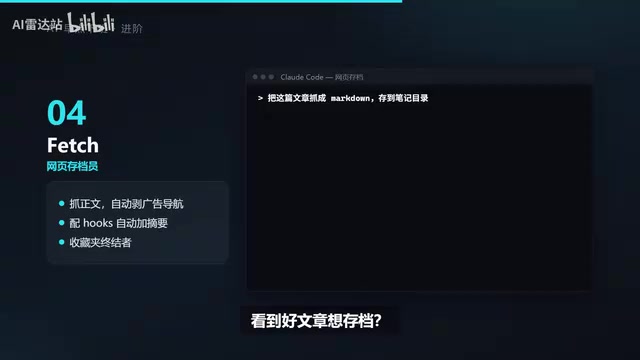
See a good article you want to archive? Throw the link at it, and Fetch Server automatically converts the web page into clean, well-structured Markdown and saves it to your notes directory.
It extracts the body content, and ads and navigation are automatically stripped out—much cleaner than manual copy-paste. If paired with Hobbs mentioned in the previous article (note: the original text here likely refers to some summarization tool), you can also automatically distill a three-line summary and place it at the top of the file after each fetch. The era of bookmarks gathering dust is over.
Memory: Give AI a Long-Term External Brain
By default, AI "forgets" everything between conversations. Memory Server gives it a knowledge graph as an external brain: your preferences, project background, and previous decisions are all recorded, and it remembers them next time you talk.
Memories are stored in a local JSON file, viewable and deletable at any time—not a black box. The longer you use it, the better it understands you—that's what a real assistant should be like.
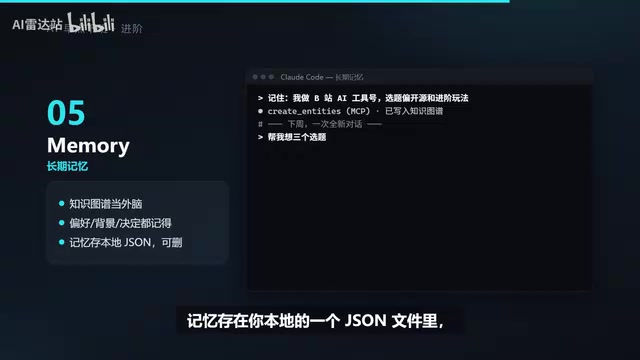
A knowledge graph is a data structure that organizes information as "entity—relationship—entity" triples. Compared to flat key-value records, it's better suited for expressing relationships like "who belongs to which project" and "which prerequisites a decision depends on." Memory Server accumulates facts extracted from conversations into the graph as nodes and edges, and during retrieval it can recall relevant memories along association paths rather than relying solely on keyword matching. Since the underlying storage is a local JSON file, the graph scale suits personal use cases, and it's easy for users to review and prune directly, preventing erroneous memories from accumulating over time.
Installation and Security Principles
All five Servers install with a single command—installing all five takes just five minutes. Installation commands and permission configurations can be found in the original video's comment section.
The only principle: only install well-known projects, and give tokens the minimum permissions. The smaller the permission scope, the less room there is for AI mistakes. Keep this bottom line in mind, and the efficiency gains from MCP are very real.
The Principle of Least Privilege originates from the systems security field: any subject should only be granted the minimum permissions necessary to complete the current task, for the shortest possible duration. Mapped to the MCP context, this means giving a GitHub token only the scopes actually needed (e.g., read-only issues rather than full repository write access), mounting only the single directory that genuinely needs organizing in File System, and requiring secondary confirmation for deletion-type tools. This way, even if the model misjudges or suffers a prompt injection attack, the damage is limited to within the authorized boundary.
Related articles
 Tech Frontiers
MuJoCo: An Analysis of DeepMind's Open-Source General-Purpose Physics Simulator
An in-depth analysis of Google DeepMind's open-source physics simulator MuJoCo: high-performance C++ kernel, MJCF modeling format, contact solving principles, MJX GPU acceleration, and robot reinforcement learning use cases.
 Tech Frontiers
Claude API Quick Start: The Official Quickstarts Project Collection
Anthropic's official claude-quickstarts project collection helps developers quickly build deployable apps with the Claude API. Nearly 20k stars, Python-based, great for beginners and prototyping.
 Tech Frontiers
AI Agents Connecting Directly to APIs: Which Calls Can Be Safely Allowed?
AI agents can call any API, but the real challenge is deciding which calls can be safely allowed. This article analyzes allowance decisions from three dimensions—intent matching, least privilege, and controllable impact—and argues that the control layer should sit outside the agent, combined with audit traceability to build a trustworthy API call governance mechanism.