9Router Tutorial: A Free AI Token Solution for Claude Access
Use open-source router 9Router to aggregate multiple free AI quotas into a unified endpoint for the Claude client.
The article explains how to use open-source AI routing proxy 9Router to call models for free in the Claude desktop client. Rather than cracking a paywall, it aggregates free-tier quotas from providers like KiRo AI, OpenCode, Gemini, and OpenRouter into a single unified API endpoint. Deployment takes two commands; after logging in, you connect free sources via API Key or OAuth on the Providers page, then enable developer mode in the Claude client and configure the third-party inference Base URL and key. The key step is creating a Combo virtual model whose name must contain "claude," with either Fallback or Round Robin scheduling. Finally, enable Model Discovery and restart the client to verify. The author also cautions that free quotas are unstable, first-request latency is high, the client keeps warning, and ToS compliance is up to the user.
What Is 9Router?
9Router is an open-source AI routing proxy tool whose core selling point is "60+ AI providers, zero downtime"—unifying models from different sources like OpenAI, Claude, Gemini, and Ollama under a single endpoint, then distributing them to clients on demand. According to its GitHub page, it also positions itself as a "free AI router and token saver," bundling a set of free-tier providers—which is exactly what makes this YouTube tutorial's "free Claude" setup possible.
Let's be clear upfront: the essence of this approach isn't cracking Claude's paywall. Rather, it aggregates multiple free-quota sources (such as KiRo AI, OpenCode, Gemini, and OpenRouter) and disguises them as a single unified API endpoint, then feeds that into the developer mode of the Claude desktop client. It relies on each provider's free-tier quota, not unlimited free usage.
Deploying 9Router: Two Commands and Done
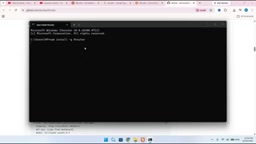
The installation method demonstrated in the tutorial comes from the Quick Start section on GitHub and requires just two commands: the first pulls and installs the 9Router repository, and the second starts the service. The creator reran the entire installation process live in the video and confirmed that after the commands execute, the terminal reports installation complete, and starting the service outputs a local access link.
Paste that link into your browser and you'll land on the 9Router login page, with the default password 123456. After logging in, you'll see two key pieces of information: the Endpoint (endpoint address) and the API Key. The endpoint address goes into the Claude client later, while the key can be newly created—in the tutorial, a new key named "free api key for claude ai" was created specifically for Claude AI.
Connecting Free Providers
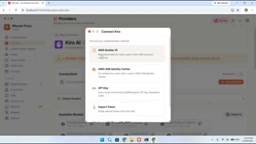
On the Providers page, you'll see categories like Claude Code and Anti-Gravity, followed by a list of free-tier providers. Different providers connect in different ways: OpenCode is ready automatically, Gemini, OpenRouter, and Ollama use API Keys, while KiRo AI goes through an OAuth flow with AWS Builder ID.
The video demonstrates the full authorization process using KiRo AI as an example: click Add Connection → select AWS Builder ID → when the browser opens, choose "Continue with Google" → select a Google account → copy the verification code on the page → return to 9Router, paste it, and confirm → once authorized, the status changes to active. Click Test Connection and you'll see a success message, indicating the provider is now available. The same process applies to the remaining free providers.
The difference between OAuth and API Key access: An API Key is a static credential that you simply paste into 9Router's configuration form—suitable for services like OpenRouter and Gemini that let you generate keys yourself in their consoles. OAuth, by contrast, is a delegated authorization flow: 9Router never touches the user's account password. Instead, it redirects to the provider's authorization page, where the user logs in and is issued a time-limited access token and refresh token. KiRo AI's use of AWS Builder ID OAuth means 9Router gains access as a third-party application; tokens must be refreshed when they expire, and if the provider revokes permissions or changes the authorization scope, the connection breaks. This also explains why OAuth-based providers' status can change from active to abnormal and require re-authorization.
Common forms of free-tier quota: Free tiers typically rate-limit by "requests per minute," "requests per day," or "total tokens per month," and some services throttle or downgrade models during peak hours. 9Router aggregates these quotas into a single pool, but each source's rate limit is calculated independently—so the more models in a Combo, the larger the theoretical total request capacity, at the cost of noticeable differences in response quality and latency across sources.
Enabling Developer Mode in the Claude Client
This is the step where most people get stuck. The Claude desktop client doesn't show a third-party inference entry by default. You first need to go to Help → Troubleshooting and enable "Enable developer mode"; only then does "Configure third-party inferences" appear in the menu.
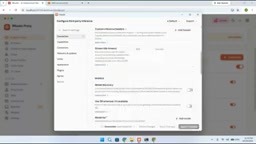
Once in the configuration: set Gateway to gateway; enter the endpoint address copied from 9Router as the Base URL; enter the newly created key as the API Key; select Bearer for Auth Scheme; then uncheck Model Discovery (you'll enable it later). This way, the Claude client forwards requests to 9Router instead of connecting directly to the official API.
How Base URL, API Key, and Auth Scheme relate: Together, these three determine how the client constructs HTTP requests. The Base URL is the target address prefix; the client appends the original official API path to it. The API Key is used for identification—9Router uses it to determine which user a request belongs to and which providers can be called. Auth Scheme determines how the key is placed in the request headers—when set to Bearer, the client sends Authorization: Bearer <your key>, consistent with the common practice for OpenAI-compatible interfaces. If Auth Scheme is wrong (for example, selecting x-api-key when the server only accepts Bearer), the request returns 401 Unauthorized—the most common source of errors during configuration.
What Model Discovery does: When enabled, the client requests the list of available models from the gateway and populates the model selector accordingly; when disabled, the client only uses built-in or manually specified models. The tutorial disables it first and re-enables it after building the Combo, to avoid pulling an empty list or caching stale results before the Combo is ready.
Creating a Combo: The Key to Multi-Model Aggregation
Combo is 9Router's core concept—bundling multiple models into a single virtual model and scheduling them by strategy. There's a hard requirement when creating one: the name must contain the keyword "claude", otherwise the Combo won't appear in the Claude client's model selector. In the video, the creator specifically compared a test combo created earlier, which was completely invisible in the Claude client because it lacked the claude keyword.
When adding models, you can check all models from each free provider, including Gemini 2.5, Gemini 3 Flash, Claude Sonnet 4.5, Big Pickle, DeepSeekAd, GLM 5.3, and more. Model order can be adjusted with arrows—models listed first are used first. There are two scheduling strategies:
- Fallback (sequential fallback): uses models linearly; switches to the next only when the first is unavailable or fails;
- Round Robin: the first request goes to Big Pickle, the second to Gemini 2.5, the third to the next, and so on in rotation.
Fallback vs. Round Robin trade-offs: Fallback prioritizes result availability—requests always start with the preferred model and only downgrade on failure, so output style stays relatively consistent, making it suitable for tasks that demand model consistency. The cost: once the preferred model is rate-limited, every request must hit a failure before falling back, adding latency. Round Robin spreads requests evenly across multiple sources, maximizing each provider's independent quota and reducing rate-limit pressure on any single source—but within the same session, different requests may be answered by different models, causing fluctuations in output style and context understanding, especially noticeable in multi-turn conversations. A common practice is to put the highest-quality, lowest-quota models at the front of the Fallback chain, and place quota-rich models in the rotation pool to handle batch tasks.
The significance of virtual models: A Combo presents itself externally as a single model ID, and the client doesn't need to know which providers sit behind it. This abstraction means switching providers or adjusting order requires no changes to client configuration—the core value of 9Router as a "unified routing layer."
Enabling Model Discovery and Verifying
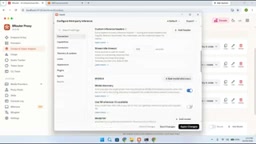
Once the Combo is built, return to Claude settings and re-enable the Model Discovery toggle, then click Test. A green checkmark indicates the model discovery test passed. Then click Apply Changes and restart Claude. After restarting, the client will warn that the current mode is unavailable—according to the video, this warning doesn't affect usage. At this point, the Combo with claude in its name should appear in the model selector.
Hands-on test: select "cloud free combo" and send a request. The first request takes a while (it's going through free tiers, so cold starts are slower), after which responses return to normal. In the video, the model was asked to generate a tic-tac-toe HTML page, and it ultimately produced working game logic.
A Few Reality Checks
This setup worked in the video, but a few points are indirectly exposed by the material itself: free providers' quotas, stability, and available models change at any time, and any source in the Combo failing can lengthen the fallback chain; first-request latency is noticeable; and the Claude client keeps showing warnings in unofficial mode. Additionally, whether connecting a third-party gateway to the official client complies with each provider's terms of service is something users must judge for themselves. The value of 9Router lies more in the idea of a "unified routing layer"—for developers who frequently switch models and want to save on token costs, that's worth studying more than simply milking free quotas.
Related articles

T3 Code: The Open-Source AI Coding Assistant's Comeback Story
T3 Code is an open-source AI coding assistant that unifies subscriptions like Codex and Claude, with powerful remote control and parallel task management.

Never Elected, Yet Ruled New York for 30 Years: The Ultimate Case Study in the Mechanics of Power
Robert Caro's biographies reveal how unelected Robert Moses ruled New York for 30 years through legal drafting and public authorities, and how Lyndon Johnson built leverage as a "powerless" Senate Majority Leader. Unpacking the underlying logic of accumulating and sustaining power.

The CPython 3.10 Recursion Trap and Synthetic Recovery in TokenGuard, an LLM Circuit Breaker
TokenGuard's author recounts a recursion crash caused by OrderedDict.pop in CPython 3.10 and introduces v0.3.0's Loop Nudge synthetic recovery, inline DLP scanning, and other new LLM agent circuit-breaker capabilities.